
How to Make an Album Cover With AI, From Brief to Upload
How to make an album cover with AI that still reads as a thumbnail: write the brief, get the title spelled right, and avoid the art stores reject.
 Maya Chen 10 min read
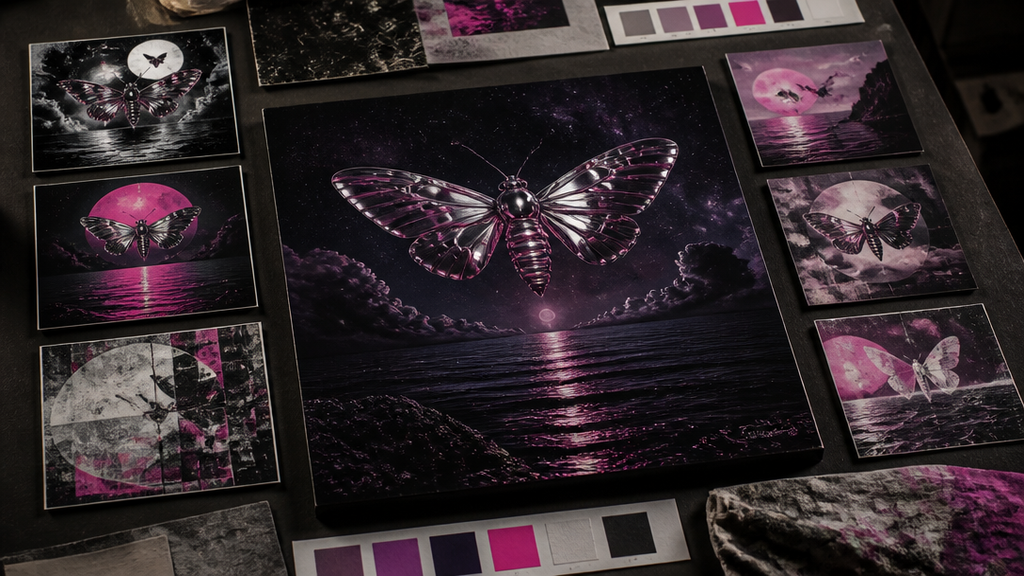
An album cover does two jobs at once: it has to look like the music, and it has to survive being shrunk to the size of a fingernail in a playlist. AI makes the drawing part fast — you can describe a record and get square art with the artist name and title already set in the type — but the decisions that make a cover work are still yours. This guide covers how to make an album cover with AI from a written brief, how to get the lettering spelled right, and the artwork rules that get covers bounced by streaming stores. Product details were checked against LazyKiwi's live tool pages on 8 November 2026.
What an album cover has to do
Most people will meet your cover small: a square in a playlist row, a notification, a Bandcamp grid, a link preview. At that size nobody reads detail. They read one shape, one colour contrast and, if it is big enough, one word. Design for that first and the full-size version takes care of itself.
- One focal point. A face, an object, a place or a single word. Two competing subjects turn to mush at thumbnail size.
- A contrast you can see from across a room: dark on light, warm on cool — not five similar mid-tones.
- Lettering that is either big or absent. A title set at a readable size, or no text and a strong image. Small type in a corner is decoration, not information.
- A square frame. Stores and distributors ask for square artwork, so compose for 1:1 from the start instead of cropping a landscape picture later.
The shrink test
Before you pick a winner, look at every candidate at the size of a postage stamp, next to two or three covers you admire. If you cannot tell what it is in a second, simplify it.
Write a one-paragraph brief before you generate
The difference between a cover that looks like your record and one that looks like generic AI art is almost always the brief. Write four or five lines before you open any tool:
- The sound in three words — hazy, warm, late-night; or loud, cheap, joyful.
- An era and a medium — 1970s soul sleeve, 90s photocopied zine, film photograph, oil paint, collage.
- Two or three colours, by name. "Rust, cream and teal" beats "a warm palette".
- The subject — you, the band, an object from a lyric, a place, or type only.
- Where the words go — artist name top left, title along the bottom, or no text at all.
Naming an era and two or three colours is the most reliable way to get a consistent result, and it keeps you describing a look rather than asking for a copy of someone else's record. Some starting points by genre:
| Release | Direction that fits | Brief line to start from |
|---|---|---|
| Soul or R&B single | Warm portrait, film grain, retro lettering | "1970s soul sleeve, golden light, faded print colours, bold rounded lettering" |
| Lo-fi or bedroom pop EP | A small domestic scene, soft colour | "rainy window, sleeping cat, watercolour, muted blue and peach" |
| Hip-hop mixtape | Low-angle portrait or one symbolic object | "low-angle portrait in a parking garage, hard red side light, gritty magazine photo" |
| Synthwave or electronic track | Graphic shapes or a night landscape | "desert highway at dusk, neon grid horizon, magenta and cyan, chrome lettering" |
| Ambient album | Texture or an empty landscape, no people | "fog over black sand, pale green light, minimal, no text" |
| Punk single | Collage, photocopy, cut-out type | "punk collage, xerox texture, ransom-note lettering, red and black" |
How to make an album cover with AI, pass by pass
Here is the workflow in LazyKiwi's AI album cover generator, which takes a description, sets the artist name and title in the type, and can build the cover around your photo. Treat it as four short passes rather than one click.
- 1
Concept pass: paste the brief
The generator opens with an example description filled in; replace it with your brief and put the artist name and the album title in quotes, spelled exactly as they should appear. Run it two or three times and keep the version whose composition reads best small, even if some details are off.
- 2
Face pass (optional): add a photo
If you or the band should be on the cover, upload a photo as a reference and the cover is built around the real faces, restyled to match the brief. Use a sharp, well-lit photo you own. Skip this pass for an illustrated, scenic or type-only cover.
- 3
Type pass: read every letter
Zoom to full size and read the artist name and title letter by letter. Short names and titles come out cleanest. If one letter is off, run it again — or fix that word afterwards, as the next section explains.
- 4
Shrink pass: test it at playlist size
Put the finalists side by side at thumbnail size, pick the one you can identify instantly, and download the square artwork.
Each run shows its credit price on the Generate button before anything is charged, and a new account comes with free credits, so you can try the concept pass before deciding anything.
Want a vinyl-sleeve look built from an existing photo instead? The vinyl record cover template turns one photo into a record-sleeve scene in one click. It is great for announcement posts and merch mockups — but read the store rules below before you deliver it as the cover.
Getting the artist name and title right
Lettering used to be the reason AI covers looked unfinished: models invented letters that almost spelled the title. Current image models set short names and titles cleanly most of the time, which is why the generator asks for them in quotes. "Most of the time" is the catch — a cover with one wrong letter is worse than a cover with no text.
- Keep it short. One- to three-word titles come out most reliably. A long title, a subtitle or a featuring credit is better added afterwards.
- Watch the hard cases. Unusual spellings, numbers, accented letters and stylised capitals are where models slip.
- Plan B is fine: generate with "no text" and add the words yourself. Add text to photo sets type that takes the light and angle of the scene, and edit text in image fixes a single wrong word while keeping the design — our guide to editing text in an image with the same font walks through it.
- Keep extra text off. Release dates, "out now", social handles and URLs belong in the post, not on the cover — stores reject them.
Album cover size and the rules stores reject
Every distributor asks for a square image at or above a minimum pixel size. The exact number varies by distributor and changes over time, so check your distributor's current artwork page before you export rather than trusting a number from a blog post. If your download falls short, upscale it: the AI photo upscaler increases resolution up to 4x and sharpens detail without redrawing the design.
Size is the easy part; content rules are what bounce covers. Apple's Music Style Guide is the most explicit public list, and it is a good checklist whichever distributor you use. It says artwork must not contain:
- Website addresses, logos, QR codes or release dates.
- References to competing stores or services, pricing, or upsells to another product.
- References to physical packaging such as CD or vinyl, or to a retailer.
- Low-quality, pixelated, misaligned or rotated images.
- Misleading art — for example, prominently showing an artist who does not perform on the album.
- Pornography, or anything that promotes hatred.
The same guide also has a rule written for the AI era. For motion album artwork, AI processing must not introduce visual degradation such as distorted text, unnatural anatomy or aberrant animation. Hold your still cover to that standard too: a warped hand or a misspelled title is exactly what a reviewer looks for.
Vinyl mockups are for promotion
A sleeve-and-record mockup makes a great release-day post, but deliver the flat square artwork to stores. Art that references physical packaging such as vinyl is on Apple's reject list.
Who and what you can put on the cover
You can use AI cover art for your own releases as long as you hold the rights to any photo you upload: photos you took, photos of you, or photos the people in them agreed to. Three things to stay away from:
- Someone else's face without permission, including a famous artist's. Apart from the consent problem, Apple notes that releases whose cover uses a name or image similar to a popular artist may be hidden.
- Copies of existing covers. "A 1970s soul sleeve" is a look; "the cover of a specific famous album" is a copy.
- Logos and trademarks you do not own — including the logo of the store you are uploading to.
If the cover uses a band photo, get a quick yes from everyone in it before release day. It costs nothing now and is painful to change once the release is live.
Beyond the square: Canvas, visualizer and release posts
A release needs more than one image. Once the cover is locked, reuse its palette and subject everywhere so people recognise it at a glance:
- A looping vertical Spotify Canvas built from the cover art, with the Spotify Canvas maker.
- An audio-reactive video for YouTube with the music visualizer.
- A lyric video where the words land on the beat — see how to make a lyric video.
- A full music video without a crew — see how to make a music video.
- Release-day posts and merch mockups from the vinyl record cover template.
Key takeaways
- Design the cover for thumbnail size first: one focal point, one strong contrast, and lettering that is either big or absent.
- Write a short brief — the sound, an era and medium, two or three named colours, the subject and where the text goes — before you generate.
- Put the artist name and title in quotes so they are set in the type, then read every letter at full size; add or fix text separately if one is off.
- Check your distributor's current minimum size and upscale if needed. Stores reject URLs, logos, release dates, packaging references and misleading art.
- Use only photos you own or have permission to use, and keep vinyl mockups for promotion rather than the delivered cover.
Image & Design Editor
Maya Chen
I test the image tools we ship on real photos — faces, text, backgrounds — and note which edits hold up at full size and which quietly fall apart.
FAQ
Common questions
How do I make an album cover with AI for free?
Write a short description of the record — mood, era, two or three colours — with the artist name and title in quotes, and run it in LazyKiwi's AI album cover generator. Signing up is free and comes with free credits; every run shows its price on the Generate button before anything is charged, and no card is needed to start.
What size should an album cover be?
Square, and at least the minimum pixel size your distributor or store asks for. That minimum differs between distributors and changes over time, so check their current artwork page before you export. If the file is too small, an AI upscaler can enlarge it up to 4x without redrawing the design.
Can AI put the band name and album title on the cover?
Yes. Put them in quotes in the description and they are set as part of the design, in lettering that fits the style. Short names and titles come out cleanest. Read every letter at full size before you download, and add or fix the text separately if one is wrong.
Can I use an AI album cover on Spotify and Apple Music?
You can use AI artwork for your own releases as long as you hold the rights to any photo you uploaded. The cover still has to pass the store's artwork rules: no URLs, logos, QR codes, release dates or pricing, no references to other services or physical packaging, no misleading images of other artists, and no visible AI defects such as distorted text.
Can I put myself or my band on an AI album cover?
Yes. Add a photo of you or the band as a reference and the cover is built around the real faces, restyled to match the brief. Use a sharp, well-lit photo you own, and get a yes from everyone in it.
Should my album cover show a vinyl record?
Not the cover you deliver to stores: Apple's style guide lists references to physical packaging such as CD or vinyl among the reasons artwork is rejected. A vinyl-sleeve mockup is great for announcement posts and merch, so make one for promotion and deliver the flat square art.
Make the cover, spelled right
Describe the record, put the artist name and title in quotes, add a photo if you want to be on it, and download square cover art. Free credits to start.
Keep reading
How to Make a Music Video on a Small Budget
How to make a music video with no crew: treatment, markers on the track, a shot list, generated or filmed shots, and cuts that land on the beats.
8 min read
How to Make a Lyric Video: Three Ways to Time the Words
How to make a lyric video where the words land on the beat: paste an LRC, tap the spacebar, or spread lines by length — plus styles, ratios, export and the music-rights rule.
10 min read
How to Make a YouTube Thumbnail With AI (Step by Step, 2026)
How to make a YouTube thumbnail with AI in six steps: pick the frame, generate with title space, add text, export to YouTube's spec and A/B test the result.
7 min read