
How to Make a Lyric Video: Three Ways to Time the Words
How to make a lyric video where the words land on the beat: paste an LRC, tap the spacebar, or spread lines by length — plus styles, ratios, export and the music-rights rule.
 Daniel Okafor 10 min read
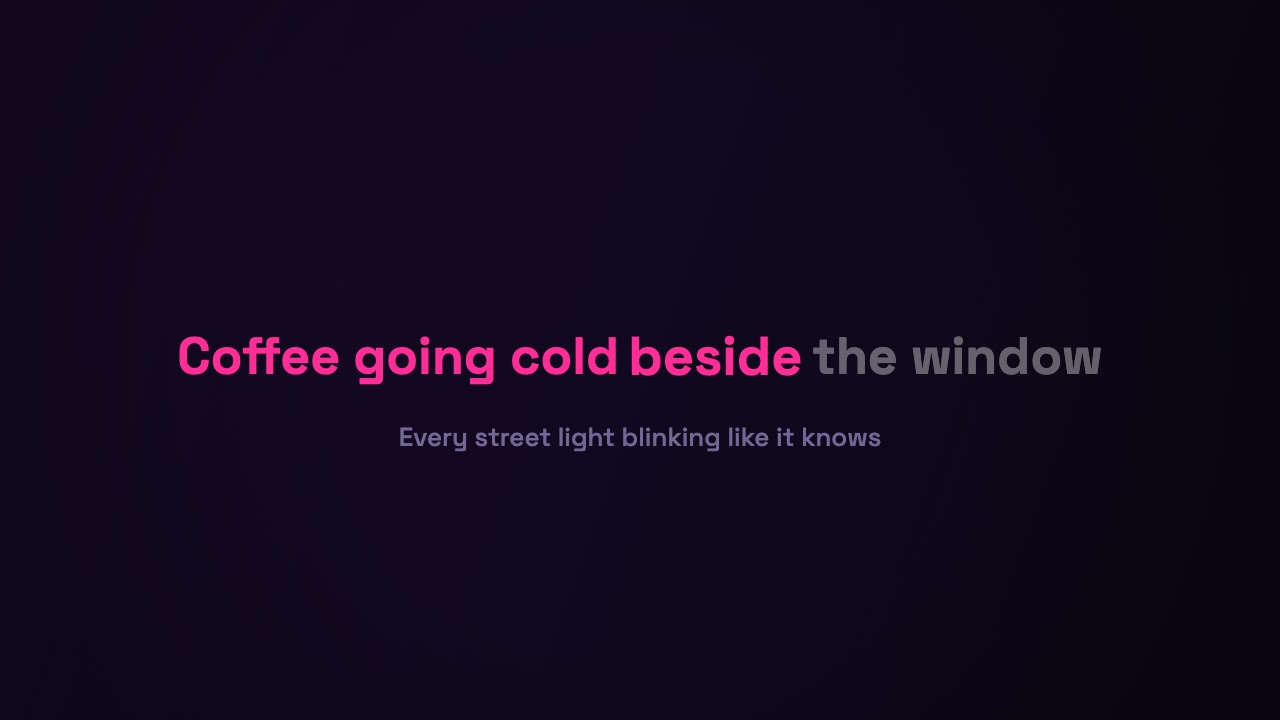
A lyric video is the words of a song on screen, arriving exactly when they are sung. The typography is the easy half; the timing is the work, and it is the half most tools quietly hand back to you. This guide walks through the whole job — the song file and lyrics you need, the three ways to get the lines onto the beat, choosing a look that suits the track, exporting for YouTube, TikTok and Reels, and the one rule about music rights that decides whether the video can go up at all. Details of the LazyKiwi tool here were checked on 7 November 2026.
What you need to make a lyric video
Three things: the audio, the words, and a way to line them up. The first two are quick; the third is where lyric videos are won or lost.
- The song as an audio file — MP3, WAV, M4A, AAC, FLAC or OGG. A clean export from your DAW or the purchased track, not a screen recording.
- The lyrics as plain text, one line per line, with a blank line wherever the music takes over so the screen rests during an instrumental.
- A timing method — a synced lyric file, your own taps, or an automatic spread. The next section is all three.
You do not need a video editor or a timeline. A browser lyric video maker holds the song, the words and the timing in one place and draws the video live as you work.
The hard part is timing, not fonts
Anyone can put a line of text on a coloured background. The thing that separates a lyric video that feels right from one that feels off by a beat is whether each line appears on the syllable it belongs to. Get that wrong and no font saves it; get it right and even plain type reads as deliberate.
That is why the useful question is not "which fonts" but "how am I going to sync this". There are three honest answers, and the best one depends on whether the song already has a synced lyric file.
Three ways to time the words
| Method | What you do | Use it when |
|---|---|---|
| Paste an LRC | Paste the synced lyric file and every line is placed to the hundredth of a second, offset header and all. | The song is released and an LRC exists for it. |
| Tap the spacebar | The song plays and you press Space at the top of each line; a wrong tap is re-taken one line at a time. | There is no LRC — your own or an unreleased track. |
| Auto spread | The lines are shared across the selection by length, so a rough draft plays on the first click. | You want a starting point to correct rather than a blank screen. |
Paste an LRC
LRC is the synced lyric format, a timestamp like [00:19.16] in front of every line, and most released songs have one somewhere. Paste it into the lyrics box and the tool recognises it on the spot: lines land to a hundredth of a second, the offset header is applied the way a music player applies it, and enhanced files with word-level timestamps can drive a word-by-word highlight. (Wikipedia has a plain-English rundown of the LRC file format if you have never opened one.)
Tap the spacebar
No LRC? Tapping takes about as long as the song does: play from the start of your selection and press Space at the top of every line. Here the tap is recorded as song time, so trimming the intro afterwards does not slide the words out of place, the left arrow re-takes the line you just missed, and clicking any line carries on from there instead of starting over. You can save what you tapped as an LRC to reuse another day.
Auto spread
Auto spread shares the selection out by line length so a draft plays back immediately. It will not be frame-accurate on a song with long held notes, but it is a fast way to see the whole thing move before you commit to tapping.
How to make a lyric video in three steps
- 1
Drop in the song and the words
Add the audio, drag the handles to the part you want — up to ten minutes — and paste the lyrics on the left, one line per line, with a blank line for instrumental breaks.
- 2
Time the lines your way
Paste an LRC and it switches to that mode by itself, or press Start tapping and hit Space at each line, or leave Auto spread on. Whichever route, you keep something you can correct afterwards.
- 3
Pick a look and download
Click through the style cards, set the type size and colours, choose a background, switch on a spectrum bar if you want one, pick 16:9, 9:16 or 1:1, and download an MP4 with the song already in it, trimmed to your selection.
Pick a style that fits the song
Full-frame typography reads better than a caption bar across the bottom, because the words are the picture. There are eight styles here, three variants each, drawn live with your own lines so each card is a real frame rather than a sample:
- Bold Center pops words in one by one, dead centre — the safe default for pop and rap.
- Karaoke shows the whole line in grey and lights it up as it is sung, with the next line waiting underneath.
- Typewriter types mono letters behind a blinking cursor; Handwritten writes onto a taped note or chalkboard.
- Neon flickers tube-light capitals; Kinetic Stack keeps the current line biggest with the last few stacked above.
- Editorial Serif fades slowly between hairlines, numbered like a poem; Glitch tears each line in with RGB ghosts.
Each style brings a backdrop you can replace — a solid colour, a gradient, an animated shader, your cover art blurred behind the words, or a photo — and a Bars option adds a thin spectrum read from your own song. Add the artist and title and the video can open on a short title card.
Export for YouTube, TikTok and Reels
The export is exactly the selection you set on the waveform — no looping to fill, no silent clip to marry up with the track afterwards — as an MP4 with the audio baked in. Switch the ratio and the layout is rebuilt for that frame.
- 16:9 for YouTube, 9:16 for Shorts, Reels and TikTok, 1:1 for the feed.
- Everything is encoded in the browser tab, so a ten-minute song is a long export rather than a queue position.
- Free exports are 720p with a small mark for personal use; any paid plan exports clean 1080p cleared for commercial use, and Pro adds 4K.
If you want the music to drive moving visuals instead of text, the music visualizer takes the same uploaded track and animates a scene to it, the AI music video generator builds full scenes around a song, and our guide to making a music video on a budget covers the shoot-and-edit route.
A note on music rights
This is the step that decides whether the video survives upload. Putting someone else's song in a video you post is a licensing question, not a technical one, and the platform — not the tool — enforces it. YouTube explains how it handles music in your videos: a copyrighted track can trigger a Content ID claim that mutes the video, blocks it in some countries or routes the ad money to the rights holder.
- Your own song, or one you have a licence for: you are clear to monetise.
- A commercial release you do not own: expect a Content ID claim; the lyric video may still play but the revenue usually is not yours.
- Lyric videos officially commissioned by the artist or label are a normal, licensed use — that is a permission you get from them, not from an editor.
If the video is for practice, a cover you have cleared, or your own track, none of this bites. If it is a chart single you do not own, assume a claim and do not count on the ad revenue.
Key takeaways
- A lyric video is words timed to the song. The typography is easy; the timing is the whole job.
- Three ways to sync: paste an LRC for released songs, tap the spacebar when there is no LRC, or auto-spread for a quick draft you then correct.
- Taps are stored as song time, so trimming the intro later does not slide the words off the beat.
- Full-frame typography beats a caption bar. Pick a style that matches the track and export 16:9 for YouTube, 9:16 for Shorts and Reels.
- Music rights, not the editor, decide whether the upload survives: use your own song or a licensed one, or expect a Content ID claim on a commercial release.
Video Workflows Editor
Daniel Okafor
I run the same clip through every video and motion tool we ship and write down what actually changes: timing, length, export, and where each one falls apart.
FAQ
Common questions
How do I make a lyric video for free?
Load the song and lyrics, time the lines (paste an LRC, tap the spacebar, or auto-spread), pick a style and export. LazyKiwi's lyric video maker previews every style free and exports 720p on the free plan with a small mark; clean 1080p comes with any paid plan.
Do I need an LRC file to make a lyric video?
No. An LRC gives the most accurate timing in one paste, but if the song does not have one — a demo, an unreleased track, your own recording — you tap the spacebar at the top of each line instead, and you can save those taps as an LRC for next time.
How do I make a lyric video for TikTok or a Short?
Build it as normal, then switch the aspect ratio to 9:16. The layout is rebuilt for the vertical frame rather than cropped from a widescreen version, and the export carries the trimmed section of the song with it.
Can I make a lyric video with no watermark?
The free plan exports 720p with a small LazyKiwi mark; a one-time credit pack or any paid plan removes it and unlocks the premium styles. The live preview of every style is free, so you can decide on the look before paying.
Can I put any song in a lyric video?
Technically yes — the tool does not stop you — but legally it depends on who owns the song. A commercial release you do not own will usually get a Content ID claim on YouTube that affects monetisation or availability. Use your own track, a licensed one, or a cover you have cleared.
How long can the lyric video be?
Up to a ten-minute selection, with as many as 120 lines of lyrics. The exported clip is exactly the part you select on the waveform, with the audio baked in, so there is no separate step to line the video up with the track.
Put the words on the beat
Drop in a song, paste the lyrics, and time them your way — paste an LRC, tap the spacebar, or let the lines spread. 24 looks, exported with the audio in the file.
Keep reading
How to Make a Music Video on a Small Budget
How to make a music video with no crew: treatment, markers on the track, a shot list, generated or filmed shots, and cuts that land on the beats.
8 min read
Animated Logo Ideas: 12 Reveals That Work
Twelve animated logo patterns sorted by how long each takes to build, what every one says about a brand, and the export settings each platform expects.
9 min read
Best AI Subtitle Generator in 2026: 7 Tools Compared
Seven AI subtitle generator options compared on verified prices, free tiers and languages, plus the caption standards and the steps to subtitle any clip.
10 min read