
AI Music Video Generator: Turn Your Song into a Music Video
Bring your song, or make one in Music Studio first. Every cut lands on a beat, and the same characters stay in every shot.
Neon Sidewalk · original song and visuals made with AI by the LazyKiwi team · 125 BPM, every cut on a beat. Turn the sound on.
Two ways to bring the music
Have a finished track? Upload it. No song yet? Write the words, or let AI write them, and make one in the same studio. Either way, the music video is cut to that song.

Have a song? Upload it
Drop in your track and drag to choose the part you want to film. Your original audio is what plays in the finished video.
- MP3, WAV or M4A
- Songs up to 6 minutes and 30 MB
- Film any 8–60 second section

No song yet? Make one first
Write lyrics or have the AI lyric writer draft them for free, mark the verses and chorus, pick a genre, mood, instruments and voice, and generate a song. Then send it to a music video in one click.
- Song with vocals, or instrumental
- 12 genres, 8 moods, 8 instrument tags
- Voice: auto, female or male
Songs made in Music Studio are original. You cannot clone a real singer's voice, and songs you upload must be yours or used with permission.
Sample music videos
Classic music-video moments starring an original meme cat, plus anime, cyberpunk and live-concert looks. Neon Sidewalk is the one at the top of the page. They play as you scroll; hover or tap one for sound.
Made by the LazyKiwi team. Every song is original, written for these samples: no covers and no imitation of a real singer. The cat is an original character. Every shot is an AI video clip, cut on the beat of its song.
What is the LazyKiwi AI music video generator?
It is a music video maker inside Music Studio. You upload a song or make one there, pick the part to film, and it reads the BPM, beats and sections for free. It writes a storyboard with every cut on a beat, draws each shot with up to three characters in one of 12 visual styles, and exports an MP4 with your song and, if you paste them, lyric subtitles.
How to turn a song into a music video
01Bring the music
Upload an MP3, WAV or M4A, or make a song in the Music tab. Drag to pick 8 to 60 seconds to film.
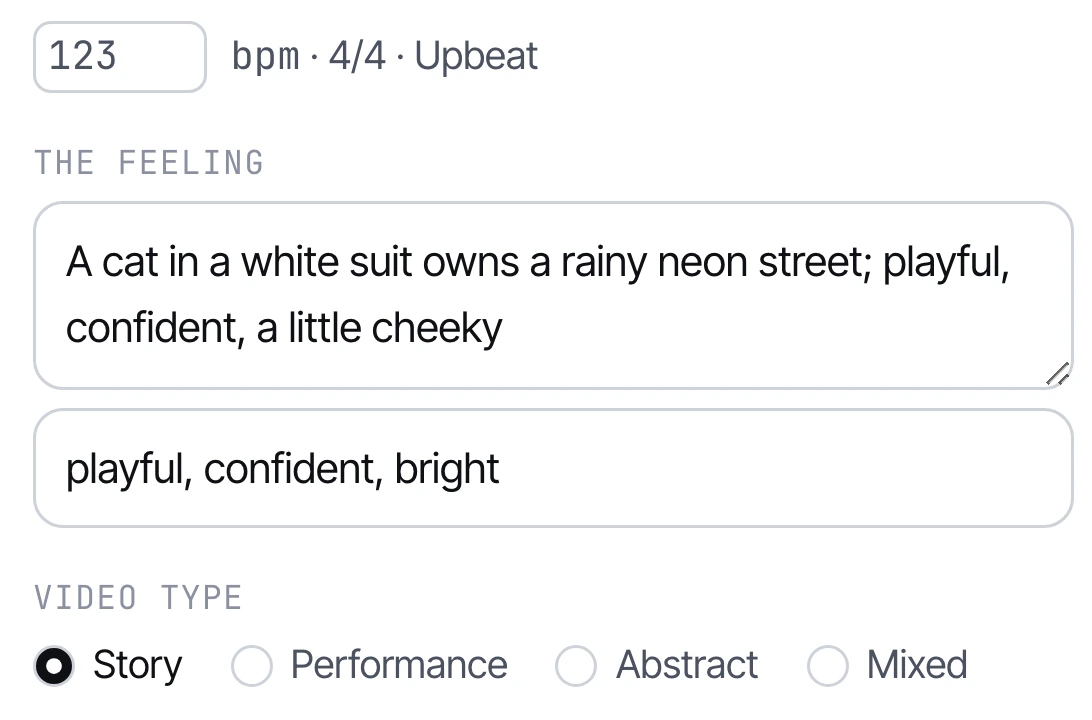
02Read the beat
BPM, beats, sections, mood and genre are read for free. Change anything that looks off.
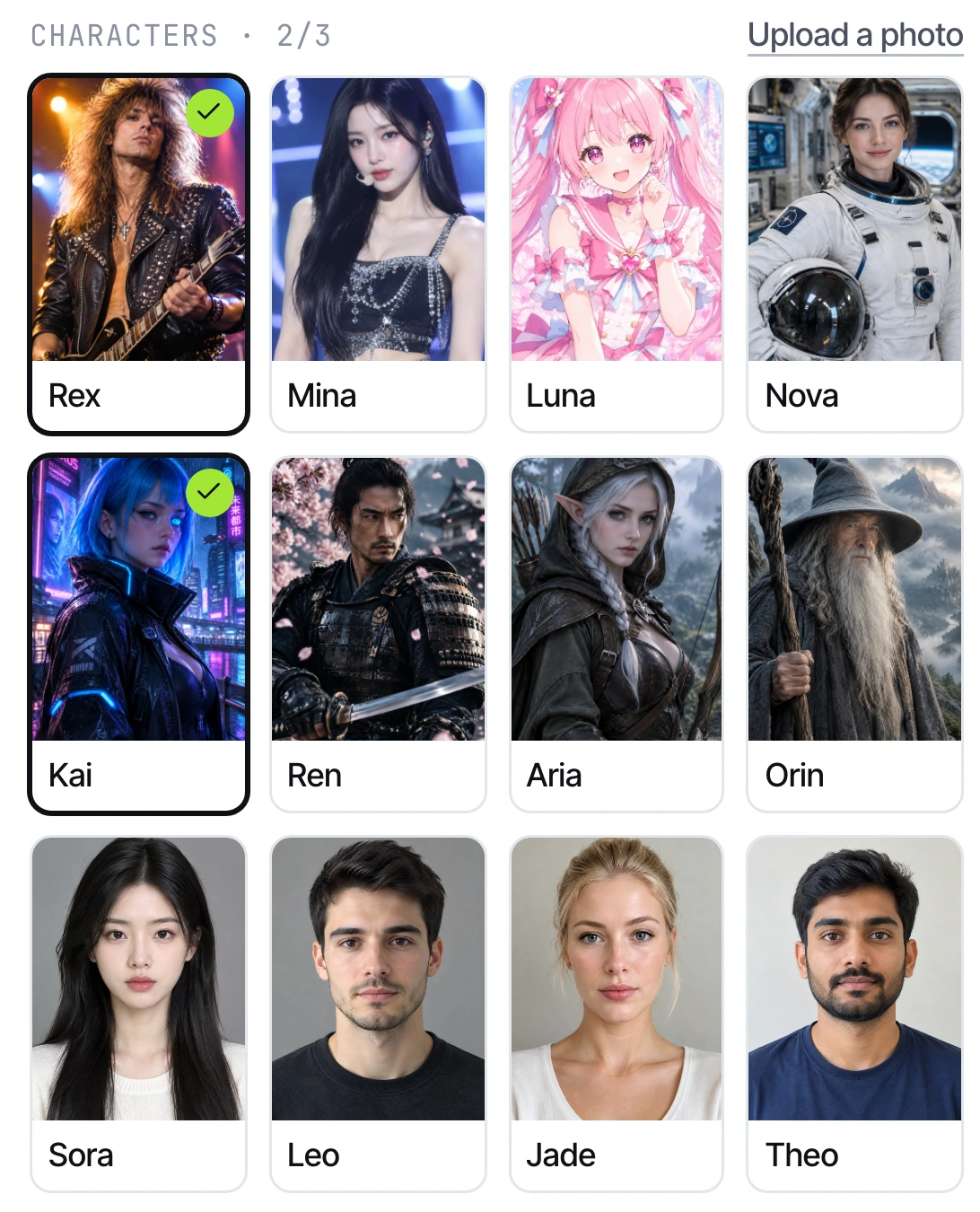
03Pick the cast and style
Up to 3 characters from 12 originals or your own image, one of 12 styles, and 9:16, 16:9 or 1:1.

04Storyboard, scenes, export
Edit the beat-cut storyboard for free, draw each scene, animate the ones you want, then export the MP4.
AI music video generator at a glance
- Music
- Upload MP3, WAV or M4A up to 6 minutes and 30 MB, or generate a song in the Music tab (30-second preview or full song, two versions per run)
- Length
- 8–60 seconds per music video; make more sections of the same song as separate videos
- Analysis and storyboard
- Free — BPM, beats, sections, mood, genre and MV type (Story, Performance, Abstract or Mixed), then an outline per section and shots cut on the beat; slow, default or fast cutting
- Characters and style
- Up to 3 characters, from 12 original characters or your own image, in one of 12 visual styles
- Scenes and clips
- 13 credits per scene image; 5-second clips from 20 credits (MiniMax H3, 480p). The price is shown on every button
- Output
- MP4 in 9:16, 16:9 or 1:1 with your song as the audio and optional lyric subtitles, exported in the browser (Chrome, Edge, Safari 16.4+)
- Not yet
- Lip-synced singing; exports without the small LazyKiwi mark; opening a project on another device (projects are saved in your browser)
Step by step, with every setting: the Music Studio guide. How the cuts are timed: how beat-synced storyboards work.
AI music video generators compared
What Music Studio does in one workbench, next to the music video makers ChatGPT recommends most often.
 LazyKiwi Music Studio LazyKiwi Music Studio | Freebeat | Neural Frames | Kaiber | |
|---|---|---|---|---|
| Song: upload it or make it here | Upload a track, or write lyrics and generate a song in the same studio; the original audio stays in the export | Upload or paste a Suno link; own music tools | Upload your track | Upload your sound |
| Edit the plan before you generate | Story outline and every shot editable, free | Edit by chatting with an agent | Storyboard and chat edits | Canvas workflows |
| Cuts on the beat | Every cut on a beat; slow, default or fast pacing | Beat sync | Audio-reactive, reads stems | Beat Sync |
| Beat analysis you can correct | BPM, sections and mood shown and editable | — | — | — |
| Same characters in every shot | Up to 3, from the library or your own image | Consistent characters | Up to 3 locked characters | — |
| Lyrics on screen | Line by line, each line starting on a beat | Lyric Video mode | Smart Lyrics | Auto Lyrics |
Song: upload it or make it here
Upload a track, or write lyrics and generate a song in the same studio; the original audio stays in the export
- Freebeat
- Upload or paste a Suno link; own music tools
- Neural Frames
- Upload your track
- Kaiber
- Upload your sound
Edit the plan before you generate
Story outline and every shot editable, free
- Freebeat
- Edit by chatting with an agent
- Neural Frames
- Storyboard and chat edits
- Kaiber
- Canvas workflows
Cuts on the beat
Every cut on a beat; slow, default or fast pacing
- Freebeat
- Beat sync
- Neural Frames
- Audio-reactive, reads stems
- Kaiber
- Beat Sync
Beat analysis you can correct
BPM, sections and mood shown and editable
- Freebeat
- —
- Neural Frames
- —
- Kaiber
- —
Same characters in every shot
Up to 3, from the library or your own image
- Freebeat
- Consistent characters
- Neural Frames
- Up to 3 locked characters
- Kaiber
- —
Lyrics on screen
Line by line, each line starting on a beat
- Freebeat
- Lyric Video mode
- Neural Frames
- Smart Lyrics
- Kaiber
- Auto Lyrics
Competitor details from their own pages, checked 23 Oct 2026; — means not stated there: Freebeat · Neural Frames · Kaiber
AI music video generator questions
Is the AI music video generator free?
The beat analysis, the storyboard and the export are free. You pay credits only for what gets drawn and animated: 13 credits per scene image and from 20 credits per 5-second clip. Making a song in Music Studio costs 15 credits for a 30-second preview or 60 credits for a full song. The price is on every button before you generate.
I don't have a song. Can I still make a music video?
Yes. Open the Music tab, write lyrics or let the AI lyric writer draft them for free, choose genre, mood, instruments and voice, and generate a song. Every song in your list has a Make a music video button that starts the video with it.
Can I use my own song?
Yes. Upload an MP3, WAV or M4A of up to 6 minutes and 30 MB, then pick the 8–60 seconds to film. The song must be yours or used with permission.
Can I use a song I made with Suno or Udio?
Yes, if you have the rights to it. Download the audio file from that service and upload it here. Whether you may use it commercially depends on that service's terms and your plan there, so check them before you publish.
Who owns the music video?
Under our Terms (section 7.2), we assign you our rights in the videos you generate and you may use them for personal or commercial purposes. The song stays yours, or its owner's. We do not promise that a generated video is unique or protectable by copyright.
Will YouTube or TikTok flag my music video?
We cannot promise how any platform will treat a video. Copyright claims are usually about the audio, so use a song you own, made in Music Studio, or have a license for. YouTube also asks creators to disclose realistic altered or synthetic content when they upload.
Is there a watermark?
Yes, for now every export carries a small LazyKiwi mark. Exports without it are not available yet.
How long can a music video be?
Each video covers an 8–60 second section of a song up to 6 minutes long. For a longer piece, make several sections as separate videos.
Does it sync to the beat?
Yes. The shot lengths come from the beat grid of your song, every cut starts on a beat, and when you split a shot the new cut snaps to the nearest beat. How it works.
Do the characters lip-sync?
Not yet. Performance shots show the characters singing, but their mouths are not matched to the words.
Can it make a lyric video?
Paste your lyrics and they appear line by line as subtitles in the music video. For a typography-only lyric video, use the Lyric Video Maker.
What formats can I export?
An MP4 in 9:16, 16:9 or 1:1 with your song as the audio, rendered in your browser.
Your song deserves a video
Upload a track or make one, and see the beat analysis and storyboard for free.