
Drop in a song and watch the music visualizer move to it.
Upload an MP3, WAV or FLAC and within seconds it plays back as a visualizer — a ring, bars, a waveform, a spinning record or sparks, all moving with the audio. Try 11 styles, trim the part you want and export at 16:9, 9:16, 1:1 or 4:5 — 720p free with a small mark, clean 1080p for your release on any paid plan.
- 10
- Visualizer styles
- Halo Ring, Radial Bars, Linear Bars, Mirrored Wave, Dual Line, Oscilloscope, Dot Matrix, Vinyl Record, Shape, Particle Burst.
- 47
- Presets
- Four to six colour and background looks per style, one click each.
- 4
- Aspect ratios
- 16:9, 9:16, 1:1 and 4:5, each laid out for its own frame.
- 10 min
- Per video
- Trim any part of a song; downloads render the whole selection in your browser.
- Preview plays with your own song — no account needed
- Presets change the look, never your song or text
- Exports include the trimmed audio
- No watermark on any paid plan
What it is
A music visualizer made from your song's own sound.
A music visualizer is a video where the picture moves with the sound: bars jump on the kick, a ring swells with the bass, a line traces the waveform. This one works that motion out from the file you drop in. The song is decoded and analysed inside your browser tab — its audio spectrum split into 64 frequency bands, 30 times a second, plus the waveform itself — so every frame of the video is drawn from its own moment of the track, and a new colour or a different style plays back against the music straight away. Pick from 11 styles and 52 presets: Halo Ring, Radial Bars, Linear Bars, Mirrored Wave, Dual Line, Oscilloscope, Dot Matrix, Vinyl Record, Shape, Particle Burst and Podcast — the last one is the classic podcast audiogram. Add the artist name, the track title and cover art, trim up to ten minutes of the song, and export at 16:9, 9:16, 1:1 or 4:5. Call it a music visualizer, an audio visualizer or, in British spelling, an audio visualiser — it runs online, in the browser, with nothing to install.
How it works
How to make a music visualizer in three steps
Drop in your song
MP3, WAV, M4A, AAC, FLAC or OGG. The file is decoded and analysed right in your browser, usually in seconds, and starts playing as a visualizer. Drag the Start and End handles over the song's energy bar to pick the part you want, up to ten minutes.
Pick a style and make it yours
Click through the 10 style cards and the preset dots under each one. Type the artist name and track title, add cover art or a logo, then fine-tune the spectrum, colours, motion and background. Switching presets changes only the look — your song, text and images stay put.
Choose a frame and download
Pick 16:9, 9:16, 1:1 or 4:5 and press Download video; downloading asks you to sign in with a free account. Free exports are 720p with a small LazyKiwi mark, for personal use. Any paid plan exports clean 1080p, cleared for releases and monetised channels, and Pro adds 4K.
11 styles · 52 presets
Rings, bars, waveforms, a spinning record and sparks
Halo Ring pulses a solid wave around your cover, Radial Bars fans an equalizer out from it, and Dot Matrix does the same in dots or LED bulb meters. Linear Bars and Dual Line set a bar spectrum under or around a big title. Mirrored Wave spreads a fluid wave either side of the album art, Oscilloscope traces the waveform itself, Vinyl Record slides a record out of its sleeve, Shape bends a triangle, diamond, pentagon or hexagon to the beat, and Particle Burst throws sparks out on every kick.
- Try all 52 presets in the live preview, on your own song
- Presets swap the look; your song, text and images stay
- Undo right after a switch if you had changed things
Moves with the music
Driven by your song's audio spectrum, frame by frame
Every frame reads how loud each of 64 frequency bands is at that moment of the song, so the motion lands with the kick instead of looping a canned animation. Tell a style whether to react to the bass, the lows and mids or the full range, then set how sensitive and how smooth it is. Bounce on bass, shake, spin and beat flash move the whole picture, and animated backgrounds, photos, cover art and particles can pulse with the bass too.
- 64 frequency bands, analysed 30 times a second
- React to bass, low + mid, or the full range
- Oscilloscope traces the song's actual waveform
Your release
Artist name, track title and cover art, placed for you
Type the artist and the track title and they are set where each style expects them — centred under a ring, big and left-aligned under bars, between two spectrums. Choose from seven fonts, uppercase or not, in any colour and size. Add cover art or a logo and it sits in the middle of the ring, on the record sleeve or square between the waves, and its blur can become the background. No cover yet? The artist's first letter stands in.
- Artist up to 60 characters, title up to 80
- Six stock background photos free; your own photo on any paid plan
- Particles, a progress bar and a timer as extras
Every platform
16:9 for YouTube, 9:16 for Reels and TikTok, 1:1 and 4:5 for the feed
Switch the ratio and the visualizer is laid out again for that frame — ring, bars, cover and title re-spaced for a wide, tall or square picture instead of a widescreen render cropped down the middle. Export a 30-second hook for Shorts or the whole song for YouTube: selections run up to ten minutes and render in your browser, with progress, time left and a cancel button. The file is an MP4 with your audio in it, with a WebM fallback on browsers that cannot encode MP4.
- Four aspect ratios from one design
- Whole songs up to 10 minutes, rendered in your browser
- Cloud render for up to 60 seconds: 5 credits per 20 seconds
Inside the tool
Your song on the left, the visualizer in the middle, the look on the right
There is no project to set up. The left rail holds the song — drop zone, trim bar and the built-in tracks (two free, the rest on any paid plan) — then the artist, title and images; the stage in the middle plays the visualizer above the selection's timeline; the right rail holds the 10 style cards with their preset dots, the Spectrum, Colour & glow, Motion, Background and Extras panels, the four ratios and the download button.
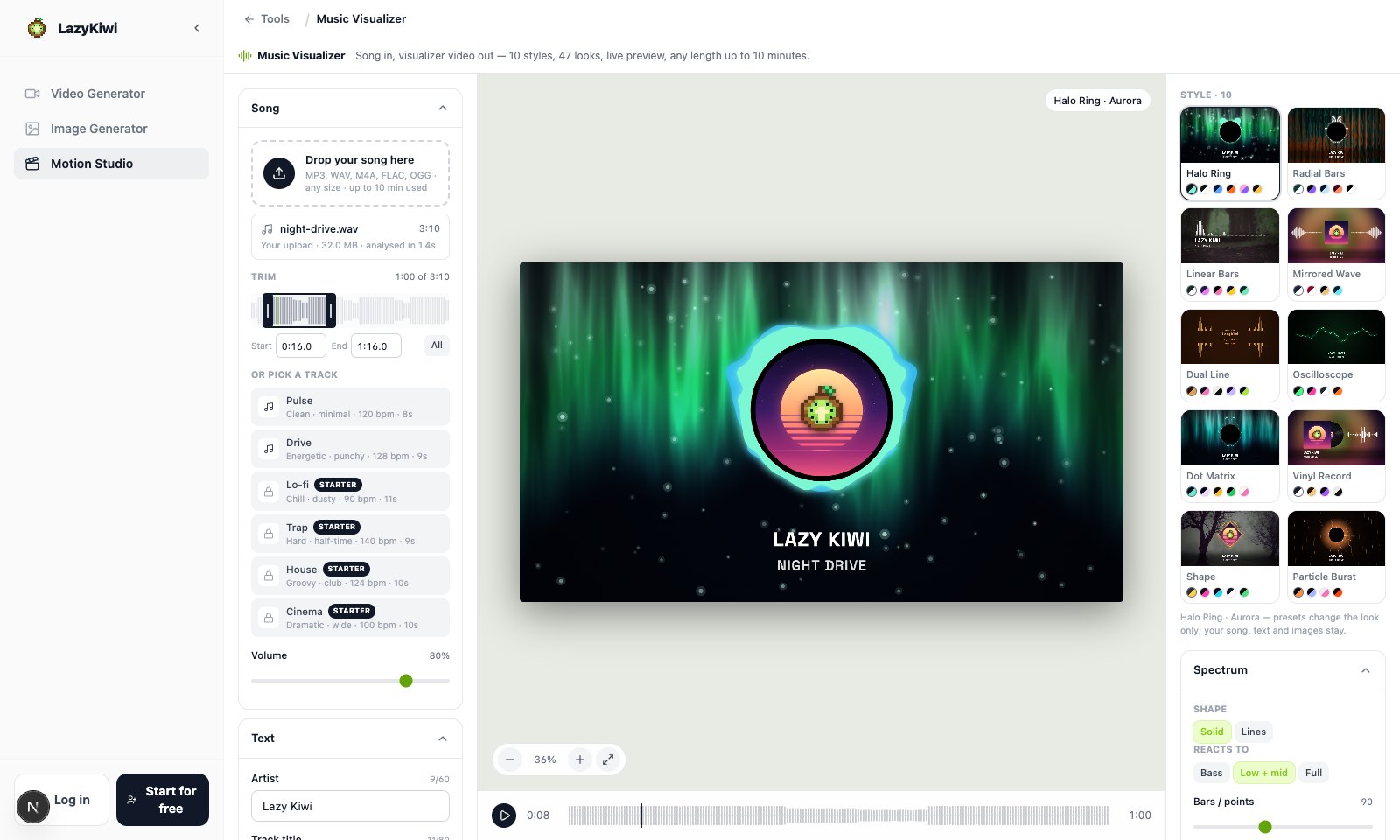
Trim on the song's energy bar
The whole track is drawn as a loudness bar under two handles. Drag them, drag the selection, or type exact Start and End times.
Ten style cards, 47 dots
Each card is a frame of that style with your text; the dots under it are its presets, one click each.
Choose what it reacts to
Bass, Low + mid or Full sets which part of the spectrum drives the style; the sliders under it set the bar count, size, height, weight, smoothing and sensitivity.
Six of the ten
Six visualizer styles, at a glance
Each tile is one style playing along to the same synthetic test track, cut vertical at 9:16: Halo Ring in Magma, Radial Bars in Prism, Linear Bars in Rainbow Road, Mirrored Wave over a cover blur, Vinyl Record in Neon Spin and Particle Burst in Sparks. Drop in your own song and the motion follows it instead.
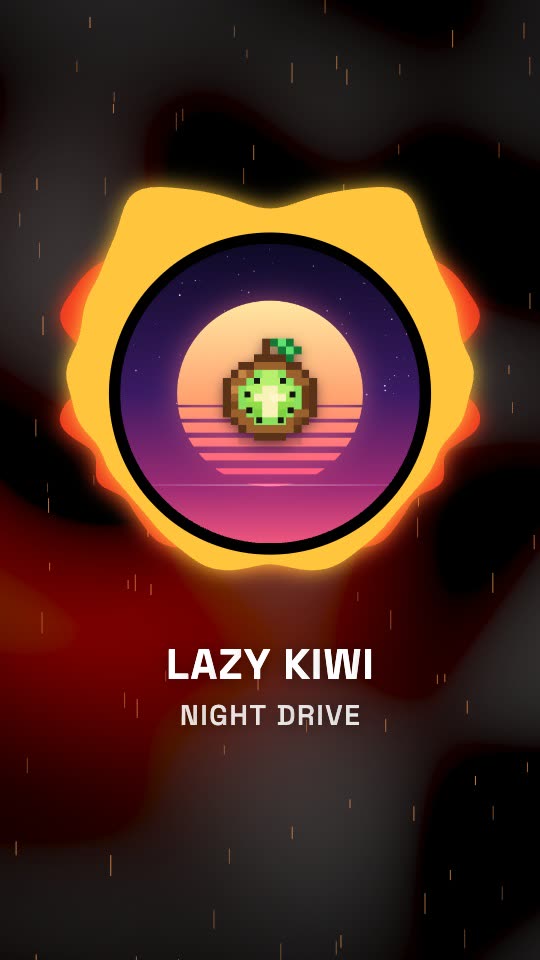
Halo Ring
A solid wave ring pulsing round the cover.
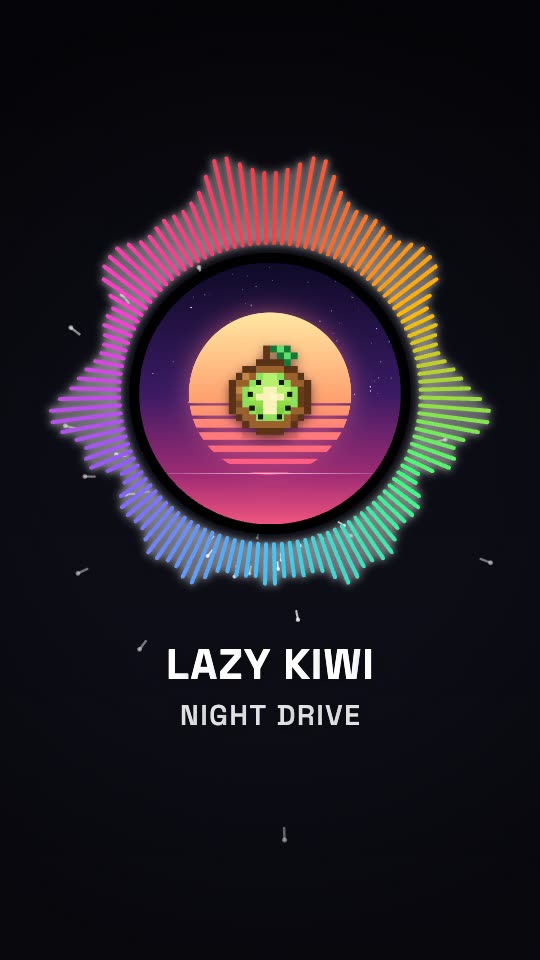
Radial Bars
Rainbow bars fanning out from the centre.
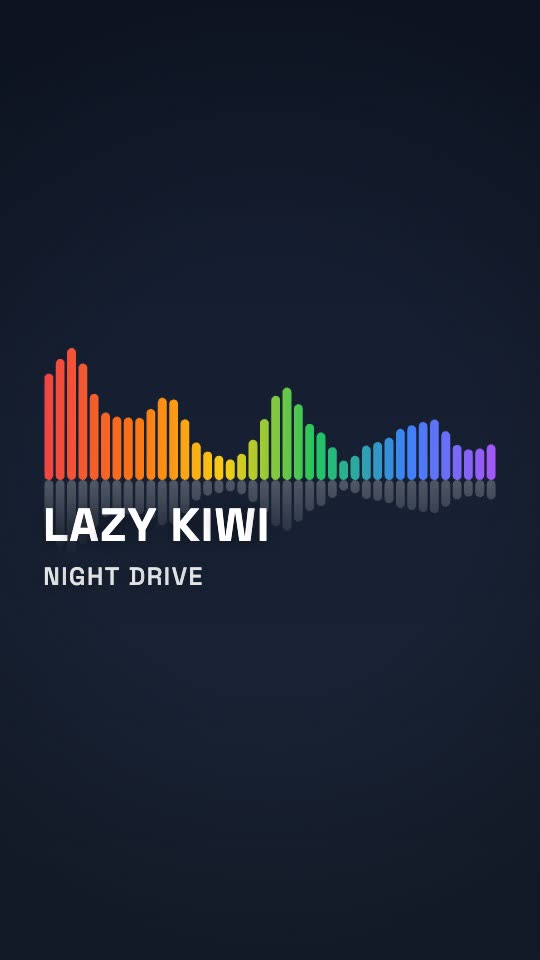
Linear Bars
A bar spectrum over a big artist title.
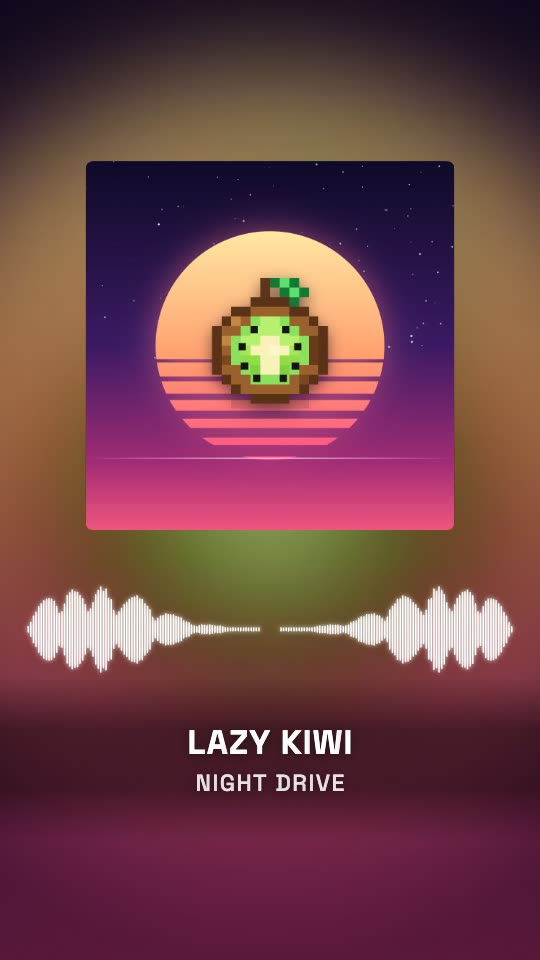
Mirrored Wave
A fluid wave either side of the album art.
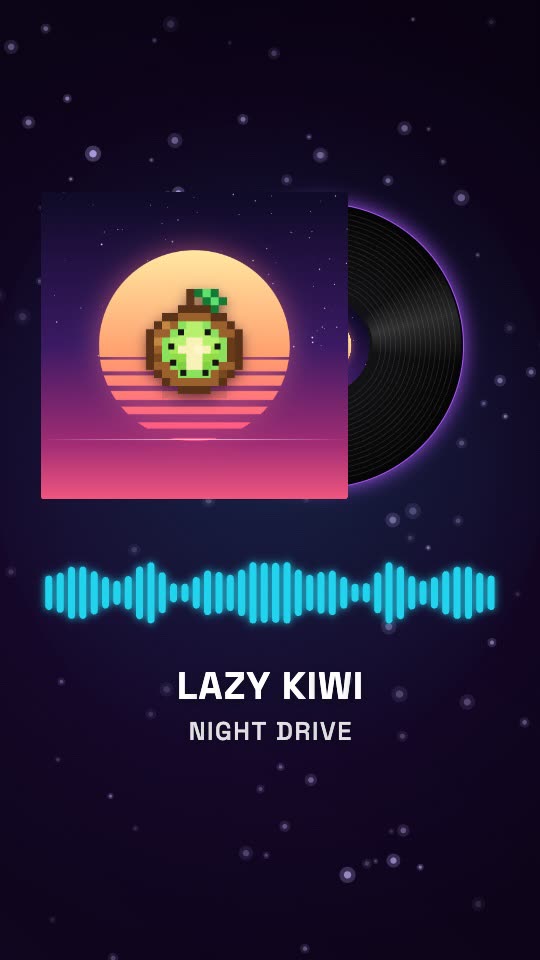
Vinyl Record
The record slides out of its sleeve and spins.
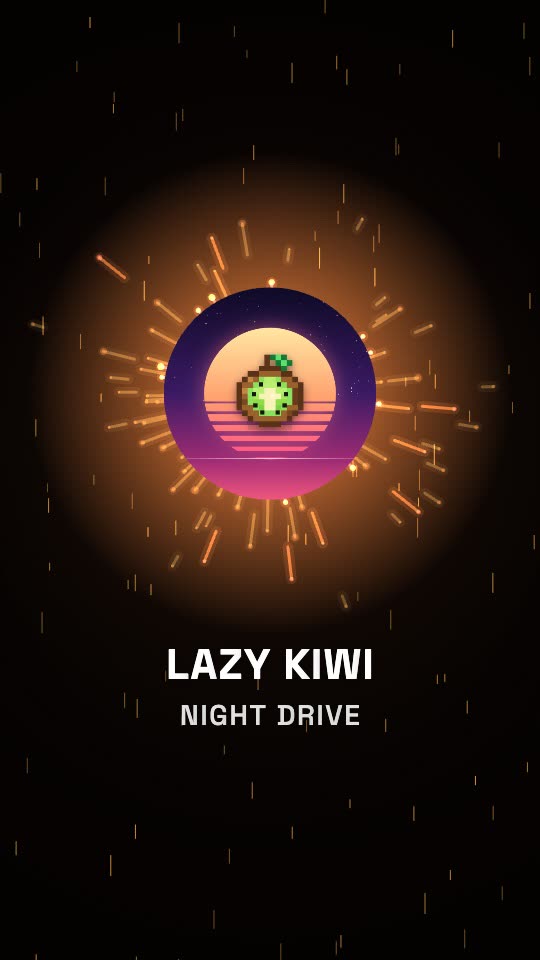
Particle Burst
Sparks thrown out on every kick.
Why LazyKiwi
Why make your music visualizer here
Hear it before you sign up
Drop in a song and the visualizer plays with it as soon as it is analysed — usually within seconds. Every style, preset, colour and ratio can be tried without an account; you sign in when you download.
No render queue while you design
The picture is drawn in your browser tab as the song plays, so a new colour or style shows up on the next beat instead of after a server render.
Ready for release day
Any paid plan exports clean 1080p cleared for commercial use — the video for a new single, promo for a release on Spotify and social, and uploads you monetise on YouTube. Pro adds 4K.
Nothing to learn
No keyframes and no After Effects template to open. Drop in the song, click a style card, type the artist name and download.
Your song stays on your machine
The file is decoded and analysed locally; nothing is uploaded to show you a preview. A copy reaches our servers only if you choose Cloud render, or when a signed-in export saves the project and the song is 8 MB or smaller.
Long songs welcome
Trim any stretch up to ten minutes. Browser exports spend no credits, show how long is left and can be cancelled at any point.
Live visualizer, render service or template marketplace
Three common ways to make a music visualizer online, and what changes when the preview is drawn live in your browser. The other two columns are drawn from Specterr, Tuneform and Videobolt's own sites and editors as of September 2026.
LazyKiwi Music Visualizer
What you get here
- The visualizer plays with your own song while you edit — no account needed until you download
- 11 styles and 52 presets, each one playable in the live preview
- Trim up to 10 minutes and export 16:9, 9:16, 1:1 or 4:5 from one design
- Unlimited 720p exports on the free plan; clean 1080p with commercial use on any paid plan, 4K on Pro
- A focused library of spectrum, waveform, vinyl and particle styles rather than a template catalogue
Online visualizer editors
Specterr, Tuneform
- Upload a song and adjust the design before signing up; saving, rendering or exporting needs an account
- Finished videos render on the provider's servers rather than in your browser
- Plans count videos per day or month, or credits per ten seconds of output
- Bigger catalogues: 40 styles on one, more than 100 presets on the other
Template marketplaces
Videobolt
- More than a thousand pre-built visualizer templates, including cinematic 3D scenes
- The editor opens after sign-up, and downloading needs a subscription
- Lyric videos, and mixes up to two hours long on the top plan
- Resolution and maximum length step up with each plan
Pricing & limits
A free music visualizer, and what paying unlocks
Drop in your own song and every style plays in the live preview; the free plan gives you unlimited 720p exports with a small LazyKiwi mark, for personal use. Paying unlocks the rest: a one-time credit pack removes the mark and lets you export the few premium styles; any paid plan adds 1080p and commercial use, so the video can go out with a release or earn on YouTube; Pro adds 4K. Cloud render is optional: 5 credits for every 20 seconds of video, for selections up to 60 seconds.
Unlimited exports
Free · 720p
- 720p MP4 with a small LazyKiwi mark, for personal use
- Any plan or credit pack removes the mark
- All four aspect ratios — 16:9, 9:16, 1:1, 4:5
- No card required to open, edit or preview
- Every style in the live preview — a few premium ones need a credit pack or plan to export
1080p on any paid plan
1080p · 4K
- Same clip, same edit, rendered clean at 1080p — commercial use included
- 4K, 60 fps and transparent ProRes on Pro and above
No credits to export
Renders in your browser
- Changing styles, colours, text and the trim re-render locally and spend no credits
- No upload queue and no render wait to pay for
- Optional cloud render, every frame stable: 5 credits per 20 seconds
FAQ
Music visualizer questions, answered
Is this music visualizer free?+
Yes, for personal use. Drop in your own song and try every style, preset and aspect ratio in the live preview without an account; a free account then gets unlimited 720p exports with a small LazyKiwi mark, for personal use. A few premium styles export only with a one-time credit pack or a paid plan, and the credit pack also removes the watermark. A visualizer that goes out with a release, promotes your music on Spotify or social, or earns on YouTube is commercial use and needs a paid plan: any paid plan exports clean 1080p with commercial use, and Pro and above add 4K.
What is a music visualizer?+
Also called an audio visualizer or a sound visualizer, it is a video whose shapes move with the sound. Bar and ring styles are drawn from the audio spectrum, the loudness of each frequency band from moment to moment, while an oscilloscope traces the waveform itself. Here the song is analysed into 64 frequency bands, 30 times a second, and every frame of the video is drawn from that analysis.
How do I make a music visualizer video?+
Open the tool and drop in your song, or start from a built-in track — two of the 18 are free here, and any paid plan opens the rest. Drag the trim handles to the part you want, pick a style card and a preset, and type the artist name and track title; add cover art if you have it. Choose 16:9, 9:16, 1:1 or 4:5, press Download video and sign in. 720p is free; 1080p needs any paid plan and 4K needs Pro.
Is there a watermark on the free audio visualizer?+
Yes — a small LazyKiwi mark in the corner of the 720p export, and it cannot be switched off on the free plan. Paying removes it: a one-time credit pack exports without the mark, and any paid plan exports the same video clean at 1080p, cleared for commercial use.
What audio files can I upload?+
MP3, WAV, M4A, AAC, FLAC and OGG. The file is decoded by your browser, so there is no upload wait and no file-size limit in the tool itself; if a file will not open, convert it to MP3 or WAV. For the cleanest sound in the export, start from WAV or FLAC rather than a low-bitrate MP3.
How long can the video be?+
Up to 10 minutes per video. The whole song is selected when you drop it in — the first ten minutes if it runs longer — and the Start and End handles pick any shorter stretch, down to a second; for a longer DJ mix, export it in ten-minute parts. Downloads render in your browser at any of those lengths, so keep the tab in front while a long one runs. Cloud render takes selections up to 60 seconds and costs 5 credits for every 20 seconds, so a one-minute clip is 15 credits.
Can I make a vertical visualizer for TikTok, Reels or Shorts?+
Yes. Choose 9:16 for TikTok, Reels and Shorts, 1:1 or 4:5 for feed posts, or 16:9 for YouTube. The layout is rebuilt for each frame — ring, bars, cover and title re-spaced — rather than cropped from a widescreen video, so a vertical cut of the chorus and a wide version of the whole song can come from the same design.
Can I use the video on YouTube or commercially?+
Yes, on any paid plan. Those exports are 1080p with no watermark and cleared for commercial use — a monetised YouTube channel, the video for a new release, promo on Spotify and social, ads and client work. Free exports, and clean exports from a credit pack alone, are for personal use. Either way the music itself is yours to clear: the visualizer does not check who owns the audio, so upload songs you have the rights to publish.
Do I need to install anything?+
No. It is an online music visualizer: the analysis, the preview and the export all run in a desktop browser tab, with no plugin, app or download. Long exports simply finish sooner on a faster computer.
Can I add lyrics to the visualizer?+
Not in this tool. The text on screen is the artist name and the track title, with your choice of font, case, colour and size; there is no lyric track or subtitle import. For a single line of animated type, such as a release date, the Animated Text Generator makes a separate clip you can cut in.
Can I make a podcast audiogram with it?+
Yes — pick the Podcast style. Drop in your episode audio, add your cover art, show name and episode title, and you get the classic audiogram: cover, an animated waveform, an optional one-line caption and a progress bar that runs the length of the clip. Five looks (Clean, Dark, Brand, Card and Mono), four aspect ratios, any clip up to ten minutes. Free exports are 720p with a small mark; any paid plan removes it and unlocks 1080p.
Does it work with Spotify?+
Not as a player plug-in: a Spotify visualizer animates alongside a song while it streams, whereas this tool makes a video file you download and post. Use it wherever a video carries your music — YouTube, Reels, TikTok or your own website.
Want characters and a story, not just bars and rings?AI Music Video Generator
Use cases
Who makes visualizer videos here
Independent artists
Put a new single on YouTube as a 16:9 visualizer with the cover art in the middle, then export the chorus at 9:16 for Reels and TikTok from the same design — no second project.
Producers and beatmakers
Beat videos go up every week, so the look should stay put while the audio changes. Keep one preset, swap the WAV and the beat name, and export the next one.
DJs
Cut up to ten minutes of a mix into a visualizer for YouTube, or trim a 30-second teaser for the next gig and export it at 9:16.
Labels and promo channels
Give a release series one visual identity: the same style and colours on every track, with the artist, title and cover art changed per release.
Podcasters
Turn an episode clip into an audio spectrum video for the feed — Oscilloscope or Dual Line with the show's name, at 1:1 or 4:5.
Event promoters
Put the headliner's track behind a 9:16 teaser for the event page and stories — the act in the artist line, the date in the title line.
More answers
More about making visualizer videos
Which visualizer style suits my track?+
Start from the music. Bass-heavy electronic and hip-hop tracks read well on Halo Ring, Radial Bars and Particle Burst, which swell and spark on the kick. Linear Bars and Dual Line suit a release where the artist name should be the biggest thing on screen. Mirrored Wave and Vinyl Record put the cover art first, and Oscilloscope gives ambient and minimal tracks a single glowing line. Previewing is free, so try a few against the chorus.
Why is the visualizer barely moving on my song?+
Quiet mixes, ambient tracks and spoken word have less energy for the spectrum to show. Open the Spectrum panel, raise Sensitivity and lower Smoothing; switching Reacts to from Bass to Full helps on tracks without much low end. On a bass-heavy mix, set it to Bass so the kick is what moves.
Can I use my album cover or logo?+
Yes. Add a JPG, PNG or WebP under Images and it sits in the centre of the ring styles, square between the waves or on the vinyl record's sleeve; pick Cover blur as the background and a blurred copy fills the frame. Without an image, the first letter of the artist name stands in. Six stock background photos are free, and any paid plan lets you use your own photo as the background.
Does the exported video include the audio?+
Yes. The download is an MP4 whose soundtrack is the part of the song you selected, starting exactly where the selection starts, so it is ready to upload without lining anything up in an editor.
What happens to my edits when I switch presets?+
Only the look changes. A preset replaces the whole visual — spectrum shape, colours, font, background and motion — while your song, trim, artist name, title and images stay as they were. If you had adjusted anything before switching, an Undo link appears for a few seconds to bring those settings back.
Why keep the tab open while a long song exports?+
Downloads are rendered frame by frame on your own computer, and browsers slow down tabs that are in the background, so a long export crawls if you switch away. A bar at the bottom of the page shows progress and time left and lets you cancel. For clips of 60 seconds or less, Cloud render does the work on our servers instead, for 5 credits per 20 seconds.
Keep going
More motion tools
Intro Maker
Turn a logo and a channel name into a 5 to 15-second YouTube intro, in one of 12 styles.
OpenProduct Launch Video
Three screenshots and three features in; a 15, 20 or 30-second launch video out.
OpenAnimated Text Generator
Eleven designed presets on real fonts, for a release date or a tour announcement in motion.
OpenAI Motion Graphics
The full Motion Studio — storyboard first, then render — with every tool on this page one tab away.
OpenGive your next release something to watch.
Drop in a song and try all 11 styles in the live preview. Export your music visualizer free at 720p, or clean 1080p for your release on any paid plan.
No credit card · Free to try · Results in seconds