
Best AI Avatar Video Generator in 2026: 8 Tools Compared
Which is the best AI avatar video generator in 2026? HeyGen, Synthesia, D-ID, Colossyan, Elai, Vidnoz, Hedra and LazyKiwi, with free tiers checked for 2026.
 Marcus Tan 12 min read
The best AI avatar video generator in 2026 depends on where the avatar comes from. For a stock presenter reading a script, HeyGen and Synthesia are the two to test first. For animating a single photo, Hedra and the Avatar Talking screen inside LazyKiwi take a portrait, a script and a voice choice, and their free tiers are enough to judge the result. We opened all eight pricing pages on 5 September 2026, wrote down what each free plan permits, and captured the LazyKiwi screens you will see below. The roundup covers the shortlist, how to choose, a tool-by-tool review, free options, and the LazyKiwi workflow.
What is the best AI avatar video generator in 2026?
There is no single winner because these products solve three different jobs. Script-to-presenter platforms (HeyGen, Synthesia, Colossyan, Elai.io) give you a library of stock avatars, a text box and translation. Photo animators (LazyKiwi Avatar Talking, D-ID's talking photo) take one image plus a script or audio file; Hedra sells avatar models inside a wider model studio. Editing suites such as Captions bolt an AI avatar onto a caption and B-roll workflow.
The table sorts the eight by avatar source and by what the free plan allows. Every figure was read from the vendor's own pricing page on 5 September 2026; the per-tool sections below link each page so you can re-check before you buy.
| Tool | Avatar source | Free tier (verified 5 September 2026) | Paid entry | Best for |
|---|---|---|---|---|
| HeyGen | Stock, photo and custom video avatar | 3 videos a month, each up to 1 minute | Creator, $29 a month | Ads and multilingual presenters |
| Synthesia | Stock and personal avatars | Basic plan, 1,200 credits a month (up to 10 minutes) | Starter, $29 a month | Training and internal comms |
| D-ID | Talking photo and stock presenters | 14-day trial, watermarked | Lite, $4.7 a month billed annually | Talking-photo explainers |
| Colossyan | Stock avatars | Starter plan, 20 minutes a month with NEO | Professional, $59 a month | Learning content and SCORM |
| Elai.io | Stock and selfie avatars | 1 free minute | Creator, $29 a month for 15 minutes | Course and product videos |
| Vidnoz | Stock and photo avatars | Daily free credits, 3 minutes a video, watermark, 720p | Starter, 15 credits a month | High-volume social clips |
| Hedra | Avatar models in a studio and API | Limited watermarked generations | Basic, $15 a month for 1,500 credits | Character clips plus b-roll in one place |
| LazyKiwi Avatar Talking | Your photo plus a typed script | 40 credits a month on the free plan | Credit plans | Quick talking-portrait posts |

Read the table by column, not by row. If you need a presenter who does not exist, stay in the first four rows. If you already have a photo of the person (or a character you generated), the D-ID and LazyKiwi rows get you a talking clip faster and for less, and the AI video generator in LazyKiwi covers the b-roll around it.
How to choose an AI avatar video generator
Five criteria decide most purchases: avatar source, lip-sync quality, languages and voices, export limits, and consent controls. Price matters less than it looks, because the cheapest plan that lacks the avatar type you need is wasted money.
Which avatar source do you need?
Stock avatars are fine for training and support videos where nobody expects a real employee. A photo avatar is the right pick for a personal brand or a fictional character. A cloned video avatar of yourself is the expensive tier: HeyGen's free plan includes one custom video avatar, Synthesia's Creator plan includes five personal avatars, and Elai.io sells a selfie avatar as a yearly add-on, per the HeyGen pricing page (2026), the Synthesia pricing page (2026) and the Elai.io pricing page (2026).
How do you judge lip sync before paying?
Use a test script with plosives (p, b), a number spoken as digits, and one deliberate pause. Watch the mouth at 0.5x speed: teeth that flicker, a jaw that keeps moving during the pause, or a smile that resets every sentence are the usual failures. Our AI lip sync guide walks through the review checklist frame by frame.
Which languages, voices and exports matter?
Language counts are marketing numbers until you hear the voice in your language. HeyGen lists 175+ languages and dialects on its Creator plan, Synthesia lists 160+ languages and voices, and Elai.io lists 75+ languages, all on the pricing pages linked above. Export is the quieter limit: Vidnoz caps free exports at 720p, per the Vidnoz pricing page (2026), while HeyGen's Pro plan moves to 4K.
What consent and disclosure rules apply?
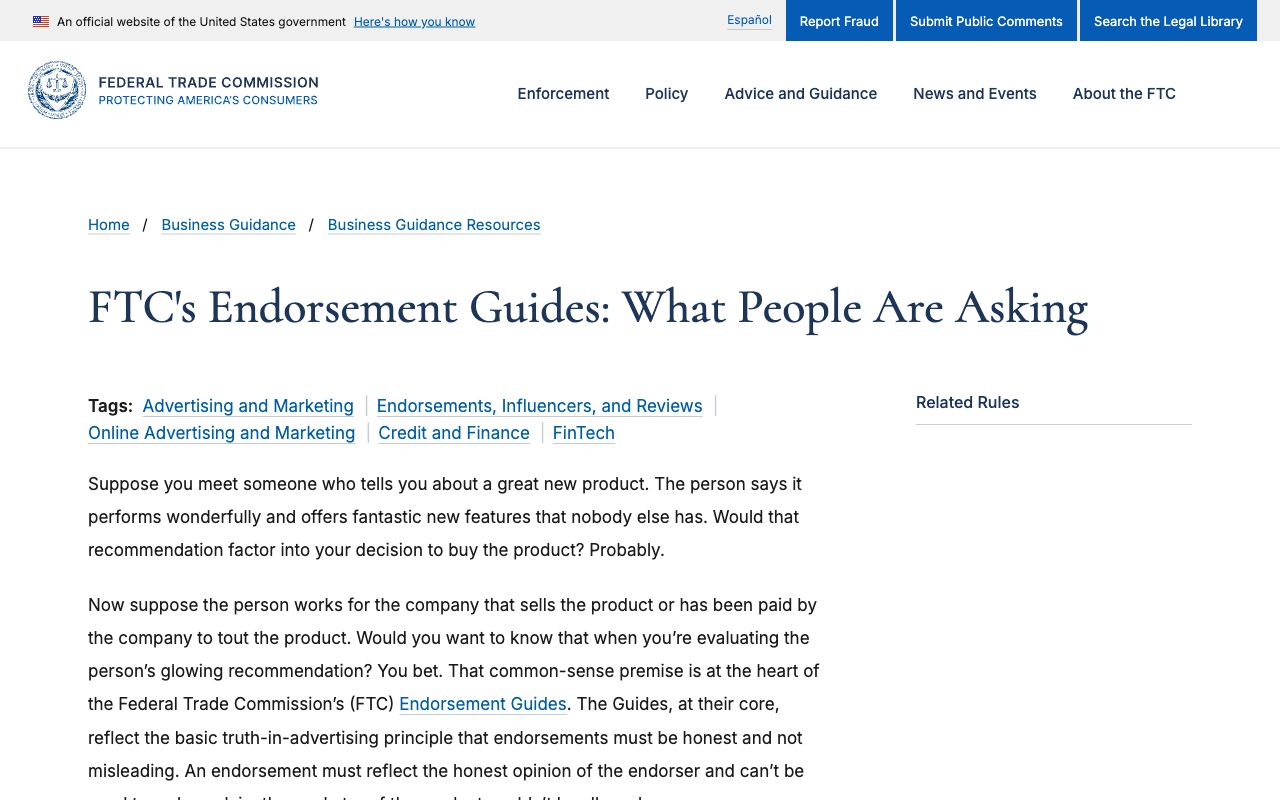
If the avatar endorses a product, the FTC Endorsement Guides FAQ (2026) says a connection between endorser and marketer that viewers would not expect must be disclosed clearly and conspicuously, and that likes from non-existent people are deceptive. In the EU, Article 50 of the AI Act requires deployers of systems that generate deep fakes to disclose that the content was artificially generated, with a lighter rule for artistic or satirical work, per the EU AI Act Explorer (2026). Synthesia publishes its own consent requirements for avatars and moderates at the point of creation, per its responsible AI page (2026).
- Avatar source: stock, your photo, or a cloned likeness (and who owns the clone).
- Lip sync: test with plosives, digits and a pause before you subscribe.
- Languages: listen to one voice in your target language, do not trust the count.
- Export: check resolution, max clip length and whether the free tier watermarks.
- Consent: written permission from anyone whose face or voice you clone.
- Disclosure: a visible label wherever the clip could be mistaken for a real person.
AI avatar video generator tools compared one by one
Prices below are the monthly figures shown on each site on 5 September 2026; annual billing is cheaper on every platform that offers it. The best AI avatar video generator on paper is rarely the best one for your face, so treat the verdicts as starting points for your own test.
HeyGen
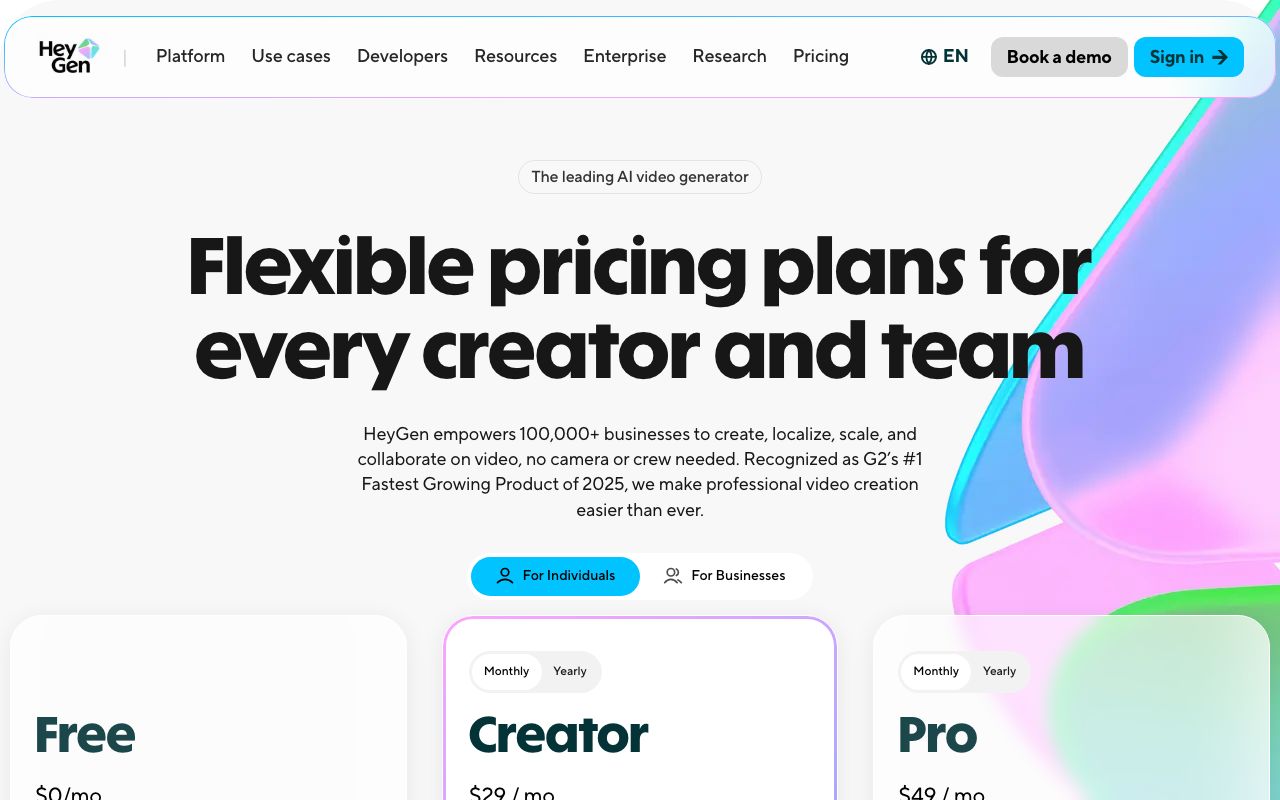
HeyGen is the reference for a heygen ai avatar video generator workflow: script in, presenter out, with translation and photo avatars. The free plan gives 3 videos a month of up to 1 minute; Creator is $29 a month (or $24 billed annually) with 600 credits, 1080p export and videos up to 30 minutes; Pro is $49 a month with 1,000 credits and 4K; Business is $149 a month with 5 custom video avatars, per the HeyGen pricing page (2026). Drawback: credits, not minutes, so a long clip with premium features burns faster than you expect.
Synthesia
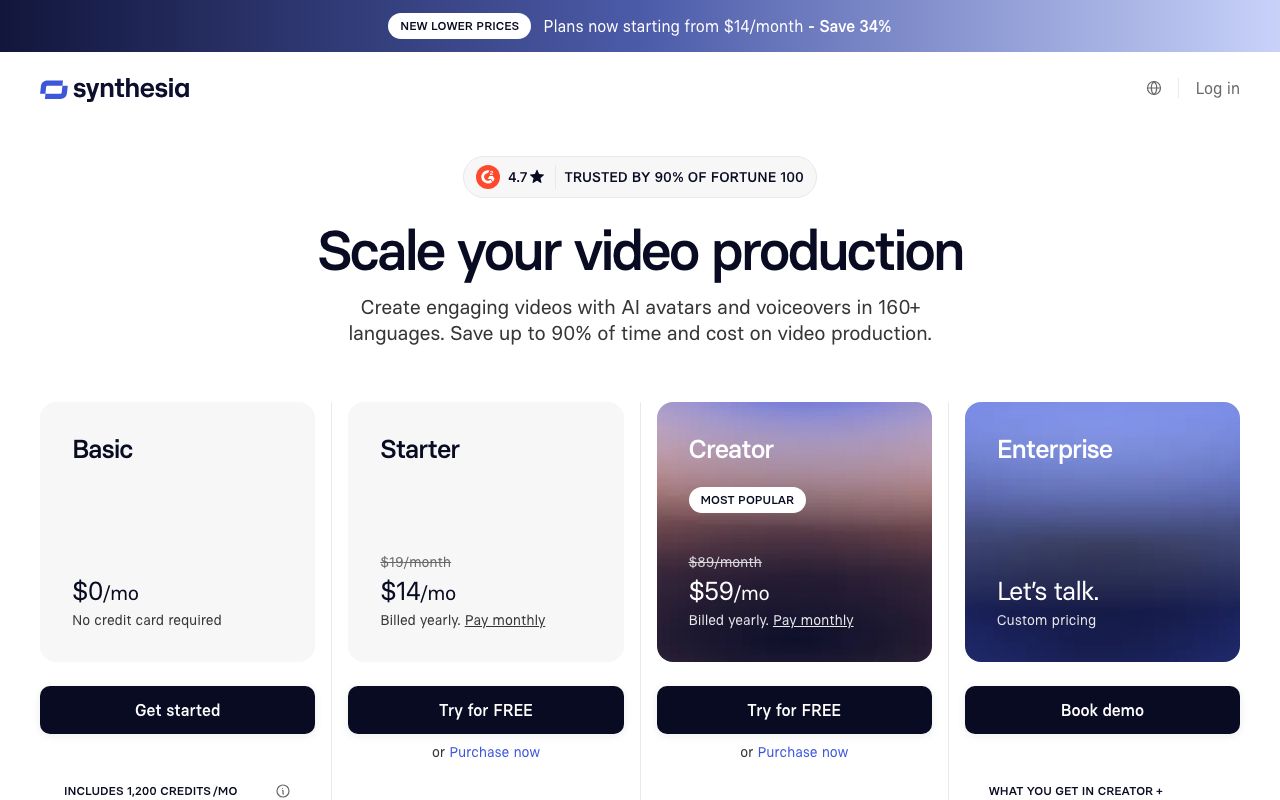
Synthesia is built for training teams: scenes, screen recording, SCORM and 160+ languages. The Basic plan is $0 with no credit card and includes 1,200 credits a month, usable for up to 10 minutes of video; Starter is $29 a month billed monthly and Creator is $89 a month billed monthly with 30 minutes and 5 personal avatars, per the Synthesia pricing page (2026). The yearly-billing price is lower and varies by region: on the same day the page quoted Starter at $18 a month in one session and $14 a month in another (see the screenshot), so check the figure your own browser shows. Drawback: the visual style is corporate, which reads as an ad on TikTok.
D-ID
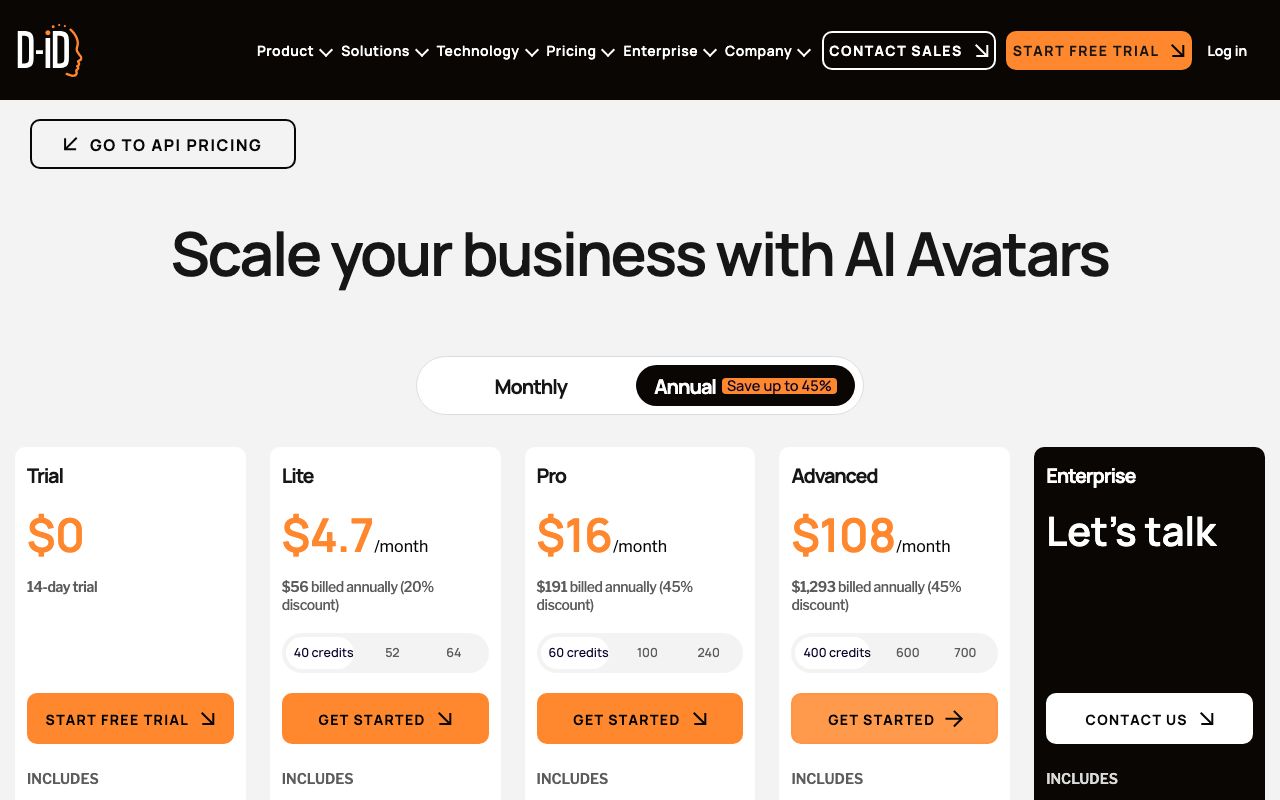
D-ID popularised the talking photo. Its Studio pricing, captured with the Annual toggle, shows a 14-day $0 Trial, Lite at $4.7 a month ($56 billed annually) with 40 credits, Pro at $16 a month ($191 billed annually) with 60 credits, and Advanced at $108 a month ($1,293 billed annually) with 400 credits; the FAQ adds that Trial and Lite carry a watermark and unused minutes are void each month, per the D-ID pricing page (2026). Drawback: photo avatars keep the head-and-shoulders crop, which limits how far you can move the camera.
Colossyan
Colossyan targets learning and development. The Starter plan is free and includes 20 minutes a month with the NEO avatar engine (0.5 minutes with NEO2); Professional is $59 a month on annual billing with 30 NEO minutes, 10 NEO2 minutes, watermark removal and up to 3 editors, per the Colossyan pricing page (2026). Drawback: the higher-quality NEO2 minutes are scarce on lower tiers.
Elai.io
Elai.io is the budget script-to-presenter option. The free plan includes 1 minute; Creator is $29 a month ($23 on annual billing) for 15 minutes; Team is $125 a month for 50 minutes with 3 editors; extra minutes cost $2 each, and a selfie avatar is $199 a year, per the Elai.io pricing page (2026). Drawback: 80+ avatars is a small library next to HeyGen or Synthesia.
Vidnoz
Vidnoz is the volume play. The free plan has a daily credit allowance, a 3-minute cap per video, 720p export and a watermark; Starter includes 15 credits a month with 1080p and no watermark; Business adds photo avatars, voice clone and translation, per the Vidnoz pricing page (2026). Drawback: the stock avatars look interchangeable, so your brand has to come from the script.
Hedra
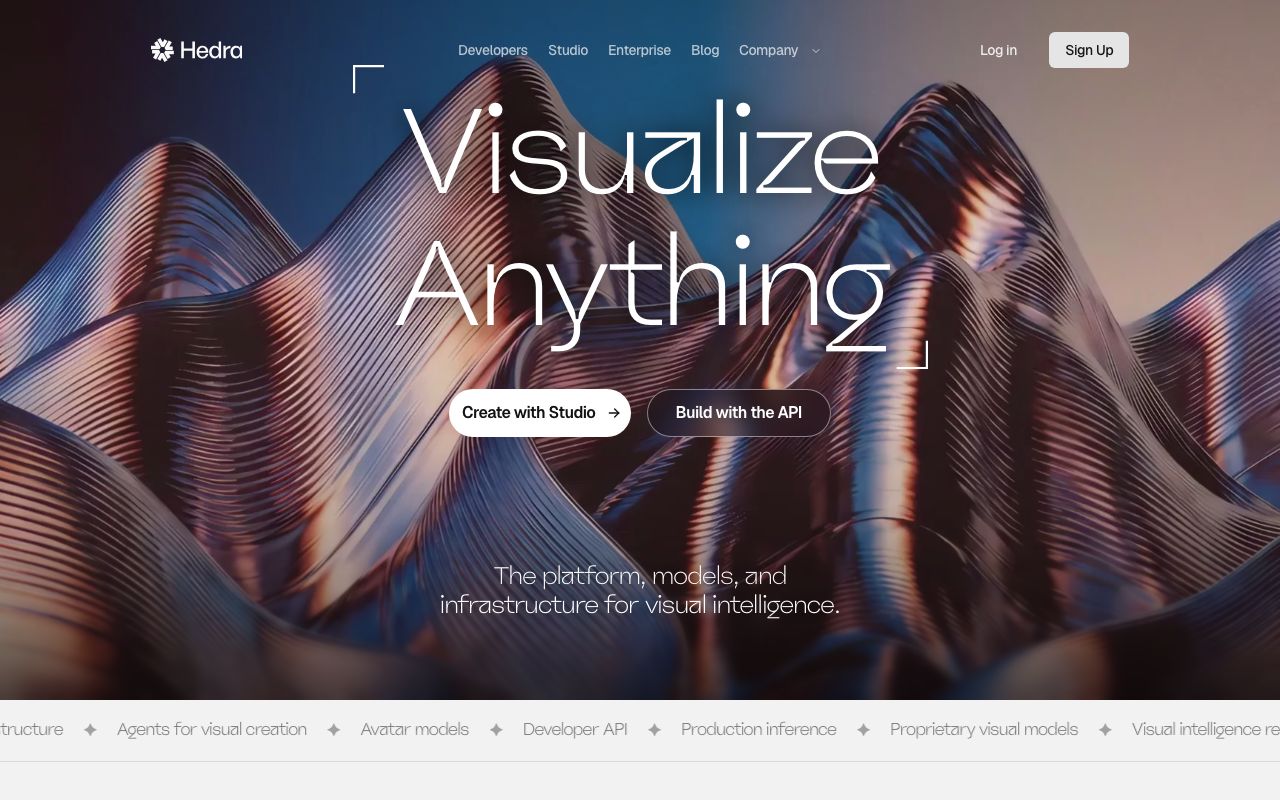
Hedra lists avatar models next to its image, video and audio models, sold through a studio and an API rather than a presenter library. Plans are Basic at $15 a month for 1,500 credits, Creator at $30 for 5,400 credits and Professional at $75 for 14,400 credits, with limited watermarked generations after a plan ends, per the Hedra pricing page (2026). Drawback: no stock presenter library and no free-tier number on the page, so budget for a plan from day one.
LazyKiwi Avatar Talking
LazyKiwi's Avatar Talking screen turns a photo into a talking avatar from a typed script of up to 1,000 characters, with eight action presets (Speech, Conversation, News Anchor, Teaching, Customer Service, Product Pitch, Emotional, Singing), four voices and four emotions, as shown in the app screenshot further down. It lives in the same workbench as the video models, so the free plan's 40 credits a month, listed on the pricing page, apply to both. Drawback: no stock avatars and no translation; it is a photo animator, not a studio.
Captions
Captions is an editor first. The free plan covers trimming and transitions without generative features; Max is $24.99 a month with 500 credits and lets you create digital twins or custom AI actors; Scale plans start at $69.99 a month for 1,400 credits, with the page noting that the prices shown are for iOS plans, per the Captions pricing page (2026). Drawback: avatar generation is one feature among many, so the per-clip cost is hard to predict.
Is there a free AI avatar video generator?
Yes, and the free tiers are more generous than they were a year ago, but each one is capped in a different place. The most usable no-cost option for a one-off stock-presenter clip is Synthesia Basic (up to 10 minutes, no card) or HeyGen Free (three one-minute videos); the honest one for a photo avatar is LazyKiwi, because the 40 monthly credits cover the Avatar Talking flow without a watermark step.
| Free tier | What you get | Where it stops |
|---|---|---|
| HeyGen Free | 3 videos a month, 1 custom video avatar, 30+ languages | 1 minute per video |
| Synthesia Basic | 1,200 credits a month, up to 10 minutes of video | Synthesia branding on exports |
| Colossyan Starter | 20 NEO minutes a month, all stock avatars | 0.5 NEO2 minutes, no watermark removal |
| Elai.io Free | 1 minute, 80+ avatars, 75+ languages | 1 minute total |
| Vidnoz Free | Daily credits, 1,800+ avatars | 3 minutes a video, 720p, watermark |
| LazyKiwi Free | 40 credits a month across avatar, video and image tools | Credits, not minutes; refreshes monthly |
Spend the free tier on the hard part
Use the free minutes on the sentence your script gets wrong most often (a brand name, a number, a foreign word). If the free output nails that sentence, the paid plan will too.
Two cautions. Free exports from Vidnoz and Colossyan carry a watermark, and D-ID's Trial and Lite plans do as well, so none of them are publishable as-is. And every credit-based free tier (HeyGen, Synthesia, Hedra, LazyKiwi) meters premium features at a higher rate, so read the credit table before assuming the whole allowance goes to avatar minutes.
How to make an AI avatar video with LazyKiwi
Two routes exist in the workbench. Avatar Talking is the direct one: photo in, talking clip out. Image-to-video with Kling v3 Omni is the indirect one for presenter motion without speech (a nod, a turn to camera) that you dub later.
- 1
Upload a front-facing portrait
Click Upload avatar and choose a photo with both eyes visible, a closed or slightly open mouth, and nothing across the chin. A generated character from the image models works as well as a real photo.
- 2
Pick an action preset
The default is Speech (formal speaking pose). Conversation and Teaching give looser head movement; News Anchor holds the frame still, which is what you want if you will add lower thirds.
- 3
Set voice and emotion
Open Voice & Emotion and choose from Male Calm, Male Energy, Female Warm or Female Clear, then Neutral, Happy, Serious or Gentle. Keep the emotion one step below what the script says.
- 4
Write the script
Type up to 1,000 characters. Put the hook in the first sentence and break long sentences with full stops rather than commas; the counter under the box shows what is left.
- 5
Generate and review
Press Generate, then watch the mouth at half speed for the plosives and the pause. Regenerate with a shorter script before you change the photo.
Quick update from the team. Our Pro plan now exports at 1080p, and the price stays at 29 dollars. Pause here. If you want the details, the link is below the video. Thanks for watching.
For the indirect route, open image-to-video with Kling v3 Omni, upload the same portrait as the reference and prompt for small motion only: 'presenter looks at camera, slight nod, soft studio light, no talking'. The model takes a text prompt, one image or a start and end frame, renders at 720p or 1080p in 16:9, 9:16 or 1:1, and accepts prompts up to 2,500 characters; clips run 3 to 60 seconds, per the model page. The 5-second 720p render showed 829 credits in the app on 5 September 2026 during a sale, so it is the pricier route and only worth it for a stylised character. The direct app link is image-to-video with Kling.
Need the same script delivered by a different character? Generate one talking clip, then run it through AI character swap instead of re-rendering the speech.
Which AI avatar generator is best for each use case?
Match the tool to the job before you compare prices. The best AI avatar video generator for compliance training will look wrong in a Reels ad, and the reverse is just as true.
- Training and onboarding: Synthesia or Colossyan. Scenes, SCORM export and stock presenters are the whole product, and the free tiers cover a pilot module.
- Social clips: LazyKiwi Avatar Talking. A photo of your character, a 20-second script, vertical export, done in one screen; Hedra if you already pay for its studio.
- Ads and UGC-style spots: HeyGen. Photo avatars plus the custom video avatar on paid plans, and enough languages to localise one spot for five markets.
- Multilingual explainers: HeyGen or Synthesia, with Elai.io as the budget fallback at 75+ languages.
- Personal brand: HeyGen's custom video avatar if you can film yourself once; LazyKiwi if you would rather build a consistent AI character, which our AI influencer guide covers.
If you are leaving HeyGen specifically, the HeyGen alternatives post compares the same tools from the switching angle: what you lose, what you gain, and how to move your avatars.

Whichever avatar ai video generator you pick, keep the source photo, the script and the voice setting in one folder. When the tool changes its model, and every one of these did in the past year, you can regenerate the whole series in an afternoon rather than rebuilding from memory.
Key takeaways
- HeyGen and Synthesia lead script-to-presenter video; HeyGen Creator and Synthesia Starter both list at $29 a month on 5 September 2026.
- For a photo avatar, LazyKiwi Avatar Talking (40 free credits a month) or D-ID Lite ($4.7 a month billed annually) is faster and cheaper than a studio platform.
- The most usable free tiers are Synthesia Basic (up to 10 minutes, no card) and HeyGen Free (3 one-minute videos); Vidnoz and Colossyan free exports carry watermarks.
- Judge lip sync with plosives, spoken digits and a deliberate pause, reviewed at half speed, before you pay for any plan.
- Disclose synthetic presenters: the FTC Endorsement Guides and Article 50 of the EU AI Act both expect a clear label when a viewer could mistake the avatar for a real person.
Tools & Reviews Editor
Marcus Tan
I open every competitor's pricing page myself before writing a comparison, and I say plainly when another tool is the better pick.
FAQ
Common questions
What is the best free AI avatar generator for video?
For a stock presenter, Synthesia Basic gives 1,200 credits a month (up to 10 minutes of video) without a card, and HeyGen Free gives three one-minute videos. For animating your own photo, LazyKiwi's free plan gives 40 credits a month that cover the Avatar Talking flow. All figures are from the pricing pages on 5 September 2026.
Can I make an AI avatar of myself?
Yes. HeyGen includes one custom video avatar on its free plan and five on Business, Synthesia's Creator plan includes five personal avatars, and Elai.io sells a selfie avatar as a yearly add-on. LazyKiwi skips the cloning step: upload a clear front-facing photo and type the script.
Do AI avatar videos need disclosure?
Usually. The FTC Endorsement Guides require clear disclosure of unexpected connections between an endorser and a marketer, and Article 50 of the EU AI Act requires deployers to disclose deep-fake content that was artificially generated. A short on-screen label such as 'AI presenter' covers both without hurting the video.
Which AI avatar generator has the best lip sync?
It varies by face and by language, so test rather than trust reviews. Photo animators such as LazyKiwi Avatar Talking and D-ID work from your own portrait, while HeyGen and Synthesia render their own stock avatars, so the same script looks different on each. Use a script with plosives, digits and a pause, and compare at 0.5x speed.
How much does HeyGen cost compared with Synthesia?
Entry paid plans match: HeyGen Creator is $29 a month ($24 billed annually) with 600 credits, and Synthesia Starter is $29 a month billed monthly (yearly billing is cheaper and varies by region) with 10 minutes of video. HeyGen meters credits; Synthesia meters minutes, which is easier to budget for long training videos.
Make your first talking avatar
Upload a portrait, pick a voice and type the script. The free plan's monthly credits cover the first clips.
Keep reading
AI Video Dubbing: A Practical Creator Guide for 2026
Use ai video dubbing to translate and localize videos while preserving the speaker’s meaning, delivery, timing, and brand voice.
8 min read
7 HeyGen Alternatives for Avatars, Training, and Social Video
Compare seven HeyGen alternatives—LazyKiwi, D-ID, Synthesia, Colossyan, Elai.io, Captions, and VEED—by their talking-photo, training, localization, social editing, and team workflows.
8 min read
AI Lip Sync: How to Make Talking Videos Look Natural
Create a convincing AI lip sync video by choosing the right portrait, preparing clean speech, controlling facial motion, and checking mouth timing with a practical review workflow.
8 min read
How to Build an AI Influencer That Feels Like a Real Creator
A practical guide to defining an AI influencer, creating a recognizable character, producing consistent content, and building audience trust.
8 min read