
How to Take a Professional Headshot at Home
How to take a professional headshot with one window, one phone and a sheet of card: the distances, the phone settings, twelve frames and how to pick one.
 Elena Vasquez 9 min read
Four measurable things separate a professional headshot from a snapshot: a catchlight in the eyes, visible separation between the head and the background, one dominant light direction, and enough distance between face and lens that the features are not stretched. None of them needs a studio. This is how to take a professional headshot with one window, one phone and a sheet of white card, including the twelve frames to shoot and how to pick the one that goes on your profile.
What makes a headshot look professional?
Strip away styling and four technical things remain. Everything else, the shirt, the smile, the background colour, is decoration on top of these.
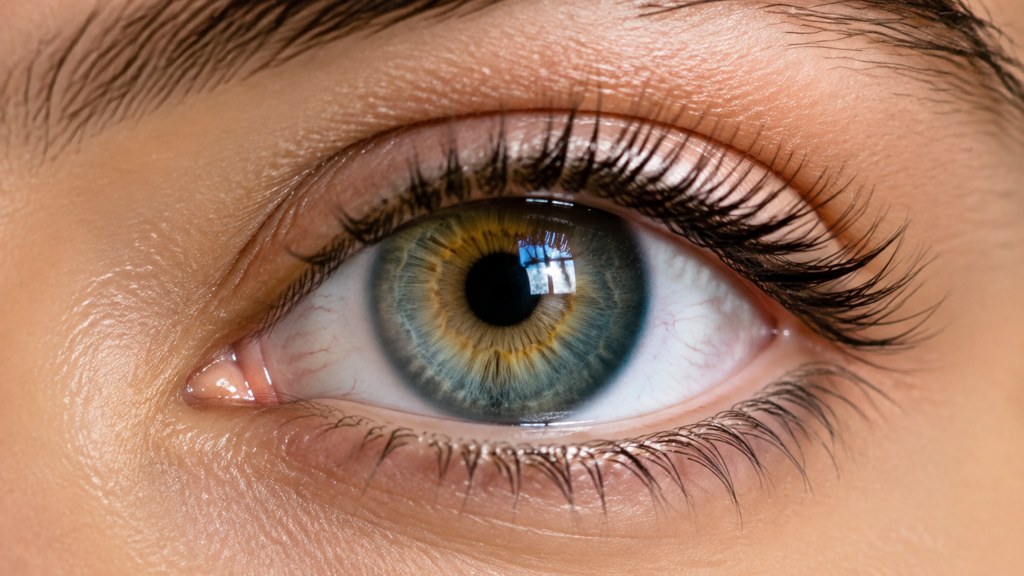
- A catchlight. One clear reflection of the light source in each eye. Without it the eyes go dead and the whole face reads as flat, whatever else you do.
- Separation. The head has to be distinguishable from what is behind it, through tone, focus or distance. A dark head against a dark wall is unfixable later.
- One dominant direction. Light arriving mainly from one side gives the face volume. Two competing sources cancel each other and produce the passport-office look.
- Distance. Features nearest a close lens enlarge. Standing further back with a longer setting keeps a nose the size it actually is.
Photograph a friend twice, once with those four in place and once without, and the difference is larger than any camera upgrade. Most professional headshot tips are downstream of this list, and most guides on how to take a professional headshot skip straight past it to gear.
How do you set up a headshot at home?
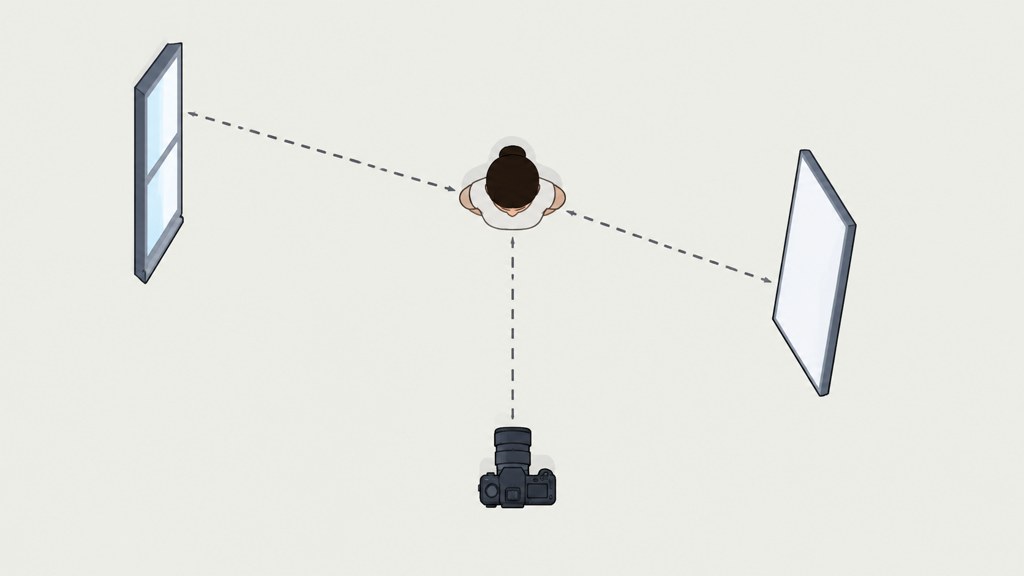
Four distances and one angle. Measure them once, mark the floor, and the session becomes repeatable.
| Element | Where to put it | Why | What goes wrong if you skip it |
|---|---|---|---|
| Subject to wall | About 1 metre | Keeps your shadow off the wall and lets the background soften | A hard shadow outline behind the head |
| Camera to subject | About 1.5 metres | Far enough that facial proportions stay honest | A wide, close lens stretches the nose and narrows the ears |
| Window to subject | Roughly 45 degrees to camera left or right | Creates one dominant direction and the catchlight | Flat, directionless light with no shape to the cheek |
| White card | Opposite the window, just outside frame | Lifts the shadow side without adding a second direction | A shadow half so dark it loses the eye |
| Camera height | Level with the eyes | Neutral proportion, no looking up or down | Chin from below, forehead from above |
An A3 sheet, a foam board or an open laptop lid all work as the card. Move it closer to lift the shadows further, further away to keep them deep. This is the only lighting control you need at home and it costs nothing.
What phone settings should you use for a headshot?
The single most common version of this question is how to take a professional headshot on iphone, and almost all of the answer is which camera you point at yourself.
- Use the rear camera, never the selfie one. Front-facing modules are wide by design and get used at arm's length, and it is that pairing which bends a face out of shape.
- Switch to the 2x or 3x optical setting and step back to keep the same framing. Nikon's lens guide describes the 85mm as a medium telephoto that is ideal for portraits and puts the 50mm near the field of view the eye sees (Nikon Learn & Explore, checked 2026-09-07); the longer phone setting is the nearest equivalent.
- Tap the face to set focus, then lock exposure so it stops shifting between frames. A set that drifts in brightness is far harder to grade afterwards.
- Treat portrait mode with suspicion. The simulated blur is convincing on a plain wall and gives itself away on glasses, flyaway hair and shoulders. Real distance from a real wall beats it.
- Turn off beauty filters and skin smoothing completely. They are the fastest way to make a professional photograph look amateur, and they cannot be undone.
Everything in this section assumes you are working out how to take a professional headshot by yourself, with nobody to hold the phone. A self-timer with a burst, or an interval mode, replaces the assistant well enough.
What are the best headshot poses?
Headshot poses are small. There is no room for a body, so everything happens in the shoulders, the neck and the jaw.
- 1
Shoulders turned, face returned
Turn the body 30 degrees off the lens, bring the face back to it. Narrows the frame and stops the shoulders reading as a wall.
- 2
Chin out and slightly down
Push the forehead toward the camera an inch. It feels ridiculous and it removes the softness under the jaw in a way no editing does convincingly.
- 3
Weight on the back foot
Even in a head-and-shoulders crop, weight changes the line of the neck and the tilt of the shoulders.
- 4
One shoulder lower
Drop the near shoulder a few centimetres. Level shoulders in a tight crop look like a school photograph.
- 5
Head tilt, five degrees only
A slight tilt reads as approachable; a large one reads as a stock photograph about customer service.
- 6
Look just past the lens, then at it
Two frames, two very different expressions, one second apart.
Run all six in a single session. They take under two minutes and they give the editing stage something to choose between.
What should you wear for headshots?
What to wear for headshots comes down to tone separation and neckline structure, in that order.
- Solid mid-tones. Black loses all detail in shadow, white pulls the eye away from the face, and mid-tones sit comfortably against both light and dark walls.
- Something firm at the throat: a shirt collar, a jacket edge, a heavy-gauge knit. In a tight crop a soft round neck leaves the head apparently unsupported.
- One colour away from your background and one away from your skin. Two steps of separation is enough; three is a costume.
- Skip micro-patterns. At thumbnail size they stop being fabric and start being a moving texture.
- Bring two options and shoot both. Deciding on camera takes five minutes and saves the whole reshoot you would otherwise book.
Check the collar in the first frame and then again halfway through. A twisted collar or a crooked lapel appears in every subsequent photograph and nobody notices until the session is over.
How do you light a headshot with one window?
Moving the subject beats adding a light. A window is a large, soft source and its quality changes with distance in ways a second lamp cannot imitate.
- Closer to the window means softer light and a faster falloff across the face, which gives more shape.
- Further away means more even light across the face but a harder edge to the shadow.
- Sheer curtain if the sun is direct. Direct sunlight through glass is a small hard source and produces exactly the look you are trying to avoid.
- Turn off every ceiling light and lamp in the room. Mixed colour temperatures produce green or orange shadows that are painful to correct.
- North-facing windows in the northern hemisphere hold their character all day, which makes them the easiest to learn on.
Publications such as PetaPixel, which ran a guide to vintage portrait lenses on 6 September 2026, and DPReview are full of lighting kit worth owning eventually. A window and a white card will get you most of the way there first, and photography schools such as NYIP publish free technique libraries for the rest.
How many frames should you shoot and how do you choose?
Twelve frames, three expressions, one session. More than that and you are choosing between near-identical files; fewer and you have no options at all.
- 1
Shoot four frames per expression
Neutral, slight smile, full smile. Move something small between each: the head tilt, the shoulder, the eye line.
- 2
Look at them small first
View the set as thumbnails. The frame that reads at 100 pixels is the one that will work as a profile picture, and it is often not the one you like at full size.
- 3
Ask two people to pick, separately
You are the worst judge of your own face because you are used to seeing it mirrored. Two independent picks that agree is a strong signal.
- 4
Choose the frame, not the expression
A good expression in a badly lit frame cannot be rescued. A slightly plain expression in a well-lit frame usually can.
Do not pick on the phone screen
Small bright screens flatter everything. Look at the set on a larger display at actual size before deciding, or you will pick the wrong frame and only find out when it is on a website.
How do you retouch a headshot without overdoing it?
Three steps, in order, and then stop. The line is between temporary and permanent: fix what would not be there next week, keep what would.
- 1
Temporary blemishes
Spots, a shaving nick, a stray eyelash on the cheek. All gone next week, so remove them.
- 2
Stray hair
The strands crossing the face or standing away from the outline. Leave the texture of the hair itself alone.
- 3
Exposure and colour
Lift the shadow side a little, neutralise any colour cast, add slight contrast. That is the whole grade.
- Leave permanently: lines, freckles, scars, skin texture, the shape of the nose and jaw.
- Leave alone: eye colour and eye size. Both are noticed instantly and neither can be defended.
- Never smooth skin globally. It removes the texture that makes a photograph read as a photograph.
The photo editor tools cover the three-step version above. If you find yourself on step four, go back and reshoot instead; it is faster than it sounds and the result is better every time.
Should you use an AI headshot generator instead?
It depends on what you are short of. If you are short of time, a generated frame is minutes rather than an afternoon. If you are short of a decent source photograph, it will not save you, because a template restyles what you give it.
Cost is worth putting in context. LinkedIn's own talent blog says a professional photographer typically costs between $200 and $400 (LinkedIn Talent Blog, checked 2026-09-07), and the U.S. Bureau of Labor Statistics puts median photographer pay at $44,660 a year, or $21.47 an hour, for May 2025 (BLS Occupational Outlook Handbook, page last modified 27 August 2026). A session is priced against a working day, which is why it costs what it costs.
- Generated packages undercut that heavily. HeadshotPro lists $29 as its entry package and $59 as its top one, and states that uploads are erased automatically after 30 days (checked 2026-09-07).
- One workbench run bills 13 credits at 1K, so the arithmetic is different again: signup adds 40 credits, which is three attempts before any money is involved.
- What none of them replaces is a source photograph with a catchlight in it. Spend the afternoon on the window first.
To show what the composer really controls, one source frame went through the career headshot template at two different crops and nothing else was touched.
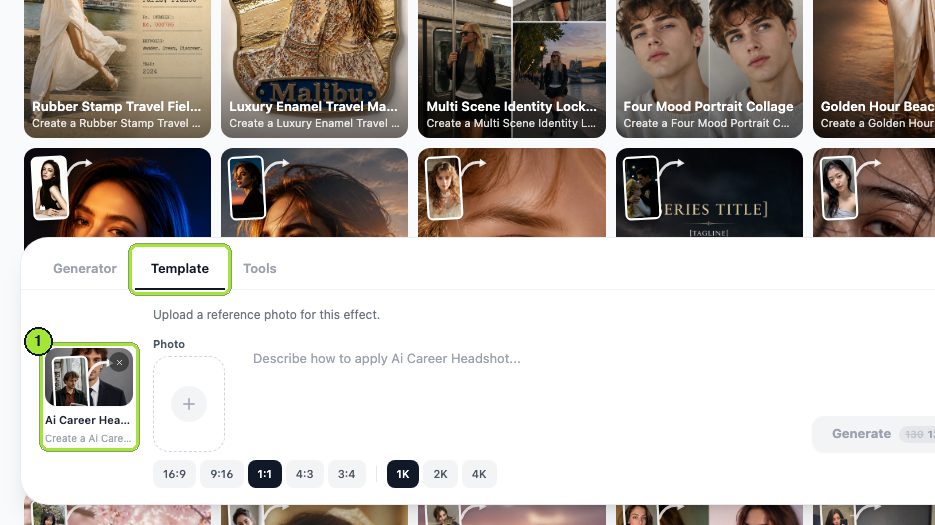
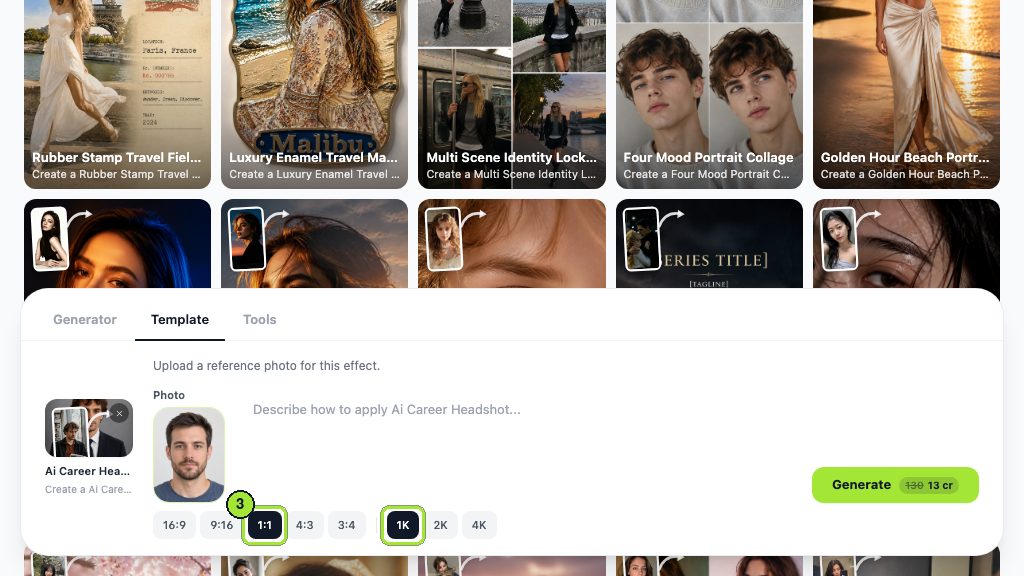
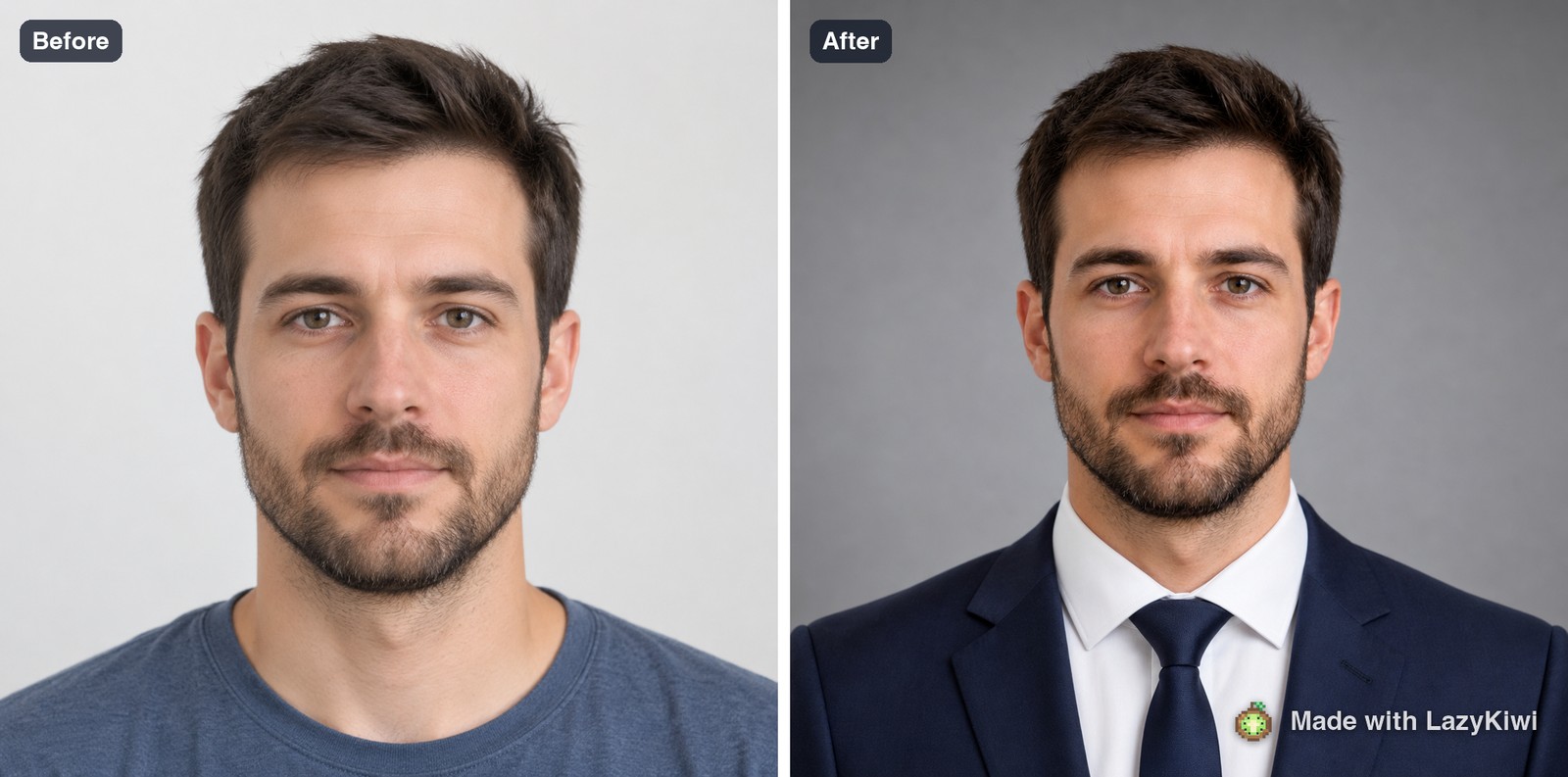
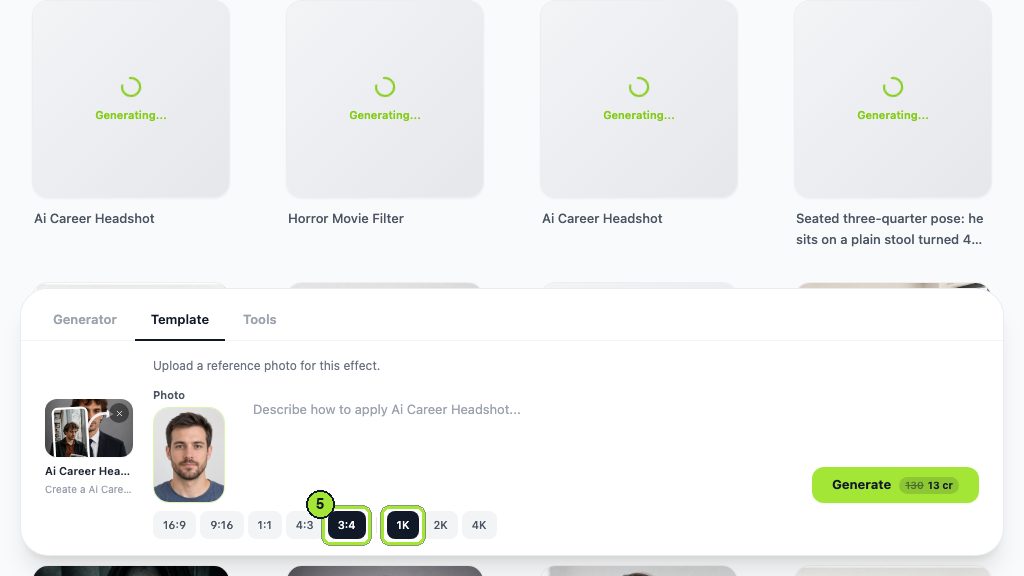

No crop tool and no background picker exist in the composer, which makes the ratio chips the entire reframing mechanism: square for a profile circle, 3:4 for a document. GPT Image 2 sits behind both outputs. Judge what comes back on recognition rather than on flattery. A stranger who had seen only that file should greet you correctly in a corridor.
Key takeaways
- Catchlight, separation, one light direction and enough distance are the four things that read as professional.
- The home setup is four distances and one angle: 1 metre to the wall, 1.5 metres to the camera, window at 45 degrees, card opposite.
- Rear camera at the 2x or 3x setting, exposure locked, filters off. The front camera is the main cause of distorted features.
- Twelve frames and three expressions, then judge them as thumbnails rather than at full size.
- Retouch what would be gone next week and leave what would still be there.
- A template run costs 13 credits for a 1K image and reframes with the ratio chips; a photographer session is typically $200 to $400 according to LinkedIn.
Commercial Imagery Editor
Elena Vasquez
I came from product and property photography, so I care about the boring parts: scale, shadows, disclosure rules, and what a listing platform will reject.
FAQ
Common questions
Can you take a professional headshot with a phone?
Yes, and the handset is rarely what limits the result. Work at the 2x or 3x rear setting from a metre and a half back, angle a window at 45 degrees, bounce light in from a sheet of paper opposite it, and lock exposure on the face before the first frame.
What is the best background for a headshot?
A plain surface that differs by one tonal step from your hair, with roughly a metre of air between you and it. That gap does two jobs at once: it moves your shadow off the surface and it lets the wall drift gently out of focus behind you.
How do you avoid a double chin in a headshot?
Push the forehead toward the lens and lower the chin very slightly, which stretches the skin between jaw and neck. Keep the camera level with your eyes, since shooting from below compresses that area, and never lift the chin to compensate.
How much does a professional headshot cost?
LinkedIn's talent blog puts a professional photographer at typically $200 to $400 (checked 2026-09-07). Generated alternatives start lower: HeadshotPro publishes from $29 for 30 images, and a single template run in the workbench costs 13 credits for a 1K file.
Why does a headshot look worse to you than a mirror does?
Because you see yourself mirrored every day and a photograph is not mirrored, so a face you know well arrives slightly wrong. It is a familiarity effect, not a fault in the picture, and it is the main reason to let two other people choose the final frame.
Turn one good frame into a finished headshot
Shoot with the window and the card, then run the best frame through the template at 1:1 for a profile or 3:4 for a CV. 13 credits a run, 40 free at signup.
Related reading

LinkedIn Profile Picture: Specs and Setup Guide
The exact size LinkedIn wants, how the circular crop changes framing, what to wear, and how to shoot or generate a photo that survives the thumbnail.
9 min read
How to Look Better in Photos: 5 Things That Work
Angle, posture, light, wardrobe and edit, in that order. The five variables that actually change how a photo of you reads, and how to test each one.
8 min read
How to Pose for Pictures: 12 Rules That Work
Twelve posing rules that hold for any body and any camera: weight, angles, hands, chin and breath. Plus what to do in the three seconds before the shutter.
10 min read
How to Take a Passport Photo at Home (2026)
Shoot a compliant passport photo with a phone: the 2x2 spec, head-height rules, lighting that kills shadows, and the checks that stop a rejection.
8 min read