
Birthday AI Photo Prompts: 14 Looks With Example Renders
14 birthday AI photo prompts for adults: cake, balloons, studio, picnic, rooftop and couple scenes, each one rendered before and after on the same person.
 Priya Sharma 14 min read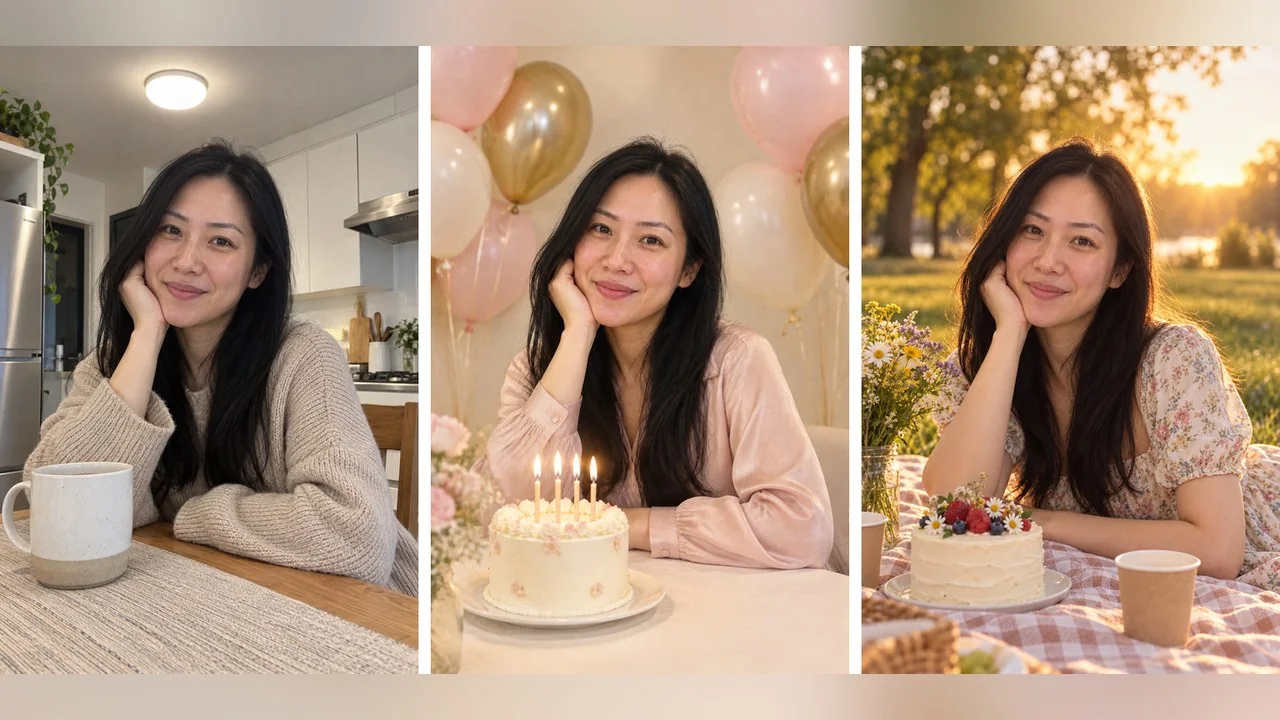
A birthday AI photo prompt turns a photo you already have into the birthday picture you did not get round to taking: the cake, the balloons, the good light, the outfit you meant to wear. Upload the photo to ChatGPT, Gemini or LazyKiwi, paste the prompt, and the model builds the party around your actual face. This guide has 14 prompts for adults, grouped by scene, and eight of them were run on three starting photos of four fictional adults so you can see the ordinary input next to the finished output. There are no prompts for children here, on purpose: kids' photos do not belong on prompt sites, and every render below is an invented adult.
What is a birthday AI photo prompt, and why is it everywhere?
The format took off because it solves a real problem: birthdays are the one day a year most people want a nice photo of themselves and the one day they are too busy to take one. A prompt that says "put me in a studio with a cake and balloons, keep my face" fixes that after the fact. The large prompt libraries, from Prompts by HK and SeaArt to PicX Studio and Imagine with Rashid, are all variations on that sentence, sorted by gender, theme and tool.
What those pages share is the output and hide the input. A beautiful render tells you nothing if you cannot see the photo it started from. So we made three ordinary input pictures of invented people, a woman at a kitchen table in a knit sweater, a man in a hallway in a t-shirt, and a couple in their living room, and ran each prompt a single time on the picture it belonged to. Nothing was re-rolled; the pairs below are first attempts, flaws included.
Who this is for: anyone over 18 with a phone photo and no party pictures. The prompts cover a solo birthday photo for women and for men, a couple version, a friends version and one with a dog. Each one names the scene, the props, the light and an outfit with coverage words, then ends with a keep line, which is the sentence that stops the model from redrawing your face along with the room.
A birthday prompt is also a more forgiving place to learn than a portrait retouch, because the scene is supposed to look staged. If you want the general method, the structure behind every prompt here is explained in our AI photo editing prompts guide; this article applies it to one occasion.
How to use a birthday prompt with your own photo
- 1
Choose a photo where the face is big and sharp
Half-length, facing the camera, no sunglasses. The scene will be replaced, so the background does not matter, but the face has to be readable.
- 2
Pick the scene, not the mood
Decide between cake, balloons, outdoor or studio first. Every prompt below changes one scene and leaves the person alone; mixing two scenes is how balloons end up growing out of a cake.
- 3
Paste the prompt after the photo
In ChatGPT, add the photo to the message before the text; OpenAI's help page confirms an uploaded picture can be edited by describing what should change. In the Gemini app, attach the photo in a new chat; Google's image page names Nano Banana 2 as its no-cost model. On LazyKiwi, drop the photo into the AI Photo Editor and type the prompt underneath.
- 4
Say what to keep
Every prompt here ends with a keep line (face, hair, smile). If the result drifts, make that line longer rather than rewriting the scene.
- 5
Add the words afterwards
Names, ages and happy-birthday banners still come out misspelt in most image models. Render the picture without any writing, then add the words in a captioning app.
Timing matters more than people expect. Run the prompt the day before, not during the party, so you have time for a second attempt if the first one gives you a strange cake. And keep the untouched original somewhere safe; every good result in this article came from editing the first photo, never from editing a previous result.
Age balloons and number candles are the single most common request in birthday prompts and the single most common failure. Ask for plain balloons, then add the number as a sticker or caption in your editing app.
Cake and candle prompts
Cake prompts are the classic birthday photo, and the easiest for a model to get right, because the cake sits in front of you and the face stays in the middle of the frame.
1. Cream studio with cake and balloons
Turn this photo into a birthday studio portrait: soft cream backdrop, a small round white cake with lit candles on a table in front of me, pastel pink and gold balloons behind me. Change my sweater to a modest blush satin blouse. Warm soft studio light. Keep my face, hair and smile exactly as they are. Photoreal. Plain balloons with no numbers or letters.
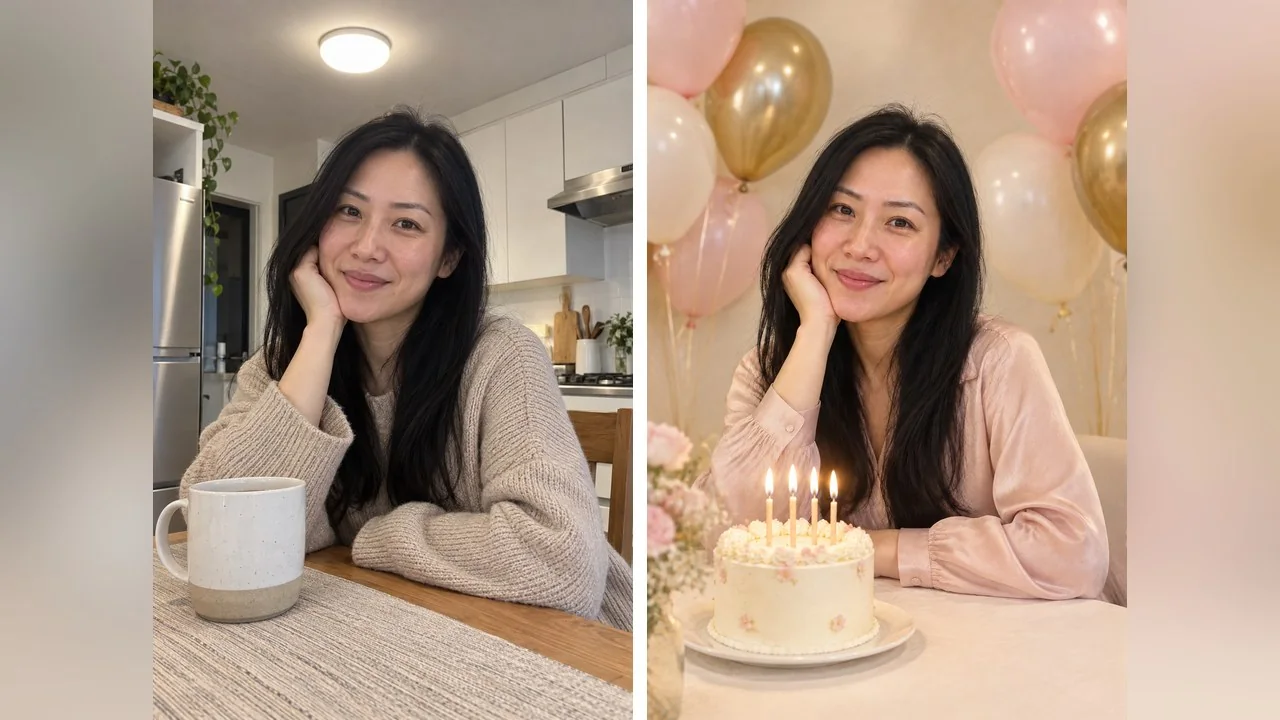
The phrase "plain balloons with no numbers or letters" is doing a job here. Without it, the model usually adds a foil number, and it is usually the wrong one.
2. Candlelit close-up
Birthday candle moment: a close-up of me leaning over a small cake with lit candles, the candle glow the only light on my face, a dark warm background, eyes open, soft smile. Keep my face and hair unchanged. Cinematic and photoreal.
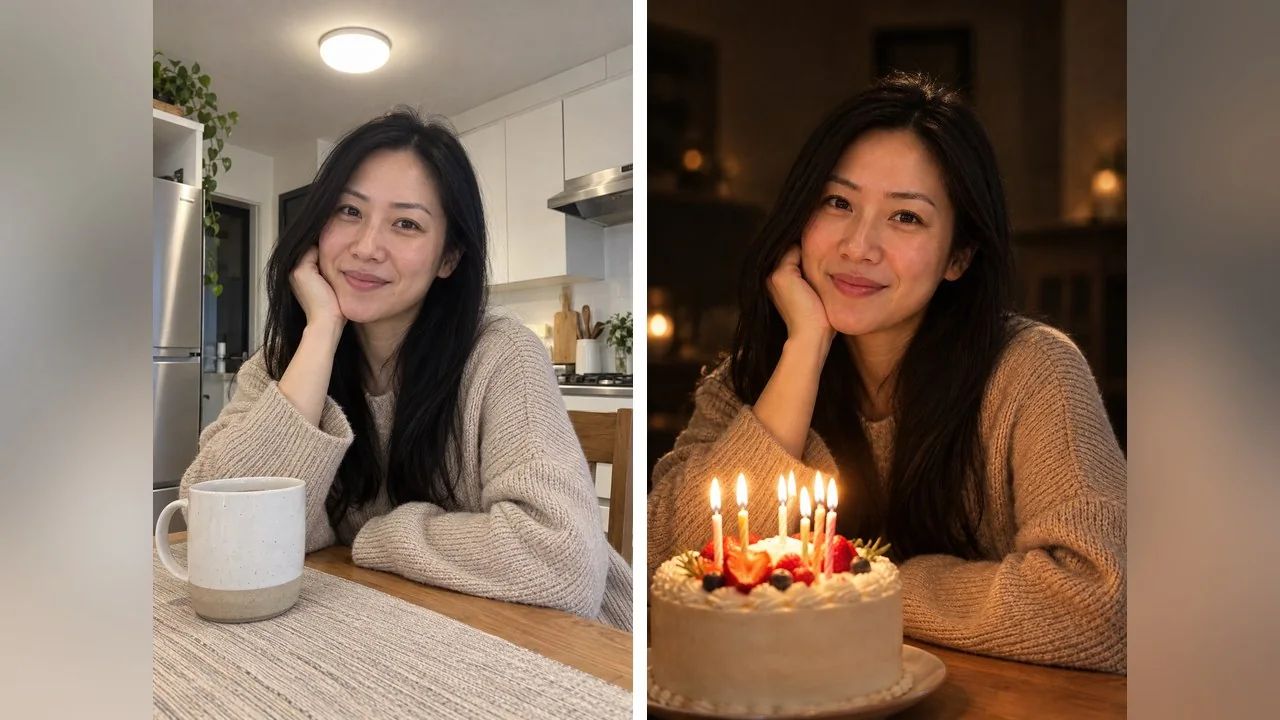
This is the one to send to the family group chat. Candles light the face from below, which flatters almost everyone, and the dark background hides whatever your kitchen looks like.
3. Candid cake-cutting
Candid birthday photo of me cutting a cake at a dining table, knife in hand, mid-laugh, a few friends' hands clapping at the edges of the frame, warm indoor light, slightly messy table with plates and a jug of juice. My face and hair must stay as they are in the upload. Photoreal, no writing on the cake.
Prompt 3 was not rendered: it asks for other people's hands, and we only had one person in the starting photo. It works best from a real party picture where the hands already exist.
Balloon prompts
Balloon walls and balloon bunches are the most shared birthday look on Instagram and the easiest to overdo. Keep the palette to two or three colours and the model will keep the picture tidy.
4. Pastel balloon wall
Put me in front of a full wall of pastel balloons in peach, cream and gold, holding a bunch of matching balloons on ribbons. Change my outfit to a simple white dress with a modest neckline. Bright, even studio light and a happy relaxed smile. Keep my face and hair as in the photo. Photoreal, no text on anything.
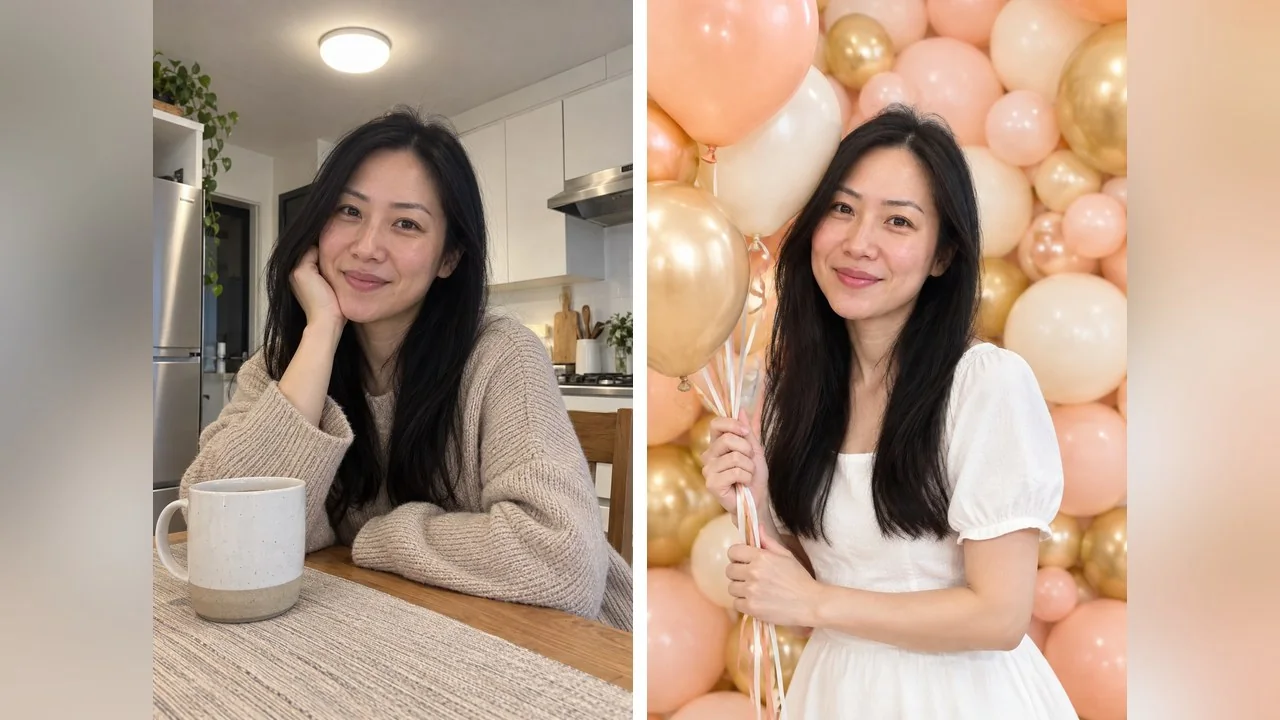
5. Black and gold minimal studio
Minimal birthday studio shot: black backdrop, a few matte black and gold balloons floating behind me, a single soft key light from the side. Change my t-shirt to a charcoal suit jacket over a plain tee. Confident, relaxed look. Keep my face and beard exactly as they are. Photoreal, plain balloons without numbers.
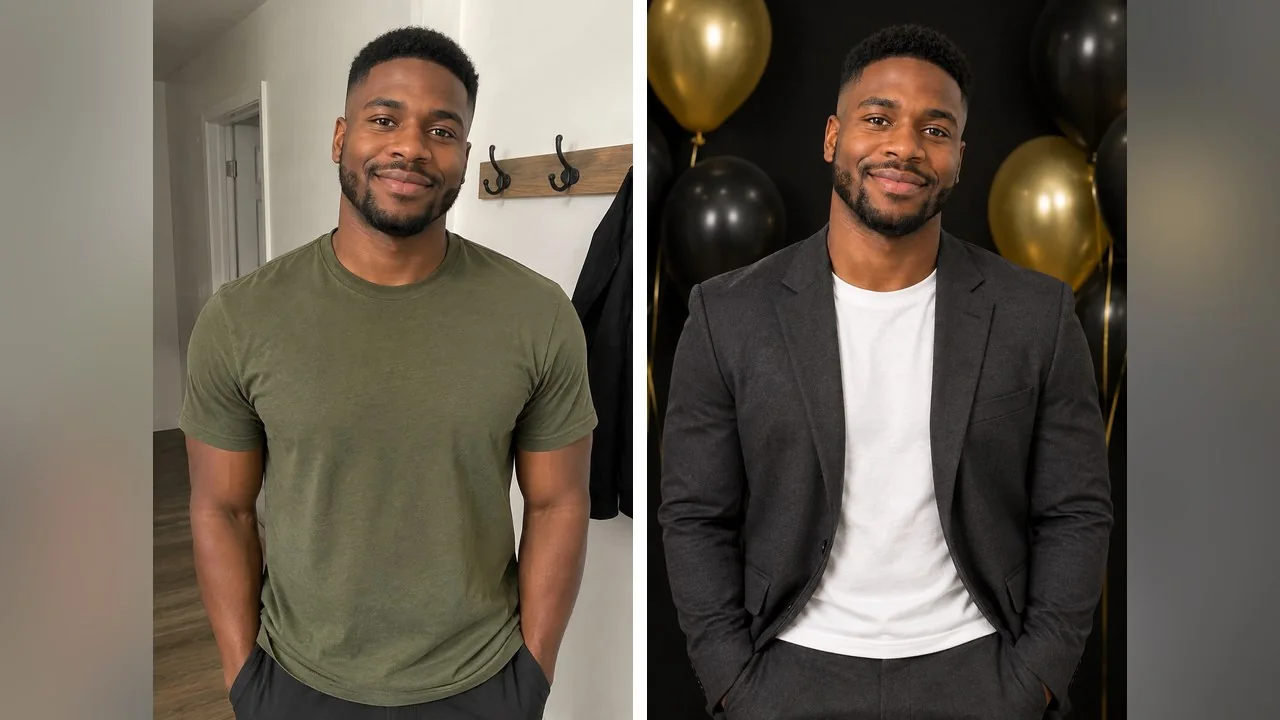
6. Balloon bunch in a doorway
Birthday portrait in an open doorway: I am holding a big bunch of pastel balloons on long ribbons, a garden with soft afternoon light behind me, a light linen top in place of the sweater. Face, hair and expression unchanged from the upload. Photoreal, plain balloons.
If you already have a real balloon picture and only the room is wrong, the AI Background Changer leaves you and the balloons alone and replaces what is behind you.
Outdoor birthday photoshoot prompts
Outdoor birthday photoshoot prompts give you the light a studio cannot: a low sun behind the hair, string lights against a dark sky. They also ask the model to invent a whole location, so check the edges for odd objects.
7. Golden-hour picnic
Birthday picnic at golden hour: I am sitting on a checked blanket in a park with a small cake, a bunch of wildflowers and paper cups, the late sun behind me putting a warm backlight on my hair. Change my sweater to a light floral summer dress with sleeves. Keep my face and hair exactly as they are. Photoreal.
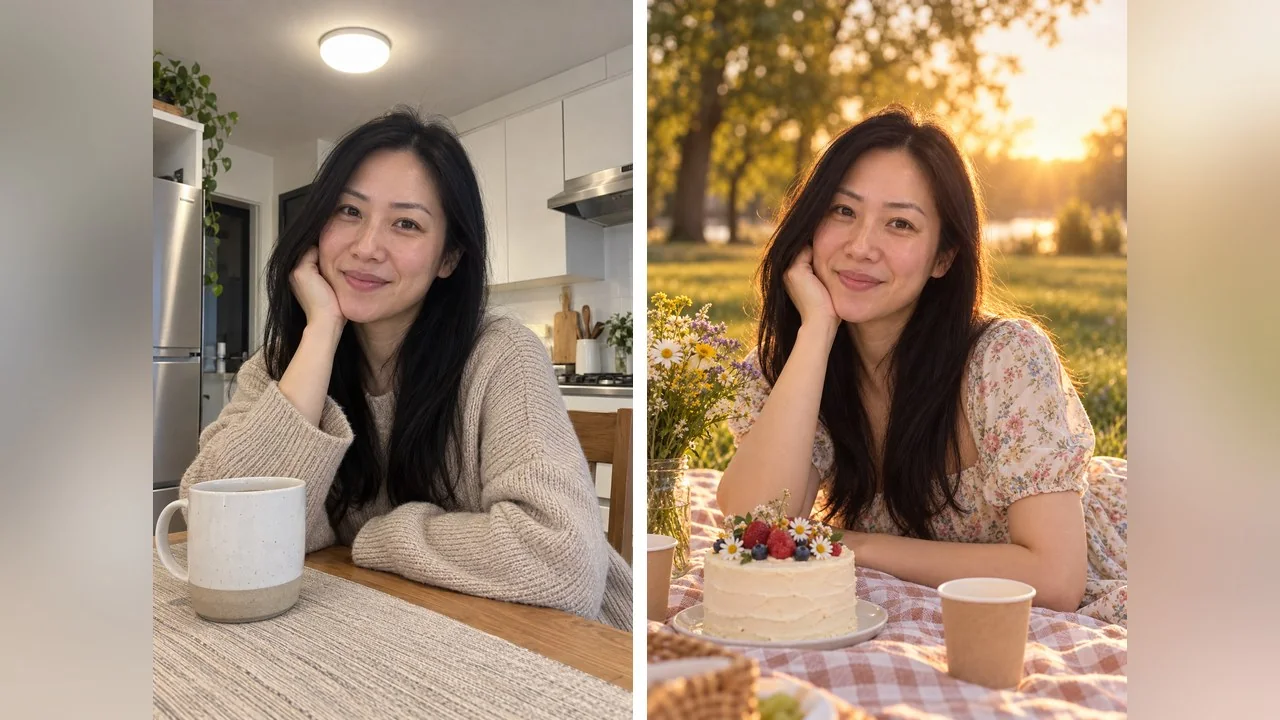
8. Rooftop at night
Birthday portrait on a city rooftop at night: string lights overhead, a small dark chocolate cake with sparkler candles on a table beside me, cool blue city lights behind and warm sparkler light on my face. Change my t-shirt to a black shirt with the sleeves rolled. Keep my face, beard and haircut identical. Photoreal, no readable signs.
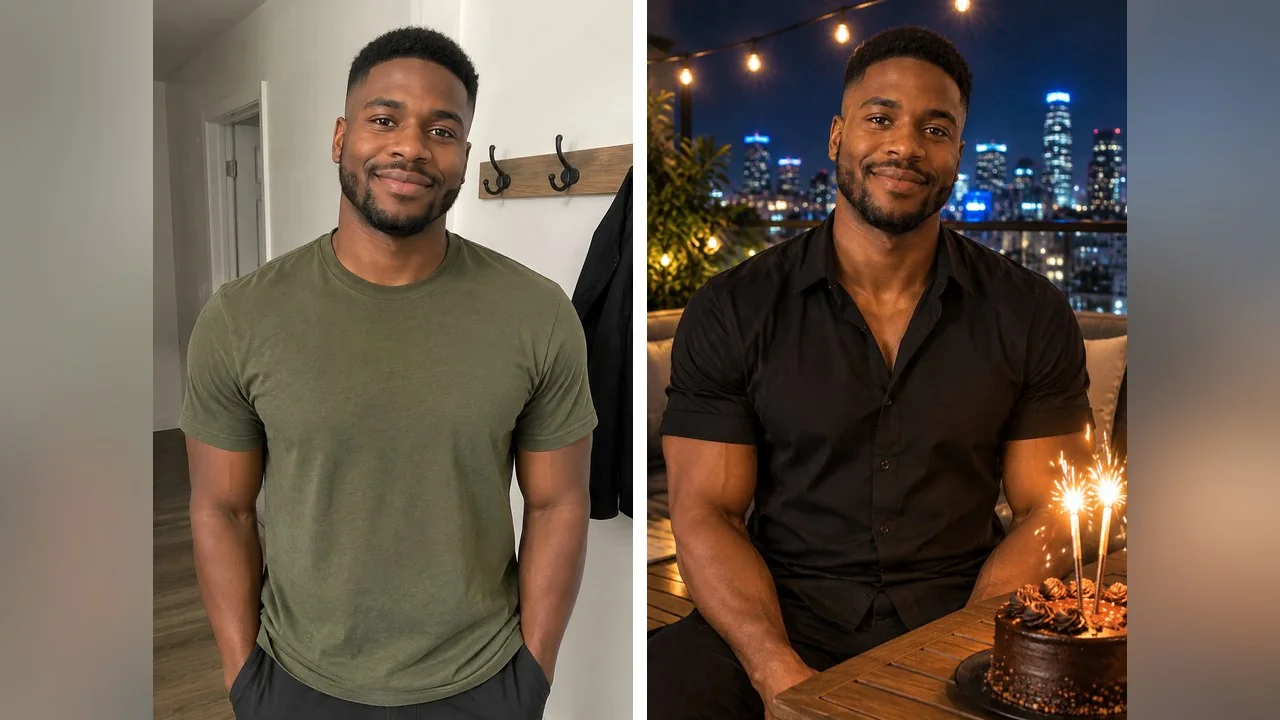
Rooftop and sparkler scenes make the strongest men's birthday photo in this list because the light does the styling. If the skyline arrives with legible signs, repeat the no-signs instruction at the very end; models weight the last sentence heavily.
9. Beach at sunset
Beach birthday at sunset: I am sitting on a low wooden table on the sand with a small cake and a few lanterns, the sea and an orange sky behind me, warm backlight, a loose white shirt replaces my top. Leave my face and hair as they are. Photoreal.
Birthday AI photo prompts for men
Most birthday prompt pages are written for women and then append a "for boys" list that is the same prompt with a suit. The ones that work for men lean on light and location rather than props: prompts 5 and 8 above, plus these two.
10. Retro flash house party
Retro 1990s house-party photo: direct on-camera flash, slightly overexposed skin, colourful streamers behind me, a plain paper party hat on my head and a sheet cake with candles on the table in front of me. Keep my face and haircut as in the photo. Grainy disposable-camera look. Photoreal.
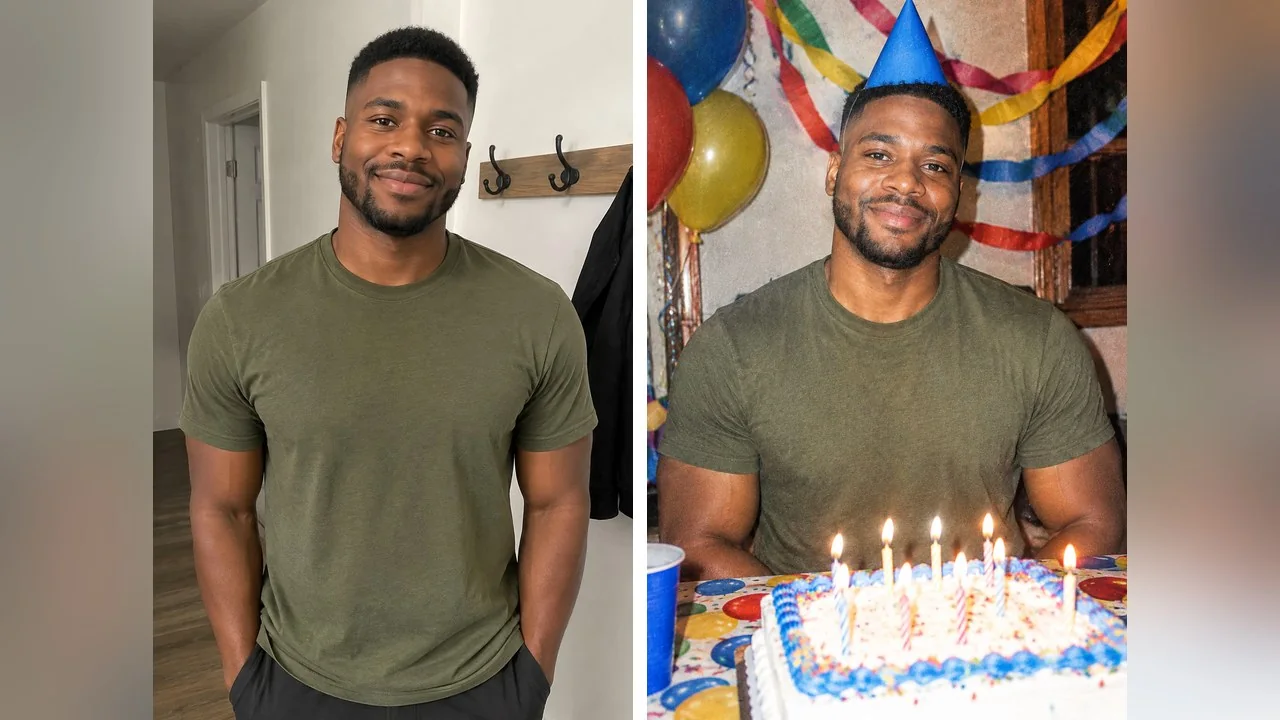
11. Hotel lounge in a suit
Birthday portrait in a hotel lounge: I am sitting in a leather armchair in a dark navy suit with an open collar, a small cake with one lit candle on the side table, warm lamp light, dark wood and brass behind me. Do not alter my face, beard or haircut. Photoreal, no logos.
Prompt 11 was not rendered, but it is the one to use for a milestone birthday post that has to sit next to a work profile. Keep the single candle; a full cake in a lounge reads as a stock photo.
Couple, friends and pet birthday prompts
Group prompts need everyone in the starting photo. The model keeps the faces it can see and invents the ones it cannot, so a solo photo plus "with my friends" produces strangers.
12. Couple birthday with cake
Couple birthday photo: the two of us standing close behind a cake with lit candles. He holds the cake plate and she leans on his shoulder. Warm fairy lights and balloons behind us. Change our clothes to matching cream outfits, a modest dress for her and a linen shirt for him. Keep both faces exactly as in the photo. Photoreal.
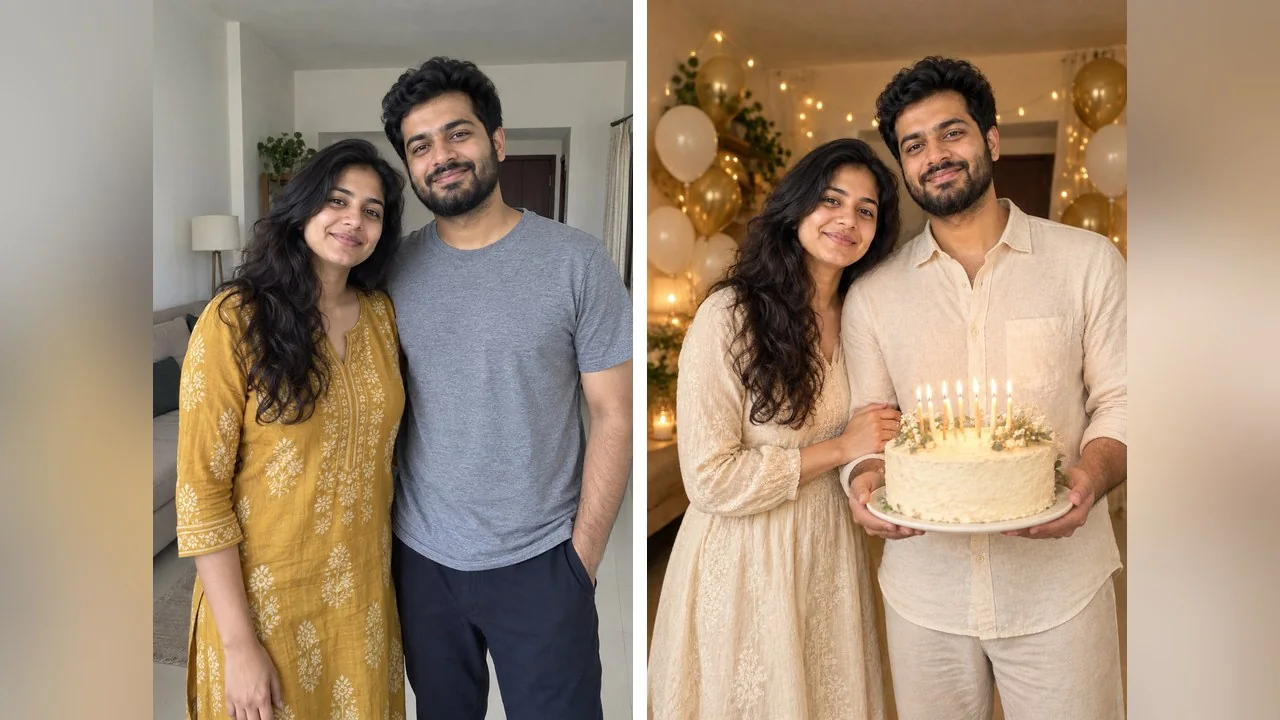
Couple prompts work best from a picture where you already stand close; the model keeps your relative heights and the way you lean. If all you have is a selfie at arm's length, crop it to the two faces before uploading.
13. Friends around a cafe table
Birthday photo with friends: the four adults in my photo around a cafe table raising coffee cups in a toast, a small cake in the middle, big natural smiles, warm window light. Every face stays as it is in the upload and nobody's hair changes. Photoreal, no text.
14. Birthday with your dog
Birthday photo with my dog: I am sitting on the floor next to my dog, who wears a small plain party hat, a cake with candles on a low table, pastel balloons behind us, soft indoor light. Leave me and my dog exactly as we look in the upload. Photoreal, no text.
For two people in two separate photos, see the two-photo section of our couple AI photo prompts guide; the same approach works for a birthday scene.
Why your AI birthday photo looks fake, and the fixes
- Numbers and names on the cake. Models misspell them; leave text out and add it later.
- Too many props in one prompt. Cake plus balloons plus confetti plus sparklers gives the model six things to place and one face to forget. Pick two.
- A changed face. Lengthen the keep line (face, hair, smile, skin tone) and restart from the untouched photo rather than stacking edits.
- Floating or oversized objects. Balloons the size of a person and cakes with no plate are common; say "small cake on a plate" and "balloons behind me".
- The wrong outfit. If the prompt does not mention clothes, the model usually keeps the original top, which can clash with a studio scene. Name a modest outfit or accept the sweater.
- Using a photo that is not yours. Ask the person first, and keep children's pictures away from prompt sites entirely.
Prompt or template: which should you use?
A copy and paste prompt gives you every detail; a template gives you a finished look in one click. The right choice depends on how much you want to decide.
| Route | What you provide | What you get | Best for |
|---|---|---|---|
| Prompt in ChatGPT | Photo plus the prompt text | A still image; OpenAI lists it on every tier, with usage caps | Custom scenes, multi-step edits |
| Prompt in Gemini | Photo plus the prompt text | A still image carrying a watermark on the no-cost model | Keeping the face close to the original |
| Prompt in LazyKiwi's AI Photo Editor | Photo plus the prompt text, ratio and resolution | A still image at your chosen ratio and size, priced on the button | Stories, prints, several versions |
| LazyKiwi's AI birthday photoshoot template | One person photo | A short birthday video with cake, balloons and streamers | A post with no prompt writing at all |
Pick the ratio before you run anything. A birthday photo for Stories or Reels wants 9:16 with the cake low in the frame so the caption has room; a feed post wants 4:5 with the face nearer the top third; a print wants 3:2 and the highest resolution on offer. Chat tools give you one size unless you ask; a browser editor lets you pick from chips.
The AI birthday photoshoot template is the no-prompt route: it turns one photo into a short clip with the whole birthday scene built in. If you would rather write the scene yourself and want a model that keeps faces well, Nano Banana is one of the listed models in the image generator, and the free credits on sign-up cover a first run.
Key takeaways
- A birthday AI photo prompt rebuilds the scene around your real face; upload the photo first, then paste the prompt.
- Eight of the 14 prompts were rendered once each on three starting photos (four fictional adults), with the input shown beside every result.
- Ask for plain balloons and a cake without writing; add numbers and names afterwards in an editor.
- One scene per prompt and a long keep line are what stop the face from drifting.
- Group prompts only keep faces that are in the starting photo; a template is the fastest route when you do not want to write anything.
Creator Growth Editor
Priya Sharma
I study what makes short-form content spread, then turn the pattern into something you can repeat on a Tuesday afternoon without a studio.
FAQ
Common questions
Which birthday AI photo prompt is best for a man?
Prompts that rely on light and setting rather than props: the black and gold minimal studio, the rooftop at night and the hotel lounge in a suit. Keep the cake small and the balloons plain, and say "keep my beard and haircut" in the keep line, because beards are the first thing to change.
Can I add my age or name to the cake or balloons?
You can ask, but most image models still misspell numbers and names, and the mistake is usually on the one object everyone looks at. Generate the picture with plain balloons and an unmarked cake, then add the age as a sticker or caption in your editing app.
Does the same birthday prompt work in Gemini and ChatGPT?
Yes, the text is identical. According to their own pages in October 2026, Gemini's no-cost model is Nano Banana 2 and its outputs carry a watermark, while OpenAI lists ChatGPT Images on every tier with usage caps. If one tool alters your face, try the other with the same words before you rewrite anything.
Why are there no kids' birthday prompts here?
Because the prompts are meant to be pasted into tools and sites we do not control, and we do not want to encourage uploading children's photos to them. Every render in this article is an invented adult, and the prompts are written for adults, couples, friends and pets.
Is there a faster way than writing a prompt?
LazyKiwi's AI birthday photoshoot template takes one person photo and produces a short birthday video with the cake, balloons and streamers already in it, with nothing to type. Prompts are better when you want a specific scene or an outfit; the template is better when you want a post in a minute.
Make your own birthday photo from a selfie
Upload a clear selfie, paste one of the 14 prompts into the AI Photo Editor and keep the keep line. New accounts get free credits on sign-up, and the price appears on the button before anything runs.
Related reading
AI Birthday Photoshoot Ideas for Any Age
Birthday portrait concepts by age and effort, the kit a home shoot really needs, and where an AI birthday photoshoot template helps or gets in the way.
10 min read
Sharda AI Prompt Guide: 7 Prompts With Example Renders
What a Sharda AI prompt is, where the official prompt website lives, how to use one with your own photo, and seven original prompts with example renders.
7 min read
How to Pose for Pictures: 12 Rules That Work
How to pose for pictures in twelve rules that hold for any body and any camera: weight, angles, hands, chin and breath, plus the seconds before the shutter.
10 min read
AI Photo Booth: Event Options and Cheaper Setups
What an AI photo booth actually costs to rent, what the software does behind the shutter, and how to run one at a wedding or office party without a vendor.
9 min read