
Leonardo AI Alternatives: 8 Options Compared (Oct 2026)
Leonardo AI alternatives read on 15 October 2026: what the Free plan and four Solo tiers really give you, and eight tools that replace the token clock.
 Elena Vasquez 9 min read
Most searches for Leonardo AI alternatives come from the same two moments: the day the 150 free tokens run out before lunch, and the day you notice that everything you made on the Free plan is public. I shoot product and property imagery, so I care less about which model is prettiest and more about whether I can budget a job, keep a client's images private, and use the result on a listing. This guide reads Leonardo.Ai's own pricing page as it stood on 15 October 2026, explains the token model and its limits, then compares eight tools by what each one replaces: a daily allowance, private results, a flat per-image price, or open weights. Every number was taken from the vendor's page that same day. No quality bake-off happened here, so quality claims remain the vendors' own.
What is Leonardo.Ai and who is it for?
Leonardo.Ai is a web platform for images, video and design built around its own models, Phoenix and the Lucid family among them, plus presets, a canvas, upscaling and the ability to train a personal model on your own pictures. It has been part of Canva since the acquisition announced on 30 July 2024, which said Leonardo would keep developing its own web platform. The homepage leads with four promises: create images, bring visuals into motion, edit with precision, and boost resolution for print.
The people it serves best are hobbyists and concept artists who want a wide catalogue of looks and the option to train on characters of their own. It is less obviously built for someone who needs one product shot a week and a predictable bill, which is the gap most of the Leonardo AI alternatives below fill.
Is Leonardo AI free? What the Free plan actually gives you
Yes, with limits that matter. According to the pricing page in its monthly view, the Free plan refills 150 fast tokens daily, holds a token bank of 150, keeps quality settings on Basic, allows one personal collection, and sets creations access to Public. That last line is the one commercial users miss: on Free, what you generate is visible to others. Essential is where private creations begin.
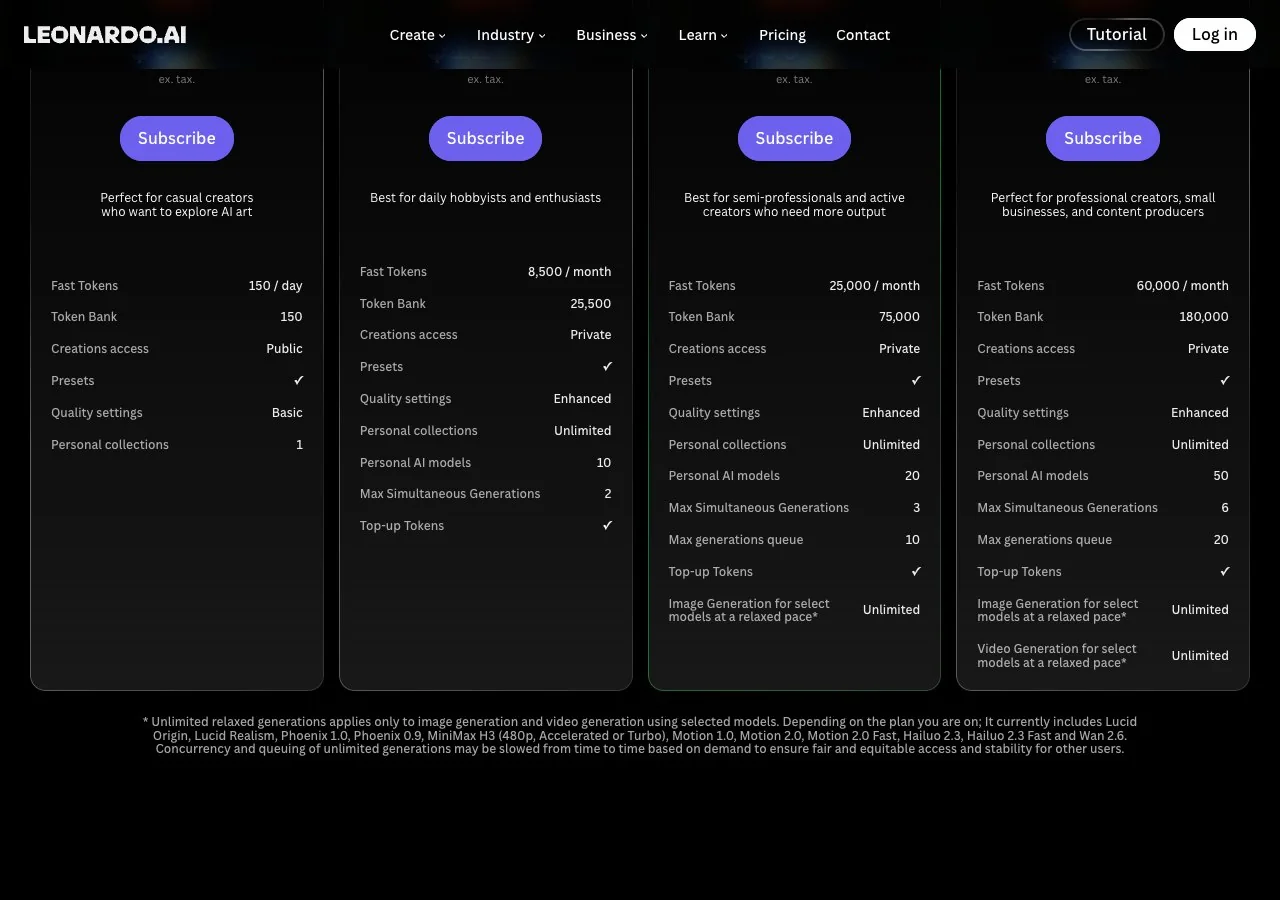
The page does not translate tokens into a number of images, because different models and settings draw different amounts, so the practical test is to run your usual brief on Free for two days and see how far 150 tokens go. A Leonardo AI alternative free of the daily clock usually trades that convenience for something else, as the table below shows.
Leonardo AI pricing: Essential, Premium, Ultimate and the token bank
Leonardo AI pricing has four Solo tiers, quoted ex. tax, and annual billing saves up to 20%. The $12 Essential tier carries 8,500 tokens of fast generation per month and a 25,500-token bank, with private creations, Enhanced quality, ten personal AI models and two simultaneous generations. The $30 Premium tier moves to 25,000 tokens, a 75,000 bank, twenty models, three simultaneous generations and uncapped relaxed-mode generation for a named model list. The $60 Ultimate tier carries 60,000 tokens, a 180,000 bank, fifty models, six simultaneous generations and relaxed video generation as well.
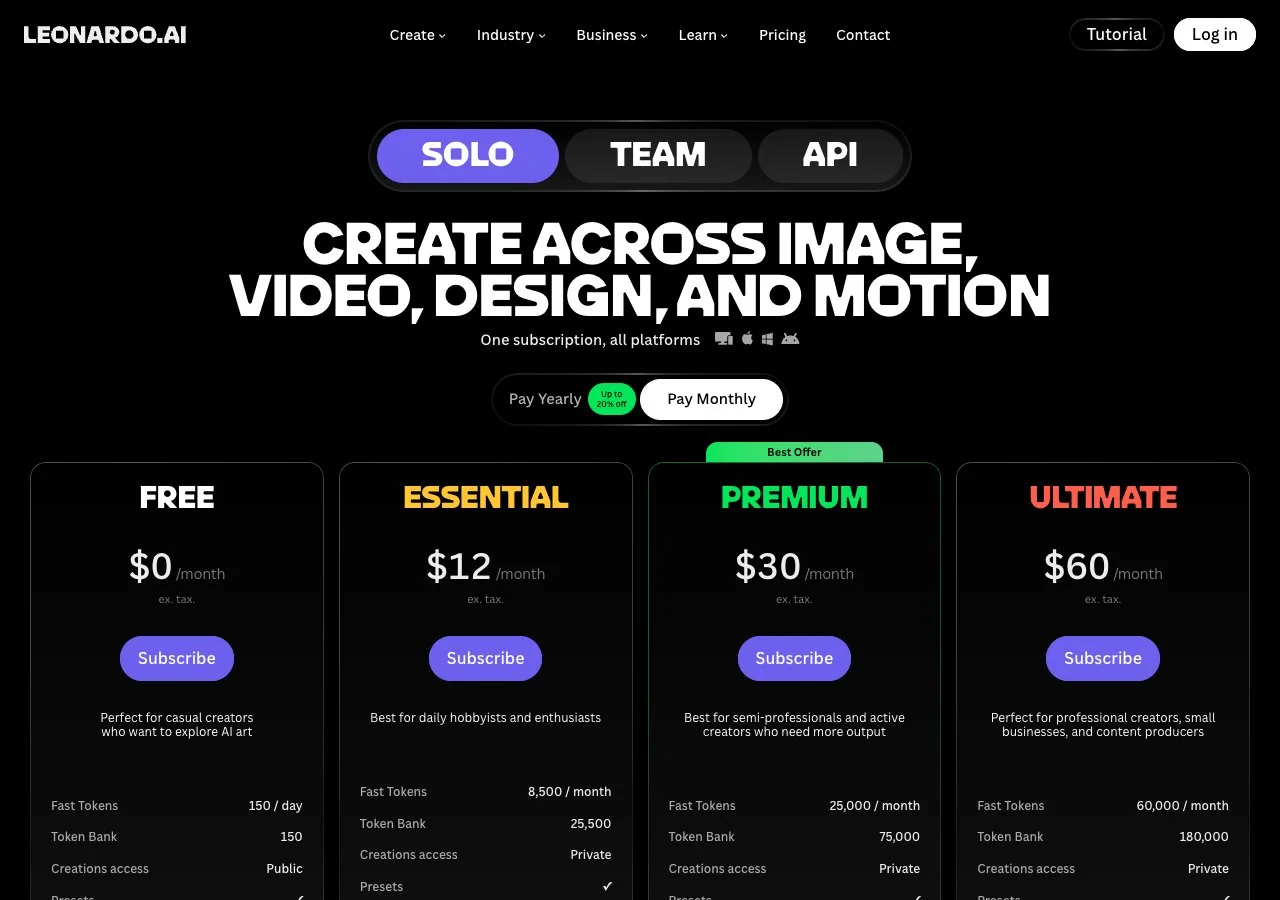
The footnote names the models covered by relaxed generation: Phoenix 0.9 and 1.0, the two Lucid models (Origin and Realism), MiniMax H3 at 480p, the Motion models, Hailuo 2.3 and Wan 2.6, and warns that relaxed jobs may be slowed when demand is high. Teams pay per seat, Starter at $24 per seat with a 75,000 shared token pool and Growth at $48 per seat with 180,000, and the API is pay as you go with credits that do not expire. The token bank is the detail to understand: unused fast tokens accumulate up to the bank ceiling, so a quiet month is not wasted on paid plans.
This is not a full Leonardo AI review; the point here is the money. If the token bank and private creations are all you need, Essential at $12 per month is the cheapest fix and you can stop reading.
Leonardo AI alternatives compared
Each row answers one question about the Leonardo AI alternatives: what does this tool replace in Leonardo's token-and-bank model, and what does it cost to get there? Figures were taken on 15 October 2026.
| Alternative | What it replaces | Free allowance | Cheapest paid tier | Private by default? |
|---|---|---|---|---|
| LazyKiwi | Daily token clock: credits per run, per-run price display | Sign-up credits | Paid plans listed on the pricing page | Private visibility is listed on the Pro plan |
| Krea | Catalogue of models plus a live canvas | 100 compute units daily, personal use only | Basic $5.25 per month (annual table); Pro $21 annual or $35 month to month | The page does not say |
| Ideogram | Text rendering and precise edits | Slow credits weekly, images public | Plus $20 per month, $15 annually | No on Free; yes from Plus |
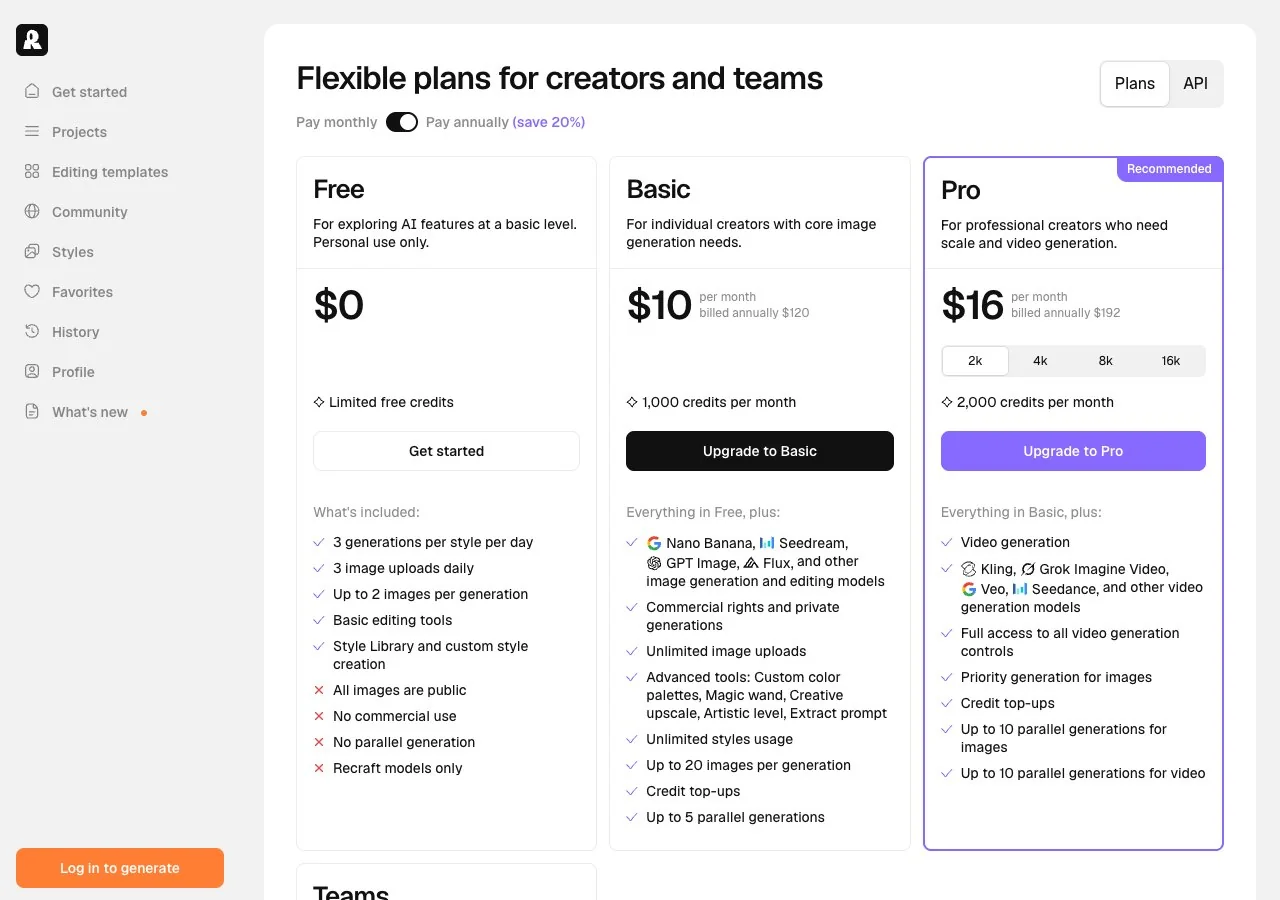
| Recraft | Brand work, vectors, explicit ownership | Three renders per style each day; free images belong to Recraft | Basic $10 per month (annual billing) | No on Free; yes on paid |
| Magnific (formerly Freepik) | A stock library with 30-plus generators on a yearly credit pool | No free tier appeared on the page | Premium $14.50 per month annually, $20 month to month | The page does not say |
| Midjourney | A single strong style with Relax mode | Only inside niji's mobile app | Basic $10 per month | No; Stealth mode is reserved for Pro and Mega |
| Adobe Firefly | A licensing statement and Adobe app integration | Daily free generations, refreshed daily | Standard US$9.99 per month | The plans page does not say |
| FLUX.2 klein + ComfyUI | The subscription itself: open weights on a GPU you own | No fee when run locally | BFL self-host licences from a 10K-images-per-month tier | Yes, it never leaves your machine |
LazyKiwi: credits per run instead of a daily token clock
LazyKiwi publishes this blog, so judge this section accordingly. The image generator swaps the daily allowance for credits: you pick one of six models, set the ratio and 1K, 2K or 4K output, and the button displays the credit price ahead of each run. New accounts receive free credits, nothing you make is public, and the paid plans carry commercial use.
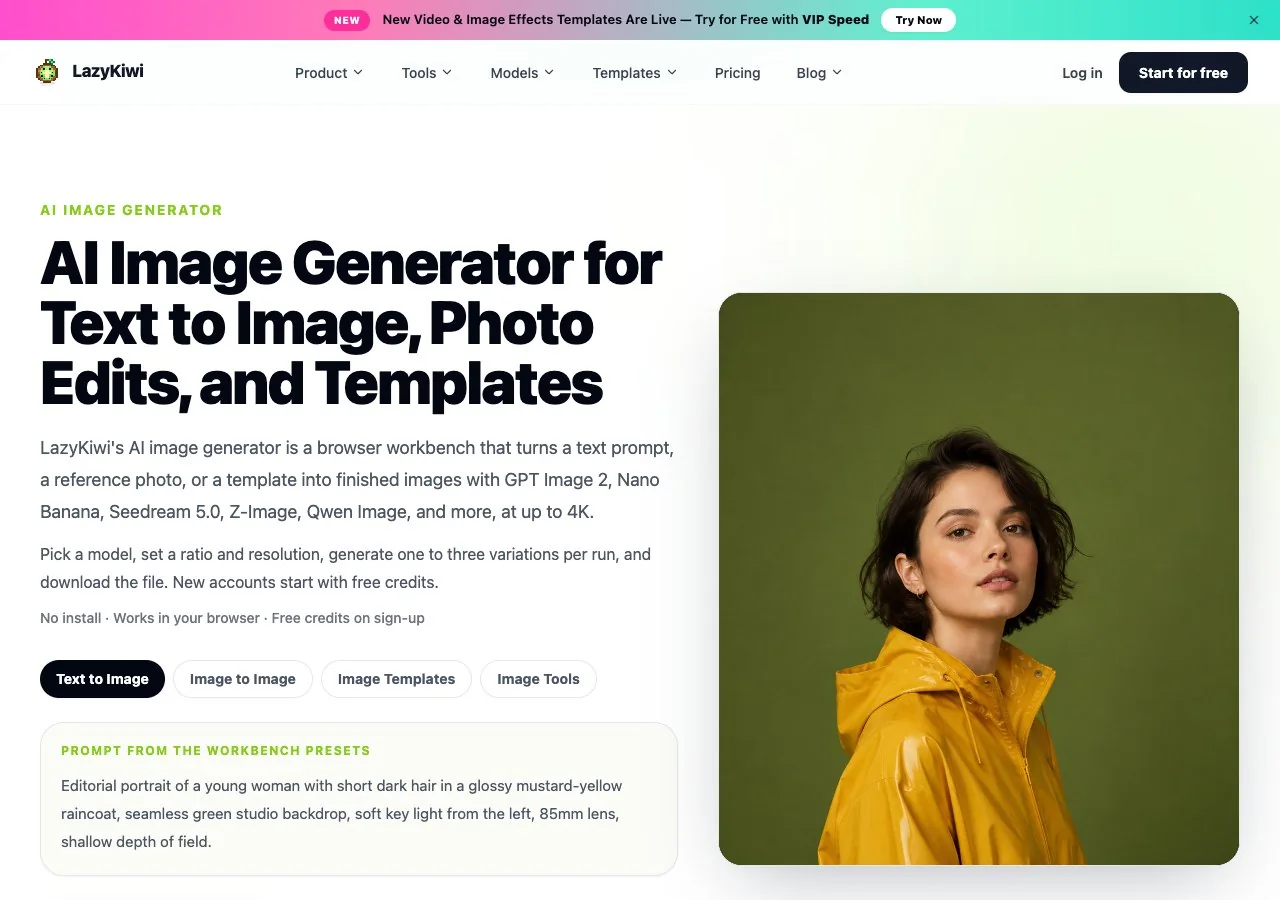
For my kind of work the useful models are Seedream 5.0 for photoreal product scenes and Z-Image for fast portraits, and the Tools tab adds the product image generator and a photo upscaler for print sizes. What Leonardo has that LazyKiwi does not: training a personal model, a canvas with realtime drawing, and a video generator built into the same subscription.
Krea: a live canvas and daily compute units
Krea is the closest match for the canvas side of Leonardo. Krea's Free tier refreshes 100 compute units daily and includes its realtime models; the detailed table on the pricing page equates that to roughly 18 Krea 1 renders or 50 Krea 2 Turbo renders per day, and it marks the commercial-licence row with a cross for Free. Pro is $21 per month on annual billing, $35 month to month, for 20,000 units, and ticks the licence.
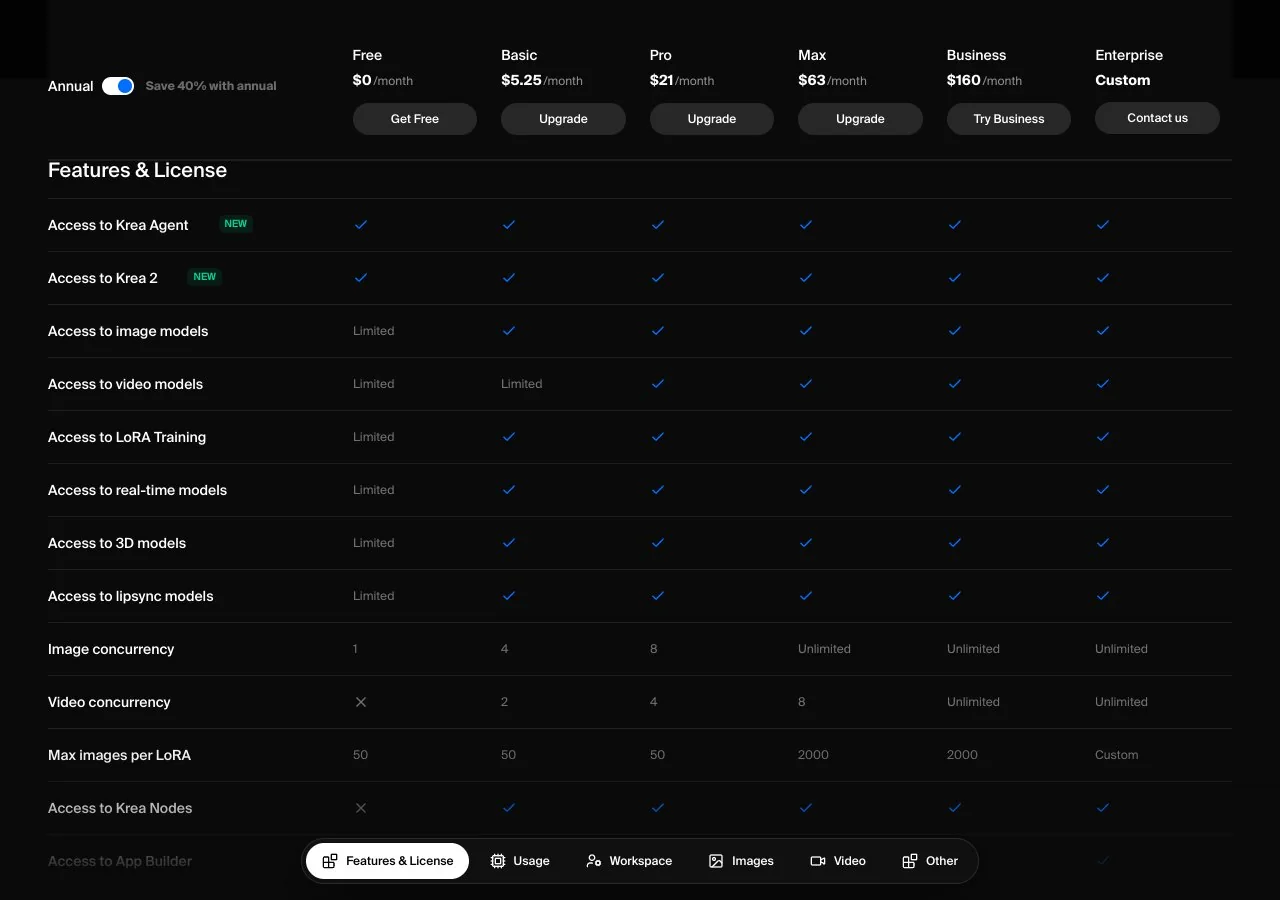
A Basic tier ($5.25 per month on annual billing, 5,000 units) sits in that table but not on the plan cards, and undercuts Leonardo Essential if a few thousand units a month is enough. The whole suite is covered in the Krea write-up.
Ideogram: text-first generation and precise edits
If your Leonardo renders keep garbling the words on a label or poster, Ideogram was built for exactly that, and the 4.5 release adds editing that leaves untouched areas alone across repeated changes. Ideogram's free tier hands out slow credits weekly to eligible accounts; Plus (2,400 priority credits) is $20 per month or $15 annually, Pro is $60 ($42 annually), and Team is $30 per user ($20 annually), per the pricing page. As at Leonardo, free output is public; privacy begins at Plus.
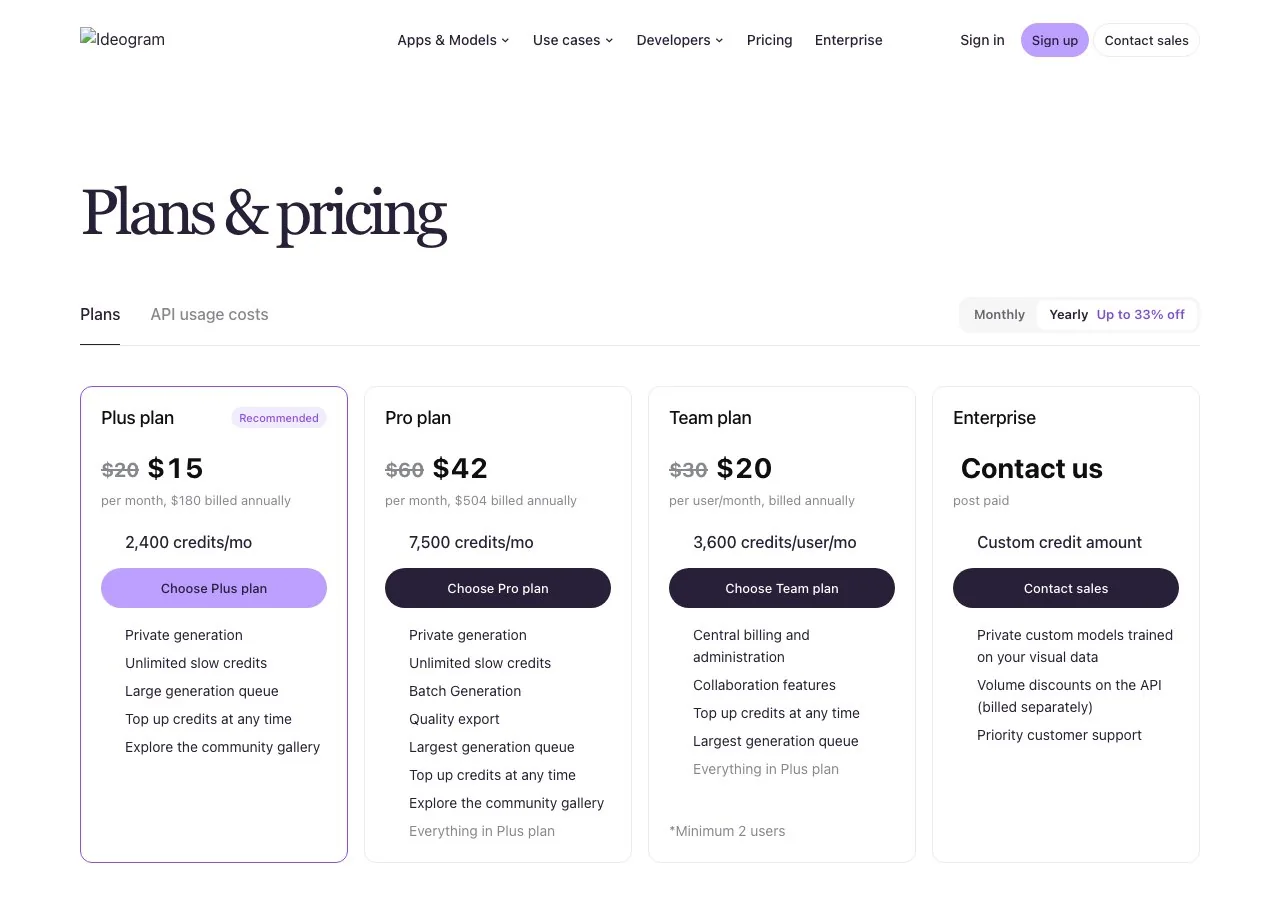
Set against Leonardo Essential at $12, Ideogram Plus at $15 annually is close in price and swaps the model catalogue for one strength done well.
Recraft: vectors and clear ownership rules
Recraft is the designer's Leonardo. Vector output sits beside raster, palettes can be fixed to brand colours, and Recraft's own pricing FAQ states that free-plan images belong to Recraft, land in the public gallery and carry no commercial licence, while subscribers own their images outright and keep them private, cancellation included. Free permits three renders a day for each style; Basic (1,000 credits) is $10 per month when billed for a year, Pro (2,000 credits) is $16 on the same terms, and Teams is $18 per seat.
Magnific, the renamed Freepik: a yearly credit pool
Freepik now trades as Magnific, and its pricing page is built for people who already buy stock. Premium costs $20 per month, or $14.50 per month paid annually, and comes with 240,000 credits for the whole year rather than a monthly reset; Premium+ ($45, or $33.75 annually) lifts the cap on Draft and Final output at High quality in 2K and 4K; the Pro Starter tier ($110, or $82.50 annually) carries 1.5M credits. No free tier appeared on the page.

The yearly credit pool is the opposite of Leonardo's daily clock: you can spend it in one busy week. That suits seasonal listing work better than a drip feed.
Midjourney: one style, no free tier
Midjourney competes on neither price nor a free route; its plan comparison starts at Basic for $10 per month with 200 minutes of fast GPU time, and Relax mode, which removes the cap on image generation, begins on Standard at $30. The only trial lives in niji's mobile app, and keeping images private requires Stealth mode, reserved for Pro ($60) and Mega ($120).
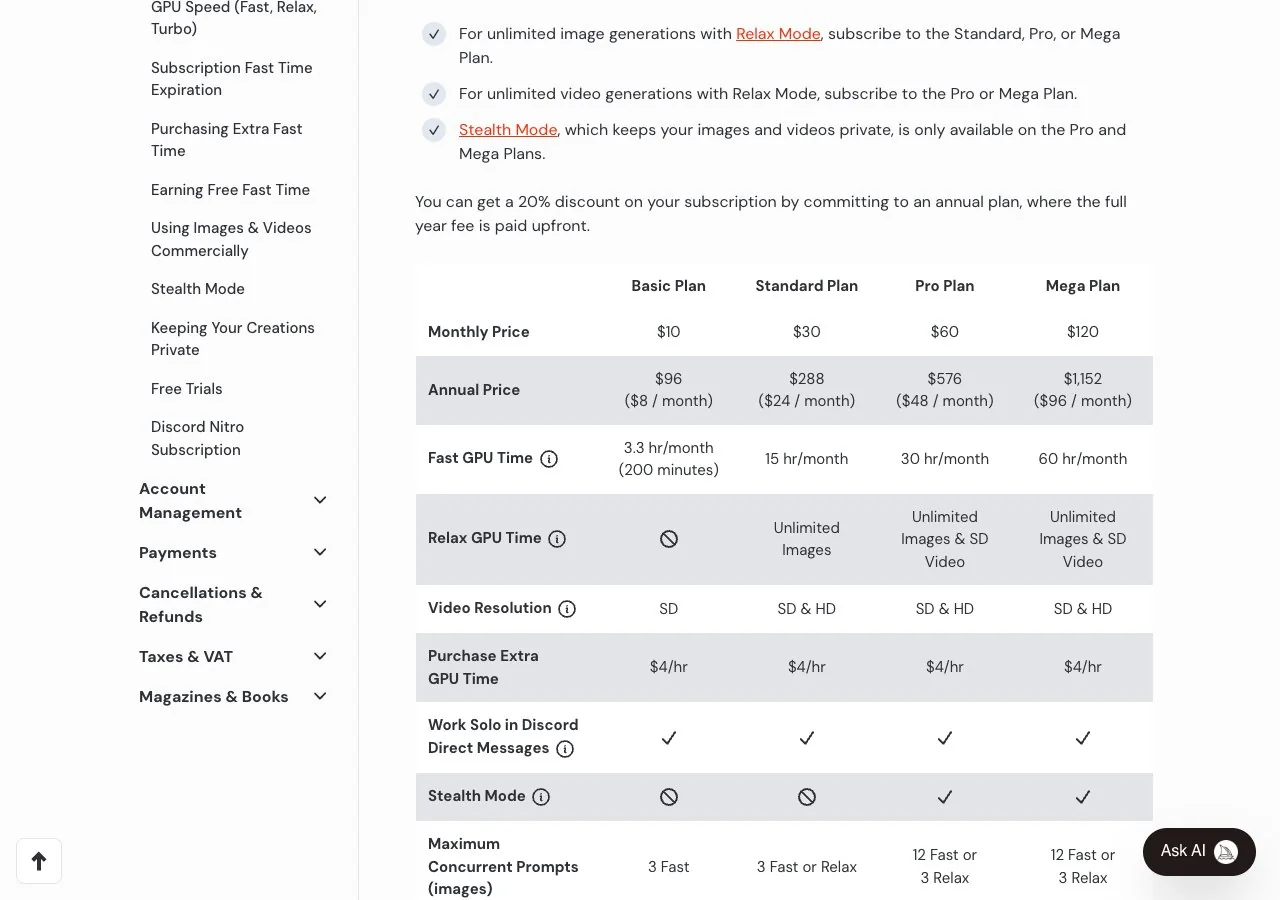
What it replaces in Leonardo is the catalogue: one model family with a recognisable look and taste-learning personalisation. If that is what you want, our Midjourney alternatives guide looks at the same question from the other direction.
Adobe Firefly: a licensing statement and daily free use
For listing platforms and brand clients who ask where the pixels came from, Adobe's Firefly plans page is the one that puts a sentence on the record: its own models learn from licensed and public-domain sources, and their output is described as usable in commercial work. Adobe's cheapest Firefly tier, Standard, is US$9.99 per month for 2,000 generative credits; Pro, at US$19.99, carries 4,000; Pro Plus and Premium list at US$49.99 and US$199.99 (30% off through 21 October 2026). No plan is required for the daily free generations.
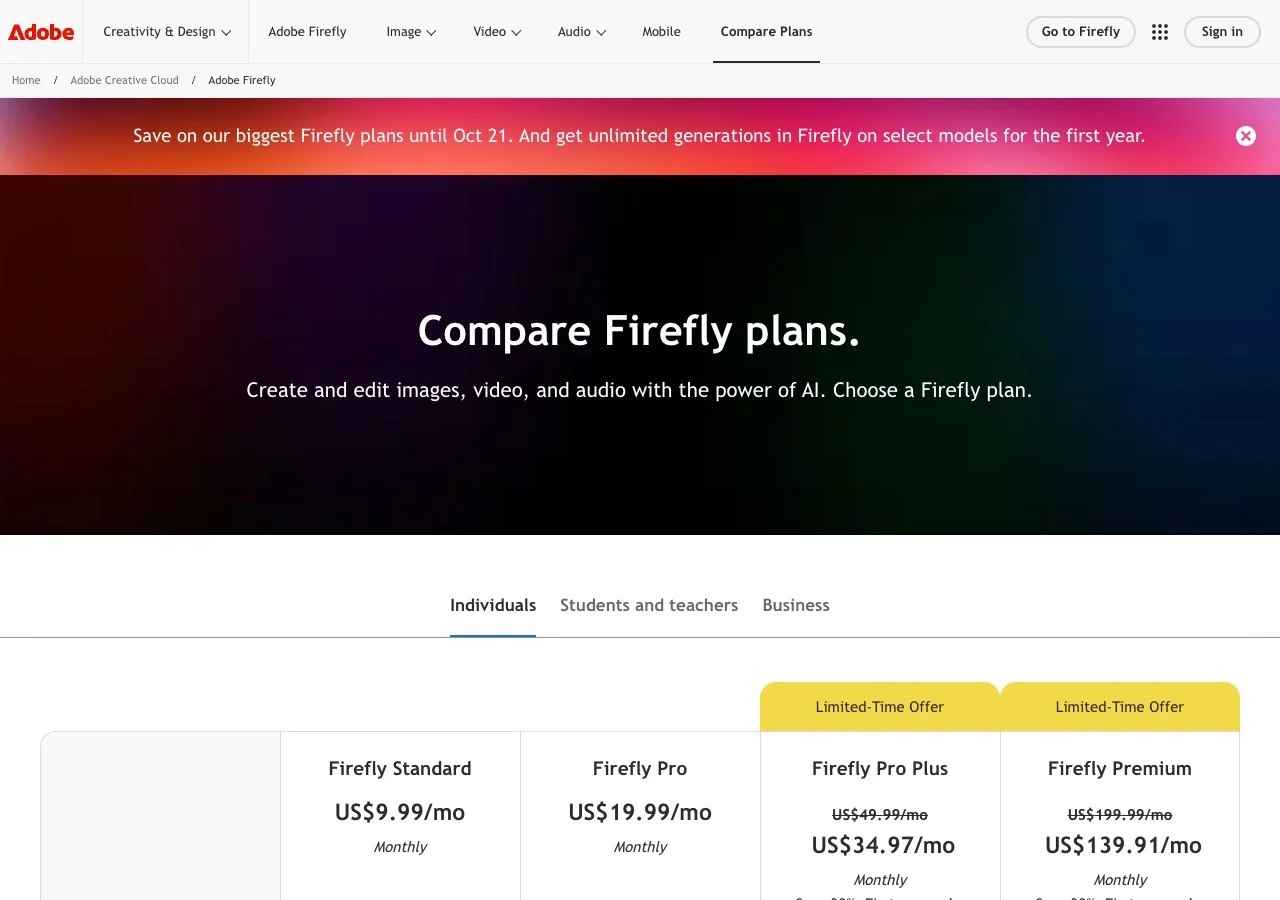
Firefly's partner models, FLUX and Nano Banana among them, sit outside that statement, so pick Adobe's own model when the provenance line matters.
Open models: FLUX.2 klein and ComfyUI on a GPU you own
The alternative to any subscription is to run the model yourself. Black Forest Labs publishes the open-weight FLUX.2 klein models, and BFL's self-hosting licences, per its pricing page, start with a 10K-images-per-month Builder tier; all of them permit fine-tuning and LoRA training. The hosted FLUX 3 Image API charges from $0.041 per image by resolution tier if you would rather not own a GPU. ComfyUI is the usual front end, in desktop and cloud editions, the latter with a free tier.
This replaces Leonardo's custom-model training with real fine-tuning, and it is the only route where images never leave your machine. The cost is your time and hardware, and no support desk exists when a workflow breaks.
When to use LazyKiwi instead of Leonardo
- You bill per job and need to know the cost before each run, not after a month of tokens.
- Client images must stay private from the first generation, without paying for a tier to switch it on.
- The brief changes between photoreal product shots, text-heavy posters and stylised portraits, so switching models matters more than one house catalogue.
- You want photo tools such as background changes, object removal and upscaling in the same place as generation.
Stay with Leonardo if you train models on characters of your own, use the realtime canvas daily, or want video and images on one subscription. Those are real strengths, and none of the Leonardo AI alternatives in this list copies all three.
Which apps like Leonardo AI are free to start?
- Krea: 100 compute units daily, personal use only on Free.
- Ideogram: slow credits weekly, public images.
- Recraft: three renders a day for each style, with Recraft keeping ownership.
- Adobe Firefly: daily free generations with Adobe's own models.
- LazyKiwi: sign-up credits, per-run price display, private visibility on the Pro plan.
- FLUX.2 klein with ComfyUI: no fee if you own the hardware.
None of these is a like-for-like free Leonardo; each is free in a different place. Decide whether privacy, licence or volume is the thing you cannot compromise on, then pick the row that gives it away.
Key takeaways
- Leonardo's Free plan refills 150 fast tokens daily with public creations and Basic quality; Essential at $12 per month ex. tax is where private results begin.
- At $30 (Premium) and $60 (Ultimate) you also get uncapped relaxed-mode generation for a named model list, and the token bank lets unused tokens accumulate.
- Krea, Ideogram and Recraft all have free tiers, but Krea withholds the commercial licence and Ideogram and Recraft publish free-plan images.
- Firefly is the pick when a client wants a provenance statement; FLUX.2 klein with ComfyUI is the pick when images must never leave your machine.
- Of the Leonardo AI alternatives here, LazyKiwi is the one that replaces the daily token clock with a per-run credit price shown on the button before each run.
Commercial Imagery Editor
Elena Vasquez
I came from product and property photography, so I care about the boring parts: scale, shadows, disclosure rules, and what a listing platform will reject.
FAQ
Common questions
Is Leonardo AI free to use?
Yes. The Free plan refills 150 fast tokens daily, holds a token bank of 150, keeps Basic quality settings and one collection, but creations are public. Private creations, Enhanced quality and personal AI models begin on Essential at $12 per month ex. tax, as read on 15 October 2026.
What are the best free Leonardo AI alternatives?
The answer hinges on what free must include. Krea refreshes 100 compute units daily but withholds the commercial licence on Free; Adobe Firefly adds a licensing statement to its daily free use; LazyKiwi gives sign-up credits and shows the credit price before each run. For a daily free allowance closest to Leonardo's, Krea is the nearest match.
How much does Leonardo AI cost per month?
Solo plans are Essential $12, Premium $30 and Ultimate $60 per month ex. tax, and annual billing saves up to 20%. Team plans are $24 per seat (Starter) and $48 per seat (Growth). The API is pay as you go with credits that do not expire, per the pricing page on 15 October 2026.
Which alternative is most like Leonardo for training your own model?
Krea offers LoRA training on 50 images on Pro and on 2,000 images on Max, and the open route is fine-tuning FLUX.2 klein weights yourself through ComfyUI. Midjourney's personalisation profiles learn your taste but do not train on your own images in the same way.
Can I use Leonardo AI images commercially?
The pricing page does not spell out commercial terms in the plan cards we read, so check Leonardo's terms of service before client work. What the page does say is that Free creations are public, which is usually the bigger problem for commercial use; Essential is where private creations begin.
Price a job before you run it
Go to the LazyKiwi workbench, choose Seedream 5.0 or Z-Image, and read the credit cost on the button ahead of each run. Sign-up credits are included, and private visibility is listed on the Pro plan.
Related reading

Midjourney Alternatives in 2026: 9 Options, Free and Paid
Nine Midjourney alternatives verified on each vendor's pricing page: which have a free tier, which edit in place, and where Midjourney's plans still win.
10 min read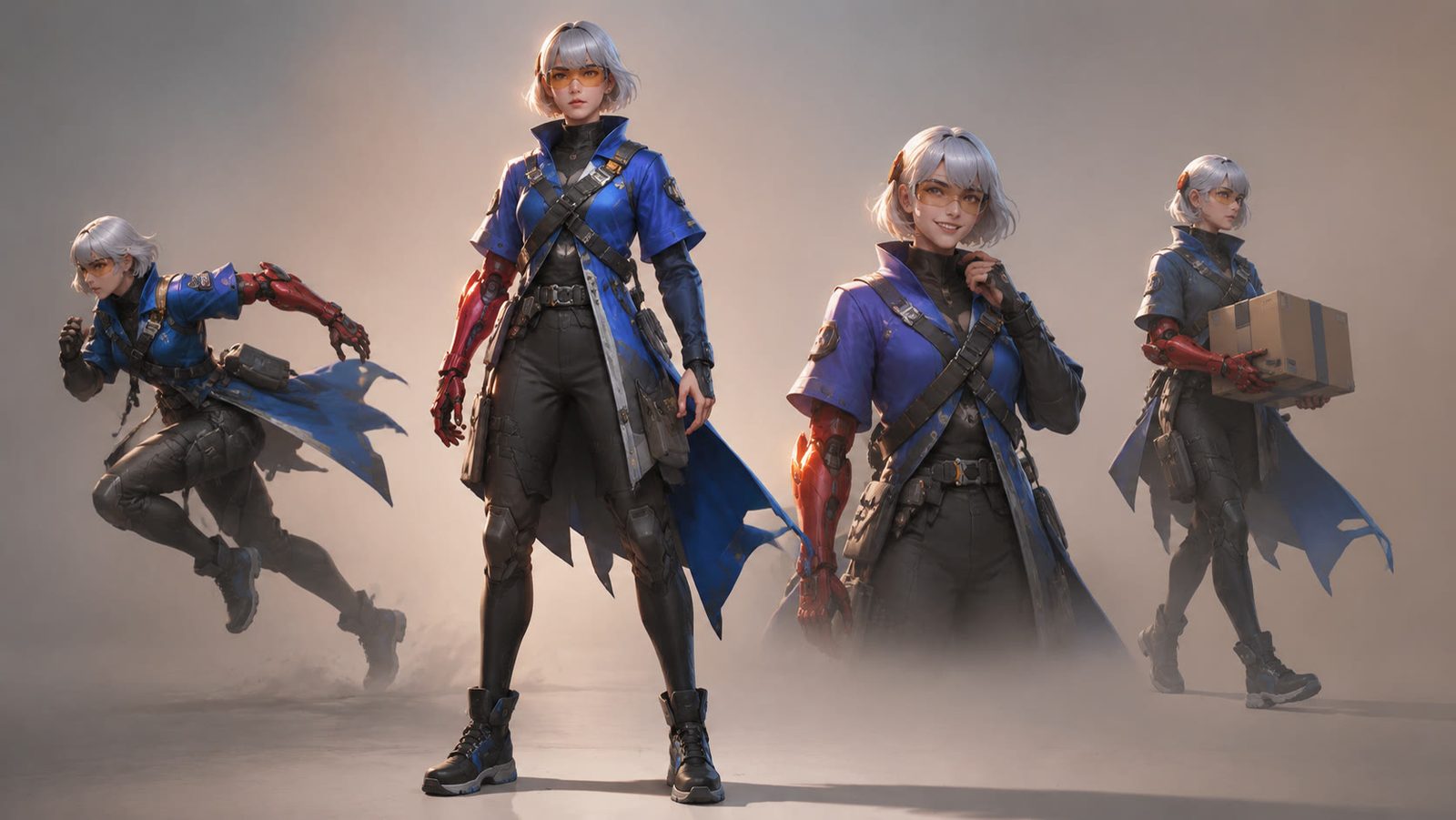
AI Character Generator: How to Design Consistent Characters
Build one character with an AI character generator, then keep the face, outfit and palette steady across poses, outfits, figures and short video.
11 min read
AI Product Photography: White Background to Branded Scene
AI product photography in practice: shoot on a phone, get a white-background image, swap in a branded scene, upscale, and export to Amazon and Google rules.
8 min read
Best AI Photo Editing Apps in 2026, Tested
Nine of the best AI photo editing apps run against the same two files: retouch a face, clean a scene, batch a set, export without a watermark.
10 min read