
How to Make an AI Baby Meme (Video and GIF) in 2026
Where the AI baby meme came from, how to make the image, video and GIF versions from one photo, caption formats that land, and the label rules per platform.
 Daniel Okafor 9 min read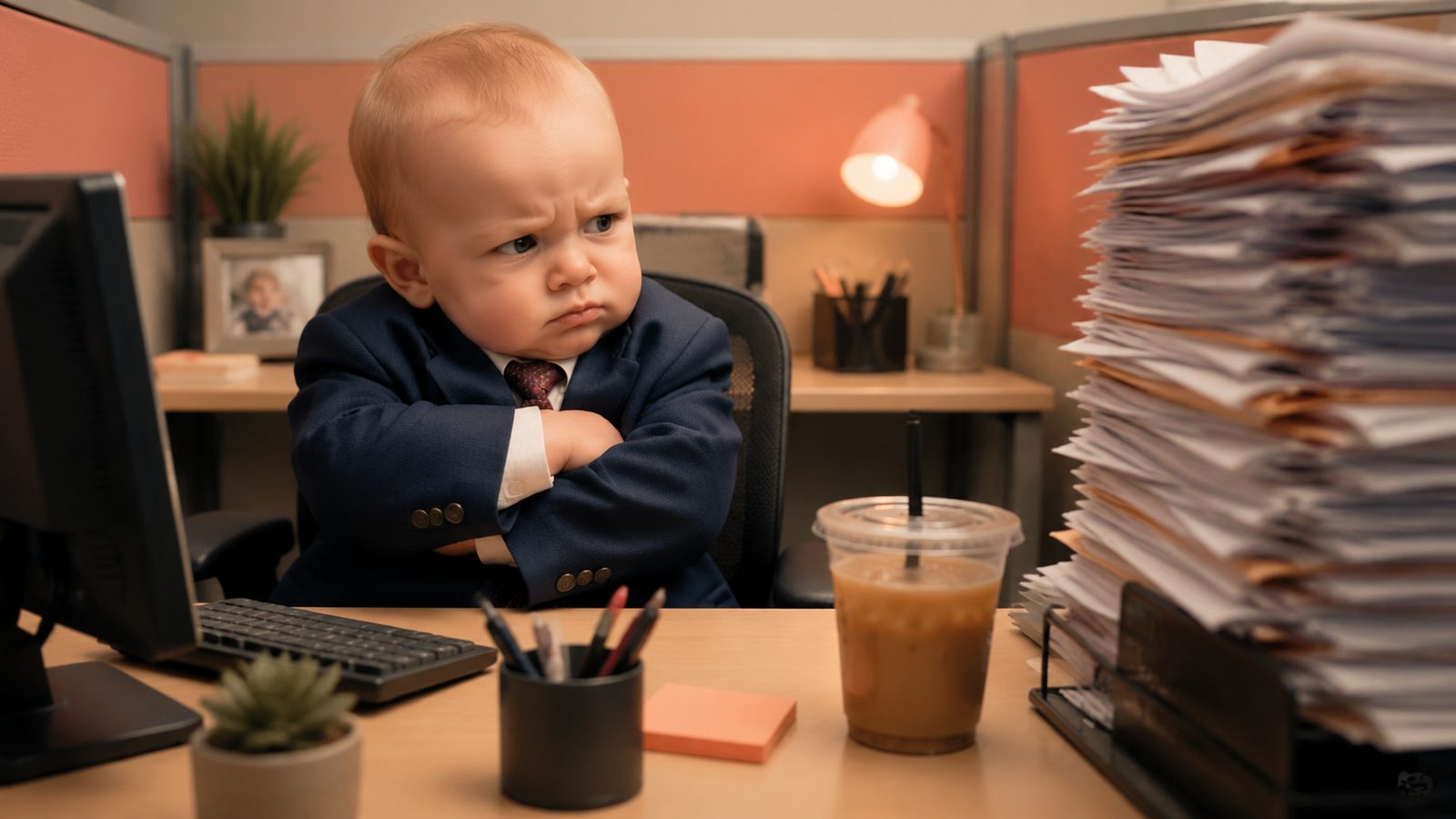
An AI baby meme is a reaction image, clip or GIF in which a generated infant carries an adult emotion: smug, exhausted, scandalised, suspiciously calm. The format peaked with the baby covering its mouth to hold in a laugh, and the residual demand is still large enough to be worth a fast, clean version. Below is the origin story with sources, the workflow I use in the LazyKiwi image and video workbench as of September 2026, the GIF export route, caption formats that still land, and the platform rules on labels and children's likenesses.
What is the AI baby meme and where did it come from?
The version most people mean is the AI baby holding laugh meme: a baby's face rotoscoped onto an adult man who lip-dubs a Chinese pop song and covers his mouth as if suppressing a laugh. Know Your Meme (2025) dates the first Instagram upload to November 6th, 2025, traces the source clip to the Douyin creator Xiucai, and records the spread to X and TikTok as both caption memes and a reaction GIF.

It was not the first. The ash baby, a screaming infant made of grey ash, started as a Reddit post of DALL-E 2 images in October 2022 and became a TikTok reaction image a year later, per Know Your Meme (2022). And the dancing variant, a baby doing a wobbling sway to an AI-made song, is logged as a TikTok trend from December 2025 with tools such as Kling AI named in the entry, per Know Your Meme (2026).

Which variants are still worth making?
- Reaction stills: one expression, one caption, posted in replies and group chats. Lowest effort, longest shelf life.
- The held laugh: a short clip or loop of the covered-mouth gesture, now used for any secondhand-embarrassment moment.
- The dance: a baby version of a person doing the sway routine, which is the variant that still gets remixed weekly.
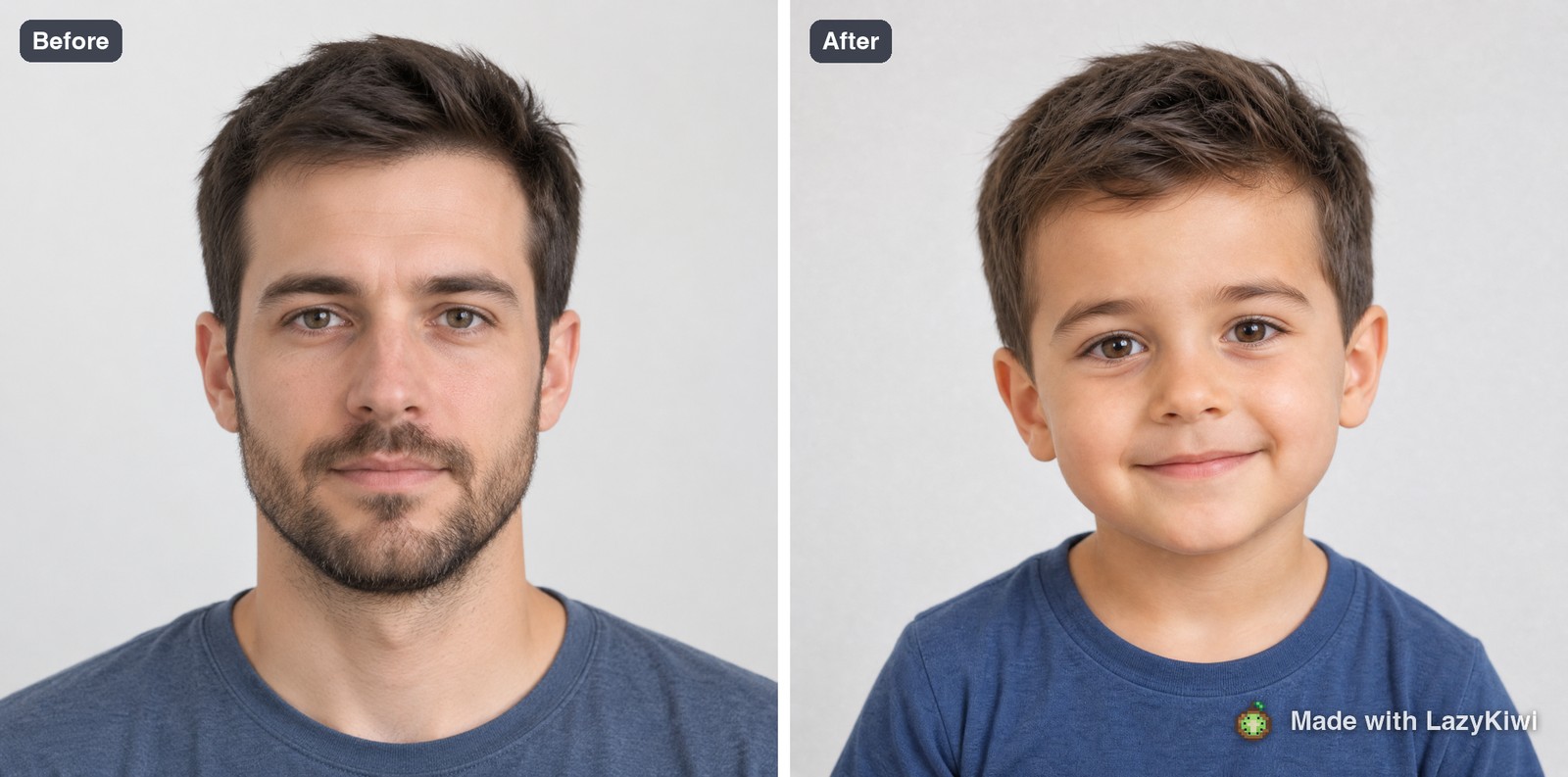
- The you-as-a-baby reveal: a before-and-after using a baby filter on an adult portrait, which is a format rather than a single meme and does not expire.
How to make an AI baby meme step by step
The fastest route is a baby filter on a portrait, a caption in the photo editor, and, if you want motion, a short image-to-video pass. Everything below lives in the AI image generator workbench, which lists text-to-image, photo edits and templates as its three entry points. The baby filter is not a prediction tool; if you are really asking what will my baby look like, that guide explains which traits are inherited predictably and how baby generators make the picture.
- 1
Write the caption first
Decide the situation before you generate anything: the group chat, the Monday meeting, the price at checkout. The baby's expression has to match the line, and it is far easier to generate toward a line than to fit a line to a random face.
- 2
Run the baby filter on a portrait
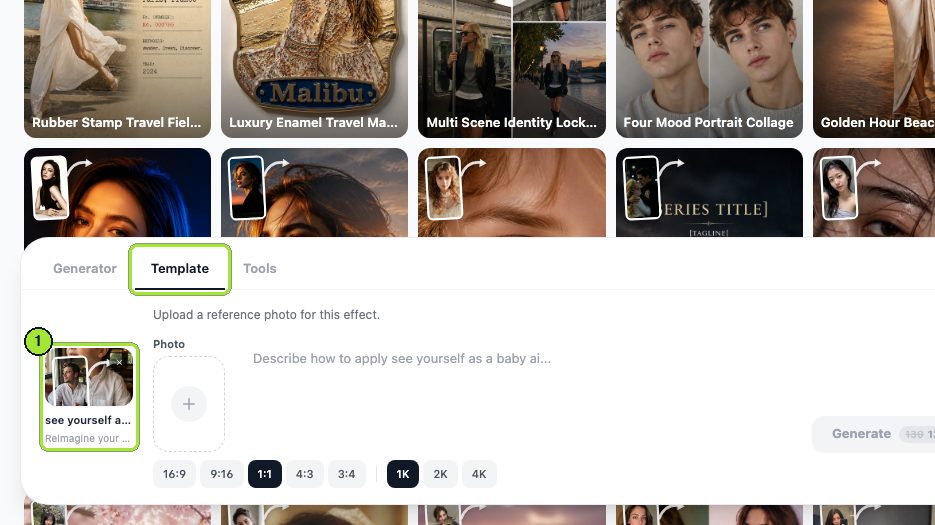
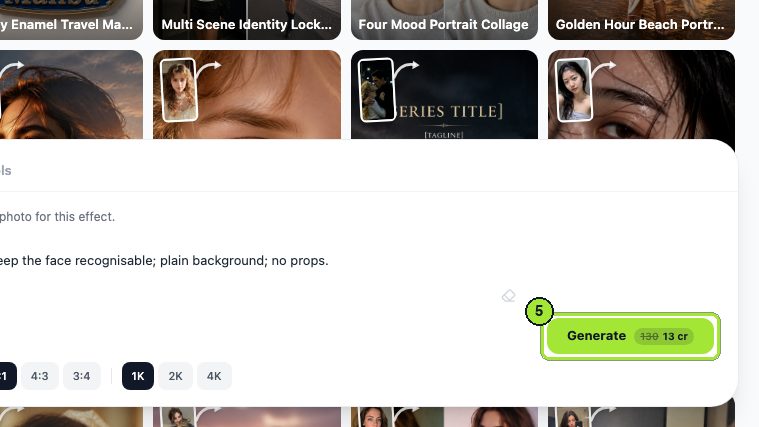
Open the baby filter template, which its page describes as age-regression that keeps identity cues from a clear, front-facing photo with no hats or glasses. Use your own face or a consenting friend's; never a real child you do not have permission to post.
- 3
Or generate the baby from text
When you do not want a real face in it at all, describe the baby instead. Nano Banana is the model I use for stills: its page lists text-to-image with more than ten aspect ratios and output up to 4K, which covers a square post and a tall story from one prompt.
- 4
Add the caption and props
Take the still into the AI photo editor, which edits from a sentence: put a tiny laptop in front of the baby, add a coffee mug, dim the room. Keep the actual words out of the generation and add them in your caption tool so they stay sharp.
- 5
Animate if the joke needs motion
For the held laugh or a slow head turn, load the still into image-to-video with Kling v3 Omni. Its page lists 3 to 60 second clips at 720p or 1080p in 16:9, 9:16 or 1:1. Ask for one gesture only; a baby that blinks, turns and covers its mouth in one clip drifts.
- 6
Export three versions
A square still for replies, a 9:16 clip for feeds and a short loop for the GIF route in the next section. Post the still first; it is the version that travels.



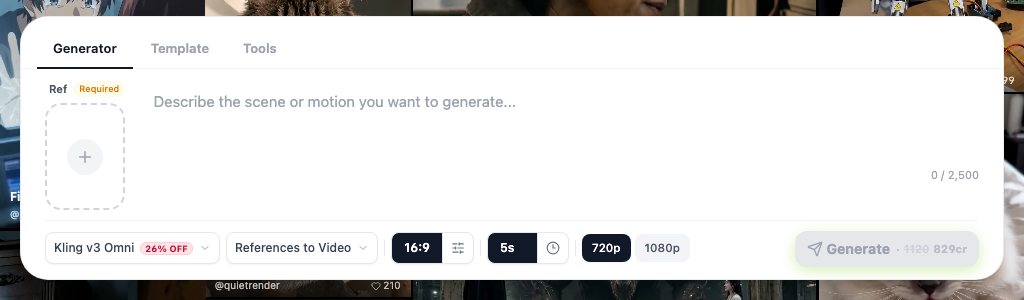
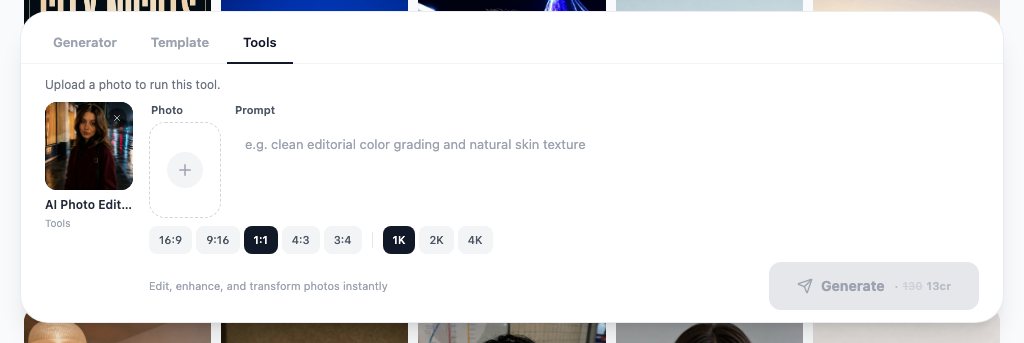
Two faces, one frame
For a reaction that needs a second character, such as the baby judging a parent, the AI image combiner merges a subject photo and a scene photo with matched lighting, so you can composite without a mask.
How to make an AI baby meme GIF
A GIF is a short clip with the sound removed and the loop point chosen on purpose. Generate the clip as above, then convert: EZGIF's video-to-GIF page takes an uploaded clip and lets you set the start and end time and the frame rate before conversion, per EZGIF (2026). Trim to the single gesture, so the loop closes on the same frame it opened on.
- 1
Generate a clip with one gesture
The covered mouth, the slow eyebrow raise, the head turn. One beat, then a return to the resting face so the loop is invisible.
- 2
Trim before you convert
Cut the clip to the gesture and its return; anything else is wasted frames and a bigger file.
- 3
Convert and check the first frame
The first frame is the thumbnail in chat previews, so it should already show the expression rather than a blank resting face.
- 4
Host it where people search
GIPHY describes itself as the largest GIF search engine, serving more than 10 billion GIFs per day, per GIPHY Developers (2026), and its rendition guide explains the sizes it generates from an upload. Tenor's own API page currently carries a service discontinuation notice, per Tenor (2026), so GIPHY is the safer upload target for reach in 2026.
| Format | Where it wins | Generate as | Watch for |
|---|---|---|---|
| Still image | Replies, group chats, quote posts | Square, one expression, caption added after | Text baked into the image goes soft on resize |
| AI baby GIF | Chat apps, GIF search, comment sections | Short loop from a 1:1 clip, sound off | A loop that jumps, a blank first frame |
| Vertical clip | TikTok, Reels, Shorts | 9:16, one gesture, sound and caption on top | A gesture that lands after the viewer has scrolled |
What prompts and captions make funny AI memes?
Funny AI memes are built on contrast, and a baby is contrast on legs: an infant carrying an adult problem needs almost no explanation. The prompt's job is to nail the expression and the scale of the props; the caption's job is to name the situation the reader is already in. The scenario table gives pairs that still work, and the prompt boxes give the wording I use.
| Scenario | Expression to prompt | Caption format |
|---|---|---|
| The group chat | Narrowed eyes, mouth slightly open, phone held at chin height | Me reading the plan change at 11pm |
| The checkout total | Wide eyes, hand over mouth | The card when it hears the total |
| Monday standup | Heavy eyelids, tiny coffee cup, oversized headset | Camera on, brain off |
| Someone else's mistake | Held laugh, shoulders up, eyes to the side | Trying to stay professional |
| The comeback | Chin up, folded arms, tiny blazer | When the reply lands |
A photoreal chubby toddler in a tiny grey blazer sits at a miniature office desk, eyes narrowed at a phone, mouth slightly open, soft window light, plain wall, square crop, no text, no logos.
The toddler in the photo slowly raises one hand to cover its mouth as if holding in a laugh, eyes glance to the side, then the hand lowers. Static camera, same face and outfit, no other movement.
What caption formats travel best?
- Me when: the caption is the situation, the baby is the reaction. Shortest and most reusable.
- Object as narrator: the card, the inbox, the fridge reacts, and the baby plays the object.
- Split caption: setup above the image, punchline below, which works for stills and fails for GIFs.
- No caption: the held-laugh loop alone, posted as a reply, where the thread is the setup.
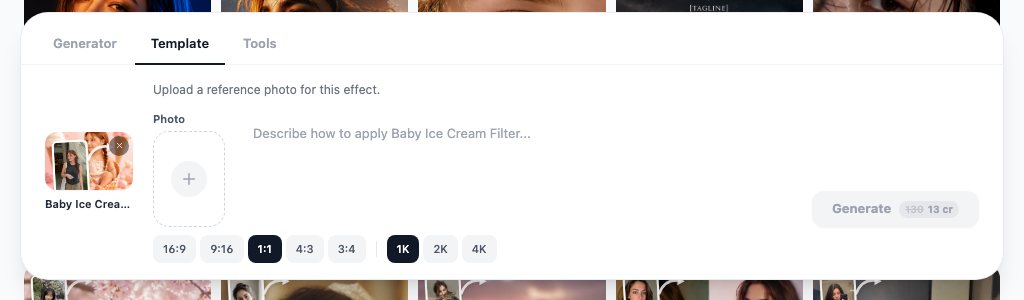
The baby ice cream filter is the gentler cousin: its page describes soft pastel tones and dessert details for family posts and announcements. It makes a poor reaction meme, because the joke there is sweetness, and a good baby AI meme runs on the opposite.
Is there a free AI baby meme generator?
There is no single button that outputs a finished meme, but each step above runs on a free tier. In LazyKiwi the pricing page lists the free plan as the default for every new account: 40 credits per month, refreshed monthly, no credit card. Image templates are priced in single-digit credits on the Generate button in my screenshots, so a still costs a fraction of what a video render does.

| Tool | Free tier (checked 2026-09-05) | What it does for this meme | Catch |
|---|---|---|---|
| LazyKiwi | Free plan with monthly credits, no card | Baby filter, text-to-image, photo editor, image-to-video | Credits per render; price shown before generating |
| Imgflip | Free with an imgflip.com watermark; paid tiers remove it, per [Imgflip (2026)](https://imgflip.com/memegenerator) | Caption and text layout on an image you already have | No generation; bring your own baby |
| EZGIF | Free web converter, per [EZGIF (2026)](https://ezgif.com/) | Video to GIF, trim, frame rate | Manual; no AI |
| CapCut | Free online editor, no card, per [CapCut (2026)](https://www.capcut.com/) | Caption styles, meme templates, video trim | Editing rather than generating |
What is the cheapest path to a finished meme?
Still first, motion last. Generate the still with a template, caption it in Imgflip or your phone, and post. Only spend video credits once the still has proven the joke in a real thread. When the motion version is worth it, run the shortest Kling duration at 720p, then re-render at 1080p only if the clip is going into a feed rather than a chat.
What are the rules for AI baby memes on TikTok and Instagram?
Two rules matter: label realistic AI, and keep real children out of it. TikTok's Community Guidelines state that clear labelling is required when AI or editing realistically depicts people or scenes, and that misleading AI content is removed regardless of intent, per TikTok (2026); the label toggle itself is described on the AI-generated content help page (2026).
Instagram and Facebook apply Meta's AI info label, which is triggered by industry-standard signals in the file or by the poster's own disclosure, per Meta Newsroom (2024). On YouTube, disclosure is required for realistic AI-generated or altered content and does not affect a video's reach or earnings, per YouTube Help (2026). A photoreal baby is realistic by any of those definitions, so tick the box every time.
Can you use a real child's face?
Not without the parent's consent, and I would not even then. Family-media guidance from Common Sense Media (2026) treats children's online likeness as something parents control rather than something creators borrow, and a meme that embarrasses a real toddler stays searchable long after the trend is gone. Use your own adult face through the baby filter, or generate a fictional baby from text, and the question never arises. The same caution applies to other face filters; our gender swap filter guide covers what happens to a photo you upload and when a swapped image is not okay to post.
- Label the post as AI on every platform, even for a still.
- Do not attach a real child's name, school or location to a generated baby.
- Keep the baby out of political, medical or crime scenarios; that is where platform removals happen.
- Say in the caption that the baby is generated when the joke could be read as real footage.
What mistakes make AI baby memes flop?
Most flops are timing or readability, not humour. These are the faults that show up in the comments, ranked by how often I see them.
- 1
Late to the specific meme
The held-laugh clip had its month; a straight copy now reads as a repost. Borrow the format, change the situation, and let the baby react to something that happened this week.
- 2
Uncanny face
Adult teeth, glassy eyes or too many fingers on the tiny hand. Regenerate; never post the render you have to defend.
- 3
Caption in the image
Generated lettering warps on resize. Add words in an editor, in a font that survives a phone screen.
- 4
Wrong ratio for the placement
A 9:16 clip in a reply gets cropped to a headless torso. Square for replies and chats, vertical for feeds.
- 5
A GIF that jumps
If the loop does not return to the resting face, the reader sees the seam and moves on.
- 6
Too many elements
One baby, one prop, one line. A second character is a different meme.
Fix the first three and the format still earns replies in 2026, even though the original wave has passed. The reaction baby is a template now, not a trend, and templates keep working for as long as the situations do.
Key takeaways
- The held-laugh baby dates to a November 2025 Instagram post; the ash baby is 2022 DALL-E 2 output and the dance variant is a December 2025 TikTok trend, all per Know Your Meme.
- Make the still with the baby filter template or a Nano Banana text prompt, add props with the AI photo editor, then animate one gesture with Kling v3 Omni.
- For a GIF, generate a single gesture that returns to the resting face, trim before converting in EZGIF, and upload to GIPHY where search happens.
- Label realistic AI on TikTok, Instagram and YouTube, and never use a real child's face; use your own face through the filter or a fictional baby from text.
- Every step runs on the LazyKiwi free plan of 40 monthly credits; post the still first and spend video credits only on a joke that already landed.
Video Workflows Editor
Daniel Okafor
I run the same clip through every video model we ship and write down what actually changes: motion, timing, cost, and where each one falls apart.
FAQ
Common questions
Is the ash baby meme AI?
Yes. Know Your Meme records the ash baby, the screaming infant made of grey ash, as a set of DALL-E 2 images posted to Reddit in October 2022, which TikTok users later turned into a reaction image for anything involving bright light or heat. It predates the video-based baby memes by three years.
How was the baby holding laugh meme made?
According to Know Your Meme, the original clip is a Douyin creator lip-dubbing a Chinese pop song and covering his mouth; an Instagram account then used an AI video tool to place a baby's face on the man, and that version spread to X and TikTok in November 2025. You can reproduce the gesture from a still with image-to-video by asking for a single hand-to-mouth motion.
Can I turn myself into a baby with AI?
Yes. The baby filter template in LazyKiwi takes one clear, front-facing photo without hats or glasses and returns a baby portrait that keeps your identity cues, according to its template page. It works on adults, which makes it the safe way to make a baby reaction meme without involving a real child.
Is it safe to post baby memes of real kids?
Post only your own adult face or a fictional generated baby. TikTok requires labels on realistic AI depictions of people, Meta and YouTube apply AI labels, and children's likeness guidance from Common Sense Media treats a child's online image as the parent's decision. A meme of a real toddler stays searchable long after the joke has passed.
What is the best AI meme maker?
There is no single tool that generates and captions in one step. For the image, a baby filter template or a text-to-image model such as Nano Banana; for the caption, Imgflip or your phone; for a GIF, EZGIF; for motion, an image-to-video model such as Kling v3 Omni. The combination beats any one meme maker because you control the expression.
Make the still, then decide on motion
Upload one front-facing photo, run the baby filter, and caption the result before spending a single video credit.
Keep reading
AI Video Effects That Stop the Scroll: A 2026 Hook Guide
Which AI video effects stop the scroll, how to add one to a photo or clip in minutes, and what the free tiers really cover, checked on official pages.
10 min read
AI GIF Generator: Turn Short Videos Into Reaction Memes
Use an AI GIF generator to convert short clips or simple prompts into polished reaction GIFs, memes, social replies, and looping animations.
8 min read
How to Make AI Cat Videos People Actually Watch (2026 Guide)
Make AI cat videos from one photo with models that keep paws and eyes honest, run the dance templates, keep one cat across a series and test free.
9 min read
How to Make an AI ASMR Video That Feels Satisfying
Create an AI ASMR video with tactile visuals, controlled motion, synchronized sound, and a seamless loop viewers will want to replay.
8 min read