
What Hair Color Suits Me? Undertone First
What hair color suits me is settled by undertone, then by how far your base can travel in one appointment. Find both in ten minutes, then preview.
 Maya Chen 9 min read
Two things decide it and neither is fashion. The first is your skin undertone, which is cool, warm or neutral and does not change. The second is how far your natural base can move in a single appointment, which is a chemistry limit rather than a preference. Ask what hair color suits me and you are really asking those two questions in sequence. Ten minutes of testing settles the first, a look at your roots settles the second, and a preview on your own photograph tells you whether the answer looks like you. Here is all three, with a real run and its honest failure.
How do you find your skin undertone?
Undertone is not skin depth. Two people with identical depth can sit on opposite sides of it. Three tests, each with a known weakness, and you want at least two agreeing before you trust the answer.
- 1
The vein test
Look at the inside of your wrist in daylight. Veins reading blue or purple point cool, green points warm, a mix points neutral. Weakness: skin thickness changes what you see, so this test fails on deeper and on very fair skin alike.
- 2
The jewellery test
Hold silver against your jaw, then gold, in the same light. One will make your skin look even and the other will make it look tired. Cool skin usually prefers silver, warm skin gold. Weakness: it depends on you judging your own face honestly.
- 3
The white paper test
Hold a sheet of plain white paper next to your bare face in daylight. Skin that looks pink or bluish against it reads cool; skin that looks yellow or golden reads warm. Weakness: the paper has to be genuinely white, not cream.
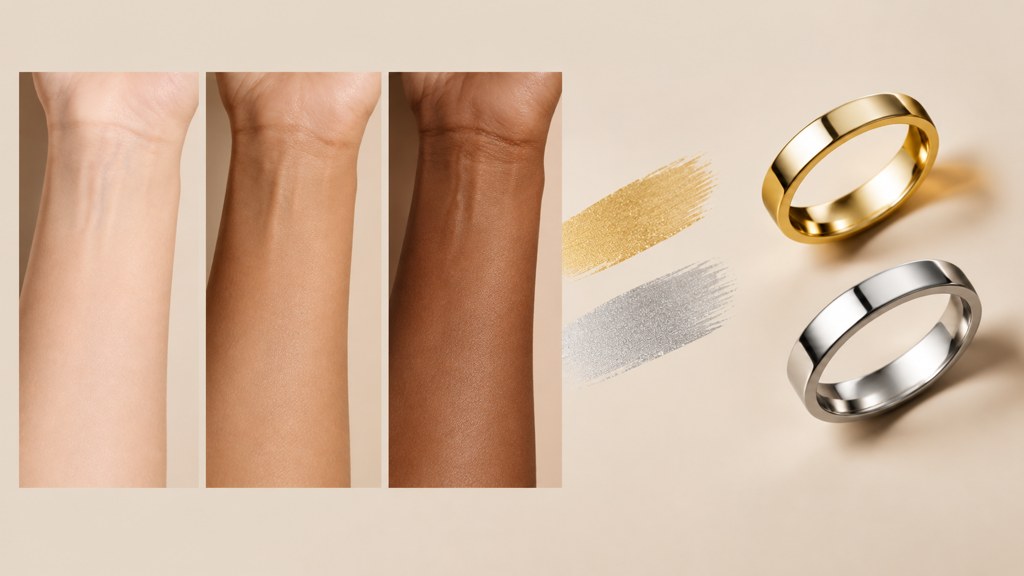
If two tests disagree, you are probably neutral, which is the largest group and the easiest to dress. Neutral undertones can wear both temperature families as long as the depth is right, so your decision moves entirely to how light or dark you want to go.
Which hair colors suit cool, warm and neutral undertones?
Colorists work in two axes: level, meaning how light or dark, and tone, meaning the temperature sitting on top of it. Pick tone from undertone and level from your natural base, and the shade name almost picks itself.
| Undertone | Tones that sit right | Tones that fight the skin | Reliable choices |
|---|---|---|---|
| Cool | Ash, pearl, smoky, violet-based | Golden, brassy, orange-based | Ash brown, cool espresso, icy blonde with a shadowed root |
| Warm | Golden, honey, caramel, copper | Blue-based ash, silver, jet black | Chestnut, caramel balayage, warm copper |
| Neutral | Both families at the right level | Anything at an extreme level | Beige blonde, soft mocha, chocolate with subtle warmth |
One rule outranks the table: the shade must not compete with your skin at the same temperature. A warm skin under a warm copper can read flushed, which is why colorists break up a single-temperature look with a cooler root or a lighter mid-length.
Contrast is a separate decision from tone
High contrast between hair and skin makes features read sharper and every uneven bit of skin more visible. Low contrast softens the whole face and hides more. This is often the real reason a technically correct shade still feels wrong.
How much can you change your hair color in one step?
Less than the internet implies, and there is a published limit worth knowing. Dermatologists put a number on it. The AAD advises picking a dye within three shades of your natural colour, and warns that going lighter than that needs higher volumes of peroxide, which causes more hair damage. Its other line is worth repeating: darker is generally kinder than lighter.
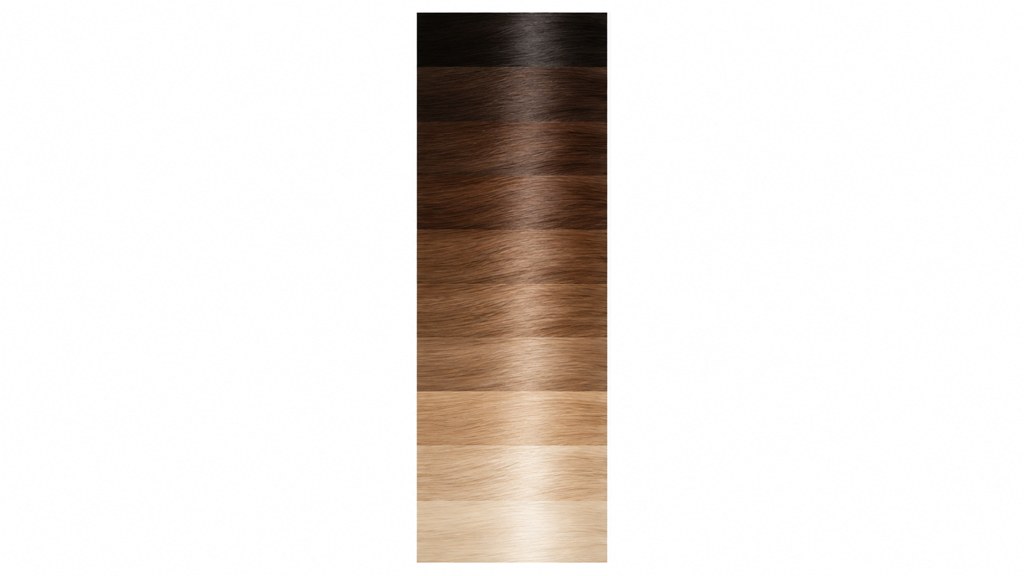
- Going lighter means lifting pigment out, and warmth is exposed on the way. That orange stage is chemistry, not a mistake, and it is why lightening is done in sessions.
- Going darker means putting pigment back in, and hair that has been lifted needs a warm filler first or the result turns muddy and green.
- Going cooler at the same level is the cheapest change and the easiest to reverse.
- Grey coverage is a separate job with its own rules, because grey hair takes color differently from pigmented hair.
This matters for previews specifically. A tool will happily render platinum on a dark base in one image. Your hair cannot do that in one appointment, and the AAD guidance above is the reason to treat that render as a destination rather than a booking.
How do you preview a hair color on your own photo?
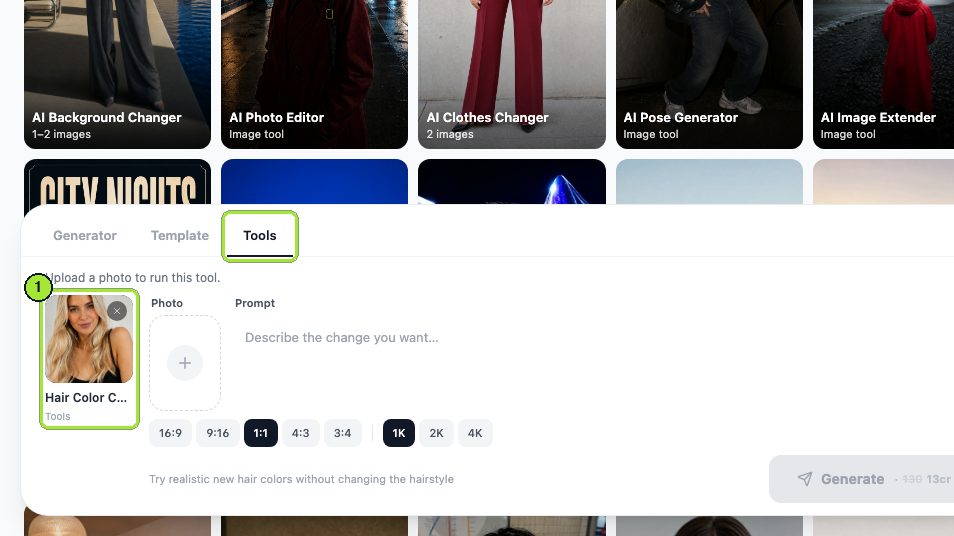
There is no shade picker in our workbench, so each shade is a sentence and a separate run. That sounds like a limitation and is actually useful, because it forces you to describe what you want in the language a colorist uses. Our hair color changer run on 7 September 2026 went as follows.
- 1
Upload a flat-lit frontal photo
Daylight, no lamp behind you, hair away from the face and against a plain wall. A photo with mixed light sources gives the model permission to relight the whole picture.
- 2
Write the shade like a formula
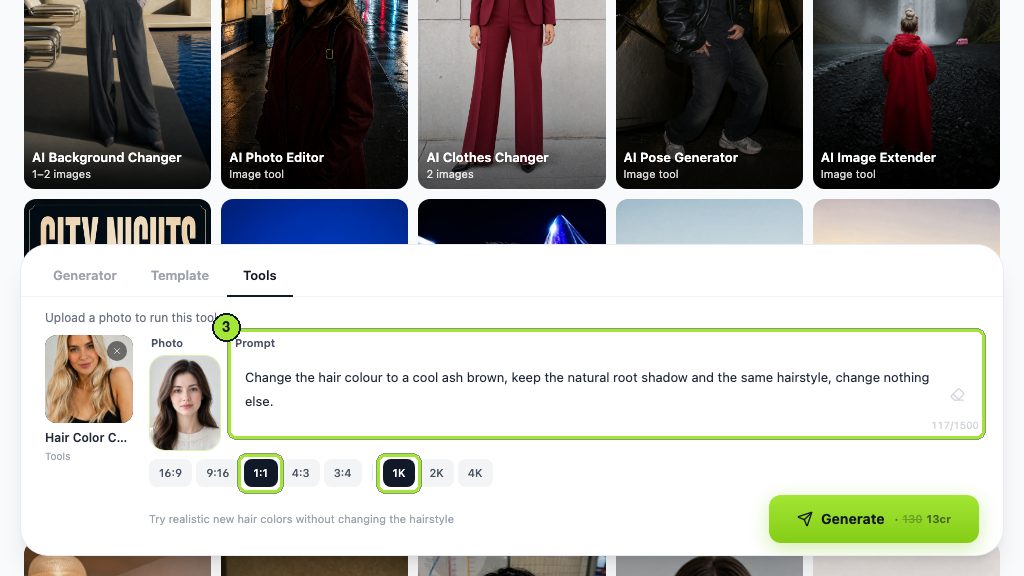
Our first prompt read: change the hair colour to a cool ash brown, keep the natural root shadow and the same hairstyle, change nothing else. Naming the root shadow is what stops the tool painting a flat block of colour from scalp to end.
- 3
Square, 1K, then Generate
We used the 1:1 and 1K chips. Thirteen credits per run, shown on the button, and the job appears in My Image while it renders.
- 4
Change one clause for shade two
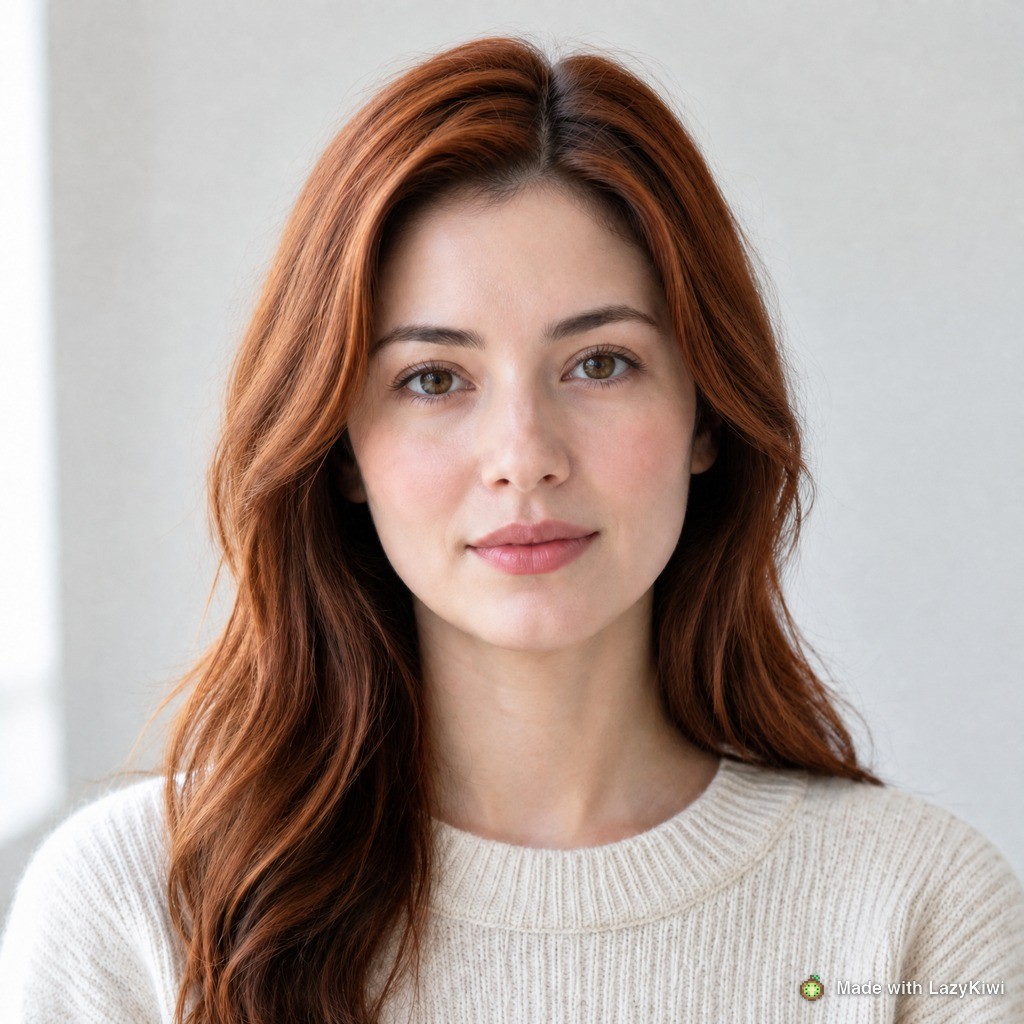
The second run swapped ash brown for warm copper red and touched nothing else, which is what makes the two results genuinely comparable.
- 5
Test the shade in bad light too
For the third run we deliberately fed an indoor selfie shot under a warm lamp and asked for high-lift platinum blonde. Three runs came to 39 credits.
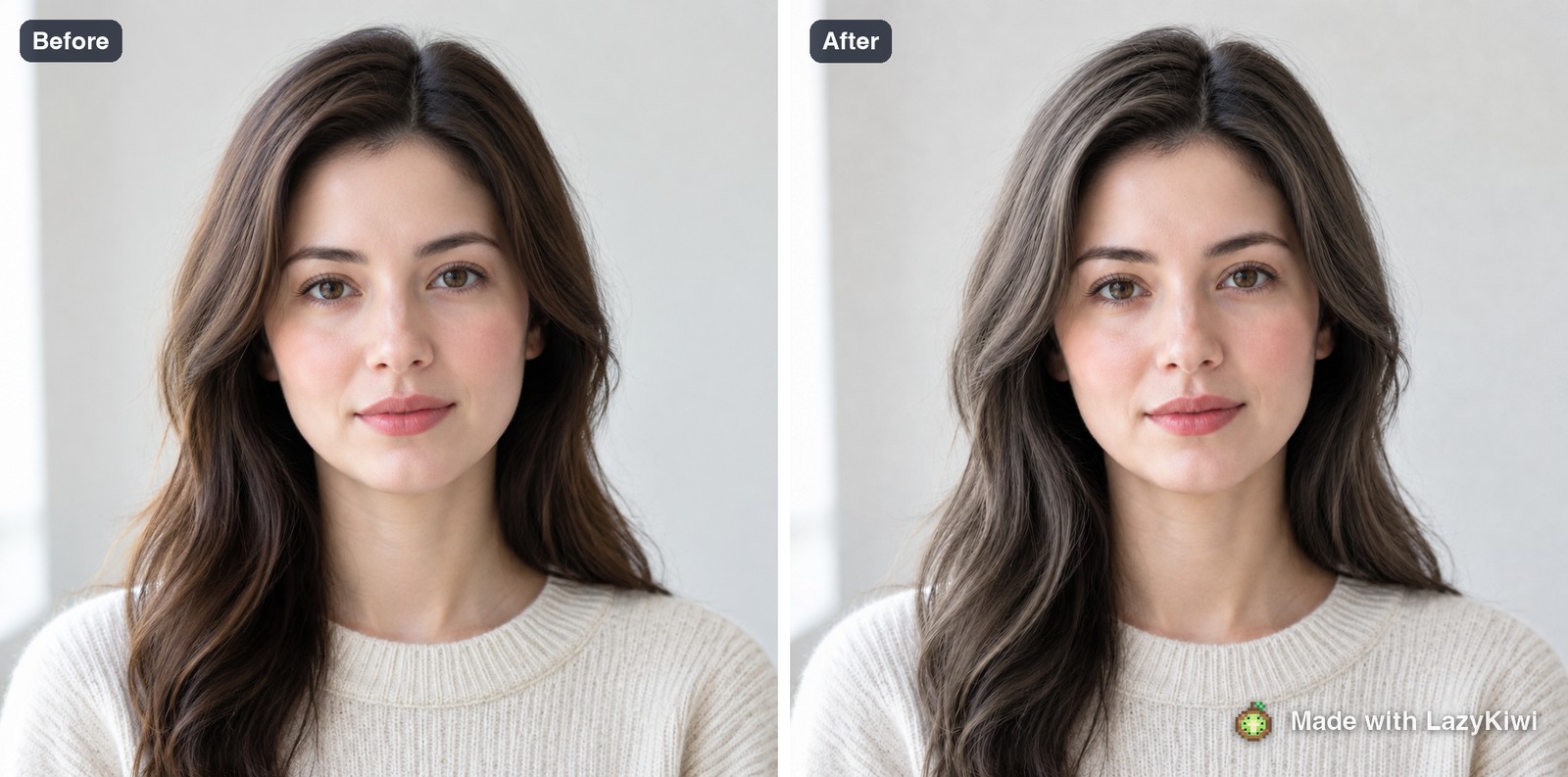
The third run is the interesting one, and it failed in a specific way. Fed a warm indoor selfie, the tool did not simply recolour the hair; it rebuilt the room, cooled the light, changed the expression and added an earring. The requested platinum arrived, but attached to a different photograph. Every tool in the workbench runs on GPT Image 2, which regenerates rather than repaints, and bad input light is where that becomes obvious.

Does your eye color change which shades work?
Not as a rule, but as a lever. Eye colour is the smallest area of colour on your face, so it only reads when something makes it read. Hair is the largest area, which makes it the control.
- A shade in the opposite temperature to your eyes makes them look stronger. Cool ash against warm hazel is the classic version of this.
- A shade in the same family softens the whole face into one impression, which suits people who want the hair rather than the eyes to be the event.
- Going much lighter overall lowers the contrast between eyes, brows and hair, and can make dark eyes read heavier than expected.
- Brows are part of this calculation. Changing hair by more than two levels without touching brows is the fastest way to look like a wig.
None of this is a rule you can fail. It is a way of predicting what a shade will do before you sit in the chair, which is exactly what a preview is for.
Is there a free hair color simulator that looks realistic?
A few, and they differ more in what they take from you than in what they cost. Everything in this table was read on the vendor's own page on 7 September 2026.
| Tool | Its own page, today | Realism limit we observed or it discloses |
|---|---|---|
| LazyKiwi hair color changer | A 1K render costs 13 credits, stated on the button; signup includes 40 credits | Rebuilds the whole frame in poor light, as our third run showed |
| Fotor | Its FAQ promises free editing with no image limit and downloads that carry no watermark | The free promise covers the editor; AI features are counted separately |
| Picsart | The plan grid starts at a discounted annual Pro tier and lists no free option | Its policy describes a scan of your face geometry, named as biometric data, whenever you apply an effect to a face |
| Perfect Corp | A business try-on platform with a free web demo and no consumer price | You meet it inside a brand's site rather than on its own |
Open them yourself before deciding: Fotor for the watermark wording, Picsart for the plan grid, and Perfect Corp for what a brand-facing hair try-on actually is. For seasonal shade coverage rather than mechanics, Allure, Cosmopolitan and Good Housekeeping all run standing hair colour sections.
Search volume splits between what hair color suits me and what color hair suits me, and both want the same answer. Anyone searching what hair color suits me quiz free is usually after a shortcut past the undertone step. A quiz can ask about your veins and your jewellery; it cannot see your base level, and level is half the answer. Treat a what hair color suits me quiz as a way to name your undertone, then bring that word to a preview.
What should you bring to a colorist after previewing?
Four things, and one of them is a photo of what you do not want.
- Two reference photos in the same light, ideally on hair whose base level is close to yours rather than three levels lighter.
- One anti-reference. Saying not this brassy prevents more disappointment than any amount of describing what you do want.
- Your honest colour history. Box dye, henna and old lightener all change what is chemically possible today, and none of them are visible in a photograph.
- The maintenance answer. Ask what this looks like in eight weeks with no salon visit, and decide on that picture rather than on the day-one one.

If the answer to what hair color suits me best keeps coming back as something four levels from your base, take the preview to the appointment and ask for the two-visit version. A colorist would far rather plan it than repair it.
What do hair color previews get wrong?
Three flattering errors, all visible in our own results once you look for them.
- Uniform shine. Rendered hair reflects light evenly along its whole length. Real coloured hair is duller at the ends, where the cuticle has taken the most damage.
- Missing root shadow, unless you demand it. Our copper run kept the darker root only because the prompt named it. Without that clause the tool paints scalp to tip in one value, which is a look nobody actually walks around with.
- Chemistry that does not exist. A render will lift a dark base to platinum in one step and show none of the warmth that lifting exposes. The AAD's three-shade guidance is the sanity check on that image.
And one that is not the tool's fault: input light. Shoot in daylight and the preview edits your hair. Shoot under a warm lamp and it rewrites your evening. If you want several shades side by side under identical conditions, run them from the image generator page using one photo and one changed clause at a time, then compare the finished cards in My Image.
Ask for the root shadow by name. Everything a preview gets wrong about colour begins at the scalp.
— Maya Chen
Key takeaways
- Undertone sets the temperature of the shade; your natural base sets how far you can travel. Answer both before looking at a single reference photo.
- The AAD advises staying within three shades of your natural colour, and warns that lightening further needs higher peroxide volumes and does more damage.
- There is no shade picker: each colour is a separate prompt and a separate 13-credit render at 1K.
- Name the root shadow in the prompt or the tool will paint one flat value from scalp to end.
- Poor input light triggers a full rebuild. Our warm-lamp selfie came back with a new room, new expression and an earring.
- Take an anti-reference and your real colour history to the appointment; neither is visible in any photograph.
Image & Design Editor
Maya Chen
Maya Chen writes the image side of the LazyKiwi blog. She tests every tool in the workbench on real photographs before she describes it, and prefers a measurement to an adjective.
FAQ
Common questions
What hair color suits me if I have a neutral undertone?
Neutral skin carries both temperature families, so the decision moves to level and contrast instead. Beige blonde, soft mocha and chocolate with a hint of warmth are the reliable middle. Choose depth by how much contrast you want against your skin rather than by season.
Can a hair color simulator show what my hair will really look like?
It shows the shade, not the chemistry. Rendered hair has even shine along its full length and no damaged ends, and it will lift a dark base to platinum in one image. Use it to judge whether a tone suits your skin, then ask a colorist what your base can actually reach.
How do I stop a preview painting one flat colour from root to tip?
Write the root shadow into the prompt explicitly. In our runs the phrase keep the natural root shadow was the only thing preserving dimension at the parting. Without it the tool renders a single value from scalp to end, which reads as a wig rather than a colour.
Does eye color really decide which shades work?
It acts as a lever rather than a rule. A shade in the opposite temperature to your eyes makes them read stronger, and a shade in the same family softens the whole face. Hair is the biggest block of colour on your head, so it controls how much the eyes register.
How many credits does previewing three shades cost?
Thirteen credits per render at 1K, so three shades came to 39 credits in our test, with the price shown on the Generate button each time. A new account starts with 40 credits, which covers exactly that comparison set with one credit to spare.
Try a shade before you commit to it
One photo, one shade written out in the Prompt box, 13 credits a render. Compare the results side by side in My Image before you book a colour appointment.
Related reading
What Is My Face Shape? A Measured Self-Test
Measure four numbers, get one answer. The tape-measure method, the six shapes, and what each one changes about hair, glasses and camera angle.
9 min read
What Hairstyle Suits Me? Test It Before You Cut
Face shape, hair texture and upkeep budget decide the cut, in that order. Work through all three, then preview the result on your own photo first.
9 min read
Oval Face Shape: How to Tell and What Suits It
How an oval face is measured, how it differs from round and oblong, and the haircuts, glasses and beard shapes that keep those proportions intact.
9 min read