Smooth Rolling Motion Any Clip
The Rolling Motion effect adds a smooth, rotating camera dynamic to your footage, creating a continuous spin that amplifies movement and draws attention. Ideal for product showcases, outfit reveals, action clips, and social media content like TikToks, Reels, and Shorts that need a high-energy visual hook. Add smooth rolling motion that tumbles through your scene. Free AI video effect, ready in seconds for dynamic TikTok and Reels. Make yours in LazyKiwi AI video generator, no sign-up needed.

WHAT IT IS
What Sells Smooth Rolling Motion
A Rolling Motion video adds dynamic energy by rotating the entire frame around a central point. This effect turns static or linear footage into a kinetic experience, making subjects appear to spin through space. It relies on consistent motion, a strong focal point, and often syncs with beats or transitions. Rolling motion looks best when it stays smooth. Line it up with 360 Rotation, and scroll-stopping effect videos has more ideas in the same vein.
Centered, Action-Ready Footage
Start with a subject in the middle of the frame, with balanced composition and enough space around it so the roll doesn’t crop out key details.
Focal Point in Motion
The subject stays anchored near the center as the frame rotates, creating an illusion of 3D spin. Natural movement like a jump or turn amplifies the effect.
Smooth Rotational Transform
The effect uses gradual angle changes with motion blur to maintain visual flow. Keyframes are often synced to audio beats for added impact.
Scroll-Stopping Social Energy
Rolling motion cuts through static feeds, making it perfect for product 360s, transition clips, and ads. It holds attention and increases content shareability.
CREATOR USE CASES
Application Scenarios
Explore how creators use the Rolling Motion effect to build stronger hooks and visual momentum across lifestyle, motion, and travel content.

Casual Street Freeze
Transform a simple walking shot into a scroll-stopping moment with motion blur and freeze cuts.
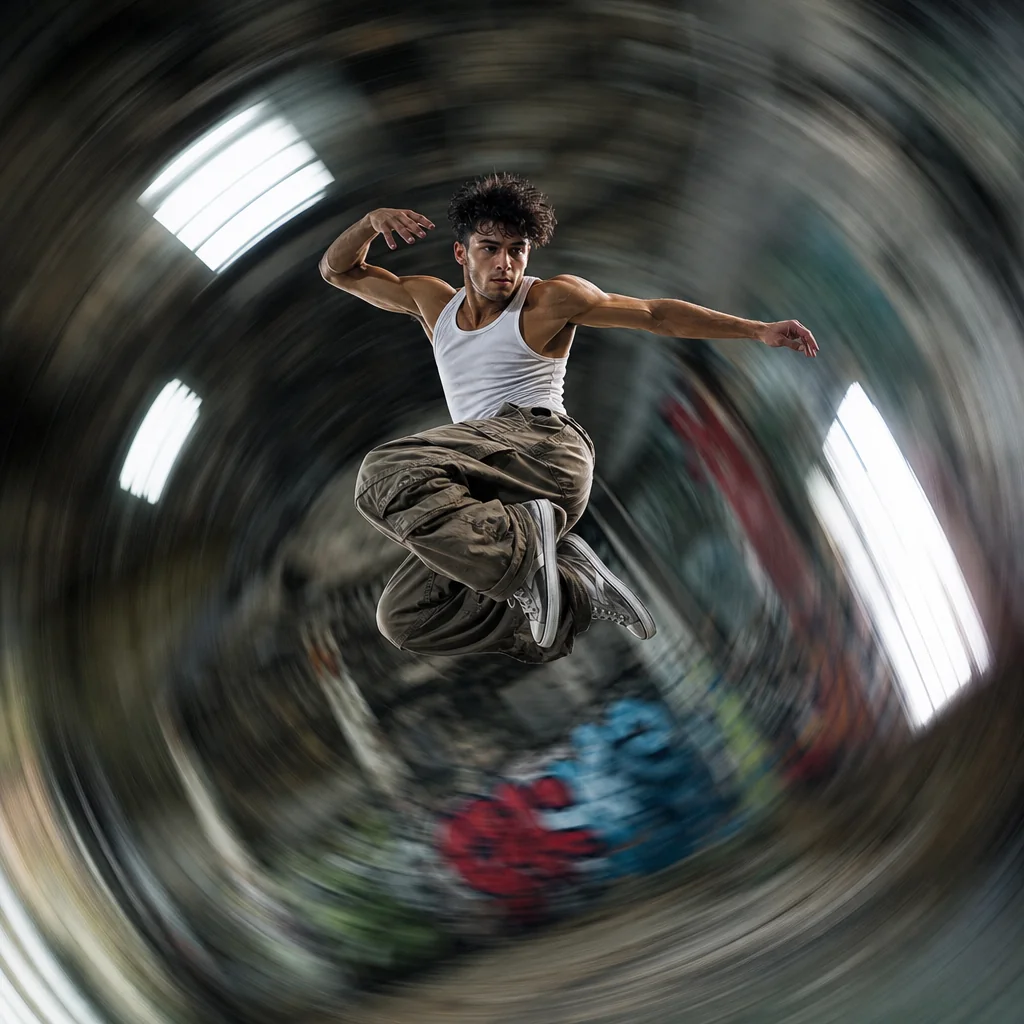
Dynamic Dance Flow
Amplify a dancer’s energy by rotating the scene around their acute movement.

Scenic Lookbook Stop
Highlight a travel outfit and iconic landmark by freezing the moment during a cinematic spin.
FAQ
Common questions
What is the Rolling Motion effect?+
Rolling Motion is a video effect that adds a smooth, continuous rolling or tilting movement to your image or clip, creating a dynamic sense of motion without manual camera work.
Why is Rolling Motion useful for TikTok, Reels, or Shorts?+
It instantly makes static shots more engaging, helps your content stand out in fast-scrolling feeds, and keeps viewers watching longer by adding a natural, looping movement.
Can I create a Rolling Motion effect from a single uploaded image?+
Yes. You can upload just one photo and the tool will automatically generate the rolling motion, turning a still image into a moving video clip.
What kind of image or video works best with Rolling Motion?+
Images with a clear subject, strong depth of field, or interesting backgrounds produce the most noticeable effect. Product shots, portraits, and landscape visuals all work well.
Can I use Rolling Motion for product, fashion, travel, or creator content?+
Absolutely. It’s ideal for product showcases, outfit reveals, travel highlights, and social media creator content where subtle movement can highlight details and add visual interest.
Where does rolling motion work best?+
Rolling motion adds energy to an otherwise static shot. If you like this, 3D Screen Break Effect and Bullet Time are natural next picks.
Other names for Rolling Motion
You might know this look as something else. Some call it a barrel roll transition, a tumbling edit, or simply the rotating motion effect popular in social media clips. Whatever name you use, LazyKiwi helps you transform these concepts into polished, short-video-ready visuals in just a few taps. Some tag it rolling motion, others a barrel roll or tumble effect, all describing the same rolling movement.
Create a Rolling Motion Video from a Frame, Upload, or Template
Start with a prompt, uploaded media, or a template to build your rolling motion effect.