
Instagram Photo Dump: How to Plan a Good One
What an Instagram photo dump is, why the unpolished format holds attention, how to sequence ten frames, and the caption structures that fit the tone.
 Priya Sharma 9 min read
An Instagram photo dump is a carousel of loosely related snapshots posted together with a short caption, and the whole point is that it looks unedited. It is not laziness dressed up as a style. Planning one takes about ten minutes: choose a run of frames that covers a real stretch of time, put them in an order that keeps people swiping, and write a caption that does not explain anything. This is how to do all three, plus what to do when the camera roll is too thin to fill a set.
What is an Instagram photo dump?
The clearest definition is by contrast. A grid post is one image, chosen from many, edited to look its best. A dump is many images, barely chosen, edited hardly at all, posted as one carousel. The photo dump meaning that people actually use is closer to a diary page than to a gallery wall.

- It covers a period, not a moment. A weekend, a week, a month.
- It mixes subjects on purpose. A portrait, a plate of food, a street, a screenshot.
- It tolerates technical faults. Blur, grain and a wonky horizon are part of the register.
- It is posted late. Two weeks after the events is normal and reads as casual rather than as reporting.
None of that is accidental. The unpolished look is a deliberate style with rules, and breaking them shows immediately: ten perfectly graded frames posted together read as a portfolio, not as a dump.
Why do photo dumps perform when polished posts do not?
Three mechanisms are plausible, and it is worth separating what is structural from what is folklore. No engagement figures appear here, because the platform does not publish per-format numbers and anything else circulating is somebody's private dashboard.
- Time in the post. A carousel takes longer to get through than a single image, because each swipe is a decision to continue. Anything that holds attention longer has more chance to be noticed.
- Lower posting friction. A format that does not require a good photograph gets posted more often, and frequency does more for a small account than polish does.
- The behind-the-scenes read. Casual frames feel addressed to people who already follow you rather than to strangers, and that changes how comments read.
- What is not a mechanism: any claim about a specific reach multiplier for carousels. Treat every such number as unsourced unless it comes from the platform itself.
Format changes are announced in different places by different companies. TikTok publishes dated announcements in its newsroom, where the entry on 4 September 2026 was about a film festival partnership rather than any format change, while Instagram tends to update the limits quietly inside its help centre. Read the source, not the screenshot of the source.
How many photos should be in a photo dump?
Seven to twelve is the working range. Below six it reads as an ordinary post that could not decide; above twelve, people stop swiping before the end and your closing frame never gets seen.
- Seven to nine: the sweet spot for a weekend or a single trip.
- Ten to twelve: fine for a month in review, if the subjects are genuinely varied.
- More than twelve: split it into two posts a week apart. Nobody is finishing a twenty-frame set on a phone at a bus stop.
- Whatever the ceiling is, check it in the help centre rather than in an article. Instagram has raised the number of photos and videos allowed in a single feed post before, and it will again.
The last slide matters more than the middle ones, because it is what a viewer sees when they stop swiping and it sits under the caption while they read. Put something worth landing on there.
How do you sequence a photo dump?
Four positions do the work. Everything between them is filler in the good sense, the material that makes the set feel like a real stretch of time.
| Position | Its job | What belongs there | What ruins it |
|---|---|---|---|
| Slide 1 | Earn the swipe | The strongest single image, or the funniest one | A photo that says everything, leaving no reason to continue |
| Slide 2 | Prove the set is worth it | Something different in subject and colour from slide 1 | A near-duplicate of slide 1, which reads as a burst |
| Middle slides | Carry time and texture | Details, food, hands, a screenshot, a blurry one | Five frames of the same scene from slightly different angles |
| Second to last | Slow it down | A quiet frame, a wide shot, an empty room | A second hero image competing with slide 1 |
| Last slide | Land it | A joke, a portrait, or the frame that explains the caption | A blank or an accidental screenshot nobody meant to include |
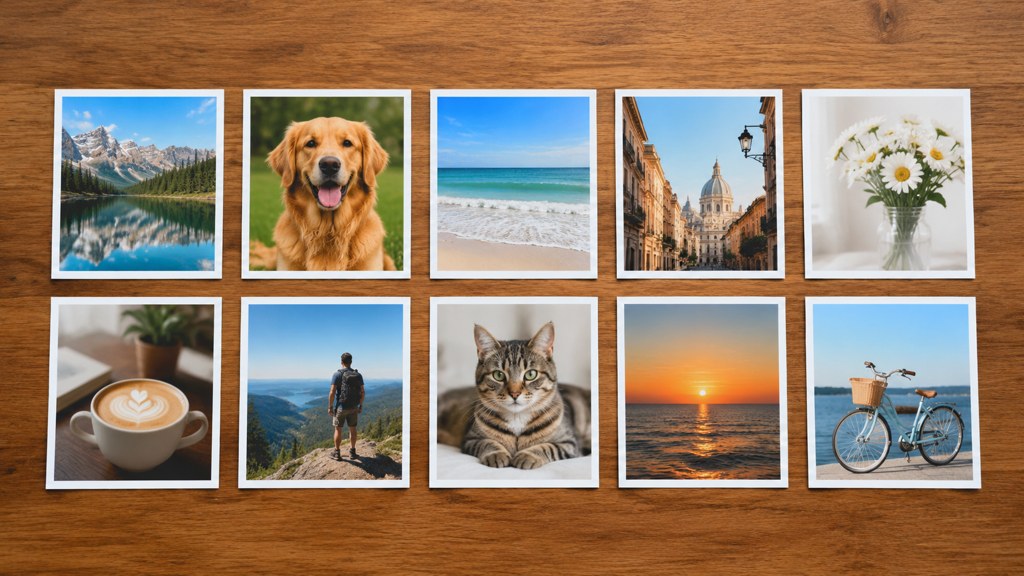
Lay the whole set out flat before posting, on a table or in a folder view. Two frames that repeat each other are obvious side by side and invisible when you scroll a camera roll.
What kinds of photos belong in a dump?

A mix that reads as a real week, roughly in these proportions.
- One good portrait. Somebody has to be in it or the set reads as a mood board.
- Two scene shots. Where you were, without making a postcard of it.
- One food or drink frame. Overused for a reason: it dates the set to a place and a time of day.
- One screenshot. A message, a note, a song. This is the frame that makes a set feel private.
- One imperfect frame. Blurred, badly lit, half a face. It is load-bearing, because it is what tells a viewer the rest was not staged either.
- One detail nobody else would photograph. A door, a receipt, a pair of shoes by the wall.
Do not grade them all the same
A uniform filter across ten frames turns a dump back into a campaign. If anything, let the white balance vary. This is the one place where mismatched colour helps rather than hurts.
What captions work for a photo dump?
Photo dump captions work by being shorter than the set deserves. The pictures already did the work, and a caption that explains them undoes it. Five structures cover almost everything.
- 1
The date stamp
A month, a place, a season. Four words at most. It gives the set a frame without commentary.
- 2
The fragment
An unfinished sentence or a single noun. It reads as a thought rather than an announcement.
- 3
The list
Three or four items separated by commas, matching nothing in particular in the photographs.
- 4
The aside
One small joke about one slide, ideally the worst one. Signals that you know which frame is bad.
- 5
The nothing
An emoji or a full stop. Works when the set is strong and fails when it is not, which makes it a useful test.
Skip the hashtag block. On a personal account a stack of tags reads as reach-seeking and undercuts the casual register the whole format depends on.
How do you make a photo dump when your camera roll is thin?
Two honest routes and one dishonest one. The dishonest route is pretending stock images are your week; it is obvious and it costs trust. The honest routes are recutting what you have, and generating connective frames that are clearly styled rather than passed off as photographs.
- Recut one shoot. Different crops, one black-and-white conversion, a detail from a corner of a frame you already posted. Five frames become nine.
- Photograph the ordinary. The kettle, the bus window, the notebook. Twenty minutes of deliberately boring photographs fills the middle of any set.
- Generate the connective frames. A styled panel that nobody could mistake for a snapshot works as a divider, a cover or a closing slide.
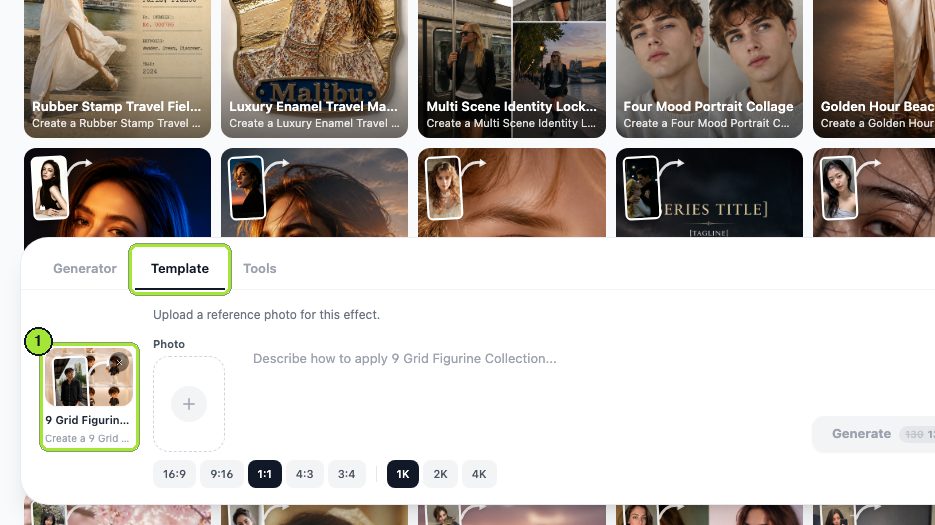
We tested the nine grid template as a cover-and-closer generator, running it twice: once on an indoor selfie and once on a photograph of a cat.
- 1
Upload one photograph
A single Photo box, one image. An ordinary indoor selfie is enough; studio quality is not required.
- 2
Set the shape and the size
We used the 1:1 ratio chip with 1K resolution, which is the shape a feed post gets cropped to anyway.
- 3
Check the price on the button
Generate names the cost before it commits. Each run came to 13 credits.
- 4
Change the source, not the settings
The second run swapped the selfie for the cat photograph and left the chips alone, so the difference is entirely down to what went in.
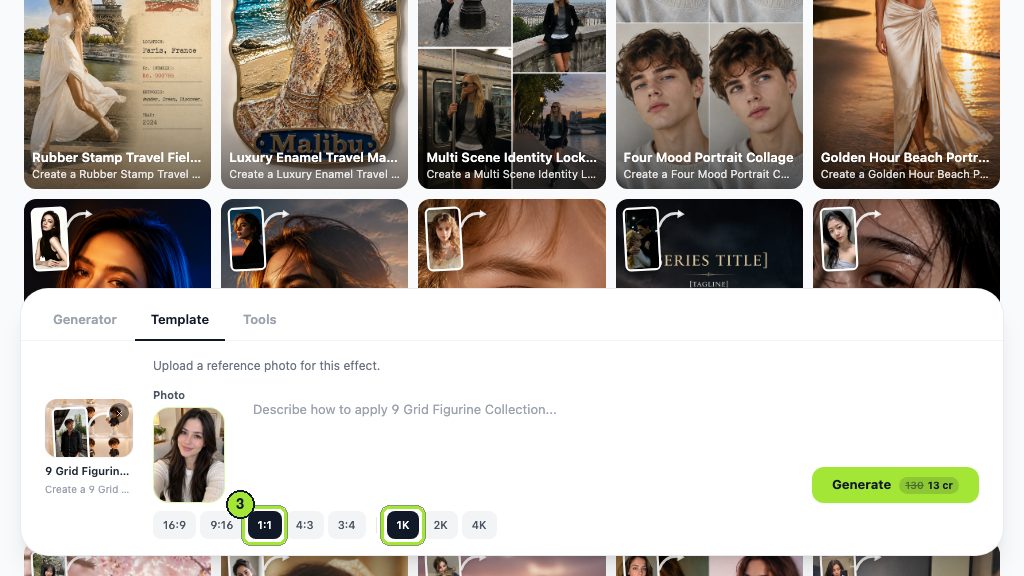
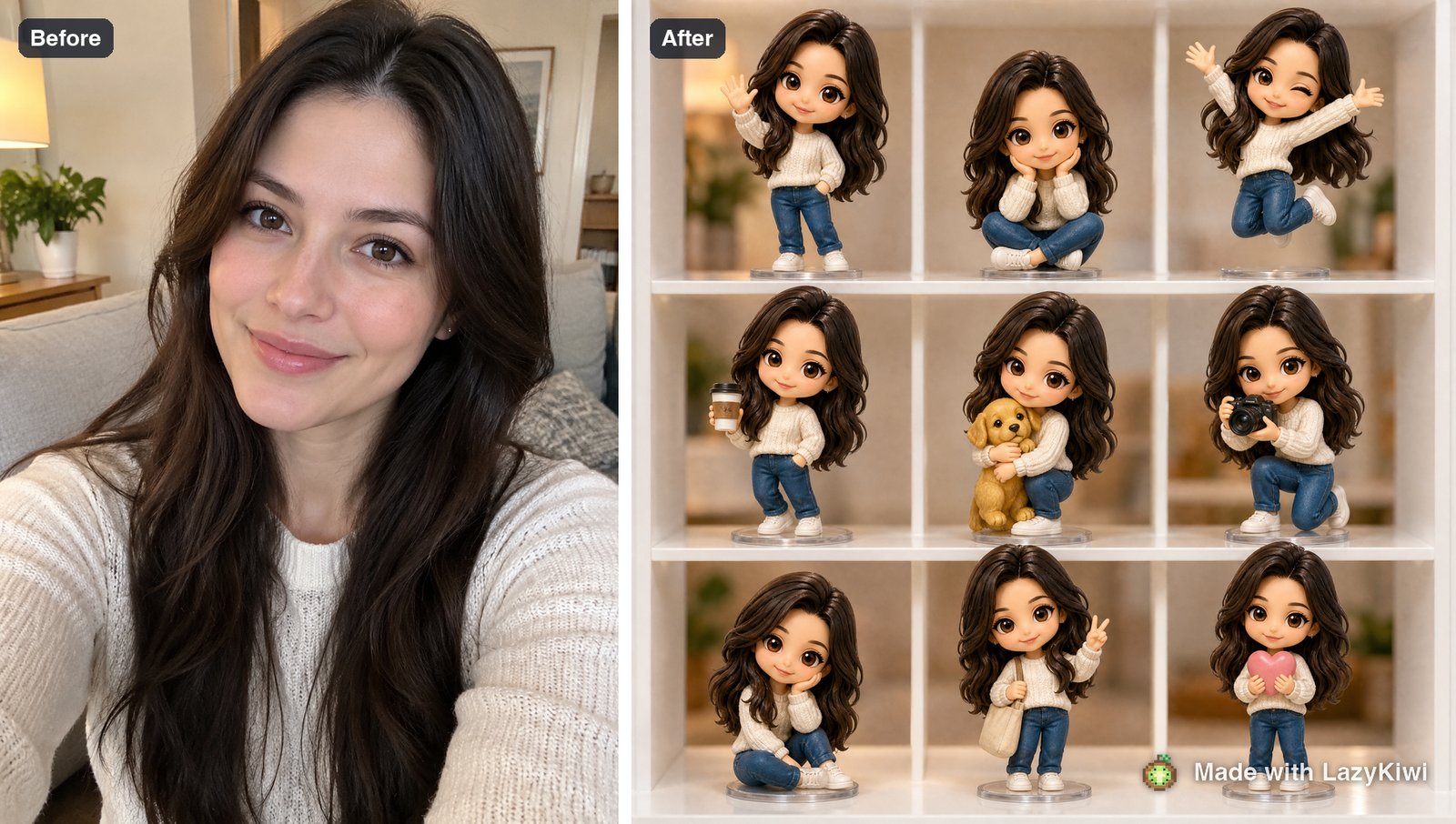
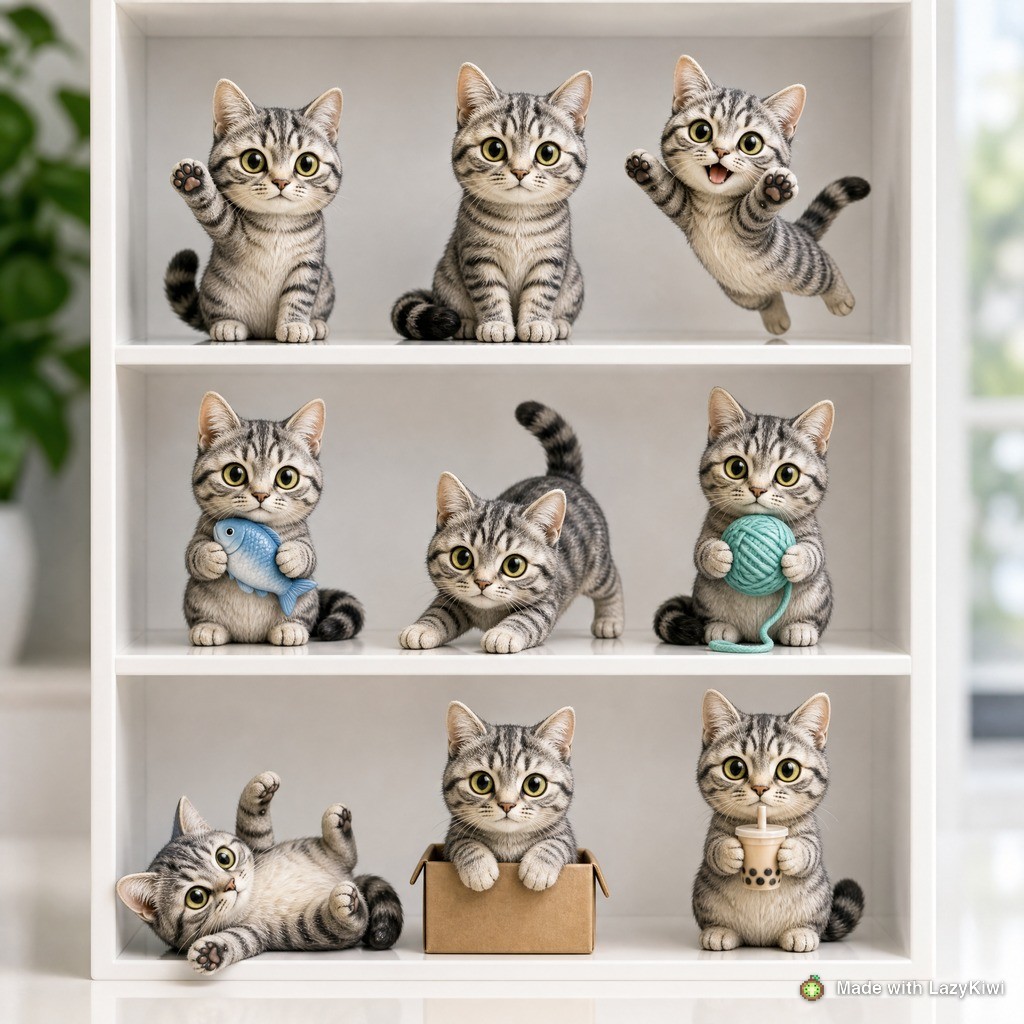
Both runs used GPT Image 2, and the photo editor tools handle the recutting half of the job. A new account starts with 40 free credits, which is three runs. Square is the shape that matters here: of 143 external image jobs run through the LazyKiwi workbench during August 2026, 124 finished at 1:1, which is the crop a feed set gets anyway.
Label the generated frames
A styled panel used as a cover is fine. A generated image posted inside a set of real photographs, with nothing to distinguish it, is the thing that gets an account called out in the comments. Keep the difference visible.
How do you post a photo dump as a story instead of a carousel?
Stories suit a dump because the format is already disposable. The difference is pacing: a carousel is swiped at the viewer's speed, a story runs at its own.
- Cut the set to five or six. Stories are watched, not browsed, and attention drops faster.
- Put the strongest frame second, not first. The first card is often skipped through before anyone has decided to watch.
- Use one sticker type across the set, or none. Mixed stickers make a sequence look like a slideshow template.
- Add a poll or a question box on the last card only. It gives the sequence somewhere to end.
- Save it as a highlight if it covered a trip. That is the only case where a story dump has a second life.
Mobile is where all of this gets seen. On our own marketing pages, Google Search Console recorded 33 clicks from 195 mobile impressions against 48 clicks from 2,606 desktop impressions in the 90 days to 2026-09-04, which is the clearest reminder we have that a phone screen is the real format.
What kills a photo dump?
- Ten near-identical frames. A burst is not a set, and the second slide is where a viewer decides.
- One heavy filter across everything. It rebuilds the polish the format exists to avoid.
- A caption that explains the joke. If slide six needs a paragraph, cut slide six.
- Nothing but portraits of yourself. The mix is what makes it read as a week rather than as a shoot.
- Posting it the same hour it happened. Immediacy belongs in stories; a dump works because time has passed.
- Chasing an Instagram photo dump aesthetic from a reference account. Copying somebody else's camera roll produces something that looks like neither of you.
Boards on Pinterest and stock libraries such as Getty Images are full of the polished version of this format, which is a useful counter-example. Editing tools such as Picsart and Adobe Express will happily make every frame match; for this one format, resist that. Photography publications such as PetaPixel cover the opposite discipline, which is worth reading precisely because a dump is not that.
Key takeaways
- A dump covers a period rather than a moment, mixes subjects on purpose and tolerates technical faults.
- Seven to twelve frames is the working range; check the platform's current per-post ceiling in the help centre rather than in an article.
- An Instagram photo dump lives on slide two, which decides whether anyone keeps swiping; the last slide is what sits under the caption.
- The imperfect frame is load-bearing: it is what tells a viewer the rest was not staged.
- Photo dump captions should be shorter than the set deserves, with no hashtag stack.
- When the camera roll is thin, recut one shoot or generate clearly styled connective frames, and keep the difference visible.
Creator Growth Editor
Priya Sharma
I study what makes short-form content spread, then turn the pattern into something you can repeat on a Tuesday afternoon without a studio.
FAQ
Common questions
What is the photo dump meaning on Instagram?
A carousel of loosely related, lightly edited snapshots posted together with a short caption, usually covering a week or a month rather than a single event. The unpolished look is the style, which is why a set of ten perfectly graded images reads as a portfolio instead.
How do I do a photo dump on Instagram?
Choose seven to twelve frames covering a real stretch of time, mix the subjects, order them so slide two differs sharply from slide one, and finish on something worth landing on. Write a caption of four or five words and skip the hashtag block.
How do you do a monthly photo dump on Instagram?
Collect frames as the month goes rather than searching at the end, aim for ten to twelve covering different weeks, and order them by time so the set reads as a passage rather than a pile. A month in review tolerates more frames than a weekend set does.
Can you delete one photo from an Instagram dump?
Editing a published carousel is handled inside the app and the options have changed over the years, so check the current behaviour in the help centre before you post something you may want to prune. Planning the set properly beforehand avoids the question entirely.
What should you not post in a photo dump?
Near-identical frames, anything heavily filtered to match, screenshots that reveal other people's messages, and generated images passed off as photographs. The format runs on looking casual and honest, and each of those breaks one half of that.
Fill the gaps in a thin camera roll
Upload one photo and get a nine-panel styled set back for a cover or a closing slide. Each 1K run costs 13 credits and a new account starts with 40 free.
Related reading
Pose Reference Library: 40 Poses by Use Case
Forty pose references sorted by what you need them for, figure drawing, portrait sessions, product shots, plus how to generate your own on demand.
10 min read
Photo Collage Ideas: 15 Layouts by Occasion
Fifteen collage layouts for birthdays, trips and anniversaries, the grid maths behind each, and how to build one from photos you already have.
9 min read
AI Photo Booth: Event Options and Cheaper Setups
What an AI photo booth costs to rent, what the software actually does, and how to run one for a wedding or office party without hiring a vendor.
9 min read
Content Repurposing: Turn One Photo Into a Week of Posts
Content repurposing from one photo: pick a source that survives recuts, run seven multiply steps in LazyKiwi, and post a Day 1 to Day 7 plan on three apps.
8 min read