
Google Flow Alternatives: 10 AI Video Tools, Prices Checked
Google Flow alternatives sorted by what you need: Veo without Flow, multi-model studios, free plans and open models, with prices read on 7 October 2026.
 Marcus Tan 12 min read
The right Google Flow alternatives depend on why you are leaving. If you like Veo but not the credit budget, use a platform that also runs Veo. If you want a different model, Kling, Hailuo, Seedance and Wan each do something Veo does not. If you mostly need editing around the clip, Runway or Adobe Firefly fit better than any single model. This guide covers Google Flow AI, the video studio built on Veo, not Flow Music, Wispr Flow or Apache Airflow. Every price below was read on the vendor's own page on 7 October 2026; where a vendor shows no price, we say so instead of guessing. LazyKiwi, which publishes this blog, is one of the ten entries, and we say where it falls short.
What Google Flow gives you on each Google AI plan
Before comparing anything, it helps to know what you are replacing. Google's plans page (US prices, read 7 October 2026) attaches Flow to every tier, but video is not in every tier:
| Google AI plan | Price | What the plan says about Flow and Veo |
|---|---|---|
| Free | $0 | Access to Flow "including limited access to Nano Banana Pro" (images); no Veo listed |
| Google AI Plus | $4.99 a month | 200 Google Flow Credits |
| Google AI Pro | $19.99 a month | 1,000 Google Flow Credits; "a limited trial of Veo 3.1 Lite" in the Gemini app |
| Google AI Ultra | $99.99 or $199.99 a month | 10,000 or 25,000 Google Flow Credits; "video generation with Veo 3.1" |
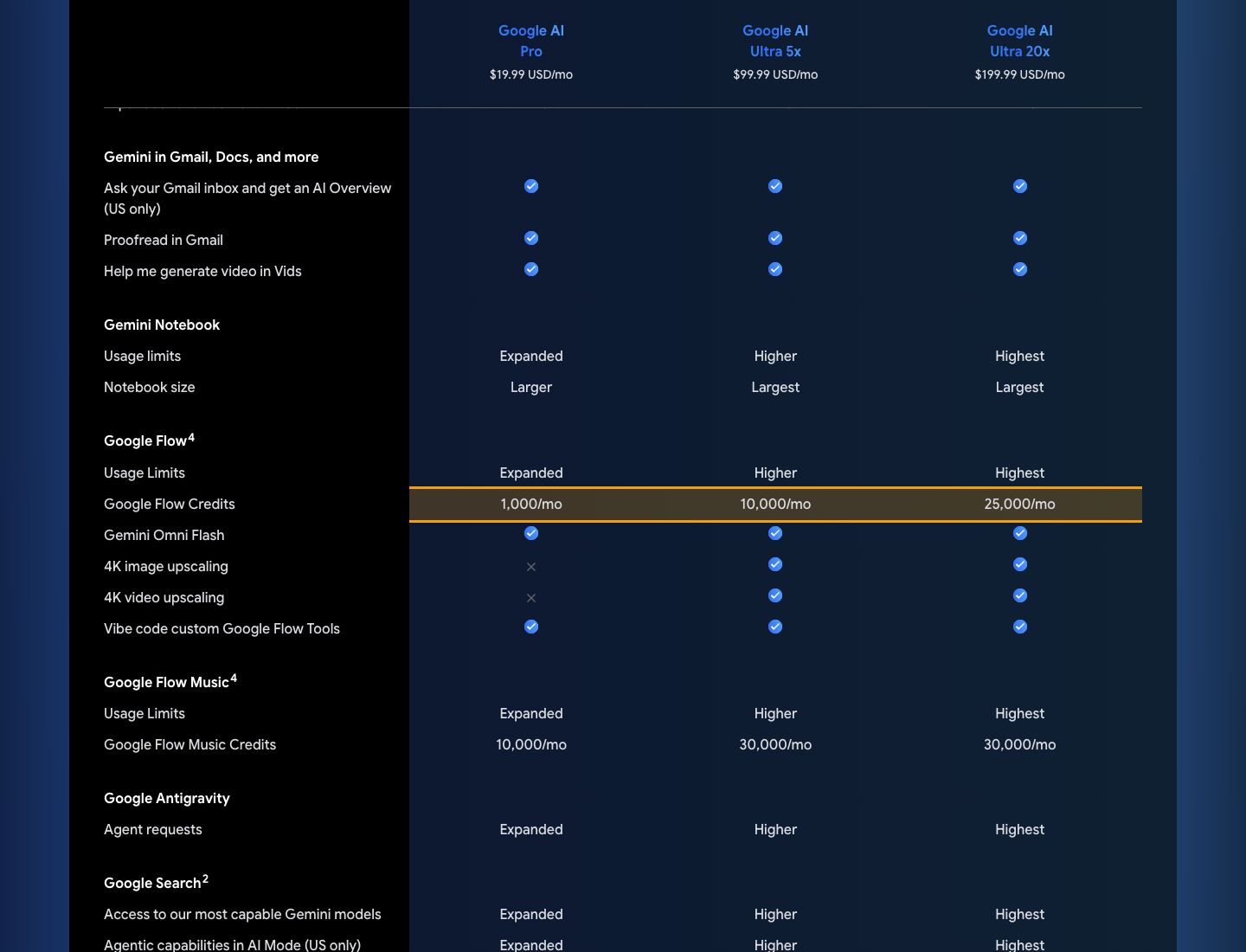
Three details from Google's Flow help center matter for the comparison. Google Workspace business and education accounts get 50 daily credits. Flow is 18+ only. And Google does not publish a per-clip credit price: the page says model costs "are evolving fast" and shows the latest cost inside the product when you pick a model. So any article quoting an exact credit cost per Veo clip is quoting a number Google itself says can change.
At launch in May 2025, Google described Flow as built on Veo, Imagen and Gemini, with camera controls, a Scenebuilder for extending shots, asset management and reusable "ingredients", per Google's launch post. Those are the features an alternative has to match if you used them.
Google Flow alternatives at a glance
Grouped by the reason people leave. Prices are the lowest paid tier shown on the vendor's page on 7 October 2026; "not shown" means the page we could read listed no dollar figure.
| Tool | Best for | Runs Veo? | Free route | Lowest paid price seen |
|---|---|---|---|---|
| Leonardo.Ai | Keeping Veo with other models beside it | Yes, Veo 3.1 incl. Fast and Lite (per Leonardo) | 150 fast tokens a day (per Leonardo) | $10 a month billed yearly (per Leonardo's article) |
| LazyKiwi | Many video models plus templates and tools in one workbench | Veo 3.1 Lite | 40 credits a month | See the pricing page |
| Runway | Editing and VFX around the clip | Not listed on pricing page | 125 one-time credits | $12 a month billed yearly ($15 monthly) |
| PixVerse | Daily free credits and many third-party models | Not listed | Daily credits on the Basic plan | Credit packs from $5 |
| Pika | Effects and quick social clips | Lists Google among its model providers; Veo not named | Free plan has no monthly credits (packs only) | $10 a month |
| Adobe Firefly | Commercial work inside Adobe apps | Not in its video partner list | Limited daily generations | $9.99 a month |
| Kling AI | Motion-heavy shots, long takes | No | Not stated on the page we read | Not shown |
| Hailuo AI | Fast everyday clips | No | Not stated on the page we read | Not shown |
| Luma Dream Machine | Camera motion and image-to-video | No | Not stated on the page we read | Not shown |
| Wan + ComfyUI | Running a model on your own GPU | No | Free (Apache 2.0 weights) | Your hardware |
Kling, Hailuo and Luma sell credit plans, but the pages we could read today showed no dollar amounts or free allowance, so those cells are left blank rather than copied from a third-party list. "Runs Veo?" means the vendor's own page names Veo, not whether it might in future.
Can you use Veo without Google Flow?
Yes, and for many people this is the real question behind the search. If Veo's look is why you opened Flow, three routes keep it:
- **Leonardo.Ai.** Its own Google Flow alternatives article says it offers Veo 3.1, including the Fast and Lite variants, next to models such as MiniMax H3, Hailuo 2.3 and Seedance 2.0 Mini. The same article lists a free plan with 150 fast tokens refreshed daily and paid plans from $10 a month billed yearly. Its pricing page blocked our checker today, so confirm at checkout.
- **LazyKiwi.** The workbench runs Veo 3.1 Lite, Google's lower-cost Veo 3.1 tier, for text-to-video and image-to-video in 16:9 or 9:16 at 720p or 1080p. It is not the full Veo 3.1 that Google reserves for Ultra, and it is not Flow: there is no Scenebuilder timeline. What you get instead is the same Veo family next to other models under one credit balance.
- **The Gemini app.** Google AI Pro includes a limited trial of Veo 3.1 Lite and Ultra includes Veo 3.1, per the plans page. That is still Google's subscription, just without Flow's editor.
A Lite tier trades some quality for price and speed. If you are leaving Flow because of credits, test the Lite tier on your hardest shot before assuming it replaces full Veo 3.1.
Best multi-model studios: Runway, PixVerse, Pika and Adobe Firefly
These replace Flow's role as a studio: one place to generate, keep assets and edit. None of them is Veo-first, but several host models that compete with it.
Runway
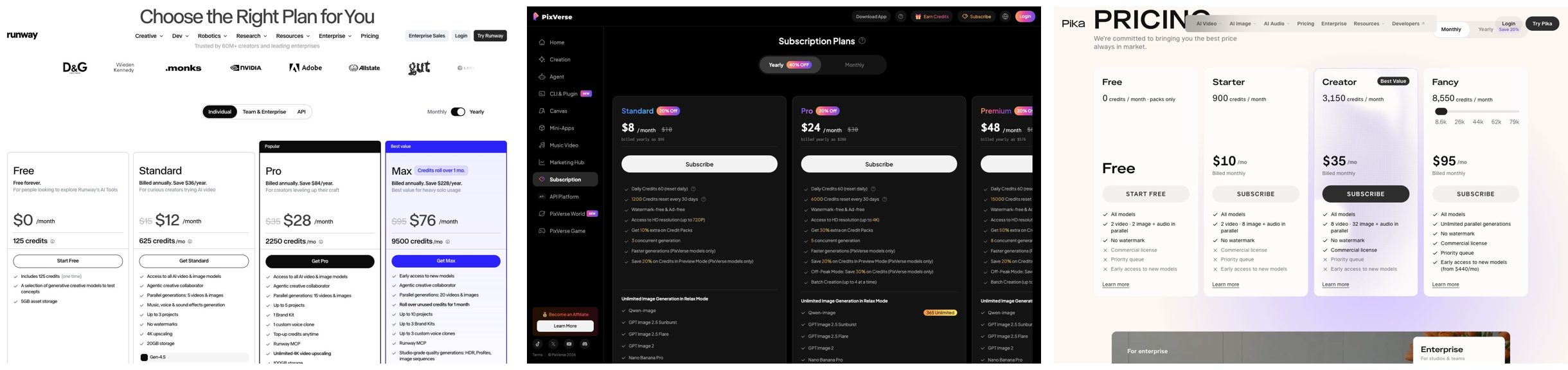
Runway's pricing page lists a free plan with 125 one-time credits, Standard at $12 a month billed yearly ($15 monthly) with 625 credits, and Pro at $28 a month billed yearly ($35 monthly) with 2,250 credits. The page converts Standard's credits into 52 seconds of Gen-4.5 and shows Kling 3.0 and Nano Banana Pro among the models available. It is the closest match if you used Flow mostly for editing shots together, because the editor is the product.
PixVerse
PixVerse's pricing page is built around daily credits: the Basic plan shows 60 initial credits and 30 daily credits that expire at the end of each day, and paid plans add membership credits from 1,200 a month. Higher tiers list third-party video models including Seedance 2.5, MiniMax H3, Kling O3, Sora 2 and Gemini Omni Flash. Credit packs run from $5 to $100.
Pika
Pika's pricing page shows a Free plan with no monthly credits (packs only), Starter at $10 a month for 900 credits, Creator at $35 for 3,150 and Fancy at $95 for 8,550. Pika's strength is effects and playful templates rather than long cinematic shots.
Adobe Firefly
Adobe's Firefly plans page lists a free plan with limited daily generations and paid tiers at $9.99, $19.99, $49.99 and $199.99 a month, with generative credits spent on video and partner models. Its video partner list names Runway, Kling AI, Luma AI and Topaz; Veo is not on it. Pick it if your team already works in Premiere and Photoshop.
Single-model apps worth testing: Kling, Hailuo, Seedance and Luma
If the reason you are leaving is the output itself, switch model rather than studio. These are the names that come up most in "vs Google Flow" searches, with what each is known for and where to run it.
- **Kling AI.** Kuaishou's model, strongest on human motion and longer takes. Run it on Kling's own site, inside Runway or Firefly as a partner model, or as Kling v3 Omni on LazyKiwi, which offers text, image and start-end frame modes.
- **Hailuo AI (MiniMax).** Quick, realistic clips from the Hailuo site, the maker of the MiniMax models. LazyKiwi runs Hailuo 2.3 Fast for image-to-video.
- **Seedance (ByteDance).** Smooth, social-ready motion. Available on PixVerse's higher tiers, in Leonardo's list as Seedance 2.0 Mini, and as Seedance 2.0 on LazyKiwi.
- **Luma Dream Machine.** Known for camera movement and image-to-video; plans are credit-based, see Luma.
- **Sora 2.** OpenAI's model with synchronized audio; LazyKiwi lists it as Sora 2. OpenAI's own page blocked our checker today, so we make no claim about its current plans.


A practical way to choose among them: write one prompt you actually need, run it on two models, and keep the one that needs fewer retries. Retries, not the sticker price, decide what a finished shot costs.
Free open-weight option: Wan and ComfyUI
If you want a Google Flow alternative free of any subscription, the honest answer is an open model on your own GPU. Alibaba's Wan 2.2 repository states the models are under the Apache 2.0 licence, and ComfyUI is the usual node-based interface for running them. You pay in setup time and hardware instead of credits, and there is nothing like Flow's scene editor out of the box.
If you want Wan without the install, LazyKiwi hosts Wan 2.7 for image-to-video and start-end frames and Wan 2.2 for short, stable motion from a still.
Is there a free Google Flow alternative?
Several, but "free" means four different things, and only one of them gives you video every day:
| Kind of free | Examples (as stated on 7 October 2026) | What it is good for |
|---|---|---|
| Daily refreshing credits | PixVerse Basic (30 a day), Leonardo (150 fast tokens a day, per Leonardo) | Small daily experiments |
| Monthly free credits | LazyKiwi Free (40 credits a month, refreshed monthly) | A few test generations a month |
| One-time trial credits | Runway (125 credits, once) | Judging a tool before paying |
| Free software | Wan 2.2 with ComfyUI | Unmetered use if you own a capable GPU |
Flow's own free tier, per Google's plans page, is image-focused: it lists limited Nano Banana Pro access and no Veo. Google Workspace accounts are the exception, with 50 daily Flow credits.
A small monthly allowance runs out after a handful of video clips on any platform. Read the credit price shown before you press generate, and test with the shortest duration first.
Which alternative fits a prompt, an image, a storyboard or a longer video?
Pick by what you have in hand, not by brand.
- 1
Only a text prompt
Any of the text-to-video models works. On LazyKiwi, open the video generator, choose Veo 3.1 Lite, Kling v3 Omni or Seedance, and compare two models on the same prompt.
- 2
A reference image or product shot
Image-to-video holds your subject better than a prompt alone. Hailuo 2.3 Fast and Wan 2.7 on LazyKiwi are image-to-video models; Luma and Kling are strong here too.
- 3
A storyboard or several connected shots
This is what Flow's Scenebuilder was for. Runway's editor is the closest replacement; on other tools, generate shots separately with a start-end frame model such as Kling v3 Omni or Wan 2.7 and cut them in an editor.
- 4
A ready-made format
If you want a known effect or trend rather than a blank prompt, start from a template. LazyKiwi's templates and Pika's effects are built for this.
- 5
Titles, counters or logo animation
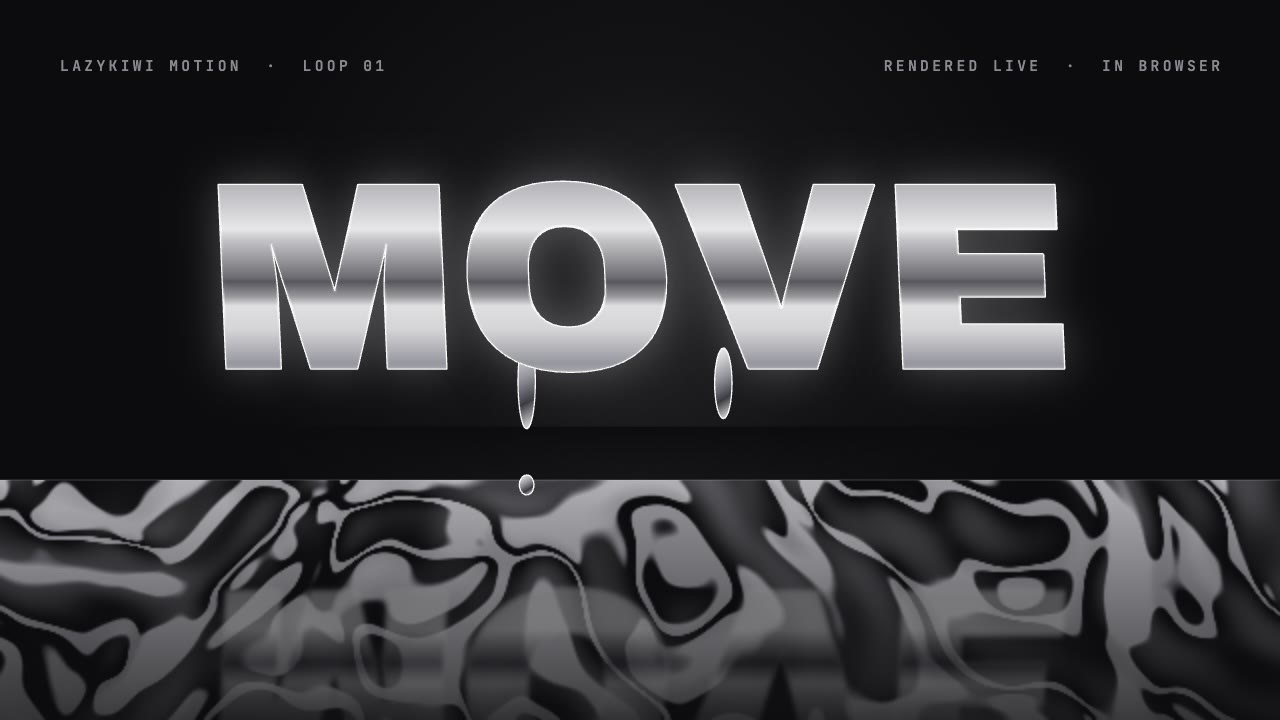
That is motion graphics, not video generation. LazyKiwi's Motion studio builds an editable animation from a storyboard you approve before rendering, which suits text and numbers better than any diffusion model.
Where LazyKiwi fits, and where it does not
We run LazyKiwi, so here is the plain version of where it sits among Google Flow alternatives.
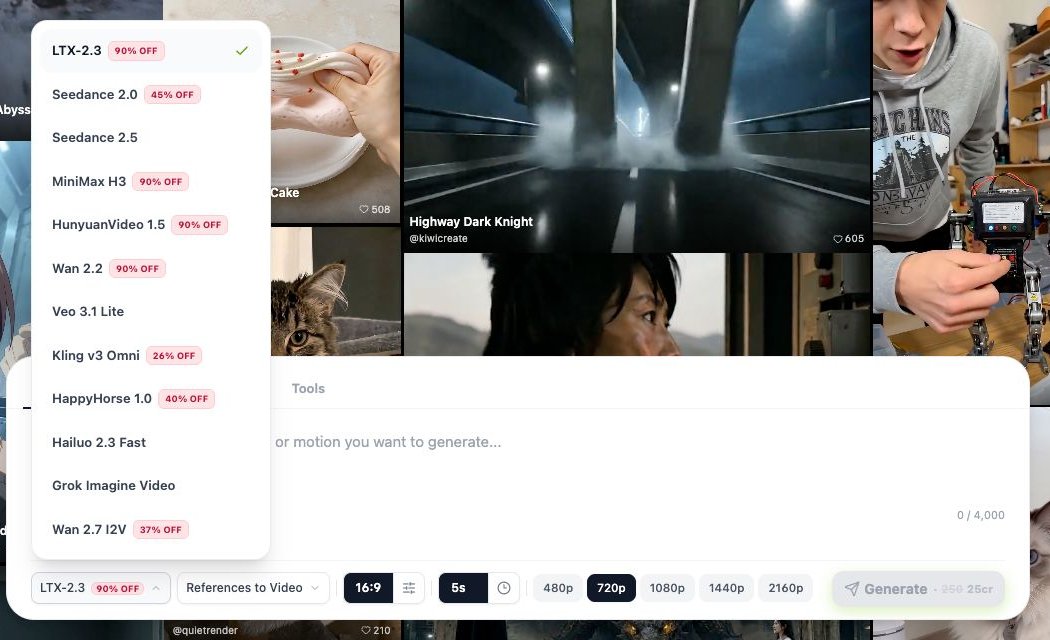
- **Good fit:** you want several video models (Veo 3.1 Lite, Kling v3 Omni, Seedance 2.0 and 2.5, Hailuo, Wan, Sora 2 and more) on one credit balance, plus templates and one-purpose tools such as a video background changer, without juggling subscriptions.
- **Not a fit:** you need full Veo 3.1 rather than the Lite tier, a Flow-style scene timeline, or a team editor with review and versioning. Google AI Ultra or Runway serve those better.
- **Price:** the Free plan lists 40 credits a month, refreshed monthly, on the pricing page. Each model shows its credit cost before you generate.
How to test Google Flow alternatives in one afternoon
Rankings, including this one, cannot tell you how a model handles your subject. A short test can.
- 1
Pick three real shots
One with a person moving, one product or object, one with on-screen text or a logo. Use prompts you would actually ship.
- 2
Run each on two tools at the same length and aspect ratio
Keep duration short; you are judging quality and retries, not length.
- 3
Count retries to a usable take
A cheaper model that needs four tries costs more than a pricier one that works first time.
- 4
Check the output terms
Watermark on the free plan, commercial use, and resolution. Flow, for example, adds an invisible SynthID watermark to Veo, Omni and Nano Banana outputs, per its help center.
Key takeaways
- Decide why you are leaving Flow first: credits, model quality, or editing. Each points to a different alternative.
- To keep Veo, use Leonardo (Veo 3.1 incl. Fast and Lite, per Leonardo), LazyKiwi (Veo 3.1 Lite) or the Gemini app on a Google AI plan.
- Runway is the closest replacement for Flow as an editor; PixVerse and Pika are credit-light studios with many models.
- Kling, Hailuo, Seedance and Luma are model switches, not studio switches; test two on the same prompt.
- Free means daily credits, monthly credits, a one-time trial, or open-weight Wan on your own GPU.
Tools & Reviews Editor
Marcus Tan
I open every competitor's pricing page myself before writing a comparison, and I say plainly when another tool is the better pick.
FAQ
Common questions
Is Google Flow free?
Partly. Google's plans page lists Flow on the free tier with limited Nano Banana Pro image access, but no Veo. Flow credits come with paid plans: 200 on AI Plus, 1,000 on AI Pro and 10,000 or 25,000 on Ultra; Veo is named only for Pro (a Lite trial) and Ultra. Workspace accounts get 50 daily credits, per Google's help center.
What is the best Google Flow alternative?
It depends on the reason. To keep Veo, Leonardo or LazyKiwi's Veo 3.1 Lite. For an editor around the clip, Runway. For motion-heavy shots, Kling. For a free daily allowance, PixVerse or Leonardo. For no subscription at all, open-weight Wan 2.2 with ComfyUI on your own GPU.
Can I use Veo 3.1 without Google Flow?
Yes. Ultra subscribers get Veo 3.1 in the Gemini app, and Pro includes a limited Veo 3.1 Lite trial. Outside Google, Leonardo says it offers Veo 3.1 including Fast and Lite, and LazyKiwi runs Veo 3.1 Lite for text-to-video and image-to-video.
How many credits does a Veo video cost in Google Flow?
Google does not publish a fixed number. Its help center says model costs are changing fast and shows the current cost in the product when you select a model. Figures quoted elsewhere may already be out of date, so check the cost on screen before you generate.
Is Google Flow the same as Flow AI or Wispr Flow?
No. Google Flow is Google's AI video studio built on Veo. Wispr Flow is a voice dictation app, Apache Airflow is workflow software, and Google also has a separate Flow Music product. This guide only covers alternatives to the video tool.
Run Veo 3.1 Lite and Kling side by side
Open the LazyKiwi video generator, write one prompt you actually need, and run it on two models. The credit cost is shown before you generate.
Keep reading
Kling vs Veo 3 in 2026: Which Video Model Wins?
Kling vs Veo 3 on the two tiers LazyKiwi runs: Kling v3 Omni for start-end frames, 1:1 and 60-second takes, Veo 3.1 Lite for silent 16:9 clips.
8 min read
Sora 2 vs Veo 3.1 in 2026: Which Video Model Should You Use?
Sora 2 vs Veo 3 with dated sources: Sora 2's API ends September 24, 2026, Veo 3.1 Lite runs in LazyKiwi at 1080p, no audio, and four models fill the gap.
9 min read
Best AI Video Editor in 2026: 7 Picks, Free and Paid
Seven of the best AI video editors compared on prices checked today, free tiers, captions, text-based cuts and generative tools, plus where LazyKiwi fits.
10 min read
How to Make AI Videos in 2026: Idea to Export, Step by Step
How to make AI videos in 2026: pick a generation mode, choose Kling v3 Omni or Seedance 2.5, prompt for clean motion, and export without wasting credits.
11 min read