
Nested Photo Edit
A photo slideshow template that zooms into itself
Picture-in-picture, three deep. A small inset grows until it becomes the main frame, then the next photo is already nested inside it. Captions swap as you go, the dots track your position, and the last frame matches the first.
- 6s
- duration
- 4
- aspect ratios
- 7
- controls
- 720p
- free, unlimited exports
Social Hooks · 6s · 9:16
Photo · Gallery · Nested · Loop
A slideshow with a mechanism instead of a crossfade
The usual photo slideshow is a stack of crossfades, which is why they all look the same and none of them hold attention past the second image. This one uses a single idea instead: every photo contains the next one. A framed inset sits inside the current picture, it scales up until it fills the frame, and by the time it arrives the following inset has already appeared inside it. Three levels, then it returns to the first — so the clip loops without a visible cut.
Each photo carries a white frame and a caption, and the caption changes as the nesting advances. A small index reads 01 / 03 at the top and three dots track the position at the bottom. Those are all real layers, which means the count and the labels stay right when you change the images.
6 seconds, three beats
What is on screen, and when. Every element named here is a layer in the document — you can click any of them on the canvas and change it.

Beat 1 · 1.1s
The first photo, with an inset
The album title and the 01 / 03 index sit at the top. The opening landscape fills the frame and the second photo is already nested inside it as a framed inset.
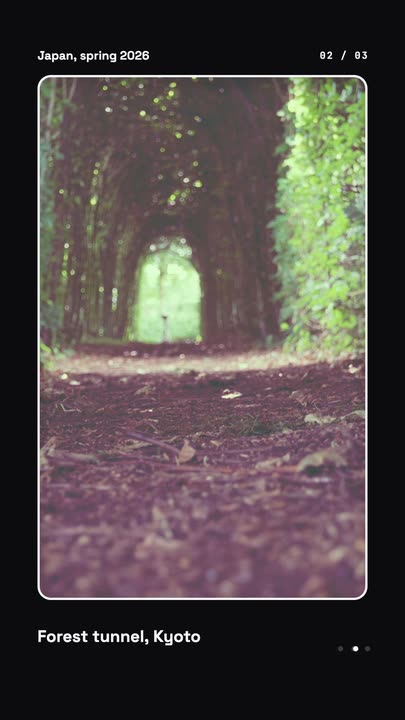
Beat 2 · 2.4s
The second grows out
The inset has scaled all the way up into the main frame and the caption has swapped to the second line, with the index at the top moving to 02 / 03.
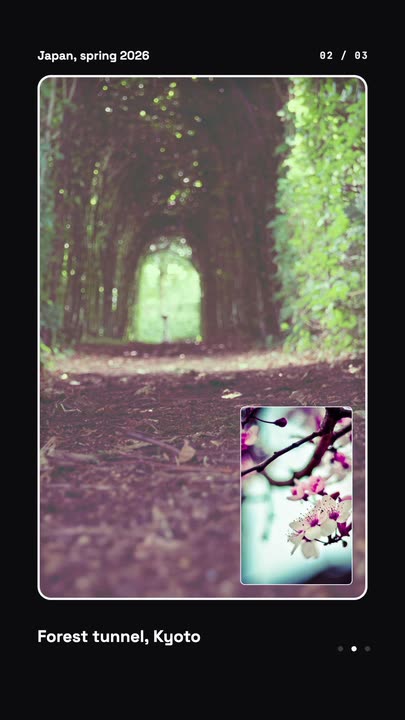
Beat 3 · 3.2s
The third nests inside it
The next photo has appeared as a framed inset inside the new main image, ready to take over — the same move, one level deeper.
Three steps to a nested slideshow
- 01
Upload three photos
Photo 1, 2 and 3 are separate image slots — a landscape, a portrait and a landscape in the shipped version, but any crop works because each one is framed rather than full-bleed.
- 02
Write the captions
The first caption is a control and the other two are canvas-editable text. There is a size control if your place names run long.
- 03
Set the frame colour and export
The frame colour applies to all three levels at once. Pick your aspect and export — the loop is seamless in every one of them.
Seamless
The last frame matches the first
The nesting returns to the opening photo at exactly the point the clip ends, so the export tiles cleanly. Set it as a looping background on a site or a stage screen and there is no jump to find.
Three at once
Every photo previews the next one
Because the following image is already visible as an inset before it takes over, the viewer always has somewhere to look next. That is what keeps a three-photo clip from feeling like three photos.
Framed, not cropped
Mixed orientations, one layout
Each slot sits inside its own frame rather than filling the canvas, so a portrait and a landscape can sit in the same sequence without one of them being butchered by a centre crop.
What you can change
Seven controls: three photos, the first caption, the frame colour, the caption size and the speed. Captions two and three are text layers you edit on the canvas.
- Click any element on the canvas to edit it directly
- Or describe the change in a sentence and let the assistant make it
- Export 9:16, 16:9, 1:1, 4:5 from the same document
Studio controls
7 named
- Photo 1Photo
- Photo 2Photo
- Photo 3Photo
- Caption 1TextMorning fog, Hokkaido
- Frame colourColour#F5F5F7
- Caption sizeSlider 34–5644
- SpeedSlider 0.5–21
Why this beats a crossfade
Crossfade slideshows are effectively free to make and worth about that much — the transition tells the viewer nothing and the pacing is arbitrary. A nested zoom has a rule, and rules read as design. It also solves the practical problem of showing a range: three products, three rooms, three destinations, in one continuous move rather than three disconnected cards.
Nested Photo Edit: questions, answered
Is the photo slideshow template free?+
Free to open and edit, and free accounts get unlimited free 720p exports with a small LazyKiwi mark. Clean 1080p is included with any paid plan.
What aspect ratios can I export?+
9:16, 16:9, 1:1 and 4:5, all seamless. The layout retargets so the frames stay inside the safe area rather than being cropped by the aspect change.
Can I use more than three photos?+
The template ships with three levels. You can add a fourth by duplicating a nested group on the canvas, or ask the assistant to extend the sequence — it edits the document rather than re-rendering it.
Do I need After Effects?+
No. This kind of nested masking is fiddly in a timeline editor and trivial here, because the nesting is a property of the document rather than something you rebuild by hand.
How long is the clip?+
Six seconds for the full three-level cycle, and it loops. Slow it to 0.5× if you want each photo to hold longer.
More product & ui
All product Gradient Sweep LogoA blue-to-lilac gradient opens from the centre and fills the frame, a white mark and a serif wordmark settle on it, then the gradient folds back to paper for a seamless loop
 Letter Bars LogoOn pure black two deep-red bars and one bright diagonal rise in turn and lock into a tall N letter mark, then a red wordmark lights up below — the streaming-service sting
 Route Logo RevealOn a pale map of white streets a route draws itself from a start pin through three waypoints; at the destination a map pin carrying your mark drops in and a label card with the brand name pops up under it
 Globe ArcsA wireframe globe turns slowly on a midnight stage while six city-to-city arcs light up in sequence, with a route table ticking along beside it.
 Spin LogoOn a full-bleed tangerine stage a dot-grid mark spins a full turn while growing into place, a thin rule draws beside it and a serif wordmark slides out with its tagline
 Offer Card FlipA photo offer card flips on its Y axis to reveal what is included, the price and a button, then flips back.
Three photos, one continuous move.
Upload your images, write the captions and export a slideshow that loops without a cut.