
Remove Person From Photo: What Actually Works
How to remove person from photo edits that survive a 100% zoom: catch the shadow, protect the subject, and know when a crop beats reconstruction.
 Maya Chen 9 min read
Remove person from photo and no pixels are actually deleted: the space they occupied has to be filled with something invented, and the quality of that invention is the whole job. What follows is the working method, from writing an instruction that also catches the shadow, through the hard case where two people overlap, to the free tools worth trying and the situations where the honest answer is a tighter crop. Every screenshot below is a real run, priced at 13 credits, including the one where the tool removed something nobody asked it to remove.
What happens when you remove a person from a photo?
Nothing gets deleted. The pixels a person occupied have to be replaced by something, and that something is manufactured. Every remove-person-from-photo tool is doing inpainting (2026): reading the surviving surroundings and writing a continuation that looks like it belongs.
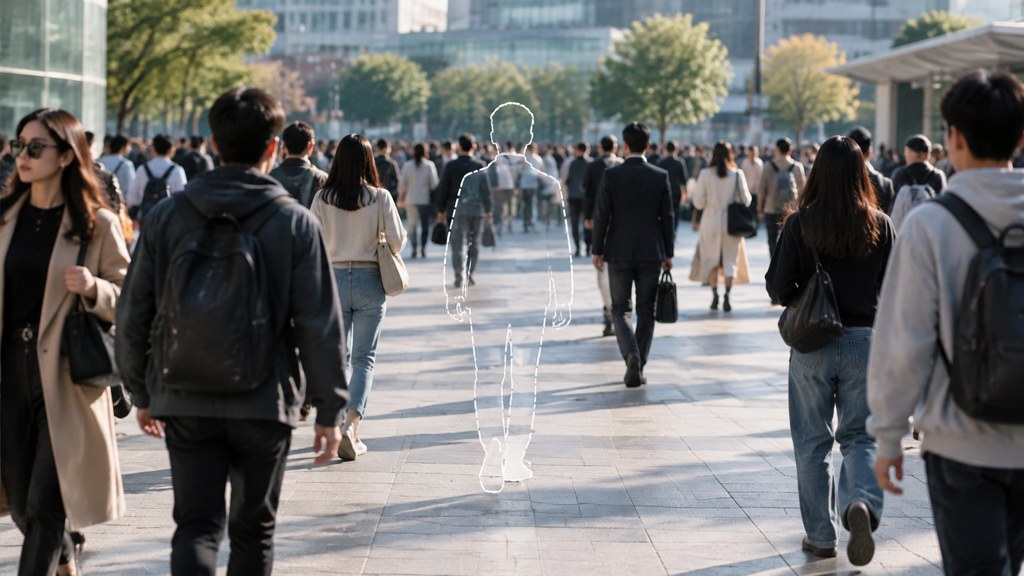
Two families of tool do this. Patch-based erasers copy texture from elsewhere in the same image, which works beautifully on grass and terribly on a face-height gap in a shop window. Generative models write new content from scratch, which handles complicated backgrounds and occasionally hallucinates a doorway that was never there.
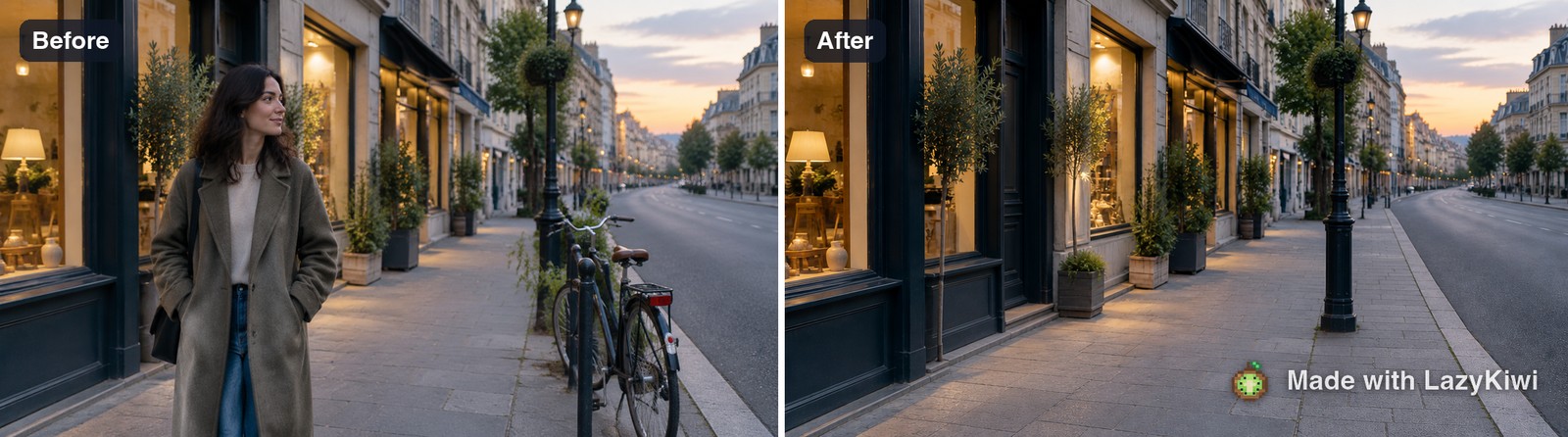
Set the standard now, before any of the how-to below. A removal is judged at 100 percent zoom on the join, not at thumbnail size in a feed. Almost everything passes at thumbnail size, which is why so many obviously edited photos circulate.
How to remove someone from a picture step by step
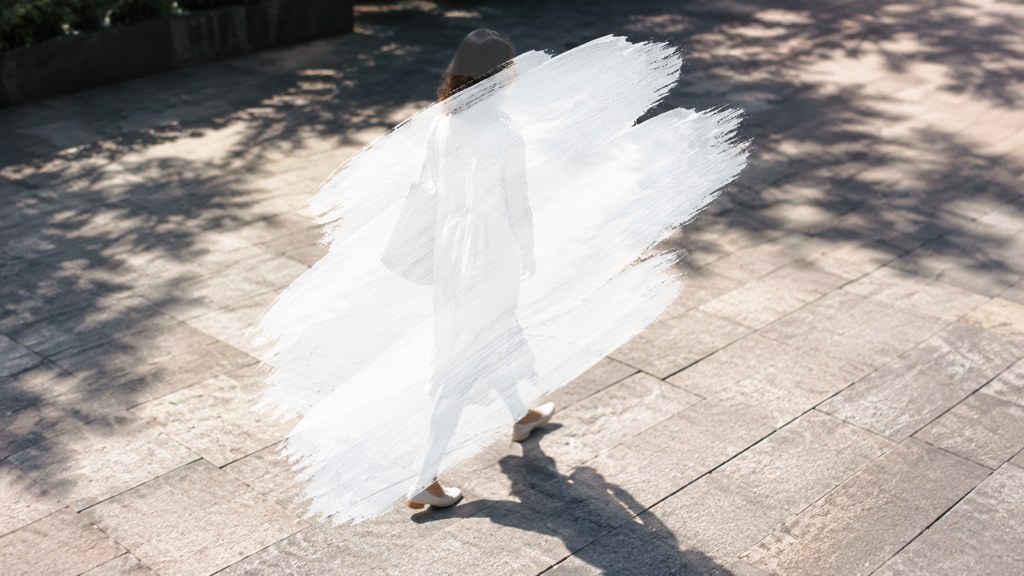
The workbench route has no lasso and no brush. You describe what leaves in the Prompt box, which is unfamiliar at first and turns out to be more precise than a wobbly finger-drawn selection, because you can also state what has to survive.
- 1
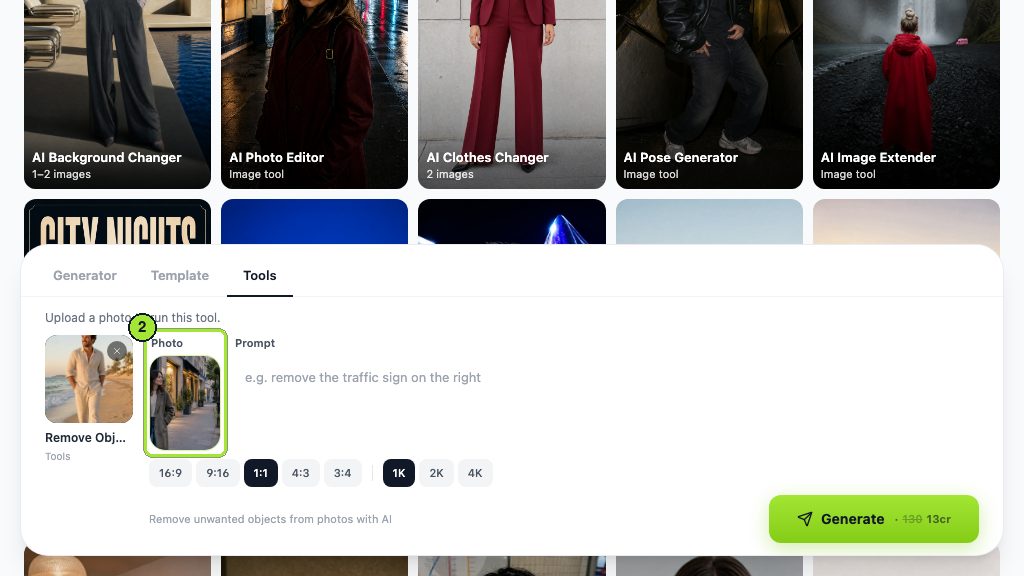
Load the photo
Open the object remover and drop the file into the Photo box. Use the original, not a messaging-app copy, because compression artefacts get rebuilt along with everything else.
- 2
Describe the person by position, not by name
"The woman walking on the left pavement" is findable. "My colleague" is not. Position, clothing colour and direction of travel are the three attributes that land reliably.
- 3
Include the shadow and any reflection
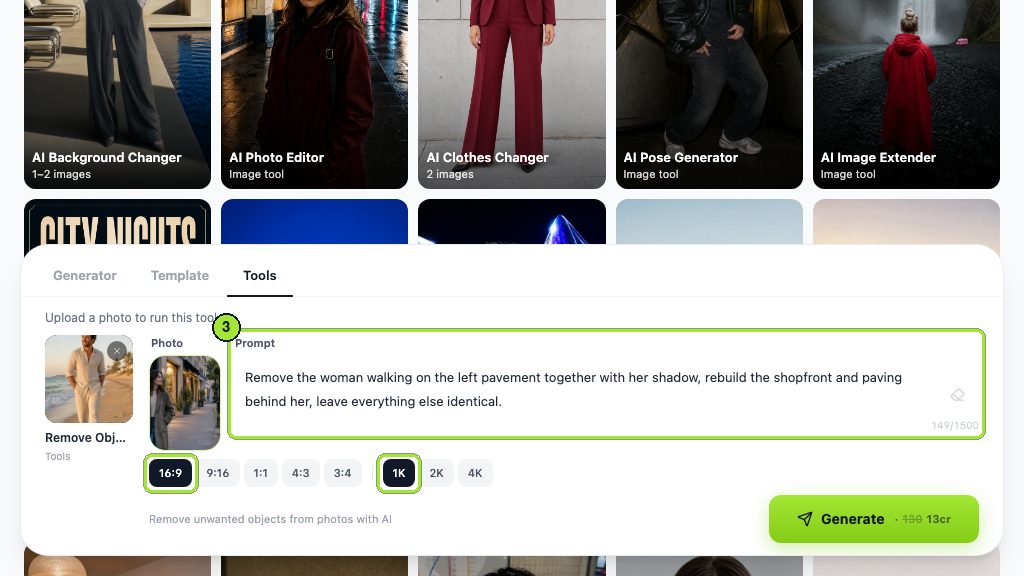
This is the step people skip and the reason removals look wrong. A body leaves a shadow on the pavement and sometimes a smear in a shop window. Name both or they stay behind as evidence.
- 4
State what must not move
Add a clause protecting the parts you care about. Without it the pass is free to tidy anything it considers untidy.
- 5
Set the ratio, then run
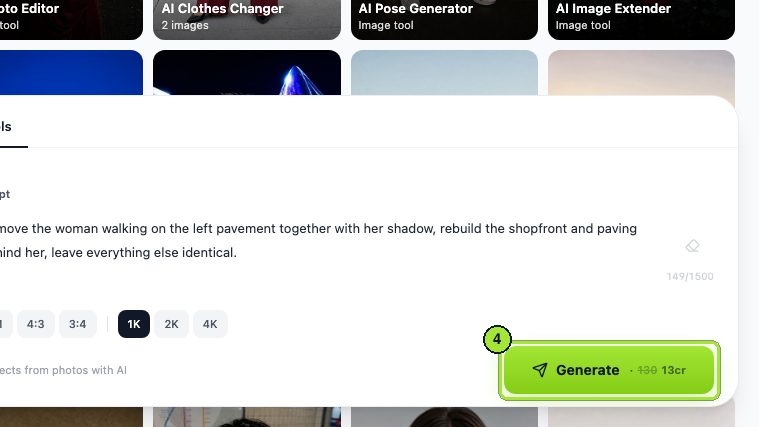
Keep the original aspect ratio so the frame is not recomposed while you are fixing one corner of it. The price sits on the Generate button.
Remove the woman walking on the left pavement together with her shadow, rebuild the shopfront and paving behind her, leave everything else identical.

Read the whole frame afterwards, not just the gap
In this run the tool also removed the parked bicycles further down the pavement, which the prompt never mentioned. Collateral edits are the most common failure of generative removal, and they are invisible if you only inspect the spot where the person stood.
That single observation is worth more than any settings advice. "Leave everything else identical" was already in the prompt and the bicycles went anyway. Compare the full frame against the original before you accept a result, and if something else has changed, run again with that object named as protected.
How do you edit someone out of a picture when they overlap the subject?
An arm around a shoulder is a different problem from a stranger twelve metres away. The tool has to rebuild the part of your subject that the other person was covering, and there is no reference for it anywhere in the frame.
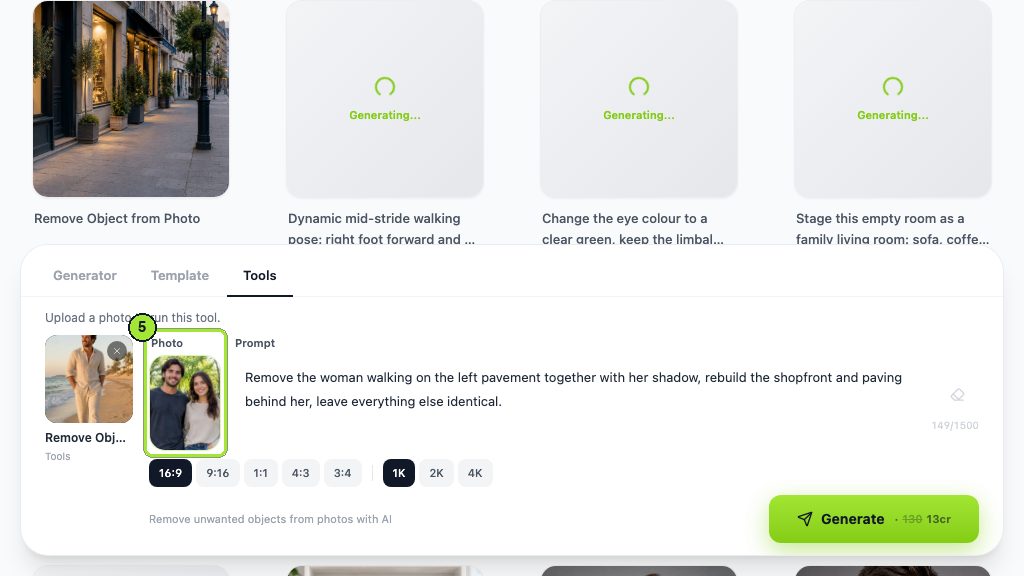
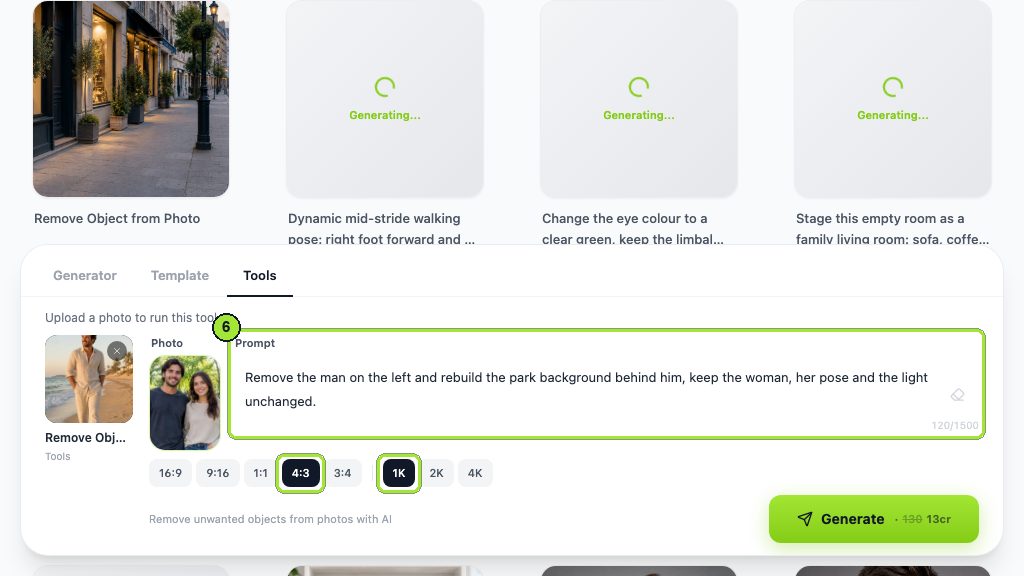
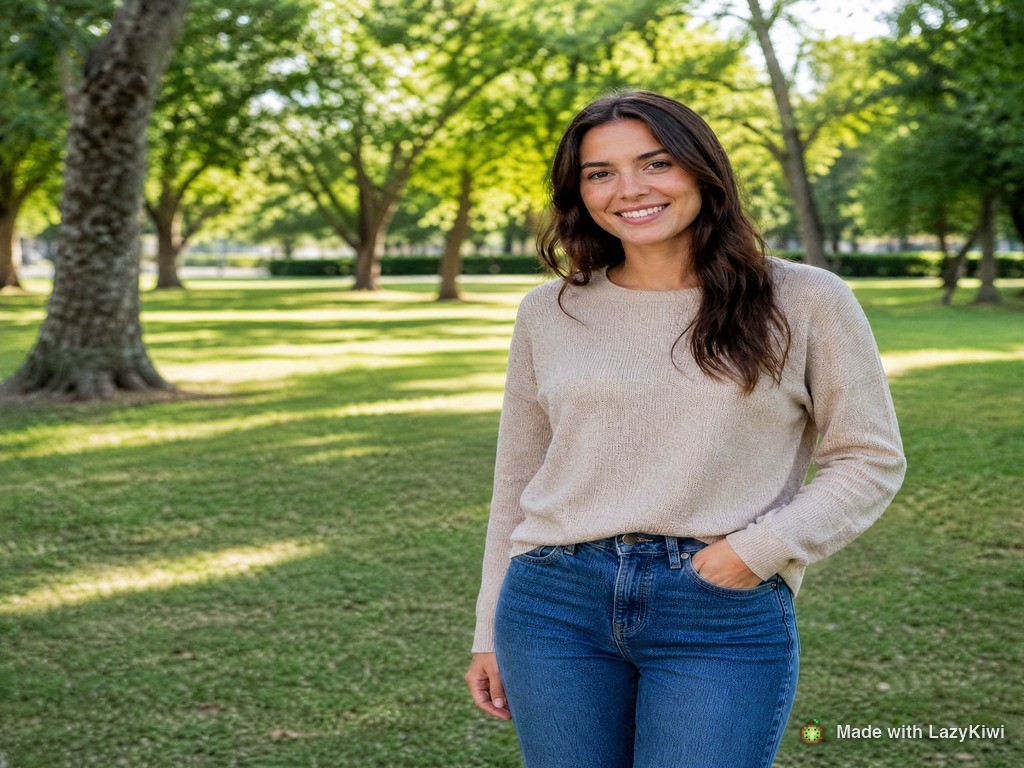
Three things decide whether this works. How much of the remaining person is hidden: a hand on a shoulder is recoverable, a body half behind another body is not. Whether hair overlaps, because hair edges are where reconstruction is most obviously wrong. And whether the light was directional, since a removed body also removes the shadow it was throwing onto the person you kept.
- **Protect the survivor explicitly.** Name the person staying, their pose and the light, in the same sentence that asks for the removal.
- **Do it in two passes when the overlap is heavy.** First remove, then run again asking only for the rebuilt edge to be cleaned up.
- **Consider the crop instead.** A tighter frame that simply excludes the other person is honest, instant and costs nothing. It is often the better answer and nobody ever suggests it.
The most reliable way to edit someone out of a picture is to crop them out. Everything else is reconstruction.
— Maya Chen
How do you remove a stranger from a travel or street photo?
This is the easy end of the job and the reason the whole category exists. A tourist against open sky is trivial: the replacement is more sky. Difficulty scales with how structured the background is.

| Background behind the person | Difficulty | What to watch |
|---|---|---|
| Open sky or plain water | Trivial | Banding where a gradient is rebuilt slightly off |
| Grass, sand, foliage | Easy | Repeated texture. Look for the same leaf twice |
| Paving, tiles, brickwork | Moderate | Grout lines that stop lining up. Follow every line across the join |
| Railings, columns, window frames | Hard | Rhythm errors. Count the gaps before and after |
| A crowd | Very hard | Half a person left behind, or a new one invented |
For repeating architecture, give the tool the rule rather than the outcome. Telling it to continue the railing at the same spacing across the gap produces better joins than asking it to remove the man in the blue jacket, because the second instruction says nothing about what should replace him.
How do you remove an ex from a portrait without it looking obvious?
It is the most-searched version of this job and the one with the most ways to go wrong, because the giveaways are not in the gap. They are in the person who stayed.
- **Colour spill.** A red shirt standing next to someone throws warm light onto their cheek and shoulder. Remove the shirt and the tint remains, pointing at a person who is no longer there.
- **A contact shadow.** Where two people touch, there is a dark line. Removing one leaves a shadow with nothing casting it.
- **Grain mismatch.** The rebuilt region is usually cleaner than the rest of the photo. On a phone shot taken indoors, that patch of unnaturally smooth wall is the tell.
- **Pose logic.** An arm that was around a waist ends up floating. Ask for the arm to be repositioned naturally, or crop above it.
Practically, run the removal, then run a second pass that asks only for the lighting and grain around the join to match the rest of the frame. Two 13-credit passes on a photo that matters is a reasonable trade, and the second one is where the result stops looking edited.
Every image tool in the workbench runs on GPT Image 2, so the same instruction style carries across removal, background work and repair. That is useful here: the vocabulary you learn writing removal prompts transfers directly.
Which apps remove people from photos on iPhone and Android?
There is no single remove people from photos app that wins on both platforms, because the best option on each one is the one already installed.
| App | Remove person from photo | The catch |
|---|---|---|
| [Apple Clean Up](https://support.apple.com/en-us/121429) | Built into Photos, tap or circle the thing you want gone | Apple lists the requirement as "iOS 18.1, iPadOS 18.1, or macOS Sequoia 15.1" on "iPhone 16 models, iPhone 15 Pro, and iPhone 15 Pro Max", plus iPads and Macs on M1 or A17 Pro and later |
| [Google Magic Eraser](https://support.google.com/photos/answer/6128850) | Google's help puts it in the editor itself: "To remove unwanted distractions, in the Actions tab, tap Magic Eraser" | A hardware floor, not a paywall. The same page asks for "at least 3 GB RAM and Android 8.0 and up" for most features. The Pixel-only framing you may remember is out of date |
| [Cleanup.pictures](https://cleanup.pictures/) | Brush over the person in a browser tab, no account needed | The free version states "Resolution limited to 720p". Pro is "$5 per month or $36 per year" |
| [Magic Studio](https://magicstudio.com/magiceraser/) | Brush eraser in a browser, and its own FAQ calls it "free to use with no usage limits" | The same sentence continues: "downloads are at a limited resolution, with maximum dimension being 600 pixels, with a Magic Studio imprint on the pictures" |
| LazyKiwi | Describe the person and the shadow in the Prompt box, no brush | A pass is 13 credits at 1K, and a new account starts with 40 |
The tap-to-erase apps are quicker and the prompt route is more controllable, and the difference shows up exactly where you would expect. A tap knows where you pointed. It does not know that the shadow two feet to the left belongs to the same person.
Is there a free tool to remove a person from a photo online?
Several, and they differ in what they take away rather than in what they charge. Free remove-person-from-photo tools generally clip the output size, add a mark, or cap how many you can run. Everything quoted here was taken from the tool's own site on 7 September 2026.
| Free route | What you get | The limit it enforces |
|---|---|---|
| [Cleanup.pictures](https://cleanup.pictures/) | Browser eraser, no signup | Its FAQ says "Export will be limited to 720px for the free version", and Pro is "$5 per month or $36 per year" |
| LazyKiwi | 40 credits on a new account, 13 per 1K pass | About three passes, and no mark on the file |
| [Fotor](https://www.fotor.com/pricing/) | Fotor Basic at US$0 with "Limited Free credits" | Basic lists "Watermarked JPG, PNG & PDF Exports"; the paid columns read "Watermark-Free" |
| [Picsart](https://picsart.com/pricing/) | A free web editor account | Removing the mark is sold as a paid benefit, listed as "The ability to remove Picsart watermarks from photos and videos". Pro is $10.50 a month billed yearly against a $15 list |
| Apple and Google built-ins | No cost at all if your hardware qualifies | Hardware and account requirements rather than money, as the table above sets out |
One structural note about the free credits in the image generator: they are not divided per tool. A removal pass, a follow-up cleanup pass and a background swap all come out of the same pool, which is how the two-pass approach above fits inside a new account.
When should you not remove a person from a photo?
There are categories where a removal stops being a tidy-up and becomes a false statement about a place, an event or an asset.
- **Property listings.** Removing a person is usually harmless, but the same tool removes clutter, damage and neighbours. The NAR Code of Ethics (2026) obliges agents to avoid misrepresenting a property, and an edited photo is a representation.
- **Anything advertising a product or service.** The FTC's endorsement guidance (2026) turns on whether a claim is misleading, and a photograph makes claims.
- **News, documentary and insurance.** A removed bystander is a removed fact. If the image is describing what happened, do not change who was there.
- **Legal and identification material.** Passport, visa and court exhibits have their own rules, and generative editing breaks all of them.
- **Photos of other people you did not ask.** Removing someone from a shared memory is a social act as much as a technical one.
For everything else, which is most things, removal is fine and nobody needs a disclaimer to enjoy a holiday photo without a stranger in it. The line is simple: if the picture is a record, leave it alone. If it is a picture, edit it.
Key takeaways
- A removal is a reconstruction. The gap is filled with content the model invents from the surroundings.
- Name the shadow and any reflection in the same instruction as the person, or they stay behind.
- Check the whole frame afterwards. In the demo run the tool also erased parked bicycles nobody mentioned.
- Overlapping subjects are the hard case; a tighter crop is frequently the better remove-person-from-photo answer.
- Free routes each take something back: Cleanup.pictures caps exports at 720px, Magic Studio caps them at 600px with an imprint, LazyKiwi gives 40 credits and no mark.
Image & Design Editor
Maya Chen
Maya Chen edits the image and design desk at LazyKiwi. She spends most of her week running real files through the workbench and writing down what the settings actually did, including the runs that did not work.
FAQ
Common questions
How do i remove a person from a photo without a brush tool?
Describe them instead. Position, clothing colour and direction of travel identify a person reliably, and unlike a brush stroke a sentence can also say what must stay unchanged. Add the shadow to the same sentence or it will be left behind.
How to remove a person from a photo on iPhone?
Use Clean Up inside Photos if your device qualifies: Apple lists iOS 18.1 or later on iPhone 16 models, iPhone 15 Pro and iPhone 15 Pro Max. Otherwise open a browser tool from the camera roll, which has no hardware requirement at all.
Why did the tool change something I did not ask about?
Generative removal rewrites a region rather than patching one, so nearby objects can be reinterpreted. In our street-scene run the parked bicycles disappeared alongside the walker. Compare full frames, then rerun naming the object you want protected.
How to edit someone out of a picture when they are holding the other person?
Expect two passes. The first removes and rebuilds the background, the second cleans the edge where the remaining person was being touched. If more than a third of the survivor is hidden, cropping usually beats reconstructing.
Does removing someone leave anything in the file?
The visible clues are colour spill, an orphaned contact shadow and a patch of grain that is cleaner than the rest of the image. Fixing those three is what separates an edit people notice from one they do not.
Try it on the photo that bothers you
Name the person and the shadow, say who stays, then look at what Generate is asking for. A new account carries 40 credits, about three 1K runs.
Related reading
How to Restore Old Photos: Full 2026 Workflow
Scan, repair, colorize and upscale a damaged print in one pass. The order that matters, what each step can and cannot fix, and where free tiers stop.
10 min read
Best AI Photo Editing Apps in 2026, Tested
Nine AI photo editors compared on the four jobs people actually run: retouch a face, clean a scene, batch a set, and export without a watermark.
10 min read
Unblur Image: Fixes That Work by Blur Type
Camera shake, missed focus and compression mush need different fixes. Diagnose the blur first, then pick the tool that can actually undo that kind.
8 min read
AI Real Estate Photo Editing: A Workflow Agents Can Trust
AI real estate photo editing that stays on the right side of the line: exposure fixes, clutter removal, labelled virtual staging, a pre-publish checklist.
9 min read