
LinkedIn Profile Picture: Specs and Setup Guide
The exact file LinkedIn accepts, how the circular crop changes framing, what to wear, and how to shoot or generate a picture that survives the thumbnail.
 Elena Vasquez 9 min read
LinkedIn accepts a profile photo between 400 by 400 and 7680 by 4320 pixels, up to 8MB, as a PNG or a JPG, and it does not accept GIFs (LinkedIn Help, checked 2026-09-07). Upload a square file inside that range and the rest is framing: the picture is displayed in a circle, at thumbnail size, next to your name in a feed. That circle is what every decision below is optimised for.
What size should a LinkedIn profile picture be?
The published limits are wide, so the useful advice is where inside them to sit.
- Minimum 400 by 400 pixels, maximum 7680 by 4320, file under 8MB, PNG or JPG only, no GIFs. Those are LinkedIn's own numbers, checked on its help page on 2026-09-07.
- Upload a square. A rectangular file gets cropped to a square and then masked to a circle, and doing that yourself means you choose what survives.
- Aim for roughly 1000 by 1000 pixels. Comfortably above the minimum, small enough to stay sharp after compression, and it still holds up if someone opens it full size.
- Export at high quality rather than at maximum. An 8MB limit is generous, and a heavily compressed 200KB file shows blocking around hair and collar edges.
- The linkedin photo size question that actually matters is not the file. It is that your face has to be readable at about 48 pixels across in a feed.

Check your own upload at thumbnail size before you commit. Shrink it on screen until it is the size of a fingernail. If you cannot tell it is you, neither can anyone scrolling.
How should a LinkedIn profile picture be framed?
LinkedIn's own guidance for members is to have your face fill about 60% of the frame, and to be the only person in the picture (LinkedIn Talent Blog, checked 2026-09-07). The same page states that simply having a photo makes a profile 14 times more likely to be viewed.
- Head and shoulders, cropped just below the collarbone. Any wider and the head is too small in the circle.
- Eyes on the upper third line. It is the most reliable single framing rule in portraiture and it survives the circular crop.
- Leave a little space above the head, not a lot. A large gap wastes the top of the circle, and a tight crop through the hairline reads as a cropped group photo.
- Centre the face horizontally. Off-centre framing that looks deliberate in a rectangle looks like a mistake once the corners are masked off.
- Keep hands, props and logos out. There is not room, and they clutter the one thing the circle is for.
The phrasing people type into search is revealing: how linkedin profile picture should be, how linkedin profile picture should look like. Both are asking for a rule rather than for inspiration, and the rule is that the face has to work at fingernail size.
What should you wear for a LinkedIn photo?
- Solid mid-tone colours. They separate from both a light and a dark background, which is more than either black or white manages.
- Some structure at the neckline. A collar, a lapel or a firm knit gives the shoulders a shape at small size; a soft round neck reads as a floating head.
- Contrast with your background, deliberately. A navy jacket on a charcoal wall merges into one dark mass in a thumbnail.
- Avoid fine patterns. Narrow stripes and small checks can shimmer once the image is scaled down, and LinkedIn scales it down a lot.
- Wear what you would wear to the job you want to be asked about. That is the entire dress code and it varies more by industry than any list can cover.
One layer of contrast is enough. Mid-tone shirt, darker jacket, plain background: three tones, no pattern, nothing competing with the face. Most linkedin headshot tips end up restating that one idea in different words.
What background works for a professional profile photo?
Plain beats interesting, but plain does not mean blank. The job of the background is separation, and a wall the same tone as your hair fails at it even though it is perfectly plain.
- A plain wall a shade lighter or darker than your hair and clothing. That single tonal step does all the work.
- Real depth, if you have it. Standing two metres in front of a wall throws it softly out of focus and looks intentional in a way a virtual blur does not.
- Outdoor shade with something distant behind you. Foliage or a street at a distance goes soft naturally.
- Not the office by default. An open-plan room with a monitor, a fire exit sign and half a colleague is busier than any wall.
- Not a synthetic gradient. The grey studio background pasted behind a phone snapshot is recognisable and it makes the photograph look like a template.
If the wall you have is the wrong tone, the AI background changer will replace it while keeping the subject, which is a smaller intervention than restaging the whole photograph.
How do you shoot a LinkedIn photo yourself?

- 1
Stand a metre in front of the wall
Far enough that your shadow does not land on it, close enough that the room behind stays out of shot.
- 2
Put the window at roughly 45 degrees
Not behind you, which turns you into a silhouette, and not directly in front, which flattens the face. To one side and slightly in front is the whole lighting setup.
- 3
Phone at eye level, one and a half metres away
Books, a shelf, a tripod. Below eye level adds chin; above it makes you look up at the camera.
- 4
Use the rear camera on a timer
The front camera is wider and usually closer, which is the combination that enlarges whatever is nearest the lens.
- 5
Shoot twelve frames, three expressions
Neutral, slight smile, real smile. Move a little between each so you get variety rather than twelve copies.
Add a white card on the shadow side
A sheet of A3 paper or an open laptop lid held opposite the window fills the dark half of the face. It is the difference between a portrait and a snapshot, and it costs nothing.
How do you make a LinkedIn headshot with AI?
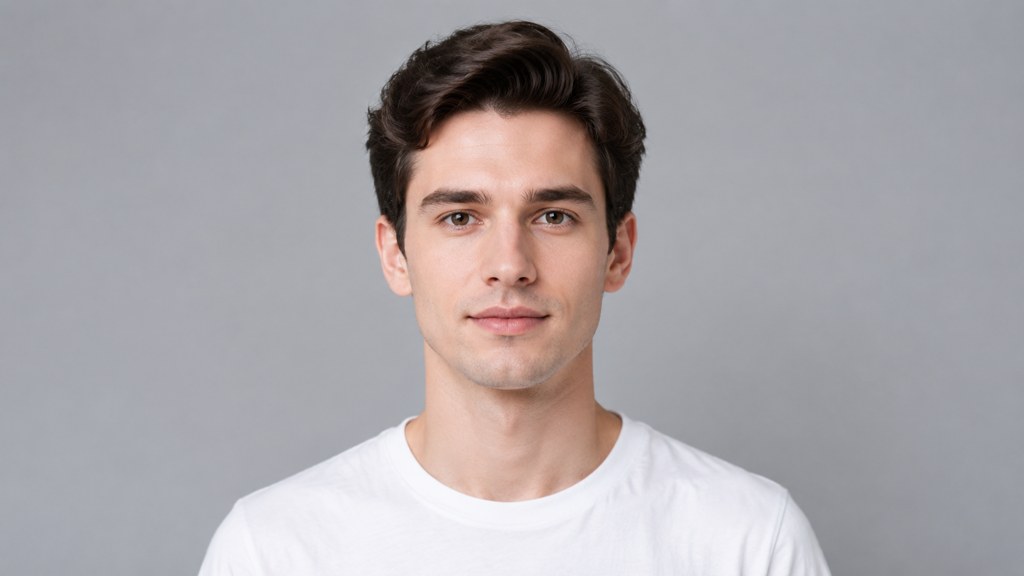
If you have a plain photograph of yourself and no time, a template will restyle it. We ran the AI career headshot template twice, first on a plain-background studio frame and then on an ordinary indoor selfie, to see how much the input matters.

- 1
Upload one photograph
A single Photo box. Face clearly visible, even light, nothing covering the eyes.
- 2
Choose the shape and size
We used the 1:1 ratio chip with 1K resolution, which is exactly what the profile circle wants.
- 3
Generate
The button prints the cost first. Each run took 13 credits.
- 4
Change the input, not the settings
There is no background option in this template, so for the second run we swapped the studio frame for a casual selfie and left the chips alone.
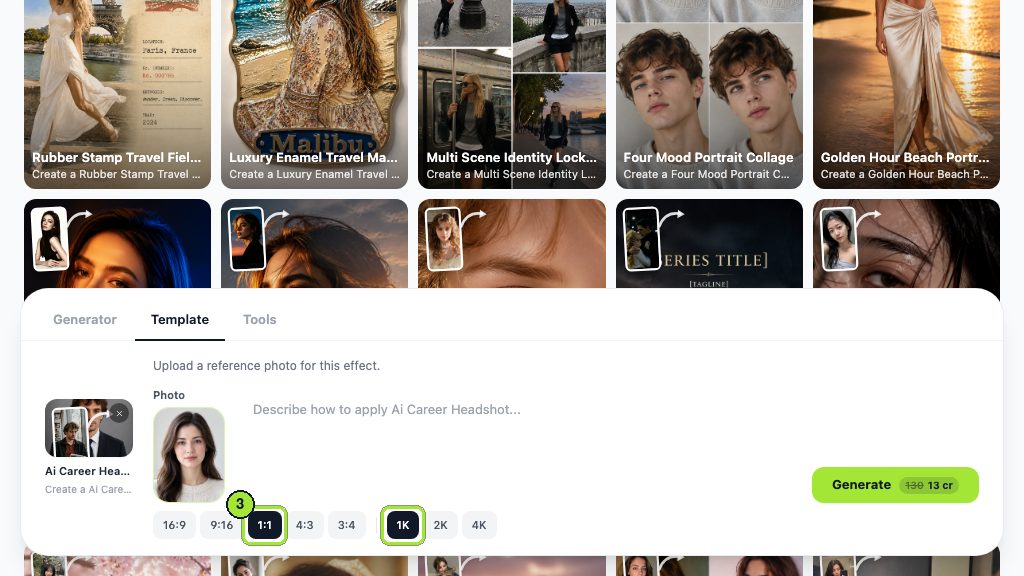


Both runs used GPT Image 2, and a new account is given 40 free credits, which is three attempts. That is enough to learn the main lesson, which is that a good input photograph beats a good prompt every time.
Should you use an AI headshot on LinkedIn?
The honest test is recognition. If someone met you at a conference having seen only that picture, would they know it was you? If yes, it is a styled photograph and styled photographs have always been normal on LinkedIn. If no, it is a different person wearing your name.
The paid services are worth comparing on what they publish, because they differ more on retention than on output. HeadshotPro, Aragon AI and Secta Labs were each read on their own pages on 2026-09-07.
| Service | Price as published today | What you get | What it says about your photos |
|---|---|---|---|
| HeadshotPro | From $29 for 30 headshots, up to $59 for 70 with 4K upscale | Results in under 30 minutes, and the FAQ says as little as 15 | Inputs never used to train models; input photos automatically delete 30 days after generation |
| Aragon AI | Not published on the landing page | Up to 100 headshots; Basic at 896 x 1088 and Executive at 1792 x 2176 pixels; process described as 30 minutes | No automatic deletion timeline stated on that page |
| Secta Labs | Not published on the home page | 100+ HD photos in the Professional Package, delivered in under 2 hours | "We do not own any of the images you get from us. You can use them for any purpose you want." |
| Template run in the workbench | 13 credits per 1K image, 40 free credits at signup | One image per run, square at 1K | Your upload is yours; check the terms page for retention |
- Acceptable: better light, a cleaner background, a tidier collar, a styled but recognisable face.
- Not acceptable: a changed jaw, nose or age, a body that is not yours, or a photograph of someone the reader would not recognise at a meeting.
- Worth doing regardless: keep the original file. If anyone asks, being able to show what you started from ends the conversation.
Provenance tooling is heading the same way. Content Credentials, hosted by the Coalition for Content Provenance and Authenticity with more than 500 participating companies, records the method of creation and an editing history alongside a file (checked 2026-09-07). Assume that over time it becomes easier, not harder, for a platform to tell how a picture was made.
How do you change your LinkedIn profile picture?
- 1
On desktop
Open your profile, click the current photo, then choose to add or edit. LinkedIn offers cropping, filters and adjustments in the same panel before you save.
- 2
On mobile
Tap your photo in the app, then the camera or edit control, and either take a new picture or pick one from the phone.
- 3
Set the visibility
The photo settings control who can see it, from your connections through to everyone including people who are not signed in. Choose deliberately if you are job hunting quietly.
- 4
Give it time to propagate
The new picture appears on your own profile immediately and can take a little longer to refresh everywhere else, including in old comments and in other people's caches.
Update it when you would no longer be recognised from it, which for most people is every two or three years rather than every year. A picture that is visibly a decade old undermines the credibility of everything under it.
What makes a LinkedIn photo look unprofessional?
- A cropped group photo. Somebody else's shoulder is always still in it, and the crop is always visible.
- Sunglasses, or a hat with a brim that shades the eyes. The eyes are the entire point at thumbnail size.
- A car interior. The angle is wrong, the light is wrong, and the seatbelt is in shot.
- Heavy filtering or aggressive smoothing. It reads as a dating profile, and it is the fastest way to lose the trust the photo exists to build.
- A photograph you know is out of date. If you have changed your hair, your glasses or a decade, the picture is now doing the opposite of its job.
- Standing too far away. A good linkedin profile picture is a portrait, not a full-length shot with a face in the middle of it.
For the technical side of portraiture, a school library such as NYIP and camera-maker technique hubs including Canon's cover lighting and lens choice in more depth than any profile-photo checklist can.
Key takeaways
- LinkedIn accepts 400 by 400 up to 7680 by 4320 pixels, under 8MB, PNG or JPG, no GIFs.
- Upload a square around 1000 by 1000; the picture is masked to a circle and read at thumbnail size.
- LinkedIn's own advice is a face filling roughly 60% of the frame, alone in the picture.
- Window at 45 degrees, phone at eye level a metre and a half away, white card on the shadow side.
- A generated headshot is fine while it stays recognisable; the services differ most on retention, and HeadshotPro is the one that publishes a deletion window.
- Update the photo when you would no longer be recognised from it, not on a schedule.
Commercial Imagery Editor
Elena Vasquez
I came from product and property photography, so I care about the boring parts: scale, shadows, disclosure rules, and what a listing platform will reject.
FAQ
Common questions
What are the exact photo dimensions LinkedIn accepts?
Between 400 by 400 and 7680 by 4320 pixels, with a maximum file size of 8MB, in PNG or JPG. GIFs are not supported. Those figures come from LinkedIn's own help page, checked on 2026-09-07, and a square upload around 1000 pixels is the practical sweet spot.
Does having a photo on your profile make a difference?
LinkedIn's talent blog states that simply having a picture makes a profile 14 times more likely to be viewed, and it recommends filling roughly 60% of the frame with your face and being the only person in shot (checked 2026-09-07).
Is an AI headshot acceptable for a professional profile?
It is acceptable while it still looks like you, in the sense that someone meeting you after seeing it would recognise you. Better light, a cleaner background and a tidier collar are styling. A changed jaw, nose or age is a different person and will eventually be noticed.
How much do AI headshot services cost?
HeadshotPro publishes from $29 for 30 headshots up to $59 for 70 with a 4K upscale, and says photos delete automatically 30 days after generation. Aragon AI and Secta Labs do not show prices on their landing pages, so you have to start a purchase to see them (all checked 2026-09-07).
Should you smile in a professional headshot?
Shoot all three: neutral, a slight smile and a real one. Which reads best depends on your face and your field, and you will not know from behind the camera. A real smile started by saying something rather than by counting is almost always the one that gets chosen.
Get a square headshot the circle will not spoil
Upload one clear photo, pick 1:1 at 1K, and get a styled headshot sized for the profile crop. Each run costs 13 credits and a new account starts with 40 free.
Related reading

How to Take a Professional Headshot at Home
A one-window, one-phone headshot setup that holds up next to studio work: distance, height, light position, wardrobe and the twelve frames to shoot.
9 min read
How to Look Better in Photos: 5 Things That Work
Angle, posture, light, wardrobe and edit, in that order. The five variables that actually change how a photo of you reads, and how to test each one.
8 min read
How to Take a Passport Photo at Home (2026)
Shoot a compliant passport photo with a phone: the 2x2 spec, head-height rules, lighting that kills shadows, and the checks that stop a rejection.
8 min read
Best AI Profile Picture Generator in 2026: 7 Tools Compared
Seven AI profile picture generator options compared on prices checked today, likeness, style range and photo retention, plus LinkedIn and Instagram sizes.
8 min read