
How to Take a Passport Photo at Home (2026)
How to take a passport photo at home with a phone: the measurable rules, a shadow-free lighting setup, the crop, the file limits and the rejection list.
 Maya Chen 10 min read
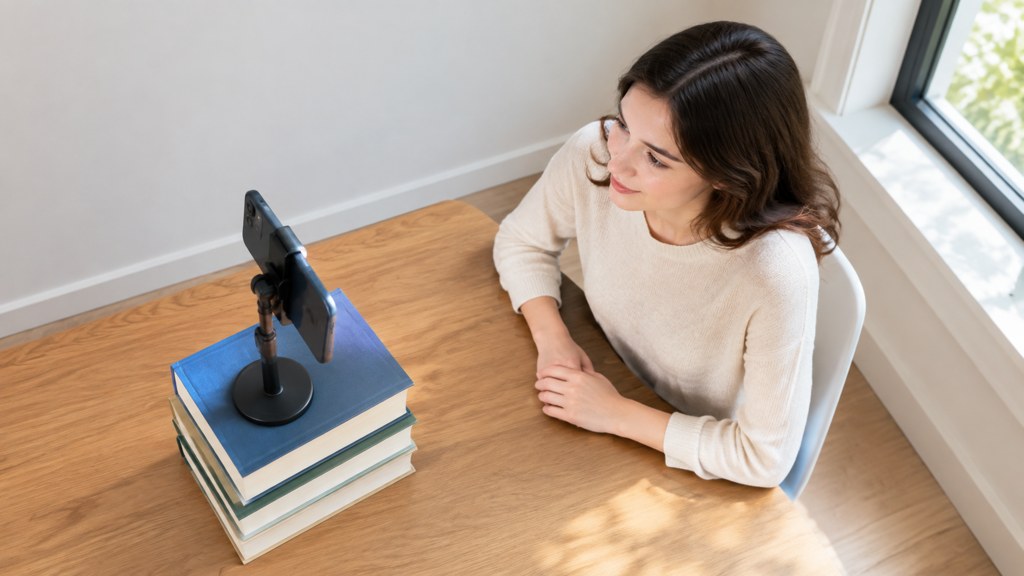
Here is how to take a passport photo at home with a phone, a window and a plain wall: rear camera, subject about a metre and a half from the wall, camera at eye level roughly a metre and a quarter away, daylight from one side plus something white on the other, neutral face, no glasses if you can avoid them, then crop to the size your passport office publishes. The rules that get files rejected are all measurable, so this piece works through them in the order a photo fails: light, framing, crop, file, then the submission itself.
What are the passport photo rules you have to hit?
Rules vary by country, and the only version that matters is the one published by the office you are applying to. Two governments state theirs in exact numbers, and reading both is useful even if you are applying somewhere else, because the shape of the requirement is the same everywhere.
| Requirement | United Kingdom, digital submission | Canada, printed photo |
|---|---|---|
| Size | At least 600 pixels wide and 750 pixels tall | 50 mm wide by 70 mm high (2 inches by 2 3/4 inches) |
| Head or face measurement | Not stated as a measurement on the digital guidance | Face 31 mm to 36 mm, chin to crown (1 1/4 to 1 7/16 inches) |
| File size | At least 50KB and no more than 10MB | Not applicable to a printed photo |
| Background | Plain light-coloured, with the subject in clear contrast to it | Plain white or light-coloured |
| Expression | Plain expression, mouth closed, eyes open and visible | Neutral, eyes open and clearly visible, not smiling or frowning |
| Glasses | Avoid them; if unavoidable, no tint, no glare, no frames across the eyes | Accepted if eyes are clearly visible with no glare; no sunglasses or tinted lenses |
| Recency | Not stated as a period on that page | Taken no more than 6 months before you apply |
Sources, both read on 7 September 2026: GOV.UK photos for passports (2026), and the Government of Canada passport photo requirements page at canada.ca, which is quoted here without a link because it does not answer automated requests from our checker.
US applicants: check the official tool, not an article
The State Department's requirements page blocked our automated access on 7 September 2026, so no US measurement is restated here from memory. Its own photo tool checks a file against the current rules, which is a better test than any figure copied from a blog.
How to take a passport photo at home step by step
- 1
Find the wall
Plain, light, unpatterned, no skirting board in frame, no light switch. A closed pale door works. A curtain does not: folds read as shadow.
- 2
Stand the subject away from it
About a metre and a half clear of the wall. That gap is what stops a hard shadow forming behind the head.
- 3
Set the camera at eye level
Phone braced on a stack of books or a small tripod, roughly a metre and a quarter back, rear camera, lens at the subject's eye height.
- 4
Light from one side, fill from the other
Window at about 45 degrees, room lights off, a white board or sheet on the opposite side to lift the shadow half of the face.
- 5
Set the face
Shoulders square, head straight, eyes on the lens, mouth closed, no smile. Hair clear of the eyes and eyebrows visible.
- 6
Shoot on a timer, several times
Three-second timer, ten frames, small changes between them. Blinks and half-expressions are the reason to shoot more than one.
- 7
Crop and check
Crop to the published proportions, then check the file against the office's own checker before you pay for anything.
That whole sequence takes about ten minutes the first time. The two steps people skip are the gap between subject and wall, and the fill on the shadow side, which is exactly why most rejected home photos are rejected.
How do you take a passport photo at home without shadows?
The lighting half of how to take a passport photo at home is one problem in two parts: no shadow on the wall behind, and no heavy shadow across the face. Distance solves the first, fill solves the second.
- Move the subject forward, not the light. A metre and a half of air behind the head makes a wall shadow physically impossible to see.
- One light source only. Turn the ceiling light off when using a window, or the two colours will fight and the shadows will cross.
- Fill the shadow side with anything white and large: a duvet, a foam board, an ironing board on its end.
- Overcast daylight is the friendliest light there is for this. Direct sun through a window is the worst.
- No flash. On-camera flash puts a hard shadow behind the ear and a specular dot in each eye.
If the room fights you, take the photo outside in open shade with a plain wall behind: a garage door, a rendered wall, the flat side of a building. Open shade is a giant soft light source and it costs nothing.
What size is a passport photo and how do you crop to it?
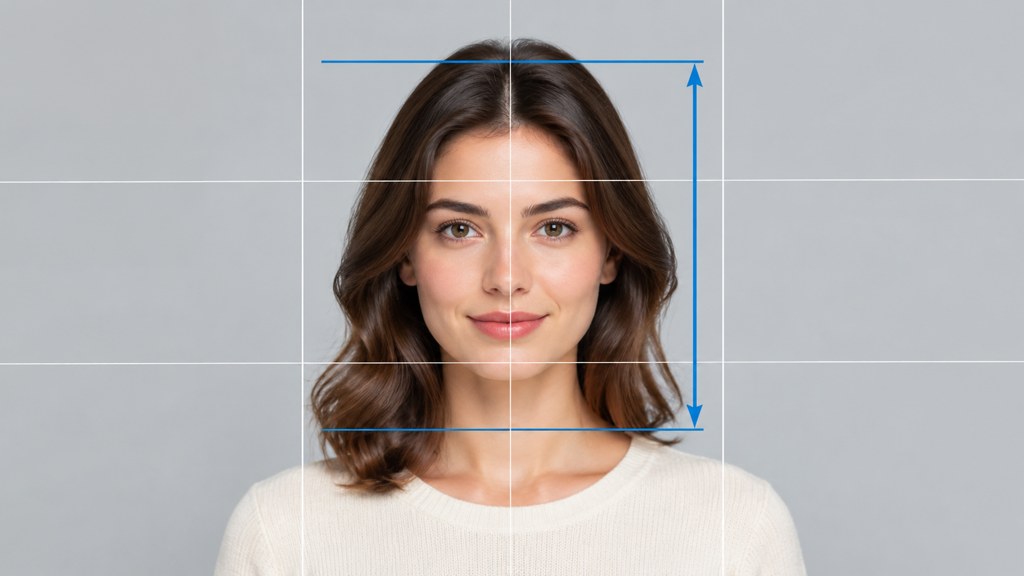
Passport photo size is defined two ways at once: the outer dimensions of the photo, and the height of the head inside it. Miss either and the file fails, which is why cropping by eye does not work.
Canada publishes both numbers: a 50 mm by 70 mm print with the face measuring 31 mm to 36 mm from chin to crown. The UK publishes pixel dimensions instead, at least 600 by 750, and leaves the head proportion to its own checker. People searching for a 2x2 photo are looking for the square American format; check its current measurement in the State Department tool rather than trusting a number in an article, including this one.
- 1
Crop to the outer proportion first
Square, or the ratio your office publishes. Get the shape right before worrying about the head.
- 2
Position the eye line
Eyes sit above the centre of the frame, not on it. This is the adjustment that fixes most too-small heads.
- 3
Check the head fraction
Measure chin to crown as a share of the total height and compare it with the published range.
- 4
Export at or above the minimum
Never enlarge a small crop to reach the pixel minimum. Shoot closer or move the camera in instead.
How do you make a digital passport photo file that a portal accepts?
A digital passport photo is judged on three things: pixel dimensions, file size and honesty. The UK guidance is specific on the first two, requiring an image "at least 600 pixels wide and 750 pixels tall" and a file "at least 50KB and no more than 10MB".
- Export as JPEG at high quality. Under-compressing to hit a minimum file size is fine; over-compressing to hit a maximum is not.
- Do not screenshot a photo. A screenshot re-samples the image, drops it to screen resolution and often adds a colour profile the portal will not read.
- Do not upload a photo of a printed photo. Every reflection and paper texture goes with it.
- Keep the original camera file. If the portal rejects the crop you can recrop from the source rather than reshooting.
- Strip nothing and add nothing. Editing metadata is not required and retouching is exactly what gets a file refused.
That last point is where photo tools get people into trouble. Background replacement, skin smoothing and face-shaping tools all exist and are all fine for a profile picture; on an identity document they alter the thing being verified. Services in that category, such as remove.bg or PhotoRoom, are built for product and portrait work rather than for ID compliance.
Can you use a phone selfie for a passport photo?
A phone, yes. A selfie, no, and the reason is optical rather than bureaucratic.
- Arm's length is about 50 centimetres, which enlarges the nose and narrows the ears. Passport offices check facial proportion, and that distortion is visible.
- Front cameras are usually lower resolution than the rear camera on the same handset.
- Holding the phone means one arm is raised, which pulls a shoulder up and tilts the head.
- Selfie modes often apply smoothing by default. Turn every beauty setting off before shooting.
Use the rear camera on a timer, at eye level, from a metre or more away. If you are alone, that is what the stack of books is for. Anyone asking how to take a good passport photo at home is really asking about distance and light rather than about the camera.
What gets a passport photo rejected?
Rejections cluster into a short list, and every item on it is fixable before you submit.
- A shadow on the background or across the face, from standing too close to the wall.
- A smile, or a mouth slightly open. Both governments quoted above require a neutral expression with the mouth closed.
- Glare on glasses, frames across the eyes, or tinted lenses. Take the glasses off unless you cannot.
- Hair over the eyes or eyebrows, or a head covering that obscures the face outline.
- A head that is too large or too small in the frame, which is a crop error rather than a photography error.
- A photo that is too old, where a recency rule applies, such as the six-month limit Canada publishes.
- Any retouching, filter or background replacement.

Run the finished file through the passport office's own checker before submitting. It is free, it is the same software that will judge the application, and it takes less time than reading this paragraph. Our passport photo maker handles the crop and the export, and the official checker still gets the final say.
Is it cheaper to take a passport photo at home than at a pharmacy?
Yes, by the whole fee, and the question is really whether the saving is worth the risk of a reshoot. One official price is easy to verify: USPS lists a "$15.00 - Post Office photo fee (if needed)" alongside its first-time application service (USPS (2026), read 7 September 2026).
The pharmacy chains are harder to pin down. Neither the Walgreens passport photo page nor the CVS passport photo page rendered a current price to us on 7 September 2026, so ask in store rather than trusting a figure from a comparison article. And note that a driving licence is a different document with its own federal standards under REAL ID (REAL ID (2026)), so nothing on this page transfers to it.
The economics of how to take a passport photo at home are simple: a home shoot costs nothing, a rejected application costs a reprint and a delay. Do it yourself when you have daylight, a plain wall and ten minutes; pay the counter fee when you are travelling next week and cannot afford a second attempt.
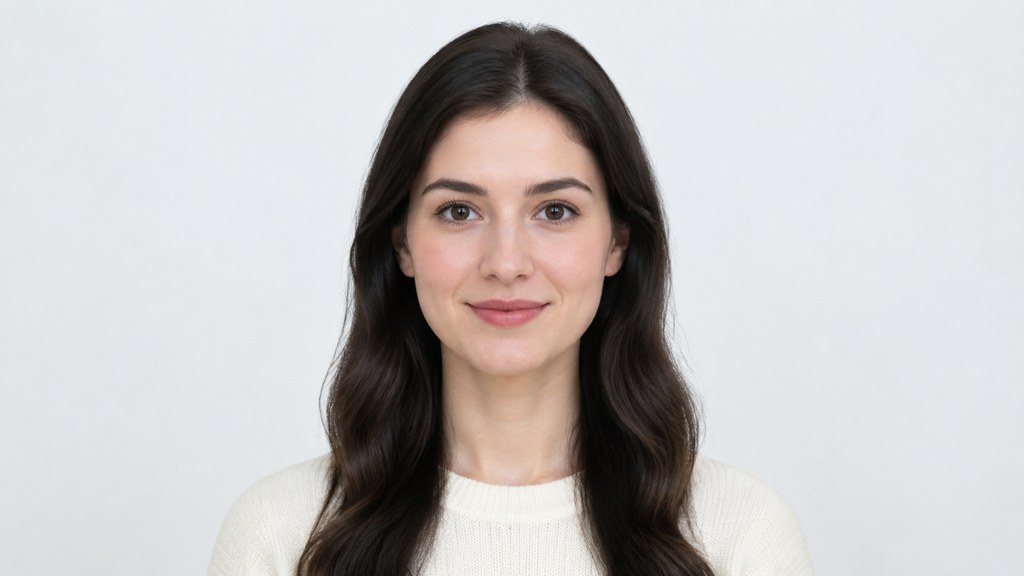
One last note on tooling. Editing tools in the same workbench as our image generator, most of which run on GPT Image 2, are excellent for a profile picture and irrelevant here. An identity photo is one of the few images left that is supposed to be exactly what the camera saw.
Key takeaways
- Distance does the work: a metre and a half between subject and wall removes the background shadow entirely.
- The UK requires at least 600 by 750 pixels and a file between 50KB and 10MB for a digital submission.
- Canada publishes 50 mm by 70 mm prints with a 31 mm to 36 mm face height and a six-month recency limit.
- Use the rear camera on a timer at eye level, never a selfie: arm's length distorts facial proportion.
- No retouching, filters or background replacement, and always run the file through the official checker before submitting.
Image & Design Editor
Maya Chen
Maya Chen edits LazyKiwi's image and design coverage. She works through every template and tool herself before writing about it, and keeps the receipts: the settings used, the credits spent and the runs that did not work.
FAQ
Common questions
How to take a passport photo at home if you live alone?
Brace the phone on a stack of books at eye height, mark your standing spot with tape a metre and a half from the wall, then use the three-second timer and shoot ten frames. Check focus on the first one, since autofocus can lock on the wall instead of your face.
What is a 2x2 photo?
It is the square format used for United States applications, quoted in inches rather than millimetres. Because the State Department's requirements page blocked automated access on 7 September 2026, confirm the current measurement and head-height rule in its own photo tool before you crop.
How to take a digital passport photo at home that a portal will accept?
Shoot at full resolution on the rear camera, crop to the published proportions rather than enlarging afterwards, and export a high-quality JPEG inside the stated file-size range. Never submit a screenshot: it re-samples the image and drops the resolution.
Can I wear glasses in a passport photo?
Both the UK and Canadian rules discourage it and neither accepts tinted lenses or glare. The UK says to avoid glasses unless you have to wear them; Canada accepts them only where the eyes are clearly visible with no reflection. Removing them is the safe option.
Does a passport photo need a pure white background?
Not necessarily pure white. The UK asks for a plain light-coloured background with the subject in clear contrast to it, and Canada accepts plain white or light-coloured. What matters is that it is even, unpatterned and free of shadow.
Crop it properly, then let the official checker decide
Shoot the frame at home with daylight and a plain wall, use the passport photo maker for the crop and export, and verify the file with your passport office before you apply.
Related reading

Best AI Profile Picture Generator in 2026: 7 Tools Compared
Seven AI profile picture generator options compared on prices checked today, likeness, style range and photo retention, plus LinkedIn and Instagram sizes.
8 min read
AI Couple Photo Generator: How to Make Natural Couple Photos
Use an AI couple photo generator to merge two selfies into one scene: the image combiner, instant couple and bridal templates, a video route, free credits.
8 min read
Content Repurposing: Turn One Photo Into a Week of Posts
Content repurposing from one photo: pick a source that survives recuts, run seven multiply steps in LazyKiwi, and post a Day 1 to Day 7 plan on three apps.
8 min read