
Best AI Image Generators in 2026: 10 Tools Compared
The best AI image generators in 2026, checked on their own pricing pages today: free tiers, output size, editing and commercial terms for ten tools.
 Noah Berger 12 min read
If you searched for the best AI image generator, you probably found ten lists with ten different winners. This one works differently. Every price, free allowance and limit below was read on the tool's own pricing or documentation page on 15 October 2026, and we say plainly when a page did not state something. We have not benchmarked image quality across these tools, so where a vendor makes a quality claim it is attributed to the vendor. The list covers ten generators: LazyKiwi, which publishes this blog, plus Midjourney, ChatGPT Images, Gemini with Nano Banana, Ideogram, Leonardo.Ai, Krea, Adobe Firefly, Stable Diffusion with ComfyUI, and FLUX. There is a comparison table first, one section per tool, and a section on which ones you can use without paying.
How we chose the best AI image generators
Three rules. First, the tool had to have a live product page with published pricing we could open today; closed betas and waitlists are out. Second, we only print numbers that appear on those pages, so a cell says "not stated" when a vendor does not publish a figure such as native output size. Third, each entry has to be a different kind of answer: a Discord-born art tool, a chat assistant, a Google app, a text specialist, a token-based studio, a realtime canvas, an Adobe product, a self-hosted stack and an open-weight model family.
If you typed best AI image generators 2026 hoping for one winner, the honest answer is that the winner depends on whether you need a free tier, a 4K export, in-place editing or a commercial licence. The table makes those four things visible side by side, and the sections after it explain the fine print.
- Free tier: what you get without a card, as written on the pricing page today.
- Best for: the job the vendor itself leads with, or the one its feature set clearly serves.
- Highest output: the largest size the vendor states for standard generation, not for a separate upscaler.
- Editing: whether you can change an existing image inside the product.
- Commercial use: what the vendor's page says about using the results in paid work.
Best AI image generators at a glance
The table reads left to right from the free route to the commercial terms. Prices are monthly unless marked, and every figure carries the date it was read: 15 October 2026.
| Tool | Free tier today | Best for | Highest stated output | Editing | Commercial use |
|---|---|---|---|---|---|
| LazyKiwi | Free credits on sign-up | Switching between six models, templates and photo tools | 4K | Image to image plus 23 photo tools | On paid plans, per the pricing page |
| Midjourney | None on web or Discord; niji mobile trial only | Stylised art, moodboards, personalisation | 2048 x 2048 px in HD mode (V8.2) | Edit Model, web editor, vary region | You own outputs; Pro or Mega if your company grosses over $1M a year |
| ChatGPT Images | "Limited image creation" on Free | Quick images and edits inside a chat, templates | Not stated on the pages we read | Selection tool, chat edits, aspect ratio changes | Not covered on the pages we read |
| Gemini (Nano Banana) | Daily quota of Nano Banana 2, 1K downloads | Photo edits in plain language, fast iteration | 2K download with a Google AI plan | Chat edits; Nano Banana Pro on paid plans | Not covered on the pages we read |
| Ideogram | Weekly slow credits for eligible accounts, public images | Text inside images, posters, precise edits | Not stated on the pricing page | Precise edit with masks and references (4.5) | Addressed in the pricing FAQ; read it before client work |
| Leonardo.Ai | 150 fast tokens a day, public creations | Presets, custom-trained models, Phoenix and Lucid | Not stated on the pricing page | Image and video editing per the homepage | Private creations start on Essential ($12) |
| Krea | 100 compute units a day, one image at a time | Realtime drawing, style references, Krea 2 | Upscaling to 22K on paid plans; generation size not stated | AI image editor, realtime edit | Licence ticked from Pro up; crossed on Free |
| Adobe Firefly | Free daily generations that refresh | Adobe users who want a provenance statement | 1K, 2K and 4K by plan | Generative Fill and Adobe app tools | Adobe says Firefly model outputs are safe for commercial use |
| Stable Diffusion + ComfyUI | Free to run locally | Full control, custom node workflows | Depends on your hardware | Any node you add | Community License: free under US$1M annual revenue |
| FLUX (Black Forest Labs) | Open-weight klein models; API from $0.041 per image | Developers and apps built on the API | Up to 4K through the API | Outpainting, eraser and try-on tools in the API | Self-host licence tiers; API per its terms |
Prices change often. If you are reading this months after publication, click through to the pricing page before you buy. We update the table when a vendor changes a plan.
LazyKiwi: six image models in one browser workbench
LazyKiwi is our own product, so treat this entry as a description rather than a verdict. The image generator is a browser workbench with six models behind one prompt box: GPT Image 2, Nano Banana, Seedream 5.0, Z-Image, Qwen Image and Wan 2.7 Image Pro. You pick a model, a ratio (1:1, 16:9, 9:16, 4:3 or 3:4), a size of 1K, 2K or 4K, and generate one to three variations per run. The Generator tab handles both text to image and image to image, so a reference photo goes in next to the prompt rather than in a separate mode.
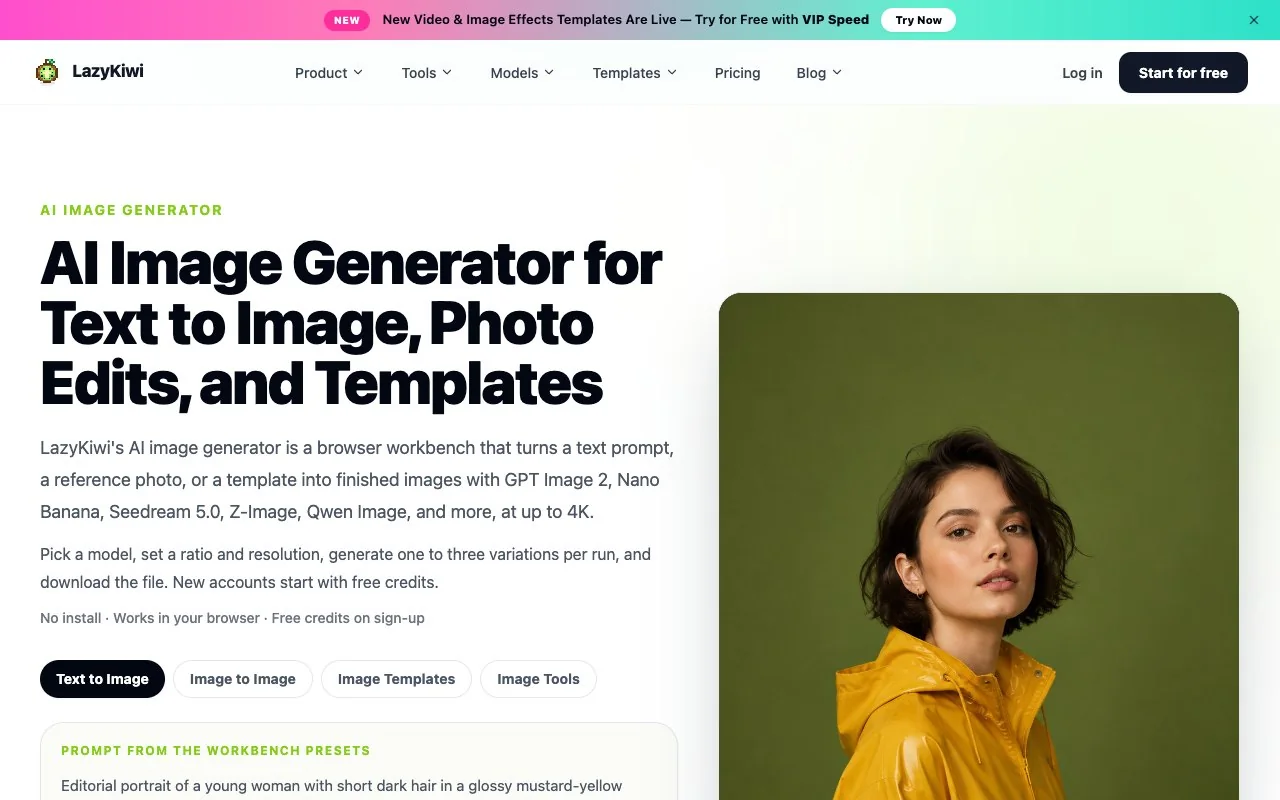
Beyond the prompt box there are 15+ photo templates with the prompt already written, and a Tools tab with 23 photo editors, from the AI photo editor that applies a described change to the photo upscaler that enlarges a finished image. New accounts start with free credits, and the credit cost of each run is shown on the Generate button before you confirm. Watermark-free export and commercial use are listed on the paid plans. What it does not have: a realtime drawing canvas, custom model training, or a public API.
Midjourney: the art-first choice with no free tier
Midjourney remains the reference point for painterly, stylised output, and its documentation is unusually clear about what each plan buys. According to its plan comparison, there are four subscriptions: Basic at $10 a month, Standard at $30, Pro at $60 and Mega at $120, with 20% off if you pay for a year upfront. Basic includes 3.3 hours of fast GPU time a month; Standard and above add Relax mode, which keeps generating images at a slower pace with no cap. Stealth mode, which keeps your work private, is only on Pro and Mega.
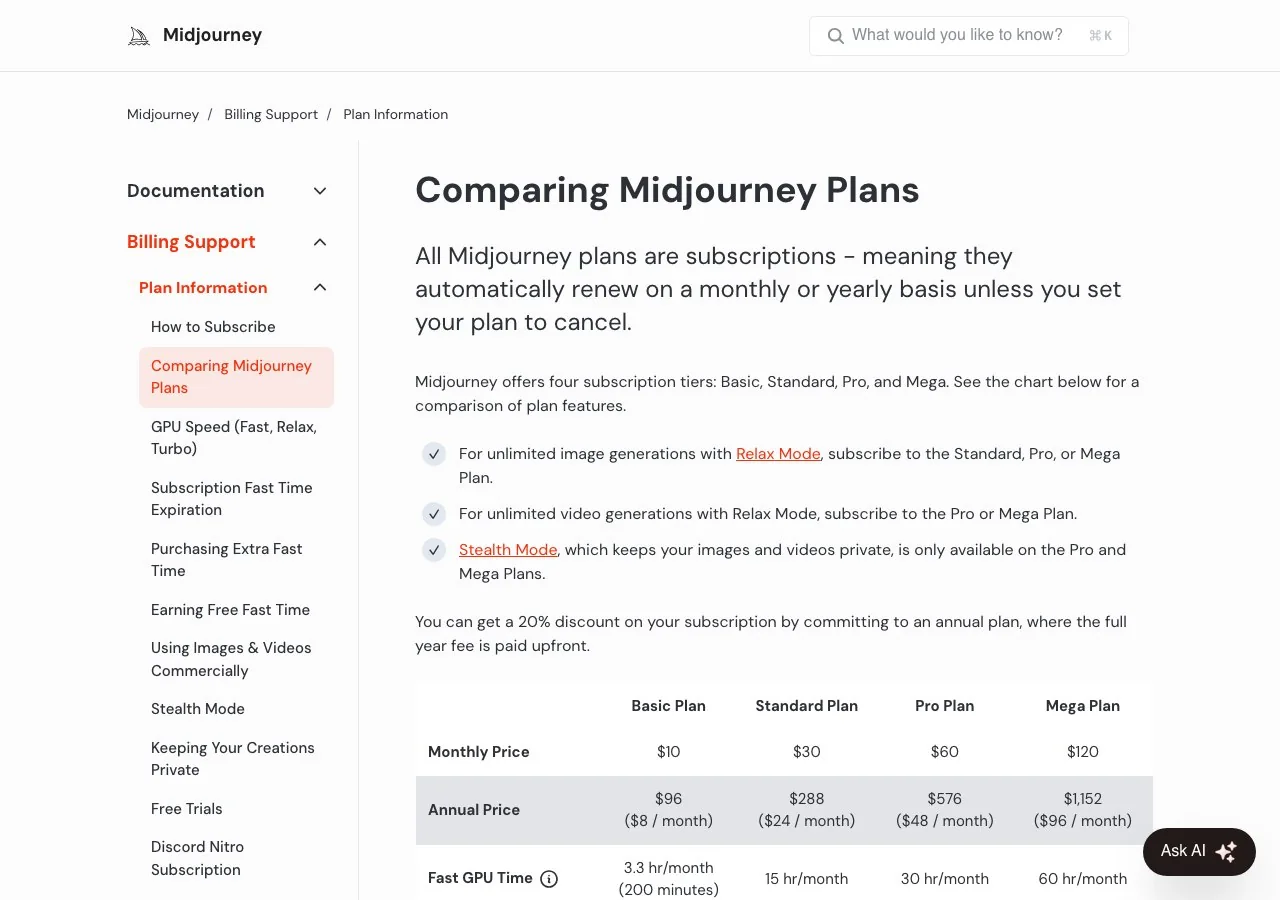
There is no free trial on the website or in Discord; the free trials page says a limited trial exists only in the niji journey mobile app. The default model is V8.2, released on 24 July 2026, and according to the image size article its HD mode produces 2048 x 2048 px images at 1:1 without an upscaler. Ownership is generous: you own what you make even after cancelling, with one business rule, a company grossing over $1,000,000 a year needs a Pro or Mega plan for commercial use.
ChatGPT Images: the easiest route if you already use ChatGPT
OpenAI folded image generation into the chat. Its help centre says ChatGPT Images is available on all tiers, and the current version, ChatGPT Images 2.5, is described as bringing sharper details, more precise editing and faster generation. You can create from a prompt, edit an uploaded image by describing the change, select a region with a selection tool, pick any aspect ratio, start from a template, or draw a sketch on mobile and turn it into an image. OpenAI is candid that highlights are not always precise and edits may extend beyond the area you selected.
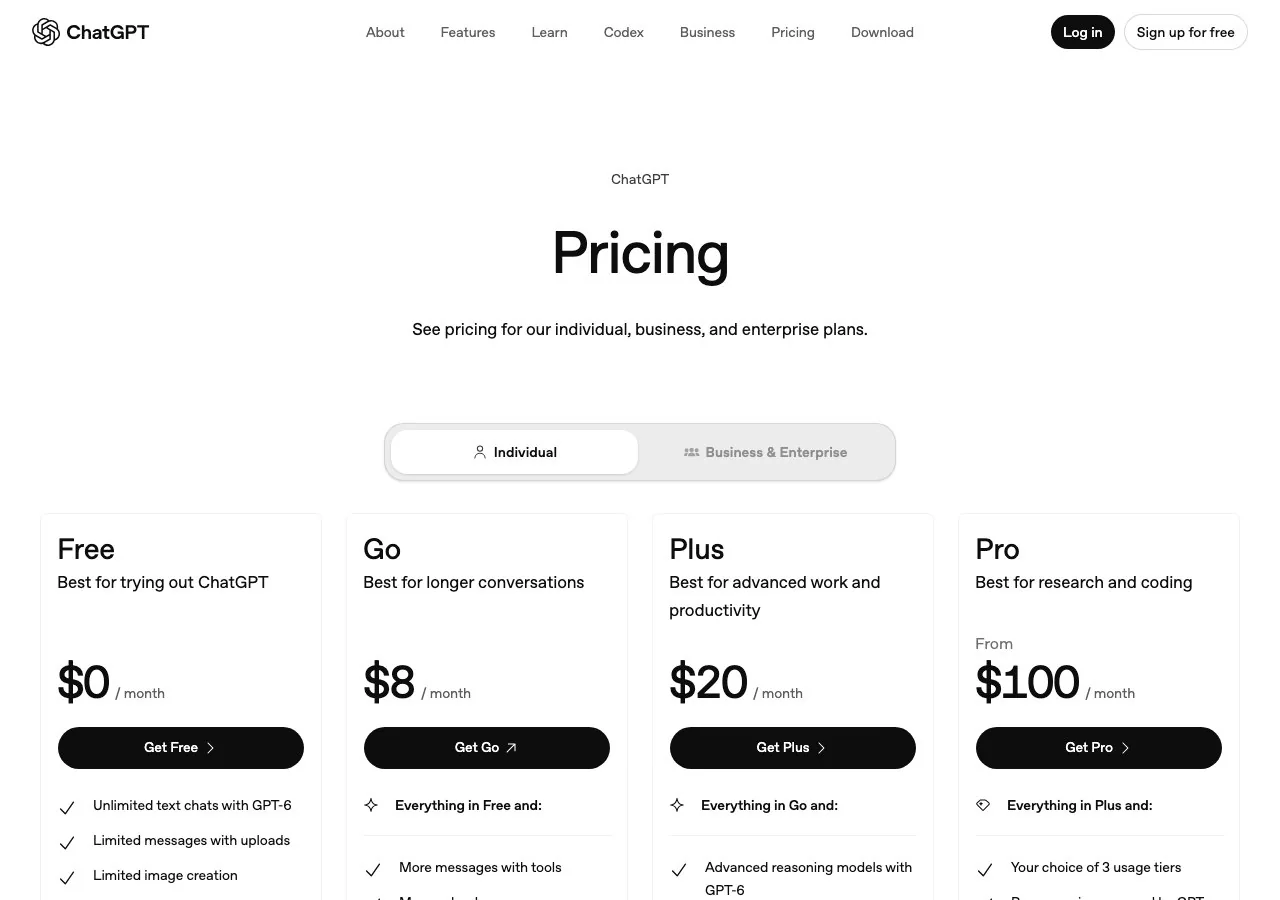
On the pricing page, Free is $0 with "limited image creation", Go is $8 a month with more image creation, Plus is $20 with "more complex and accurate image creation", and Pro starts at $100 with faster image creation and no stated cap. The pages we read do not give a maximum output size. If you want the same model outside the chat, LazyKiwi runs GPT Image 2 at up to 2K with inpainting and outpainting, and we explain its text rendering on the GPT Image 2 page.
Gemini and Nano Banana: Google's image generator
Google's generator lives inside the Gemini app under the Nano Banana name. The Gemini help page lists three variants: Nano Banana 2 Lite for speed, Nano Banana 2 as the balance of speed and quality, and Nano Banana Pro, which needs a paid plan. Free users get a daily quota of Nano Banana 2 images and can download at 1K; a Google AI plan raises downloads to 2K. You must be 18 or over to edit images, and 13 to generate them.
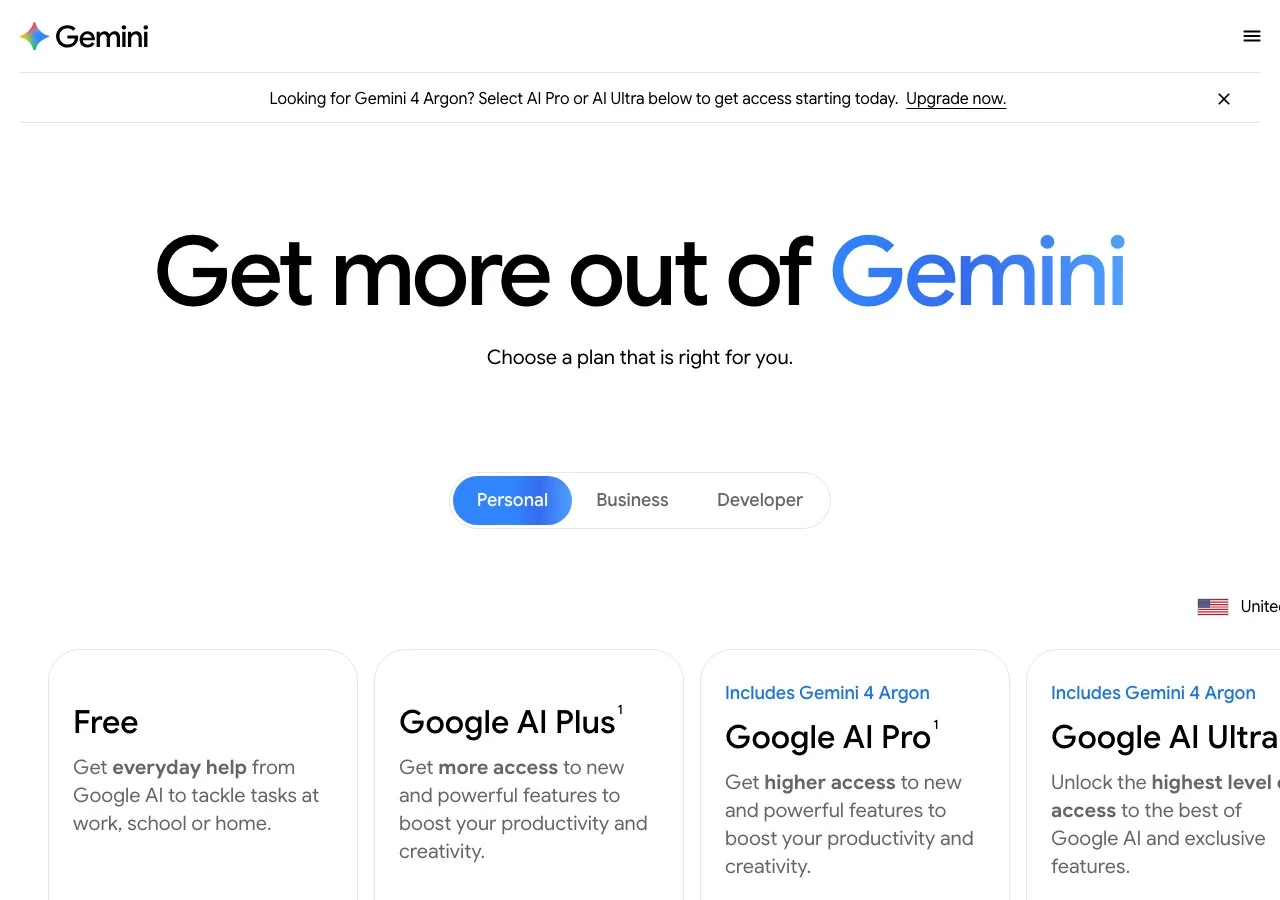
The subscriptions page prices Google AI Plus at $4.99 a month, AI Pro at $19.99 and AI Ultra from $99.99, each framed as more access to Nano Banana rather than a fixed number of images. If you want Nano Banana without a Google plan, LazyKiwi's Nano Banana page runs the original, Pro, 2 and 2.1 versions on credits at up to 4K, and our Nano Banana 2.1 vs Pro comparison explains which to pick.
Ideogram: the text-in-image specialist
Ideogram built its reputation on legible lettering inside images, and its October 2026 model, Ideogram 4.5, is pitched as an edit model that keeps untouched pixels stable across repeated edits. The pricing page lists a Free plan with weekly slow credits for accounts signed in with Google, Apple or Microsoft, then Plus at $20 a month ($15 billed annually) with 2,400 priority credits, Pro at $60 ($42 annually) with 7,500, and Team at $30 per user ($20 annually) with 3,600 per user. Priority credits are what make an image generate instantly; slow credits have no monthly cap on the paid plans.
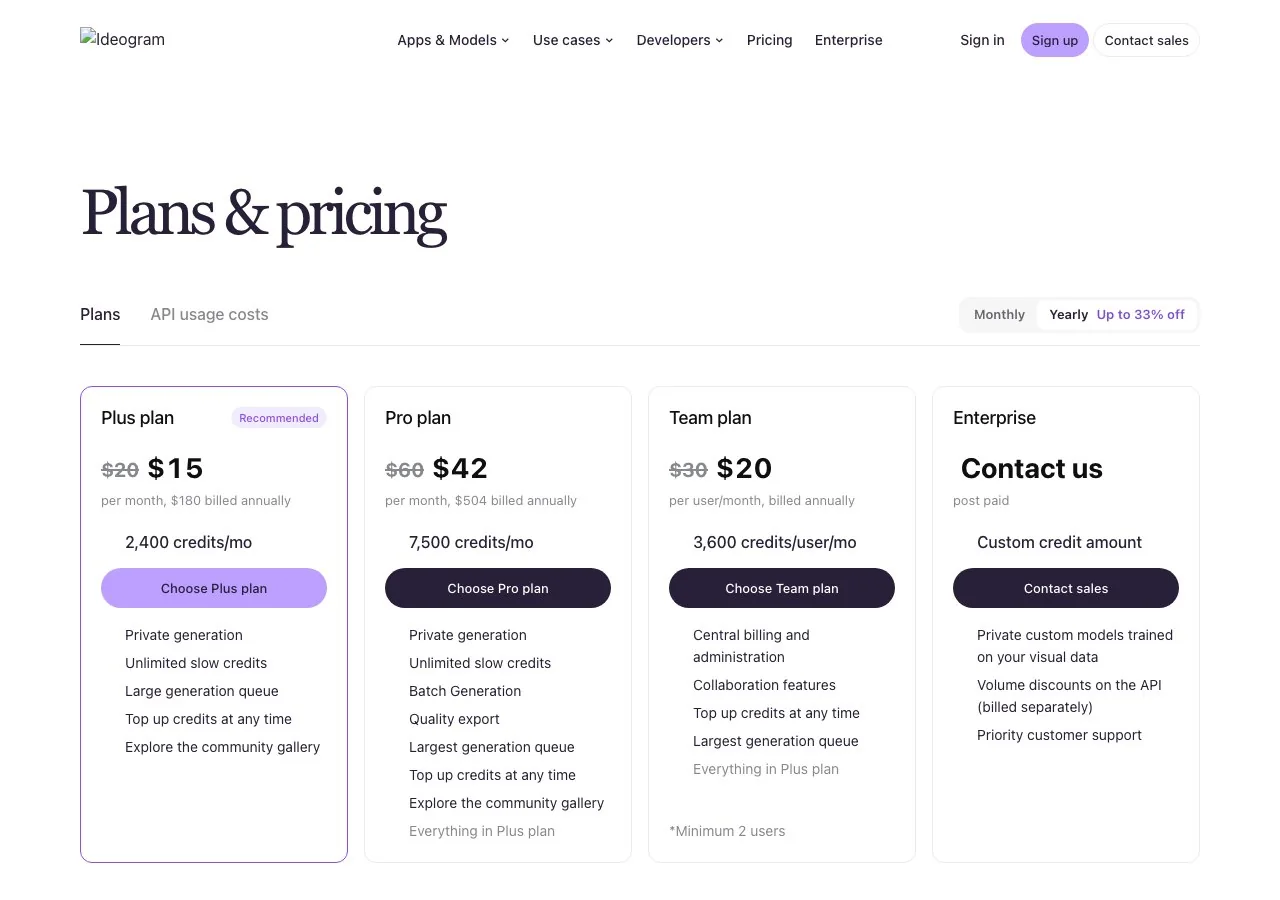
Private generation starts at Plus; Free images are public. Native output size is not stated on the pricing page, and the commercial-use question is answered in the page's own FAQ, which is worth reading before client work. We cover the new model, its API prices and the open-weight question in Ideogram 4.5: what's new.
Leonardo.Ai: fast tokens, presets and your own models
Leonardo, owned by Canva since July 2024, prices by fast tokens. Its pricing page, read in the monthly view and quoted ex. tax, shows Free with 150 fast tokens a day and public creations, Essential at $12 a month with 8,500 tokens, Premium at $30 with 25,000 and Ultimate at $60 with 60,000, with up to 20% off yearly. Paid plans make creations private, raise quality settings from Basic to Enhanced, and let you train personal AI models, 10 on Essential up to 50 on Ultimate. Premium and Ultimate add relaxed-pace image generation with no cap on selected models, which the footnote names as Lucid Origin, Lucid Realism, Phoenix 1.0 and Phoenix 0.9 among others.
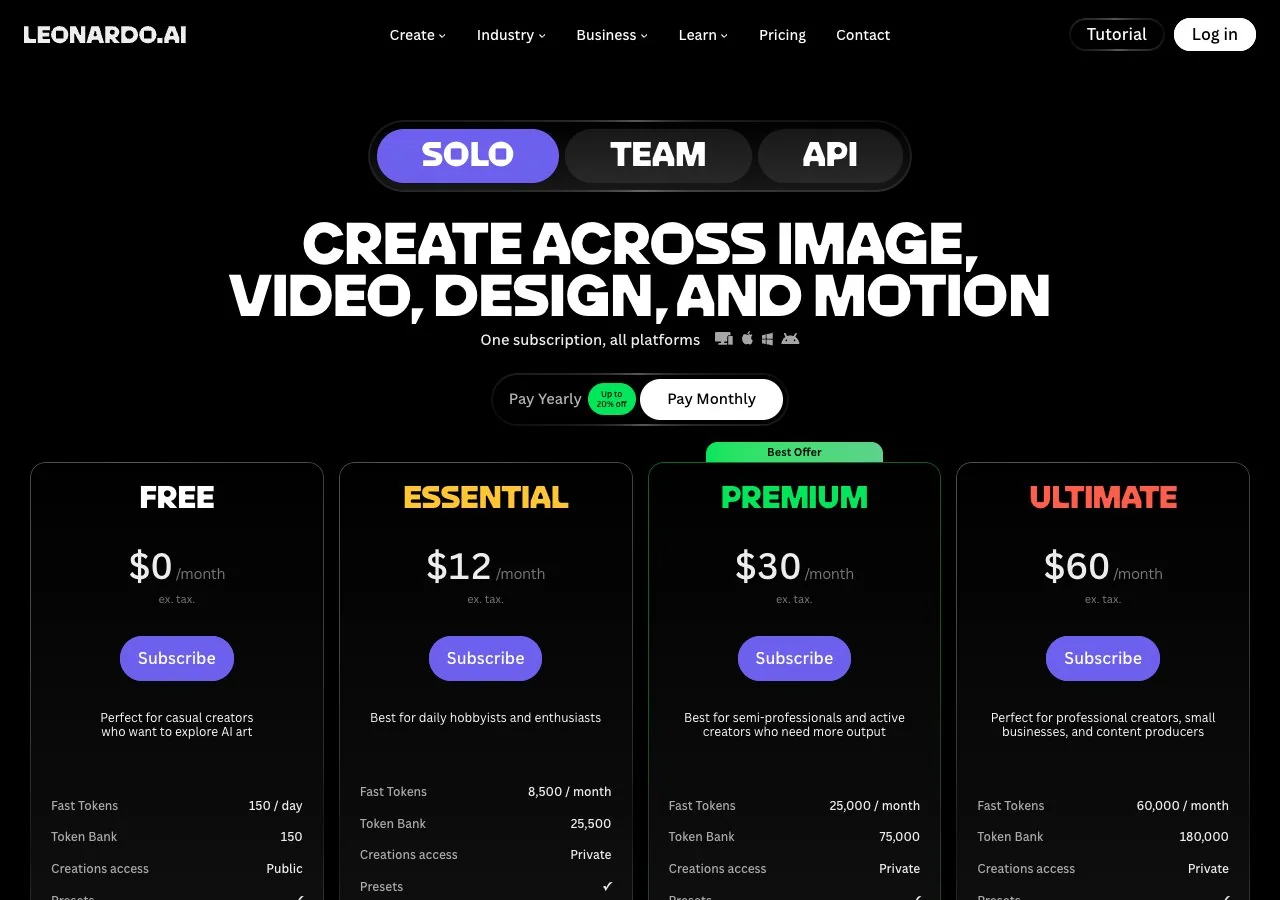
A token is not an image: the cost per generation changes with the model and settings, so the daily 150 stretches further on light settings and runs out quickly on heavy ones. Output size is not stated on the pricing page. If the token maths is the thing putting you off, our Leonardo AI alternatives guide compares the options by what replaces it.
Krea: realtime canvas, Krea 2 and a free plan with a catch
Krea is a suite rather than a single model: text to image, a realtime mode that redraws as you type or sketch, video, 3D, upscaling and LoRA training, with third-party models such as FLUX, Ideogram, Gemini and Seedance alongside its own Krea 2. The pricing page gives the Free plan 100 compute units a day with one image at a time, Pro 20,000 units a month at $35 ($21 billed yearly) and Max 60,000 at $105 ($63 yearly); a Basic tier at $5.25 a month on the yearly toggle appears only in the detailed comparison table.
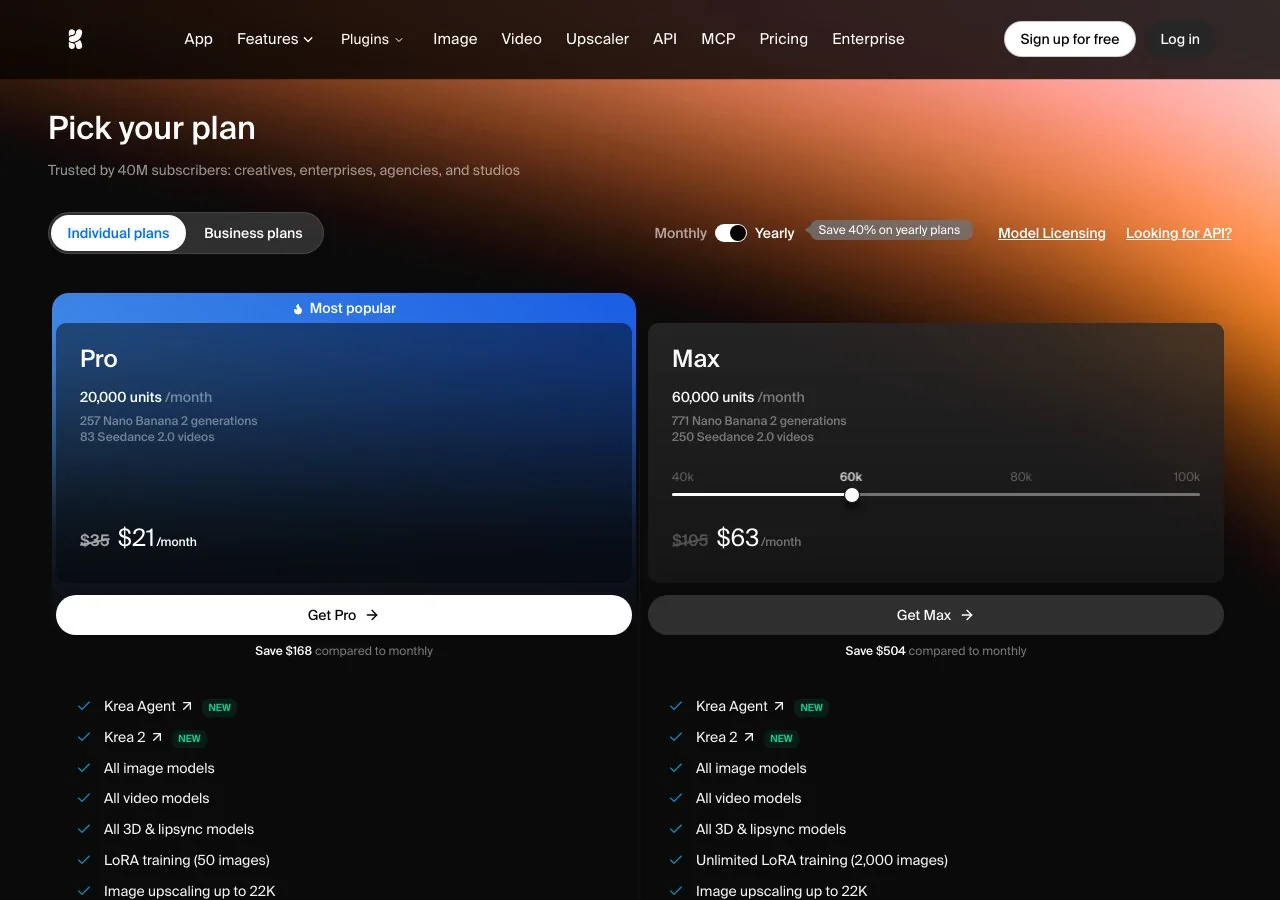
The catch sits in that same table: the commercial licence row is ticked for Pro and above and crossed for Free, so Free output is for personal use. Krea 2 itself is open-weight; the Turbo variant is on Hugging Face under a community licence and generates at up to 2K. We go deeper in our Krea review.
Adobe Firefly: the commercially safe pitch
Adobe sells Firefly on provenance. Its plans page states that outputs from Adobe Firefly models are safe for commercial use because the models are trained on licensed content and public-domain content, and it lists partner models, including Nano Banana and FLUX, inside the same app. Firefly Standard is US$9.99 a month with 2,000 generative credits, Pro US$19.99 with 4,000, Pro Plus US$49.99 with 10,000 and Premium US$199.99 with 50,000. On the day we read it the top two tiers were discounted 30% until 21 October, and the higher tiers advertise uncapped generation on selected image models at 1K, 2K and 4K for the first year.
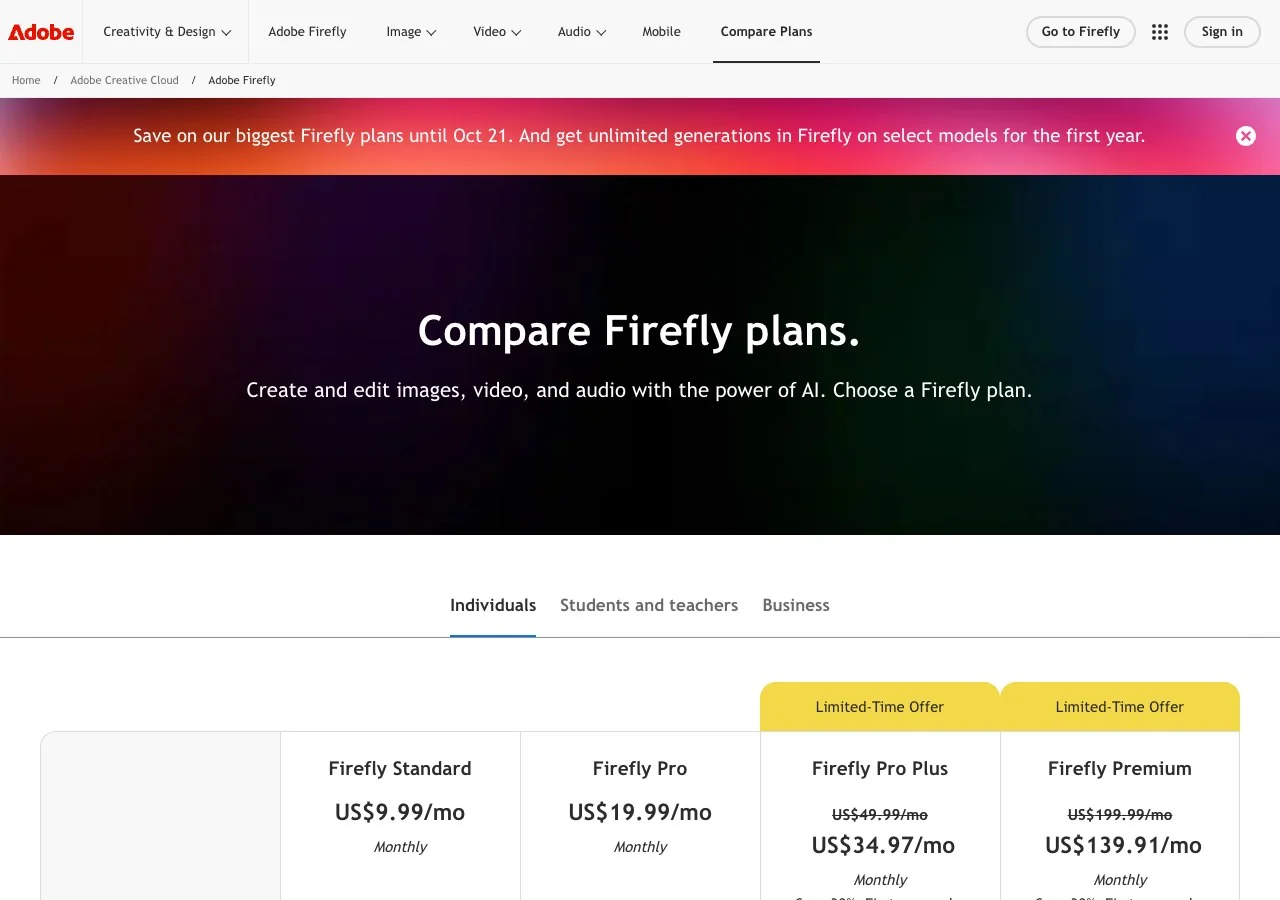
You do not need a plan to start: the page says free daily generations across image, video and audio refresh every day. One caution: the commercial-safety statement covers Adobe's own models, not the partner models you can also select in the same interface.
Stable Diffusion and ComfyUI: run the generator yourself
If you have a capable GPU, the free option is local. ComfyUI is the node-based interface most people use: you connect models, steps and outputs on a canvas where every step is inspectable, and the site counts more than 60,000 community nodes, a desktop app, and a cloud version with a free tier. Stability AI's Community License lets individuals and organisations under US$1 million in annual revenue use the Stable Diffusion 3.5 suite and SDXL Turbo free, including commercially; above that threshold you need an Enterprise licence.
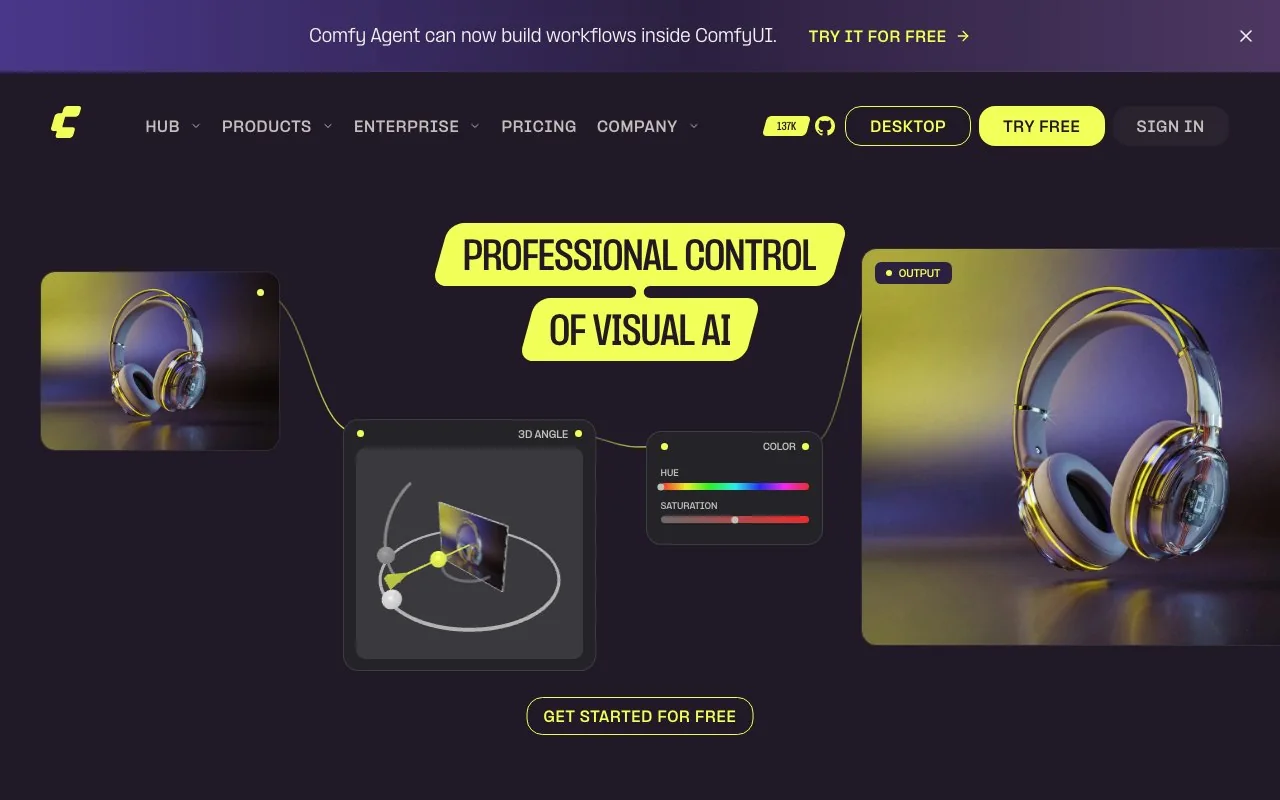
The trade-offs are time and hardware. Output size is whatever your GPU and workflow can handle, there is no support desk, and the learning curve is real. If you want the node approach without the install, Krea Nodes and the cloud version of ComfyUI cover most of it.
FLUX: the open-weight family behind many apps
Black Forest Labs' FLUX models power a surprising number of the products above. The BFL pricing page lists FLUX 3 Image at $0.041 to $0.607 per image depending on the resolution tier, from 768 x 768 up to 4K, with the same price for text to image and image to image; reference images cost nothing extra and failed generations are not charged. For self-hosting there are FLUX.2 klein open-weight models, with licence tiers that start at 10,000 images a month and include fine-tuning and LoRA rights.
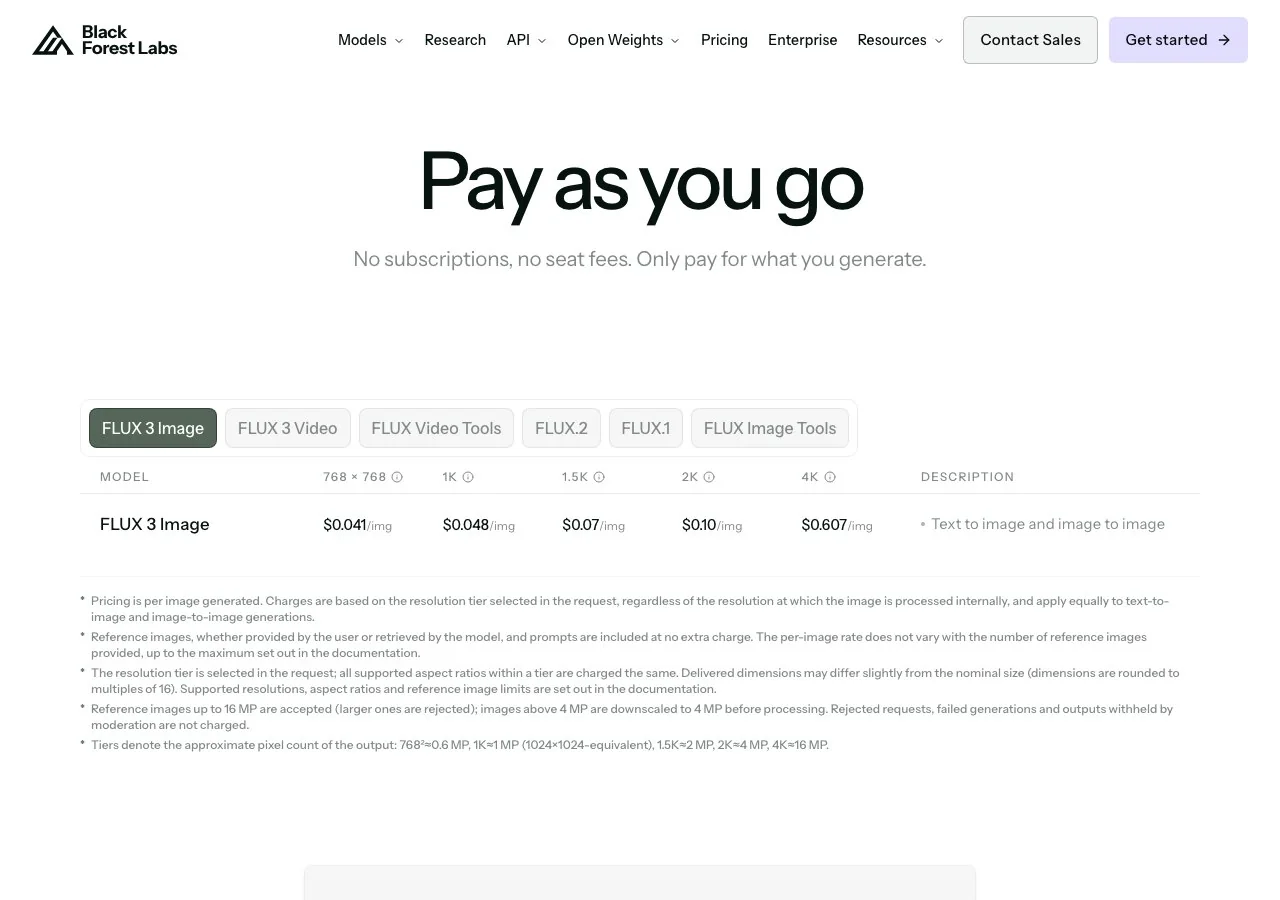
Few people use FLUX through BFL directly. You meet it inside Krea, Adobe Firefly, ComfyUI workflows and dozens of API apps, which is why it belongs on a list of generators even though it has no consumer app of its own.
Which AI image generator is free in 2026?
"AI image generator free" is the most searched variant of this query, so here is the plain version of the free routes, as read today:
- Free and local: Stable Diffusion through ComfyUI, if you have the hardware; commercial use is allowed under the Community License below US$1 million in revenue.
- Free daily allowances: Leonardo (150 fast tokens a day, public gallery), Krea (100 compute units a day, no commercial licence), Adobe Firefly (daily generations that refresh) and Gemini (a daily Nano Banana 2 quota with 1K downloads).
- Free but thin: ChatGPT Free with "limited image creation", and Ideogram Free with weekly slow credits and public images.
- Free credits to start: LazyKiwi gives new accounts free credits across all six models; after that the cost is shown before you generate.
- Not free: Midjourney, apart from the trial inside the niji mobile app.
So the best free AI image generator depends on what "free" needs to include. For private commercial work the free tiers mostly fall short: Leonardo and Ideogram publish your images, Krea withholds the licence. For learning and personal images, Gemini and Firefly are the roomiest, and a local ComfyUI install has no meter at all.
A text to image generator with a free tier usually recovers the cost through public galleries, slower queues or watermarks. Read the ownership line before you post client work.
How to pick an AI picture generator for your job
- 1
Posters and anything with words
Ideogram first; GPT Image 2, either on LazyKiwi or inside ChatGPT, second.
- 2
Photoreal product or portrait shots
Nano Banana or Seedream 5.0 on LazyKiwi, or Firefly if you need Adobe's provenance statement on file.
- 3
Illustration and concept art
Midjourney, Leonardo's Phoenix and Lucid models, or Krea 2 with a style reference.
- 4
Sketch-to-image and live iteration
Krea's realtime mode, or ChatGPT's sketch tool on mobile.
- 5
Volume at a known unit price
FLUX through the BFL API, or a local ComfyUI pipeline once it is set up.
Whatever image generator AI you settle on, run one test with your real brief before paying: a product on a white background, a poster with three lines of text, and a portrait. Check each result at 100% zoom, then read the ownership terms.
Key takeaways
- There is no single best AI image generator: the right pick depends on free tier, output size, editing and commercial terms, all read on 15 October 2026.
- Midjourney has no free trial on web or Discord and starts at $10 a month; its V8.2 HD mode outputs 2048 px.
- Free daily allowances exist at Leonardo (150 fast tokens), Krea (100 units, no commercial licence) and Adobe Firefly; Gemini gives a daily Nano Banana 2 quota.
- Stable Diffusion via ComfyUI is free to run locally, and the Community License covers commercial use under US$1M revenue.
- LazyKiwi runs GPT Image 2, Nano Banana, Seedream 5.0, Z-Image, Qwen Image and Wan 2.7 Image Pro at up to 4K with free credits to start.
Models & Research Editor
Noah Berger
Noah Berger tracks generative models and the rules around them for LazyKiwi. He works from primary sources, dates every claim, and updates a post when the model or the policy behind it changes.
FAQ
Common questions
What is the best AI image generator overall?
We did not run a quality benchmark, so we will not crown one. On the facts we could verify, Midjourney leads for stylised art, Ideogram for text in images, Gemini and ChatGPT for convenience, ComfyUI for control, and LazyKiwi if you want several models in one workbench with 4K output.
Is there a completely free AI image generator?
Yes, with conditions. Stable Diffusion through ComfyUI is free to run on your own GPU. Leonardo, Krea, Adobe Firefly and Gemini give daily free allowances, but Leonardo and Ideogram make free images public and Krea's free plan has no commercial licence. LazyKiwi gives new accounts free credits.
Which AI image generator makes the largest images?
Among stated figures, LazyKiwi outputs up to 4K on its listed models, Adobe Firefly's top plans advertise 4K on selected models, and the FLUX API goes to 4K. Midjourney's V8.2 HD mode produces 2048 x 2048 px. ChatGPT, Leonardo, Ideogram and Krea do not state a native size on the pages we read.
Can I use AI images commercially?
It depends on the vendor's terms, not the image. Midjourney says you own your outputs; Krea's free plan lacks the licence; Leonardo and Ideogram make free output public; Adobe states its own models' outputs are safe for commercial use. Our copyright guide covers what the law adds on top.
Is ChatGPT or Gemini as good as Midjourney for images?
They are built for different jobs. Midjourney is a dedicated art tool with a paid-only model; ChatGPT and Gemini are assistants with image generation inside, including a free route. We have not run a side-by-side quality test, so pick by workflow and budget first.
Try six image models with one prompt
Open the LazyKiwi image generator, type one prompt, and compare GPT Image 2, Nano Banana, Seedream 5.0 and more side by side. Free credits on sign-up, and the cost is shown before you generate.
Related reading
Nano Banana 2.1 vs Pro: Price, Specs and Which to Use
Nano Banana 2.1 vs Pro from Google's own model card and price list: what each costs per image, where 2.1 wins, and the jobs Pro still does better.
8 min read
Ideogram 4.5: What's New, Pricing and Alternatives
Ideogram 4.5 is an edit model built to stop drift across repeated changes. What it does, what it costs per image, whether it is open, and what else to try.
8 min read
Can You Copyright AI Art? What the Rules Say
Can you copyright AI art? The US position quoted from the Copyright Office, what counts as human authorship, how to register, and how the UK differs.
9 min read
Best AI Photo Editing Apps in 2026, Tested
Nine of the best AI photo editing apps run against the same two files: retouch a face, clean a scene, batch a set, export without a watermark.
10 min read