
Nano Banana 2.1 vs Pro: Price, Specs and Which to Use
Nano Banana 2.1 vs Pro from Google's own model card and price list: what each costs per image, where 2.1 wins, and the jobs Pro still does better.
 Noah Berger 9 min read
Nano Banana 2.1 vs Pro comes down to volume versus control. Nano Banana 2.1, released on 6 October 2026, is Google's new Flash-tier image model: it costs about a quarter of Pro per 1K image, and in Google's own preference tests it scored above Pro on every row Google published. Nano Banana Pro (Gemini 3 Pro Image) still holds more reference faces, accepts style reference images that 2.1 does not, and remains Google's "premium choice" for the hardest visual work. Everything below comes from Google's model card, API documentation and price list, read on 13 October 2026. We did not run our own side-by-side test, and we say where a claim is Google's rather than independent.
Nano Banana 2.1 vs Pro at a glance
Nano Banana 2.1 vs Pro in one table, with every cell taken from a Google page. If you only need the decision, skip to the last section.
| Spec | Nano Banana 2.1 | Nano Banana Pro |
|---|---|---|
| API model ID | gemini-nano-banana-2.1 | gemini-3-pro-image |
| Built on | Gemini 3.6 Flash | Gemini 3 Pro |
| Released | 6 October 2026 | November 2025 |
| Output sizes | 1K, 2K, 4K (no 512px) | 1K, 2K, 4K |
| Price per 1K image (API) | $0.0336 | $0.134 |
| Price per 4K image (API) | $0.113 | $0.24 |
| Object references | Up to 10 | Up to 6 |
| Character references | Up to 4 | Up to 5 |
| Style references | Not listed | Up to 3 |
| Thinking control | minimal, medium (default), high | Always on, no level setting |
Sources: the Nano Banana 2.1 model card, the Gemini API image generation guide and the Gemini API price list. Pro's launch date is from Google's Nano Banana Pro announcement.
Are Nano Banana 2.1 and Pro the same model?
No. They sit on different base models. Google's model card says Nano Banana 2.1 "is based on Gemini 3.6 Flash", while Nano Banana Pro is the image model of the Gemini 3 Pro family. Google's API guide describes 2.1 as "the primary high-efficiency workhorse model" and Pro as "the premium choice for the most complex visual tasks".
The naming is what confuses people. Earlier Flash models carried technical names such as Gemini 3.1 Flash Image, which Google nicknamed Nano Banana 2. Version 2.1 ships under the nickname itself, so the API ID is literally gemini-nano-banana-2.1. It replaces Nano Banana 2, and Google's guide now recommends 2.1 "for all new projects" in place of the older Flash model.
Pro is not being replaced. It is older (November 2025) but remains in the lineup as the higher-priced tier, so the real choice is between a newer, cheaper model and an older, more expensive one with a few capabilities the newer one lacks.
Nano Banana Pro vs 2.1 on price: what Google charges per image
Google bills image output by the token and publishes a per-image equivalent. These are standard (non-batch) Gemini API list prices from the pricing page:
| Resolution | Nano Banana 2.1 | Nano Banana Pro | Pro costs |
|---|---|---|---|
| 1K | $0.0336 | $0.134 | About 4x more |
| 2K | $0.0504 | $0.134 | About 2.7x more |
| 4K | $0.113 | $0.24 | About 2.1x more |
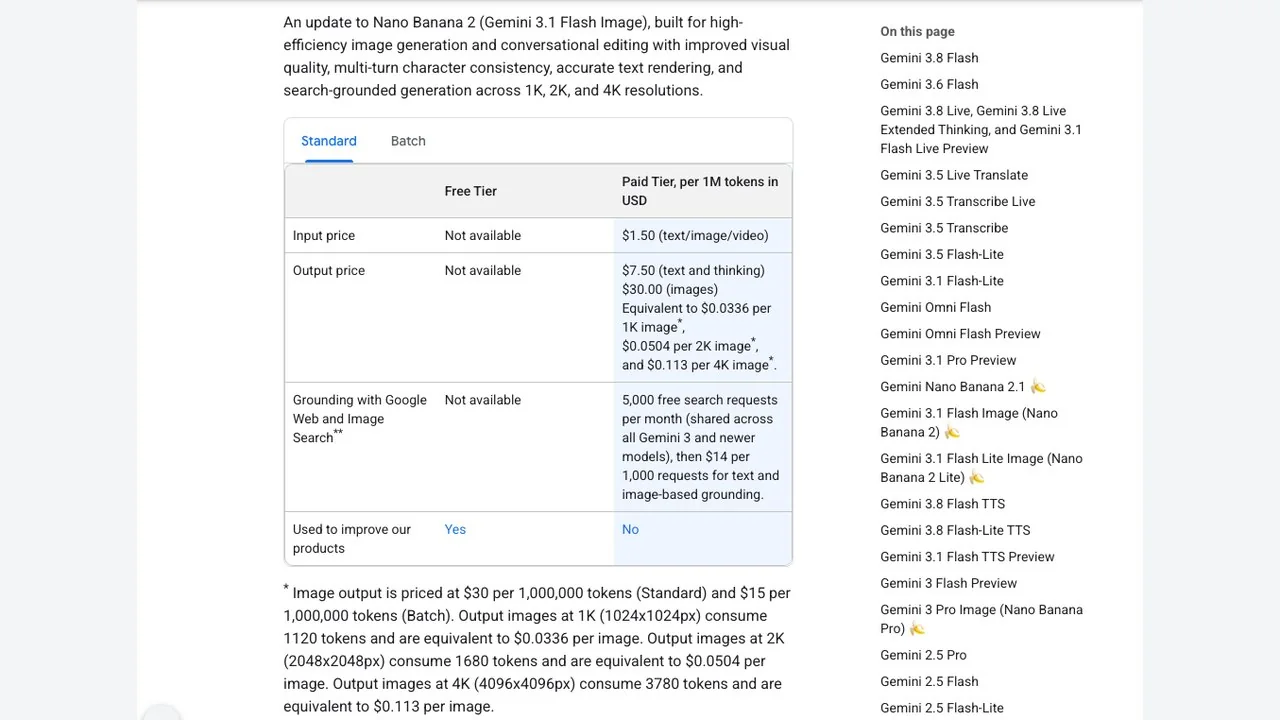
Two details change the maths. First, Pro charges the same for 1K and 2K, so if you need 2K anyway the gap narrows. Second, the batch tier halves 2.1's image price ($15 instead of $30 per million image tokens). Neither model has a free API tier: both rows read "Not available" under Free Tier, although Google notes the models can be tried in Google AI Studio.
A cheaper image is only cheaper if you keep it. Track cost per accepted image, not cost per generation: if Pro gets a tricky brief right first time and 2.1 needs three tries, the gap shrinks fast.
Is Nano Banana 2.1 better than Pro? What Google's tests show
On Google's own numbers, yes. The model card reports human side-by-side preference scores (Elo) and 2.1 with thinking enabled leads Pro on every row, often by a wide margin:
| Google benchmark | 2.1 (thinking) | 2.1 (no thinking) | Pro |
|---|---|---|---|
| Text-to-image, overall preference | 1050 | 1015 | 935 |
| Infographic design | 1048 | 1001 | 912 |
| General editing | 1026 | 980 | 939 |
| Multi-character consistency | 1106 | 1068 | 1011 |
| Mask/ink-based editing | 1049 | 1042 | 927 |
| Multi-reference editing | 1066 | 1041 | 989 |
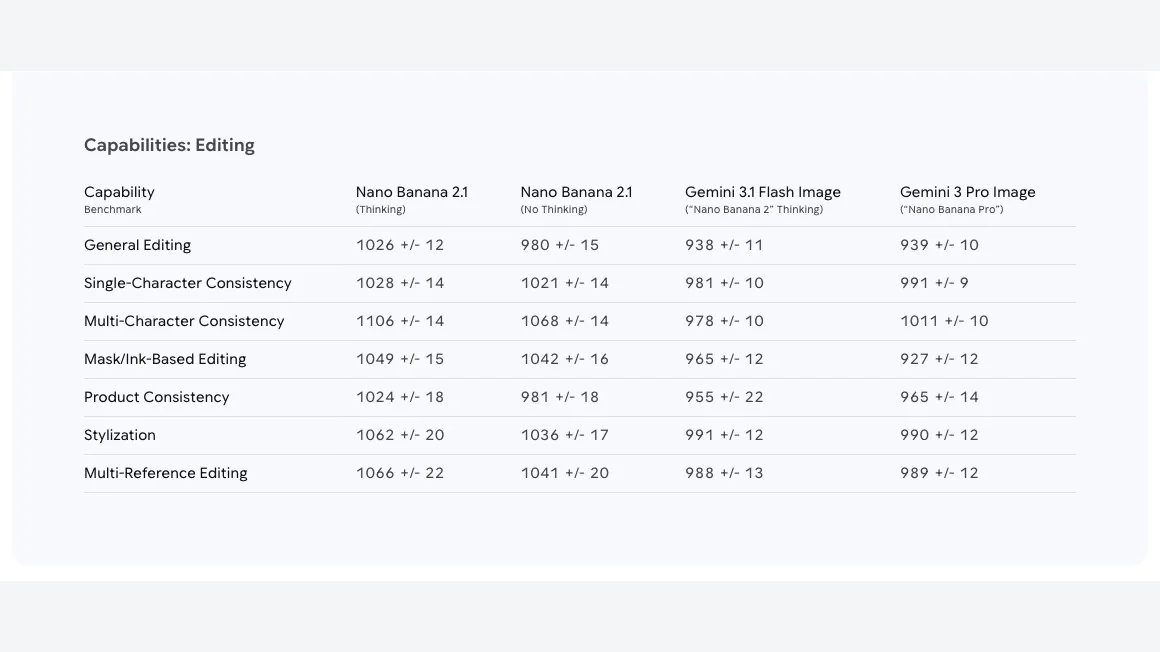
Read these as Google grading its own models. No outside lab had published a replication when we checked. Hands-on reviewers are more mixed: The Decoder ran its standard prompt and found Pro's image "more realistic and natural" in colour and proportion, and Fuser's same-prompt test gave Pro the character test while 2.1 followed lighting briefs more closely. So the fair summary is: 2.1 wins Google's benchmarks, and Pro still wins some individual images.
Nano Banana 2.1 still has room for several quality improvements, including poor text rendering in small text, often blurry in the 1k model.
— Google DeepMind, Nano Banana 2.1 model card
Where each model still slips
Google lists the weak spots of 2.1 itself, which is useful because it tells you where Pro is worth testing:
- Small text, long paragraphs and page-length text render poorly, "often blurry in 1k".
- Character consistency between input images and output "is not always perfect".
- Masked or doodle-based edits can follow instructions only partly.
- Some edits keep the pose of the input image when you asked for a new one.
- Left and right can get confused, and 3D reasoning and factual accuracy are still limited.
For Pro, Google's launch post sold long in-image text, brand consistency and "precision creative control" as its strengths, and the API guide still frames it as the model for professional asset production. In practice that means posters with dense copy, packaging with exact labels, and casts of recurring characters are the jobs to send to Pro first.
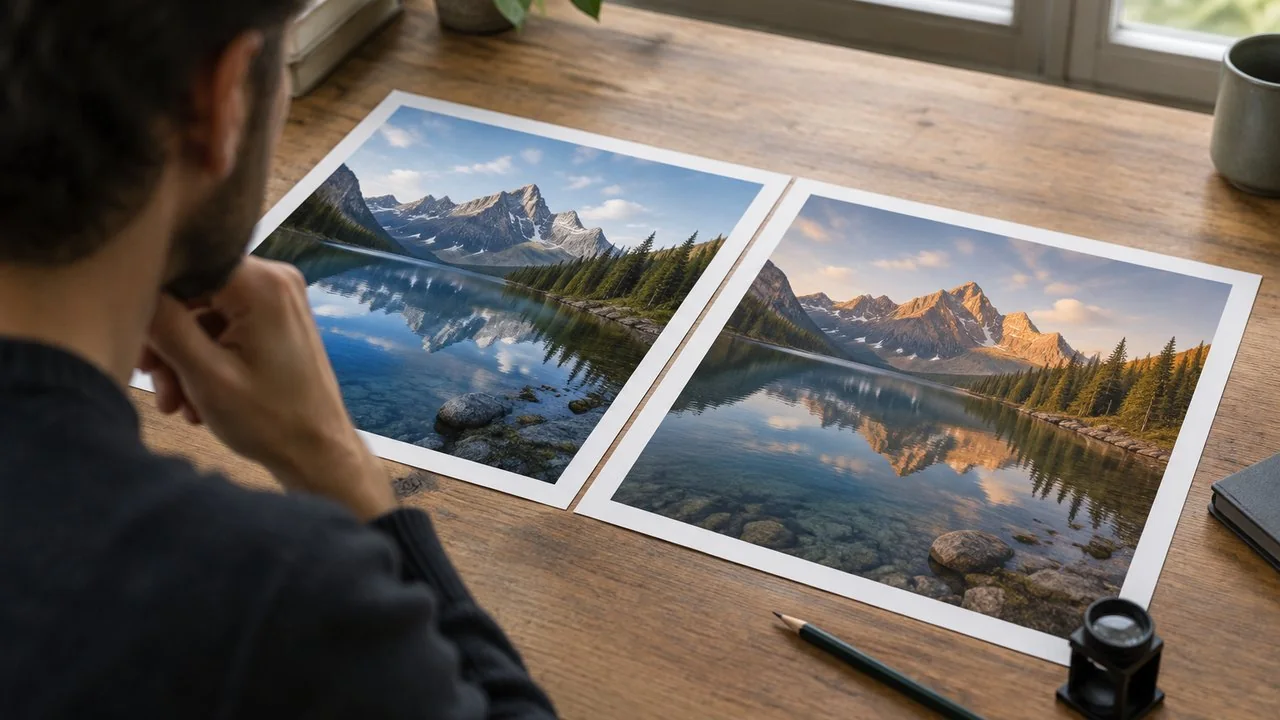
References, characters and style locks
Both models accept up to 14 reference images in total, but they split that budget differently. This table is from Google's image generation guide:
| Reference type | Nano Banana 2.1 | Nano Banana Pro |
|---|---|---|
| Objects kept with high fidelity | Up to 10 | Up to 6 |
| Characters kept consistent | Up to 4 | Up to 5 |
| Style reference images | Not available | Up to 3 |
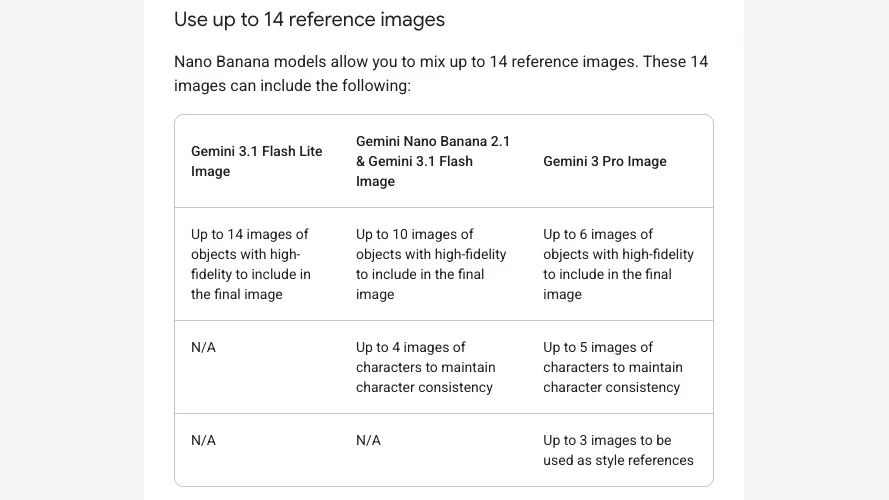
This is the clearest practical split. A product catalogue shot that needs ten props to stay exact suits 2.1. A comic page with five recurring people, or a campaign that must match three mood-board images, suits Pro.
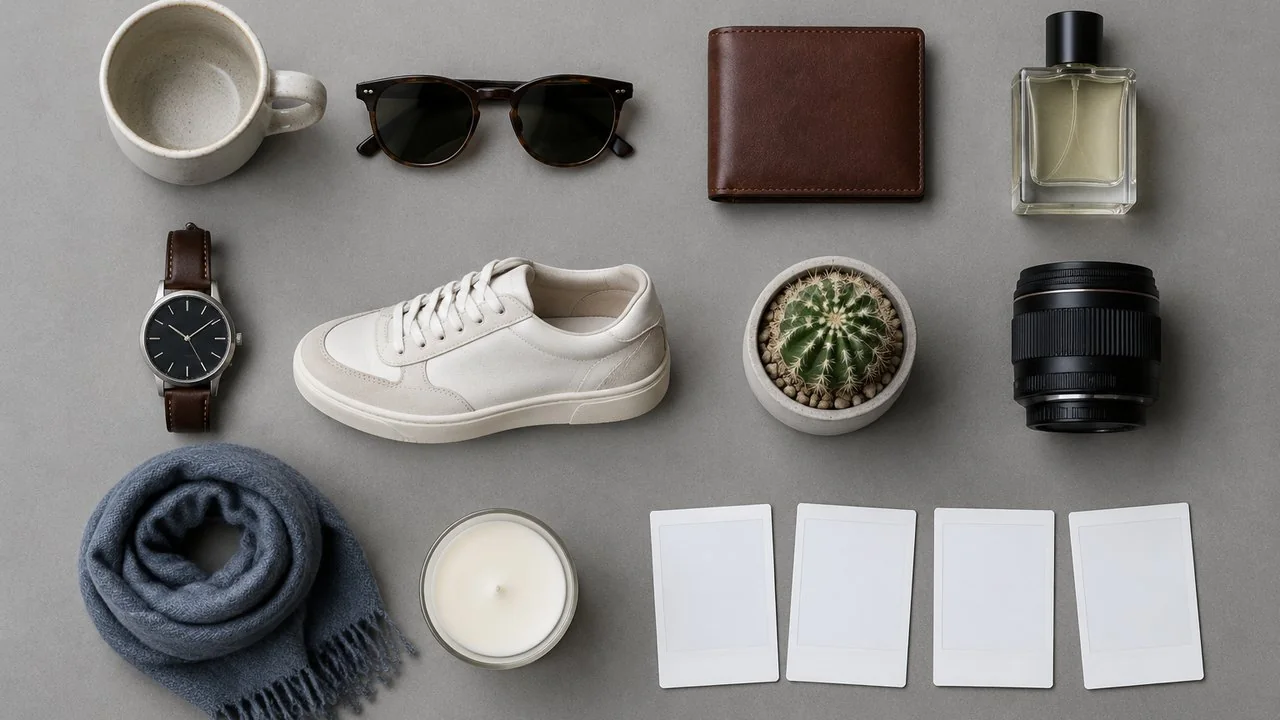
Thinking levels, resolution and speed
Every Gemini 3 image model "thinks" before rendering: it can make up to two interim images to test composition, and those are not charged. The difference is control. On 2.1 you can set thinking to minimal, medium (the default) or high to trade quality for latency. On Pro, thinking is on and cannot be switched off in the API.
Resolution is the same on paper, 1K, 2K and 4K for both, but 2.1 drops the 512px size that Nano Banana 2 offered. Google's 2.1 model page also says it fixed tiling artifacts on extreme 1:4, 4:1, 1:8 and 8:1 frames at 2K and 4K, which matters for banners and panoramas. Google positions 2.1 at Flash-tier speed; it publishes no seconds-per-image figure for either model, so we do not quote one.
Where you can use Nano Banana 2.1 and Pro
- Gemini app: Google's image generation page lists Nano Banana 2 as the free model and Nano Banana 2.1 as the model that comes "with a Google AI plan". Paid Plus, Pro and Ultra users can regenerate an image with Pro via the three-dot menu and "Redo with Pro".
- Developers: both are in the Gemini API and Google AI Studio, paid tier only.
- Other Google products: the model card lists AI Mode in Search, Flow, Stitch, Google Ads and the Gemini Enterprise platform for 2.1.
- Third-party apps: many image platforms route to one or both models; check which version they call, because "Nano Banana" alone can mean 2, 2.1 or Pro.
That last point applies to us too. LazyKiwi's image generator lists a model called simply Nano Banana, without a version number, so we do not use it as evidence in this comparison and we are not claiming 2.1 or Pro runs there.
Can ChatGPT do what Nano Banana does?
For most everyday jobs, yes, but not with these models. ChatGPT uses OpenAI's own image model. OpenAI's help centre says ChatGPT Images is available on all tiers, can edit an uploaded image, lets you select part of an image and describe a change, and supports any aspect ratio; "images with thinking" is limited to Plus, Pro and Business.
What ChatGPT does not give you is a choice between a cheap high-volume model and a premium one, explicit reference budgets, or per-image API pricing in the same interface. If the question is "which Google model", ChatGPT is not an answer; if the question is "can I make and edit images in a chat", it is. OpenAI's latest image model is available outside ChatGPT too, for example as GPT Image 2.5 on LazyKiwi.
Nano Banana 2.1 vs Pro: which should you pick?
- 1
Pick 2.1 for volume
Social images, thumbnails, product variations and quick edits where cost per image matters and Google's benchmarks favour it.
- 2
Pick 2.1 for many props
Catalogue and flat-lay scenes with up to ten objects that must stay exact.
- 3
Pick Pro for casts and style locks
Five recurring characters, or up to three style reference images to match a look.
- 4
Pick Pro for dense text
Posters and labels with small or long copy, where Google itself warns that 2.1 blurs at 1K.
- 5
Test both on your hardest brief
If a job sits in between, run it on both and compare the accepted-image cost.
How to run your own same-prompt test
You do not need a lab to settle Nano Banana 2.1 vs Pro for your own work. Pick three prompts that represent your real work: one photo, one with text, one edit of an existing image. Run each once per model at the same resolution and aspect ratio, without retries, then compare full-size crops of hands, faces and lettering. Note the cost of each image and whether you would use it.
Two habits make the result honest. Use input images neither model made, so no model edits its own output, and write down the settings before you look at the results. If your work mostly merges a person into a new scene, the dedicated AI image combiner is a quicker way to see what multi-image fusion looks like before committing to an API.

Key takeaways
- Nano Banana 2.1 costs $0.0336 per 1K image on the Gemini API, against $0.134 for Nano Banana Pro.
- Google's model card scores 2.1 above Pro in every benchmark row it published; those are Google's own tests.
- Pro keeps five characters and takes three style references; 2.1 keeps four characters and ten objects.
- 2.1 lets you set thinking to minimal, medium or high; Pro's thinking cannot be switched off.
- In the Gemini app, 2.1 needs a Google AI plan and paid users can "Redo with Pro".
- For Nano Banana 2.1 vs Pro on your own brief, run three real prompts once on each and compare the cost per image you keep.
Models & Research Editor
Noah Berger
Noah Berger tracks generative models and the rules around them for LazyKiwi. He works from primary sources, dates every claim, and updates a post when the model or the policy behind it changes.
FAQ
Common questions
Is Nano Banana 2.1 better than Nano Banana Pro?
On Google's own human-preference benchmarks, 2.1 with thinking scores higher than Pro in every category listed on the model card. Independent hands-on tests are mixed: some reviewers still find Pro's images more natural, and Pro won character-matching tests. Treat 2.1 as the default and Pro as the specialist.
How much cheaper is Nano Banana 2.1 than Pro?
On the Gemini API, a 1K image costs $0.0336 with 2.1 and $0.134 with Pro, roughly a quarter of the price. At 2K it is $0.0504 versus $0.134, and at 4K $0.113 versus $0.24. Batch mode halves the 2.1 image rate.
Can I use Nano Banana 2.1 for free?
In the Gemini app, Google lists Nano Banana 2 as the free model and 2.1 as part of a Google AI plan. On the Gemini API neither 2.1 nor Pro has a free tier, although Google says they can be tried in Google AI Studio.
What is the difference between Nano Banana 2 vs Pro and 2.1 vs Pro?
Nano Banana 2 (Gemini 3.1 Flash Image) is the previous Flash model. Version 2.1 replaces it with better benchmark scores, half the 1K price and a thinking-level setting, but drops the 512px size. Pro is unchanged, so most older 2 vs Pro advice now applies to 2.1 vs Pro with a wider price gap.
Does LazyKiwi offer Nano Banana 2.1 or Pro?
LazyKiwi's image generator lists a model named Nano Banana without a version, so we do not claim it is 2.1 or Pro. If you need a specific version for a comparison, call Google's API or an app that names the exact model ID.
Need images today, not a model debate?
Open the LazyKiwi image generator, pick GPT Image 2.5 or another listed model, and see the credit price on the Generate button before you run anything.
Related reading

Best AI Photo Editing Apps in 2026, Tested
Nine of the best AI photo editing apps run against the same two files: retouch a face, clean a scene, batch a set, export without a watermark.
10 min read
How to Combine Photos: 3 Ways That Look Real
Combine photos three ways: a grid, a blended double exposure, or a true composite. Match light, scale and shadow so the join stops being visible.
9 min read
AI Product Photography: White Background to Branded Scene
AI product photography in practice: shoot on a phone, get a white-background image, swap in a branded scene, upscale, and export to Amazon and Google rules.
8 min read
AI Mockup Generator: Make Product and Apparel Mockups Fast
An AI mockup generator builds the scene around your real design instead of a fixed template: the LazyKiwi route, six tools compared, prompts that hold up.
8 min read