
Polaroid Filter: How to Get a Real Instant Look
A polaroid filter has to copy five faults: warm cast, lifted shadows, soft corners, coarse grain and an uneven border. Do them in the right order.
 Maya Chen 9 min read
A polaroid filter that works is not a colour preset with a frame stuck on the outside. Instant film has five specific faults, and a convincing imitation reproduces all of them in a particular order: warm the colour, lift the shadows so the darks never reach black, soften the corners, add coarse even grain, and composite the surround last so the border stays clean while the picture inside it degrades. Below: what causes each fault, the proportions of the frame, the phone routes people actually search for, a template run with the two-upload requirement it enforces, the rules for making a set that reads as one pack, and an honest section on the hardest use case there is.
What gives instant film its look?
Five characteristics, each with a physical cause in the chemistry or the optics. Reproduce the causes and the look follows; reproduce the look directly and you get a sticker.
- A warm colour shift. The dyes in an integral print sit warm, and prints drift warmer still as they age, so a faintly amber cast is period-correct rather than a mistake.
- Low contrast in the shadows. Dark areas lift towards grey instead of going black, which is the opposite of what a modern sensor does and the single hardest part to fake convincingly.
- Soft corners. A simple plastic lens loses sharpness away from the centre, so corner detail smears while the middle stays acceptable.
- Limited resolution overall. The print is small and the emulsion is coarse; fine texture such as hair or fabric weave turns to suggestion.
- The border. An opaque surround with a deeper strip along one edge, because the chemistry pod and the rollers had to live somewhere.
A short history, because it explains the constraints. The first commercial instant camera arrived in 1948, a year after Edwin Land unveiled instant film in New York, and the format survived the company's Chapter 11 filing in February 2008 to become a hobbyist product again. Those dates are on Wikipedia's instant camera article, read on 7 September 2026. Everything on the list above is a consequence of making a print develop in your hand in under a minute.
How do you make a photo look like a Polaroid?
Five moves, and the order is the entire trick. Get the border on first and every later adjustment fights it.
- 1
Shift the colour
Warm the whole frame and push a little green into the midtones. Skin should look like it was printed rather than photographed.
- 2
Lift the shadows
Raise the black point so the darkest area sits well above black. This is the step that separates a convincing print from a modern photo with a colour cast, and almost nobody does enough of it.
- 3
Soften the corners
Blur the outer quarter of the frame slightly while leaving the centre alone. A uniform blur reads as a mistake; a radial one reads as a cheap lens.
- 4
Add coarse grain
Larger and softer than digital noise, spread evenly rather than pooled in the shadows. Instant film grain is a print texture, not a sensor artefact.
- 5
Frame it last
Composite the finished image into the surround at the end, on its own layer, so the border stays clean while everything inside it is degraded.
Never age the border
The picture ages; the surround does not, or barely. Yellowing the frame along with the image is the most common giveaway in a faked print, because in a real one the emulsion and the frame material age at completely different rates.
What are the correct instant photo dimensions and border?
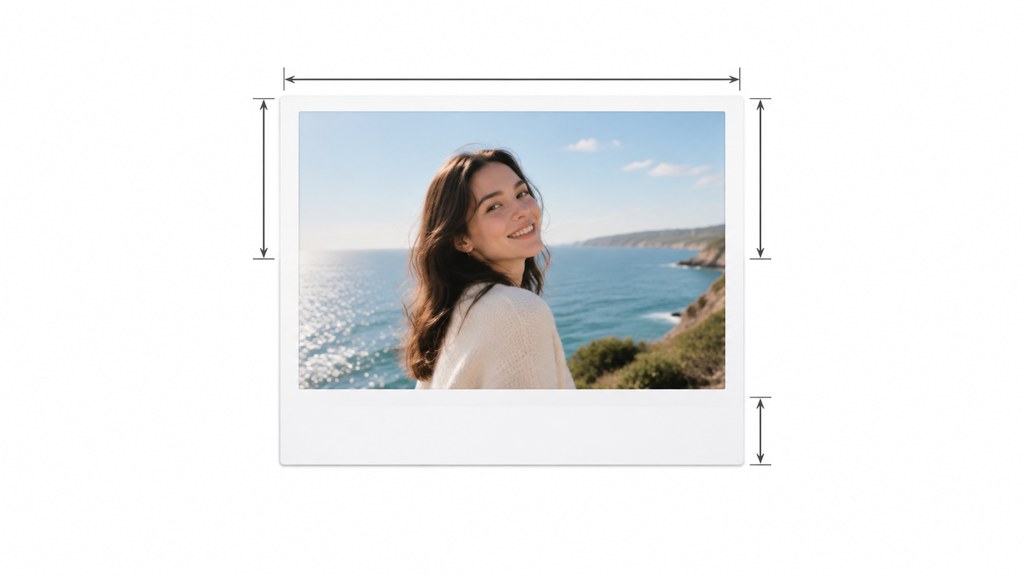
The proportions are the part people estimate and get wrong. Two things to get right, one measurable and one not.
- The image area is close to square, not 4:3 and not 3:2. If you crop a phone photo to 4:3 and drop it in a surround, the result is subtly wrong before any colour work starts.
- The surround is not even. Three sides carry a narrow margin and the fourth, at the bottom in normal orientation, is several times deeper. That deep strip is the reason the format became a caption space.
- Square formats are not all the same size. Wikipedia's instant camera article gives 86mm by 72mm photographs for the Lomo'Instant Square Glass, released in August 2017, which is a reminder that each family has its own dimensions rather than one universal standard.
- Corners are rounded, very slightly. Not a design radius, just the die that cut the frame.
I could not open a current manufacturer specification sheet today to quote exact frame and border measurements for a specific film pack, so I am not going to invent millimetres for one. Measure a print you own, or work in proportions: a near-square opening, three narrow margins and one deep one, and you will be close enough that nobody checks.
How do you get a Polaroid filter on a phone?
Three routes, and they differ mostly in how much control you keep.
- A camera or gallery app filter. Fastest and least controllable. These usually apply colour and a frame in one step, which is exactly the ordering mistake described above, so the border often gets the same colour treatment as the picture.
- A social platform's built-in effects. Convenient, but the output is typically re-encoded for the feed, so the grain you added competes with the compression the platform adds.
- A general editor such as Picsart or Fotor, where you do the five steps by hand. Slower, and the only route where the border stays clean.
Searches for how to get polaroid filter on iphone and how to get polaroid filter on instagram both peak around the same feature: an effect that stamps a frame on. If you only want a quick post, that is fine. If you want a set that reads as a pack of real prints, do the colour work first and add the surround yourself.
Which template gives an instant-print look from a normal photo?
The workbench ships a polaroid family photo template that composes two photographs into one print. Note that requirement before you plan around it: two uploads are mandatory, so a single-subject card is not what this template does.

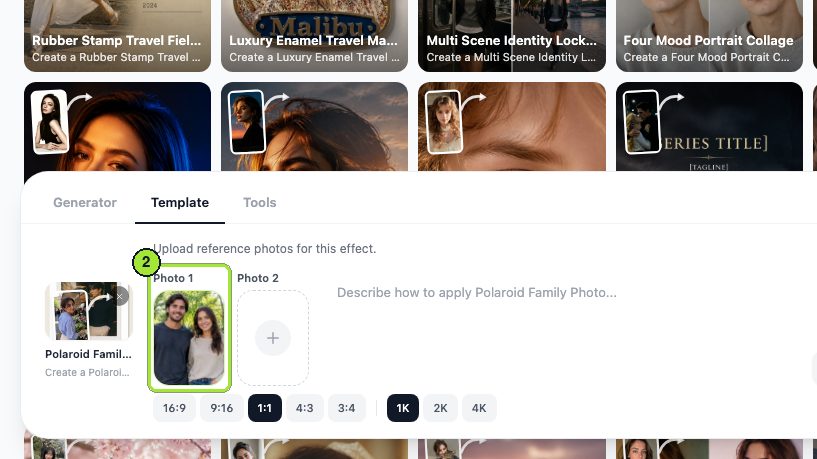
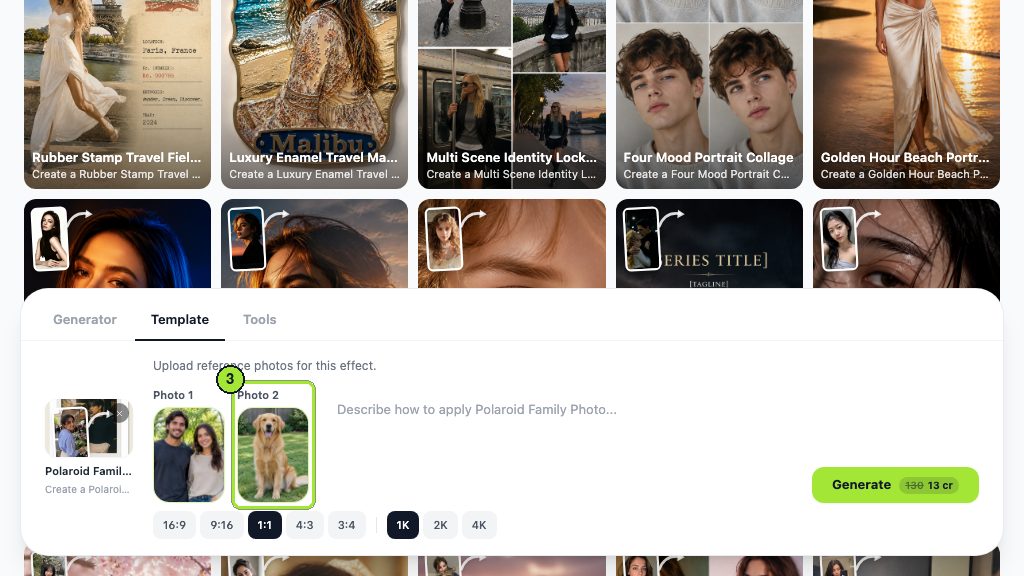
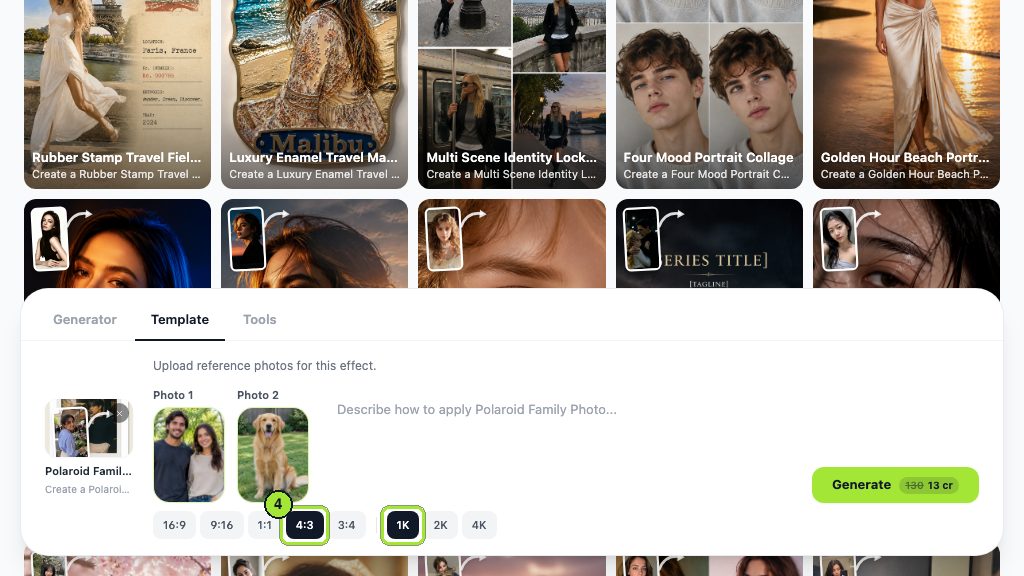
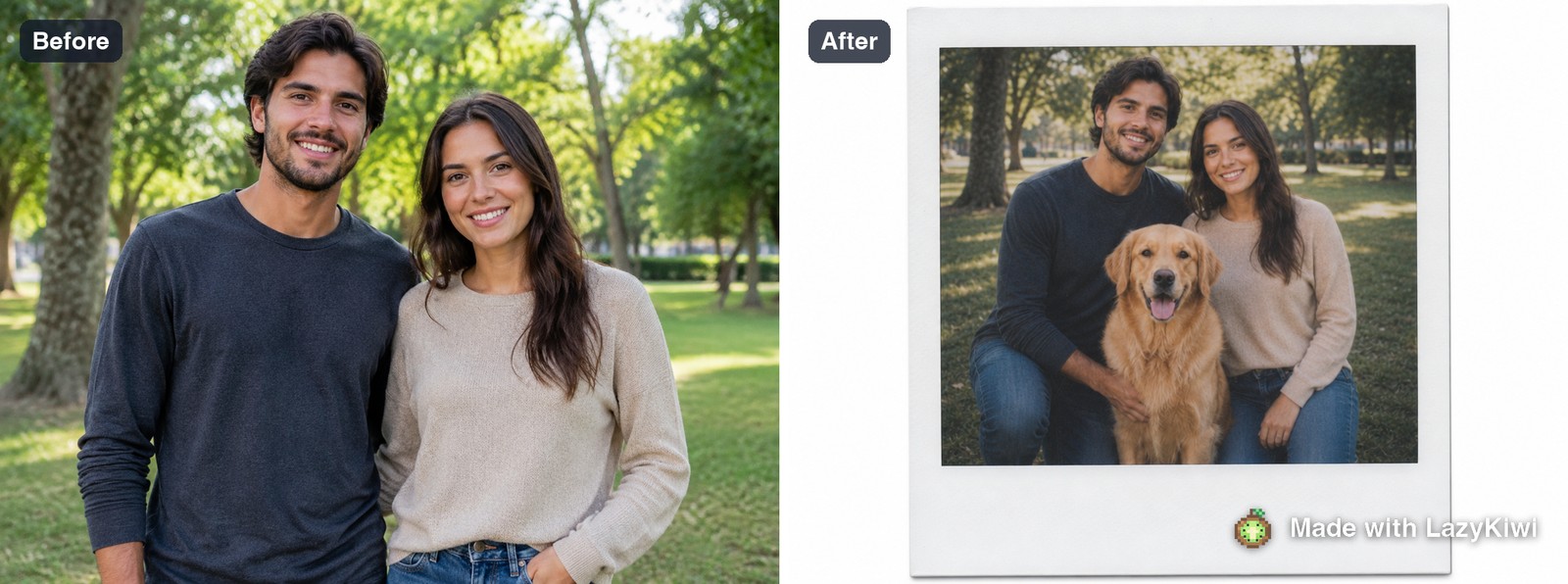
There is no colour or border control anywhere in the composer, so the second run varied the only framing control there is, switching the ratio from 4:3 to 1:1. That is the honest scope of the template: it decides the print treatment and you decide the crop.
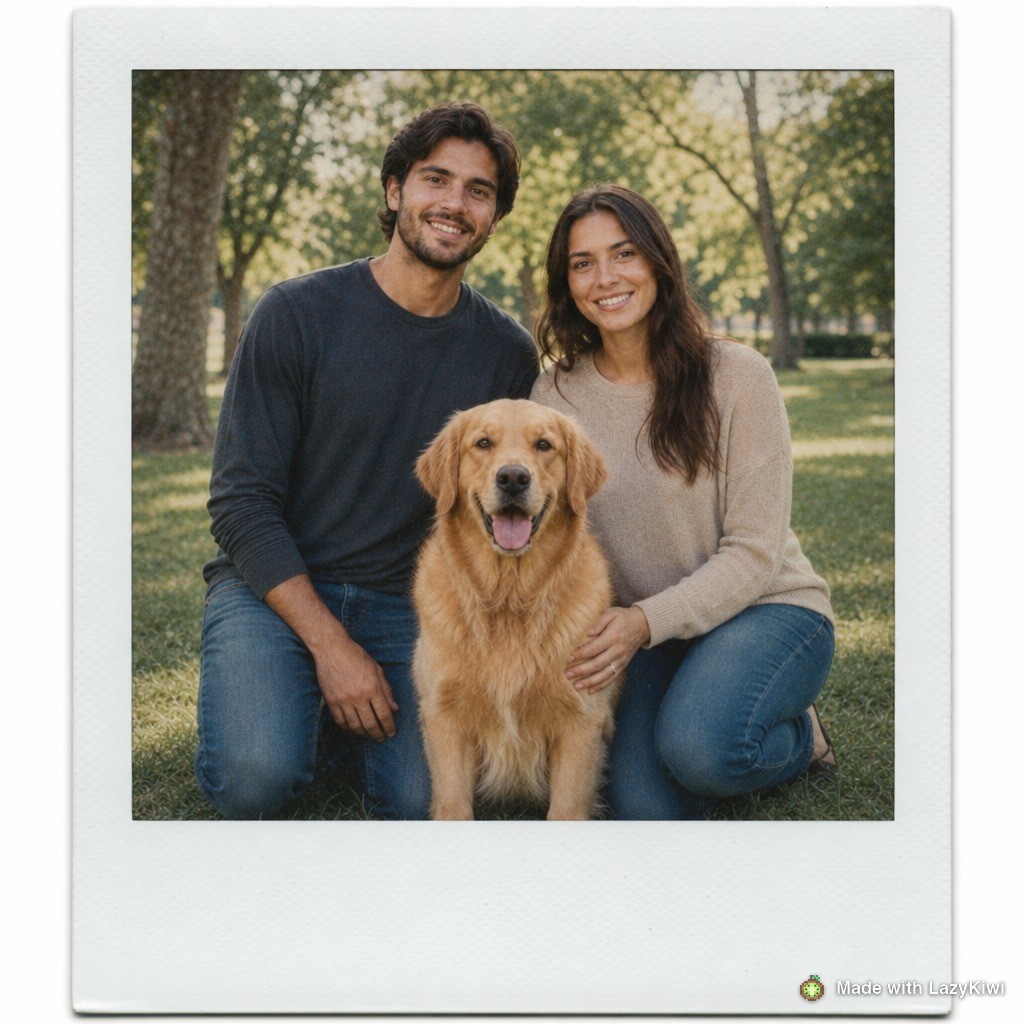
On skin tone, the thing to watch is over-yellowing. If faces come back more amber than you want, say so in the Prompt box rather than correcting afterwards, because pulling yellow out of a finished print flattens the warm cast that made it work. Both runs went through GPT Image 2. LazyKiwi's own workbench numbers for August 2026 put that model behind 127 of 181 external generations, so its colour habits are worth learning once and reusing everywhere.
How do you make a set of instant prints that look like they came from one pack?
A single convincing print is easy. A set is where fakes fall apart, because people compare frames against each other before they compare any frame against reality.
| Setting | Across one pack | What breaks it |
|---|---|---|
| White balance | Identical on every frame | Per-photo auto correction |
| Shadow lift | One value, applied to all | Lifting only the dark photos |
| Grain amount | One amount, one size | Scaling grain to each image |
| Border | Same surround, same proportions | Different frames per photo |
| Sharpness | Same softening radius | Sharpening the ones that look soft |
Work on the whole batch at once: get one frame right, save the recipe, apply it to everything, then resist the urge to fix individual photos. Real packs are inconsistent in exposure and utterly consistent in treatment, which is the reverse of what careful editing produces. The AI photo editor is useful here precisely because giving it the same instruction for every image is easier than resisting the temptation to tweak.
Should you make a photo with someone who has died?
This is the most emotionally loaded thing people do with these tools, and it deserves a straight answer rather than a disclaimer. Yes, people do it, and for many it helps. There are three questions worth sitting with first.
- 1
Who else is in the family?
A generated photograph of a dead parent is not only yours. Showing it to a sibling or a widow without warning can land very differently than it landed for you. Ask before you share, not after.
- 2
Would they have agreed?
Consent cannot be given retrospectively. The nearest honest test is whether the person was comfortable being photographed at all, and whether the pose and setting are things they would have recognised as themselves.
- 3
How will it be labelled?
The risk is not the making, it is the drift. An image made as a private keepsake ends up in a family group chat, then on a memorial page, then in a slideshow at a funeral, by which point nobody remembers it was generated.
So label it, in the file name and in the caption, every time you pass it on. Provenance metadata is the durable version of that: Content Credentials exists to attach a tamper-evident record of how an image was made, and it survives the trip through a group chat better than a caption does. Stock libraries take the same position on synthetic content for the same reason, which is why Getty Images treats disclosure of generated material as a licensing condition rather than a courtesy.
One thing to avoid outright: making an image of someone else's deceased relative on their behalf as a surprise. The generous instinct is real and the result is usually not received the way it was meant.
What makes a fake instant photo obvious?
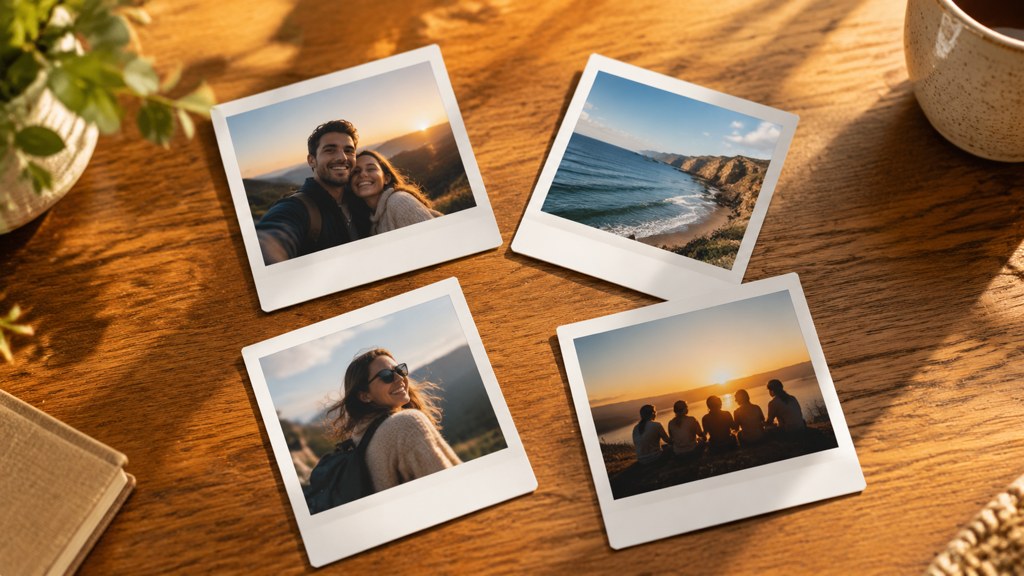
Four tells, and three of them are things a careful editor adds on purpose.
- Perfect corners. Sharp detail all the way to the edge says a good lens, and a good lens is not what took this picture.
- A pure white border. Real surrounds are off-white and slightly uneven, and they do not carry the same colour cast as the image inside them.
- Modern shadows. Deep, detailed, clean darks are the strongest single giveaway, because instant chemistry could not produce them.
- A print that is too sharp. If the fabric weave is legible, the resolution is wrong for the format regardless of what colour work you did.
Test it the way a viewer will. Shrink the image to the size it will appear at, which for most people is a phone screen, and look at it next to a photograph of a real print. Faked ones usually fail at that size before they fail at full resolution, because the border proportions are the first thing the eye measures. Photography sites such as PetaPixel and DPReview publish plenty of scans of genuine prints if you want a reference to compare against.
Key takeaways
- Five faults, one order: colour, shadows, corners, grain, then the border last.
- Lifted shadows are the step almost everyone underdoes, and the one that gives a fake away fastest.
- The image area is near-square and the surround is deeper on one edge. Cropping to 4:3 is wrong before you start.
- Never age the surround with the picture; in a real print the two materials age differently.
- The workbench polaroid template requires two uploads and has no colour or border control, only ratio and resolution.
- Treat a generated photo of someone who has died as something to label, not something to surprise a family with.
Image & Design Editor
Maya Chen
Maya writes about image tools from the desk rather than the demo reel. She tests templates on ordinary photographs, keeps the runs that fail, and reports what the panel actually shows.
FAQ
Common questions
How to get polaroid filter results without an app?
Do the five steps by hand in any editor: warm the colour, lift the black point until the darks sit grey, soften the outer quarter of the frame, add coarse even grain, then place the finished image inside a clean surround on a separate layer so the border escapes the colour work.
What is the difference between a polaroid effect and a real print?
A real print has lifted shadows, soft corners and an off-white surround that ages at a different rate to the picture. Most polaroid effect presets get the warm cast right and the shadows wrong, which is why they read as modern photos wearing a frame.
How to get polaroid filter on instagram or iphone?
Both offer built-in effects that stamp a frame and a colour shift in a single step. They are fine for one post. For a set, the frame gets the same colour treatment as the picture, and that shared cast is what makes a group of them look processed rather than printed.
What are good polaroid photo ideas for a set?
Things that suit a small near-square frame: one or two people close to the camera, hands holding an object, a pet, a table from above, a doorway. Wide scenes and group shots lose everything at print size, because the format has very little resolution to spend.
Can I make a polaroid picture of a relative who has died?
Yes, and many people find it comforting. Ask other family members before you share it, keep the pose and setting recognisable as the person, and label the file and the caption every time it is passed on so it does not drift into being treated as a real photograph.
Compose an instant print from two photos
Two uploads, a ratio, a resolution, and the price on the button before you commit. No colour or border knobs to get wrong.
Related reading
Paper Animation Tools: Free Options Compared
Tools that turn a photo or idea into a paper-craft animation, compared on style range, render length and what each free tier actually lets you export.
8 min read
Digital Camera Filter: Get the 2000s Flash Look
The digicam look is direct flash, high contrast and noise — not a preset. How to shoot it, how to fake it convincingly, and which templates get closest.
8 min read
VHS Filter: How to Get a Convincing Tape Look
Tracking lines, chroma bleed, interlacing and head-switching noise — the four artefacts that sell a VHS look, and how to add them without overdoing it.
8 min read