
Free watermark remover: lift the mark, rebuild what was under it.
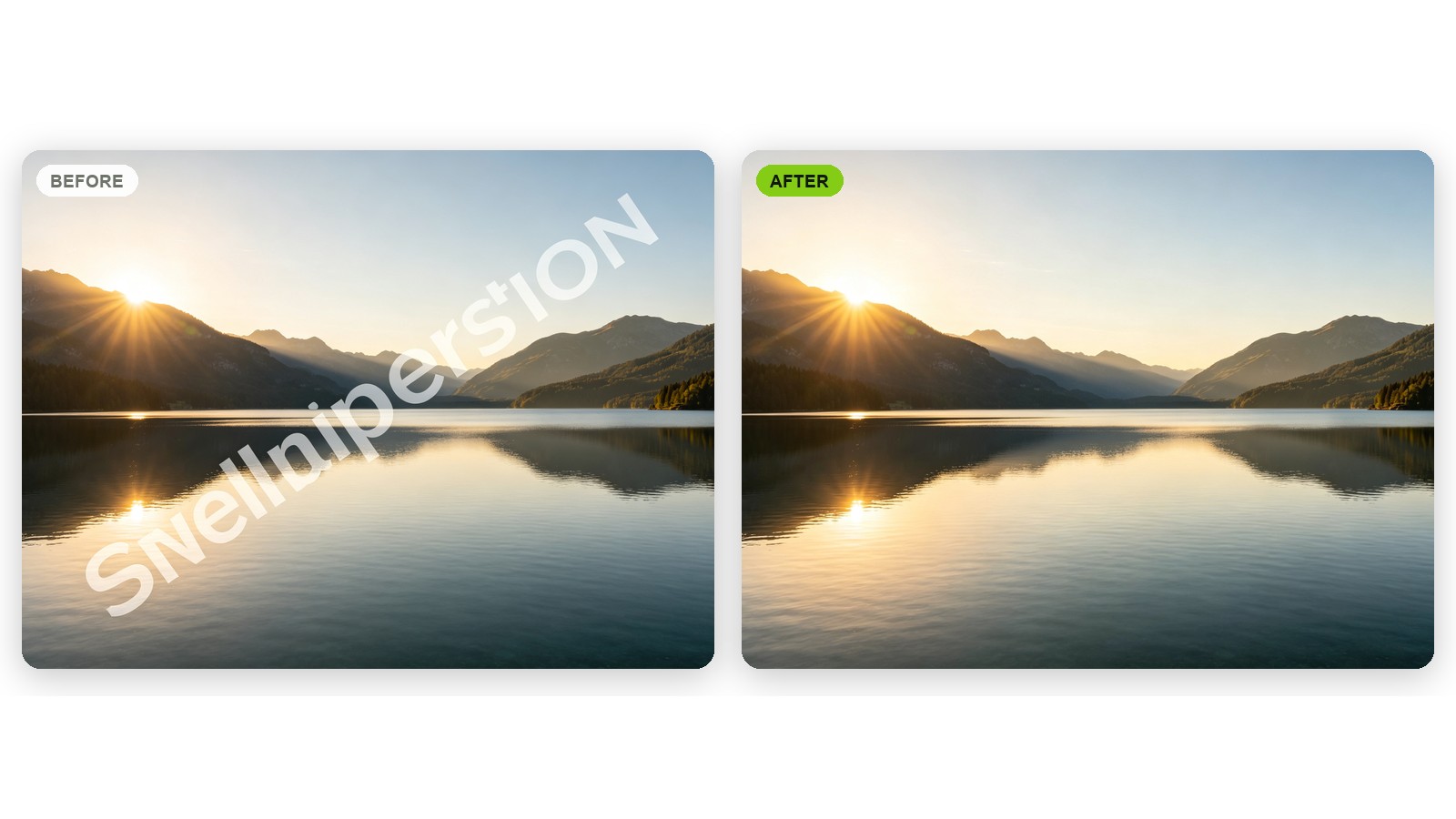
Upload an image you own and the mark comes off: tiled sample text, a corner logo bug, a translucent bar across the middle. Whatever it was covering is painted back at the same grain and lighting, so the picture doesn't look patched.
 BEFORE
 AFTER ✨
What it is
Not a blur patch. The picture underneath.
Cheap tools soften a watermark until it stops being obvious and hand you back a gray smear where it used to be. LazyKiwi works out what the mark was covering and reconstructs it at the same lighting, grain and perspective as the rest of the frame, whether that is brick, a sky gradient, hair or fabric. It is built for the images you have a right to: the photo you shot, the draft you stamped, the asset you licensed.
How it works
Your result in three steps
Upload the marked image
The proof you sent a client, the draft you stamped yourself, or the only surviving export of a photo you took.
Say which mark to lift
Write it the way you'd say it: "remove the diagonal sample text" or "take the logo out of the bottom-right corner".
Generate & download
Look at the area the mark covered at full size, run it again if a trace survives, then download the clean image.

What was under the mark comes back
Lifting a watermark leaves a gap in the picture. The AI reads the pixels around that gap, works out what belongs in it and paints it in, so a cleared sky stays a smooth gradient and cleared skin keeps its texture.
- Remove watermark tiling across a full frame
- Grain and lighting kept consistent
- No gray box, no soft patch
Tiled text, corner bugs and translucent bars
One box handles the three marks you actually meet: repeated sample text running diagonally across the whole frame, a small logo sitting in one corner, and a semi-transparent strip along the bottom edge. Remove a watermark from an image in one pass, or work through a busy frame one mark at a time.
- Diagonal repeated sample text
- A corner logo or studio bug
- A translucent bar or footer strip
Made for your own back catalogue
Most of the work done here is people getting their own pictures back. An old studio mark sitting on four hundred published images, a DRAFT stamp on a layout that has since been signed off, a client proof that outlived the file it came from.
- Photos you shot yourself
- Drafts you watermarked
- Assets you have licensed
Why LazyKiwi
Built to leave no trace
Texture, not a blur patch
The area the mark covered is rebuilt to match what surrounds it, instead of being softened until you stop noticing it.
Only on images you own
Use this on photos you shot, drafts you made and files you have the rights to. Taking a watermark off someone else's work so you can publish it is a copyright problem, not an editing one.
Private by default
Uploads travel over an encrypted connection, are used only to produce your image, and are never sold or shared.
Free to start
No credit card. Clear a mark from one of your own images and judge the result before you pay for anything.
Rerun until it's right
If a faint trace survives in a busy corner, reword the request and run it again. There is no penalty for iterating.
No retouching skills
No clone stamp, no healing brush, no patching by hand at 400% zoom. If you can point at the mark, you can lift it.
FAQ
Questions, answered
How do I remove a watermark from an image I own?+
Upload the image, name the mark you want lifted, such as "remove the diagonal sample text across the middle", and download the cleaned version. There is no masking or clone stamping involved.
Is there a free AI watermark remover?+
Yes. Upload an image and clear a mark for free, with no credit card, so you can see the quality on your own files before choosing a plan.
Can it remove a watermark from a video or a PDF?+
This page is for photos and images. For text and logos burned into a clip, use remove text from video; for a stray object or sticker in a photo, the magic eraser is quicker.
Is it OK to remove a watermark from someone else's photo?+
No, and it is worth saying plainly. A watermark is there to mark who owns a picture, so stripping one off work that isn't yours in order to use it is a copyright problem rather than an editing one. Run this on images you shot, made or licensed.
Are my uploads private?+
Your images are processed securely, kept private and never sold or published. What you upload stays yours.
Can it remove the Gemini watermark from an image I generated?+
The visible sparkle mark in the corner of an image you generated yourself is cleared like any other corner logo: upload the image and that corner is rebuilt to match. Invisible provenance marks embedded in the pixels, such as SynthID, are a different thing; this tool does not remove them and does not claim to.
Use cases
When you need the clean version back
Photographers with only the proof left
The 2019 shoot survives as a watermarked JPEG in a sent folder and the master is on a drive that no longer spins. Recover a clean copy of your own photo from the proof you still have.
Designers and their own drafts
You stamped DRAFT across a layout so the client couldn't run it early. It is approved now, the working file has gone, and the printer wants the artwork flat and clean by Friday.
A studio changing its name
Your old logo bug sits in the corner of years of published work. Remove the watermark from the images you own, put the new mark on, and the archive matches the rebrand.
More answers
More about watermark removal
Does it matter what the watermark is sitting on?+
More than anything else. A mark over sky, a plain wall or a soft out-of-focus background comes off almost invisibly, because the AI only has to carry on something simple. A mark lying across a face, printed text or dense foliage is harder: that detail has to be invented, and invented detail has to be exactly right before anyone believes it.
Can it clear a heavy tiled watermark over the whole frame?+
Often, but this is the hardest job on the page. When repeated text covers every part of an image there is very little untouched material left to rebuild from, so faint traces can survive in the busiest areas. Run it, check the result at full size, and expect to spend a minute on the worst patch.
What about a large opaque logo?+
A translucent mark still lets the picture show through it, so there is real information underneath to recover. A solid logo hides everything it covers, and that area has to be generated from nothing. Small opaque marks come off cleanly; a large one sitting over your subject will come off less cleanly.
Is a watermark remover online as good as removing it by hand?+
For most marks it is far quicker and close enough that nobody would spot the join. For a watermark across a face, or fine lettering in something being printed large, a retoucher still has the edge. Trying it costs you a minute and tells you which of the two jobs you have.
Get your own picture back, clean.
Upload an image you own, point at the mark, and download it without one. Free to try, no credit card.
No credit card · Free to try · Results in seconds