
Make A Spider Filter Prank From Your Photo
Turn one photo into a funny home-video scare: a spider appears on the cheek, the calm moment breaks, and the reaction escalates into a frantic jump.

Spider Filter Prank Template
Upload one clear photo of a person. Front-facing images with visible hair, face, and clothing work best.
THE TREND
What is the spider filter prank trend?
The format starts as an ordinary phone moment, then turns into a dramatic visual scare when a large spider suddenly appears on the person’s cheek.
Calm phone moment
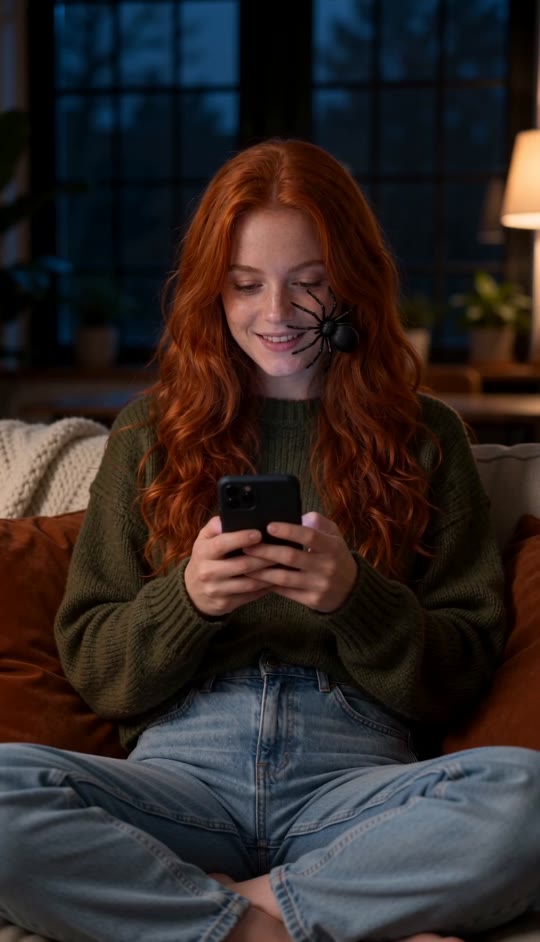
The person sits comfortably on a sofa, focused on a phone with a relaxed expression.
Sudden cheek scare
A realistic black spider appears beside the nose and mouth, making the surprise instantly readable.
Big reaction
Wide eyes, an open mouth, hands at the cheeks, and a frantic jump create the comedic payoff.
Cozy home-video look
Warm lamp light, natural skin tones, soft shadows, and a continuous handheld camera keep the effect believable.
EXAMPLES
Two ways to try the spider filter prank
The same reaction works with different looks and personalities while the sofa scare remains the focus.
Curly-haired sofa scare
A warm, expressive subject turns an ordinary phone break into an exaggerated living-room fright.
Playful surprise reaction
A different person gets the same sudden cheek scare, with wide eyes and a quick jump to standing.
FAQ
Spider Filter Prank FAQ
What is the spider filter prank?+
It is a short visual prank format where a realistic spider suddenly appears on a person’s cheek during an ordinary moment, triggering an exaggerated startled reaction.
How do I make a spider filter prank video?+
Upload one clear photo and generate. The template builds the living room, phone moment, cheek spider, reaction, camera movement, and generated audio for you.
Where does the spider appear?+
The spider appears on the person’s left cheek, which is the viewer’s right, beside the nose and mouth.
Does the person keep the same identity?+
Yes. The template is designed to preserve the uploaded person’s face, hair, skin tone, clothing, and identity throughout the reaction.
Can I use a photo with more than one person?+
This template is designed for one main person. A single, clearly visible subject gives the most consistent result.
What kind of photo works best?+
Use a clear front-facing photo with the face, hair, and clothing visible. A relaxed expression and good indoor lighting are helpful.
Does the video include audio?+
The generated video includes its own generated audio. It does not use an original song.
Does the spider stay visible the whole time?+
No. It appears clearly at the scare moment, then the fast hand and body reaction becomes the visual focus.
Is this connected to a show, artist, or brand?+
No. It is an independent template inspired by a popular prank format and does not claim affiliation with any show, artist, or brand.
Other ways people search for it
These related phrases describe the same short-form visual effect.
One photo. One sudden scare.
The sofa, cheek spider, camera movement, and reaction are already built in.


