
Make Your Photo Part Of An Icy Magic Button Reveal
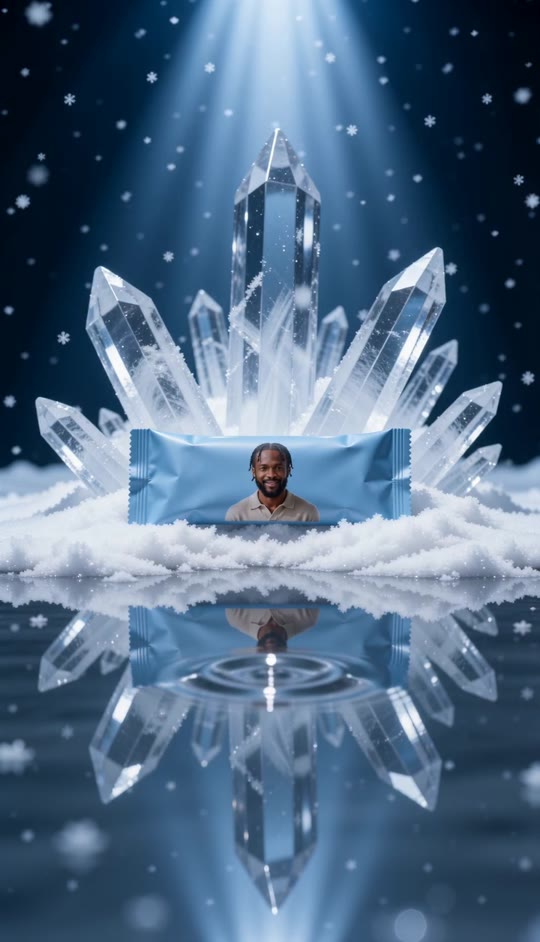
Put your portrait on a little blue packet beneath towering ice crystals. Snow falls as ripples sweep across its reflection, turning one photo into a polished product-style video.

Magic Button Template
Upload one clear photo with your face, hair, and upper outfit visible. Your portrait appears as a small print on the packet.
THE TREND
What is the magic button trend?
This take on the magic button effect is an icy product reveal: the scene stays still while falling snow and a ripple across the reflection create the moment of change.
Small blue packet
The wrapped packet stays centered in the snow, with your photo printed as a small portrait on its front.
Crystal backdrop
Tall, translucent crystals fan out behind the packet under a bright overhead spotlight.
Ripple reveal
Circular ripples spread through the foreground pool and briefly distort the packet’s reflection.
Still camera, icy atmosphere
A locked-off shot lets drifting snow, sparkling ice, and glossy water carry the motion.
EXAMPLES
See the magic button effect with two portraits
Both examples use the same blue packet and icy scene; the small printed portrait changes with the uploaded photo.
Warm portrait, cool scene
A smiling portrait adds a personal detail to the blue packet beneath the crystals.
Another face, same ripple
A different portrait shows how the reflection reveal works without changing the product-shot composition.
FAQ
Magic Button FAQ
What is the magic button video effect?+
Here, it is a short, icy product-style video: a small blue packet sits before tall crystals while ripples spread across its reflection.
Does someone press a button in this template?+
No. This version follows the product-shot example: the visible action is a ripple in the foreground water, not a hand pressing a button.
Where does my photo appear?+
Your photo becomes a small printed portrait on the front of the blue packet. It does not fill the screen.
How many photos do I upload?+
Upload one photo of one person.
Will the person move or speak?+
No. The person appears only in the printed portrait. Snow falls and water ripples while the packet stays still.
What kind of photo works best?+
Choose a clear, front-facing photo with visible hair and upper clothing so the small print remains recognizable.
Does the camera move?+
No. The camera remains centered and locked off throughout the clip.
Does the video have sound?+
Yes. It includes generated icy ambience and a soft sound for the water disturbance, not an original song.
Can I use another person's photo?+
Use a photo you have permission to use, especially if you plan to share the result.
Other names for the magic button effect
These searches describe the icy product-shot look and its reflective water reveal.
Your portrait, printed into an icy reveal.
Add one photo; the blue packet, crystal backdrop, falling snow, and reflective ripple are built in.


