
Turn One Photo Into A Bold Moving Collage
Take center stage in a surreal visual collage, with a vivid pink megaphone, monochrome echoes of your image, and flowing graphic shapes.
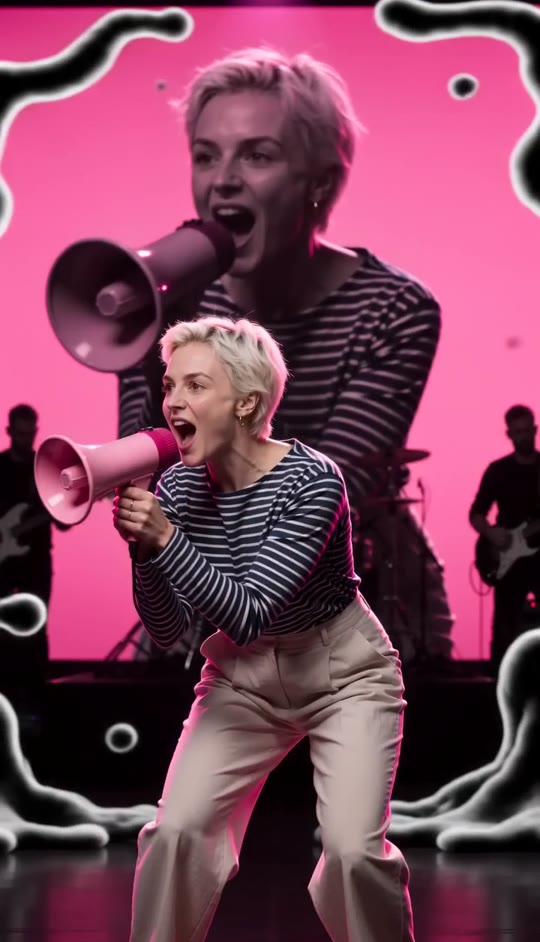
Fragments Template
Upload one clear photo of the person you want at center stage.
THE TREND
What is the Fragments trend?
Fragments transforms one performer into a layered concert-stage collage, with repeated black-and-white cutouts, flowing shapes, and vivid pink accents.
One performer, echoed
Your photo anchors the scene while oversized monochrome cutouts repeat the same person around the frame.
A vivid pink megaphone
The performer calls through a bright pink megaphone that remains the focal prop.
Flowing cutout shapes
Bold black-and-white organic shapes sweep across the layered photographic composition.
A shifting stage collage
The live-stage setting and rapid changes in scale move between wide, medium, and close views.
EXAMPLES
See Fragments in motion
Two examples show how a portrait becomes the anchor of a changing stage collage.
Pink megaphone on stage
A central performer calls through a vivid pink megaphone as monochrome cutouts flank the stage.

Cutouts and flowing shapes
Repeated portraits and graphic shapes shift around the performer through changing collage compositions.
FAQ
Fragments FAQ
What is the Fragments AI video trend?+
It is a surreal concert-stage collage built around one recognizable performer, repeated monochrome cutouts, a vivid pink megaphone, and flowing graphic shapes.
How do I make a Fragments video?+
Upload one photo to the Fragments template and generate. The stage, megaphone, repeated cutouts, and shifting collage are built in.
How many photos do I need?+
One photo is enough. The repeated figures are generated as echoes of the same person.
Will the person stay recognizable?+
The central performer and repeated cutouts are based on the person in your uploaded photo.
Does the video use an original song?+
No. The clip has generated audio and does not include an original song.
What kind of photo works best?+
A clear photo of one adult with a visible face and recognizable hairstyle gives the effect a strong central subject.
Will it change the person's outfit?+
The template is designed to keep the clothing from the reference photo unchanged.
Can I use a group photo?+
A photo with one clearly visible person works best so the repeated cutouts stay focused on the intended subject.
Can I use someone else's photo?+
Use another person's photo only with their permission to make a video with it.
Other ways to search for this effect
Explore related phrases for the same monochrome stage collage look.
One photo. A stage full of fragments.
Make your portrait the center of a pink-accented concert collage.


