
Eyes In Video Template
Turn your portrait into a striking eye-zoom video. The camera closes in from a sunlit city street, reveals the detail of your iris, and disappears into the pupil.
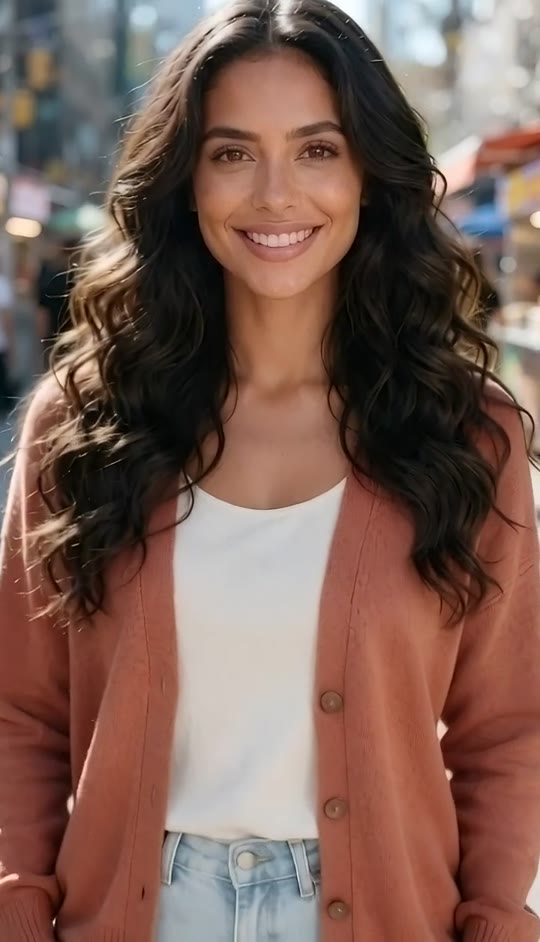
Eyes In Template
Upload one clear, front-facing photo with both eyes visible. A naturally lit portrait works best.
THE TREND
What is the eyes in trend?
Eyes in turns a street portrait into one continuous camera journey, moving closer until the subject’s eye fills the screen.
City-street opening
The subject faces the camera in warm daylight, with colorful storefronts and passing city life softly blurred behind them.
Unbroken push-in
A lightly swaying camera moves from a medium portrait through a close-up without a visible cut.
Detailed eye close-up
The move passes the eyelashes and eye surface to reveal brown and amber detail in the iris.
Pupil blackout
The dark pupil grows to fill almost the entire frame, creating a near-black ending.
EXAMPLES
Eyes in, two different portraits
See how the same camera move works with two distinct faces and outfits.
Sunlit street portrait
Long dark waves frame a steady gaze as the camera moves into the eye.

Close-up with bangs
Straight black hair and wispy bangs frame the face before the shot narrows to the iris.
FAQ
Eyes In FAQ
What is the eyes in effect?+
It is a continuous camera push from a person’s portrait into an extreme close-up of their eye, ending as the pupil fills the frame.
How do I make an eyes in video?+
Upload one clear portrait and generate. The street setting, camera movement, eye close-up, blackout, and generated audio are built into the template.
How many photos do I need?+
One photo of one person.
What photo works best?+
Choose a front-facing portrait with a sharp, unobstructed face and clearly visible eyes.
Will the video keep my outfit?+
The template directs the video to preserve the face, hairstyle, skin tone, and clothing shown in your photo.
Does the video go somewhere after entering the pupil?+
No. This version ends with the pupil expanding into a near-black frame.
Does the eye have to be brown in my photo?+
The template calls for a warm brown-and-amber iris close-up. A photo with naturally brown eyes will make that detail feel most consistent.
Does the eyes in video have sound?+
Yes. It includes generated city ambience and a subtle rising whoosh, not an original song.
Is there a cut between the portrait and the eye?+
The effect is designed as one continuous push-in, with no unrelated scene change.
Other names for eyes in
People also describe this effect by its continuous camera move and pupil ending.
Take your portrait all the way into the eye.
Upload one photo to create a short vertical video with generated audio.


