
Product Video Spin or Still Photos?
Compare product video spins with still photos and choose the format that best shows your product, fits your workflow, and supports your sales goals.
 Daniel Okafor 7 min read
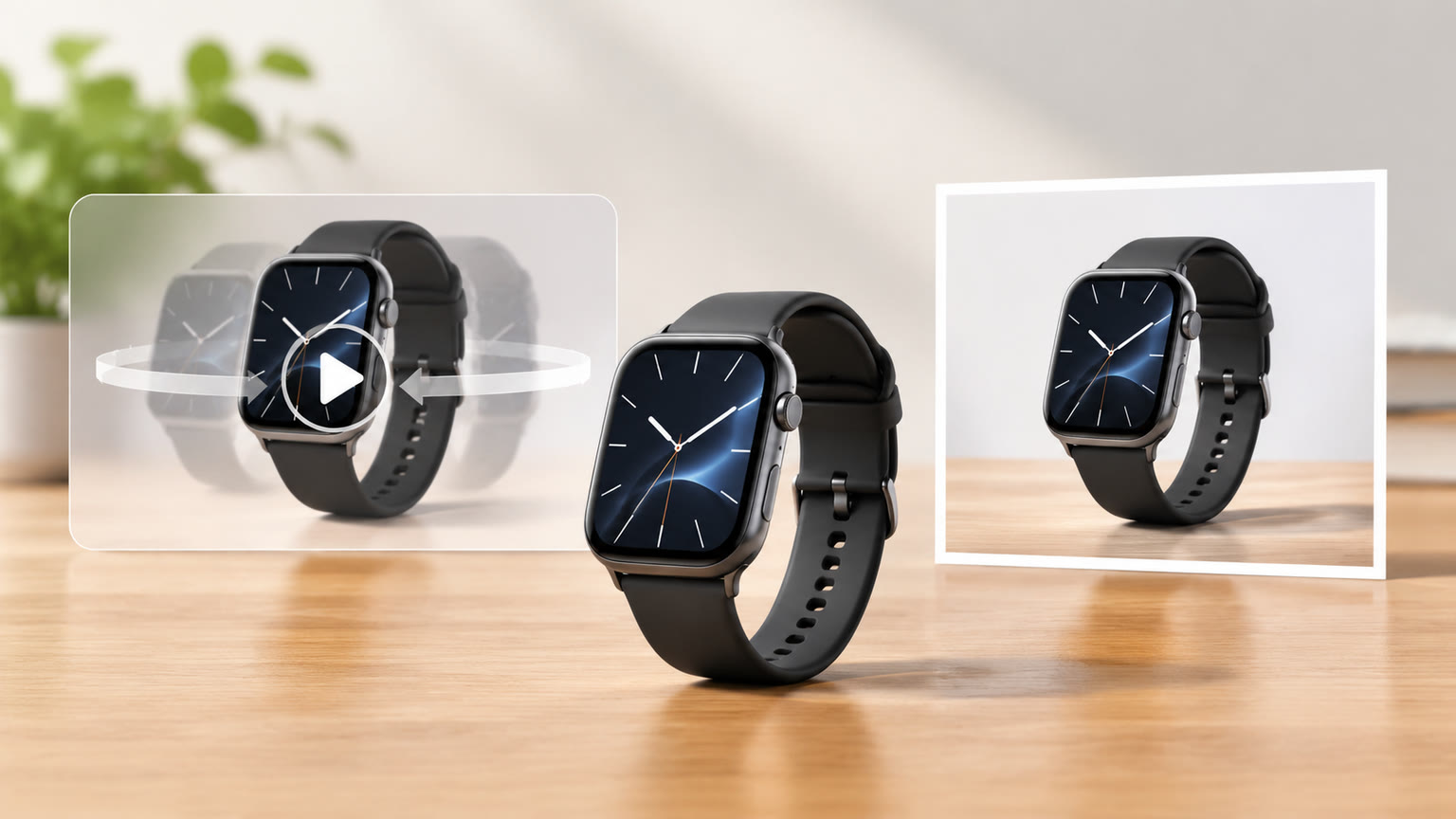
A product video spin is usually better when shoppers need to understand a product's shape, movement, or details from multiple angles; still photos are often better for fast scanning, precise comparison, and flexible reuse. The right choice depends on what a customer needs to see before buying, where the content will appear, and how much production time you can spend. Many product pages benefit from using both formats for different jobs.
What a Product Spin Shows That Photos Cannot
A product spin communicates how an item looks as its viewpoint changes. It can help shoppers understand its silhouette, proportions, finish, and relationship between visible sides without asking them to interpret a set of separate images. That added sense of dimension matters for objects whose design is difficult to understand from a single front-facing view.
A spin is particularly useful when shape is part of the product's appeal: a chair with a distinctive profile, a handbag with visible side panels, or a bottle whose form changes from top to base. It can also help show details around an object, such as the back of a package or the placement of controls. For a broader motion-led concept, a product reveal video template can help you explore a more staged presentation.
- Choose a spin when shoppers need to inspect several sides or understand the object's overall form.
- Choose a spin when a changing viewpoint helps convey materials, proportions, or construction.
- Use a different video approach when the story depends on a person using the product, a setting, or a sequence of actions.
Keep the product easy to inspect. If fast cuts, busy backgrounds, or dramatic camera movement make its shape harder to read, the motion is working against the sale.
When Still Product Photos Are the Better Choice
Still photos are often the better choice when customers need to compare options quickly or inspect a particular detail without waiting for a clip to play. A gallery can give each image a clear role: front view, back view, close-up, scale reference, or lifestyle scene. Shoppers can move directly to the view they need, while a retailer can place the most important image first.
Photos also make it straightforward to keep a consistent visual style across a catalog. Matching crop, lighting, background, and angle can make product listings easier to scan, especially when customers are comparing several similar items. If you are building or refining that imagery, the AI product image generator and the image generator are relevant places to explore image creation.
| Still photos | Product spin |
|---|---|
| Best for scanning and direct comparison | Best for showing changing viewpoints |
| Each frame can focus on one exact detail | A continuous view can clarify overall form |
| Easy to assign specific roles in a gallery | Useful when shape or finish changes with angle |
| Can be reused as individual product images | Works as a motion asset in video placements |
When choosing photos, make the first image answer the most basic question: what is the product, and what does it look like? Use later images for details that the lead shot cannot show.
Match the Format to the Product
The product itself should guide the choice. A spin earns its place when viewing the object from multiple directions adds meaningful information; a collection of stills is usually clearer when each important feature can be shown in a direct, stable frame. Think about whether motion reveals something useful or merely makes the presentation feel more active.
- For furniture and decor, show the overall silhouette and how the item looks from different sides.
- For clothing and accessories, use views that clarify shape, drape, closures, and fine details.
- For small electronics, prioritize clear close-ups of controls, ports, and included components.
- For packaging, show the front, back, label, and any shape or opening detail a buyer needs to inspect.
- For products with little to learn from a changing angle, use strong stills rather than adding motion by default.
These are starting points, not fixed rules. A photo gallery can show multiple angles, and a video can focus on one carefully chosen feature instead of a full rotation. Consider your actual customer questions: if people need to know how an item opens, fits, or works, a demonstration may be more useful than either a simple spin or a beauty shot.
Consider Where Customers Will See It
The placement can be as important as the format. A product detail page may give shoppers room to browse both a gallery and a video, while a compact listing may need one clear lead image. On a social feed, motion can help a product presentation feel immediate, but it should still communicate the item if someone watches without sound or only catches part of the clip.
Before producing assets, check the display requirements of the channel you plan to use. Consider aspect ratio, file size, playback behavior, and whether a video starts automatically. A still image may be more dependable in placements where video playback is uncertain; a short, legible spin may be worth preparing when motion is supported and the product benefits from it.
| Lead with stills | Add a spin |
|---|---|
| When the image is the first or only visible asset | When viewers can choose to watch a clip |
| When buyers need quick side-by-side comparison | When the product is hard to understand from one angle |
| When the placement favors a single frame | When motion has room to play without hiding details |
Prepare a strong still thumbnail even when you publish a video. It gives the product a clear introduction and remains useful when playback does not start.
Plan the Production Before You Create
A useful product spin needs consistency from beginning to end. The product should stay centered and at a stable scale, and the lighting should reveal its surface without changing so much that the finish appears inconsistent. For stills, the equivalent discipline is a planned shot list with repeatable angles, framing, and background.
- 1
List the buyer's questions
Write down what a shopper needs to see, such as overall shape, surface finish, a closure, or included parts. Let that list determine which frames or movements matter.
- 2
Choose a format for each question
Use a still for a specific, inspectable detail and a spin when a changing viewpoint makes the answer clearer. Some questions may call for a separate demonstration.
- 3
Set the visual treatment
Decide on background, light, crop, and product position before creating the full set. Consistency makes the result easier to compare and reuse.
- 4
Review the result at its destination size
Check that the product remains visible in the actual placement and that small details are legible. Revise if motion, cropping, or framing obscures the information.
If your goal is a larger launch moment rather than a straightforward view of the object, a product launch video tool may fit that creative direction. For general video creation, you can also explore the AI video generator; choose the workflow that matches the asset you actually need.
Use Both Formats When They Have Different Jobs
You do not have to choose one format for every part of a product presentation. A practical combination is a clear lead photo, supporting stills for close inspection, and a spin for products whose form benefits from motion. Each asset should answer a different question rather than repeat the same view in another format.
- Use the lead photo to make the product immediately recognizable.
- Use gallery images for exact details, alternate angles, and scale or context.
- Use a spin to clarify form across viewpoints when that information is useful.
- Use a demonstration video when customers need to see the product operating or being used.
When resources are limited, start with the assets that answer the most important buying questions. A small, deliberate set of clear photos can be more useful than a motion asset that adds little information. Expand the set when you know which views are missing, and keep the framing and product appearance consistent across formats.
Review the whole product page as a sequence: does the first image identify the item, do the other views resolve practical questions, and does video add something the stills cannot?
Make the Decision With a Simple Test
Choose a product spin when seeing the item change angles makes it easier to understand; choose still photos when stable, specific views make it easier to inspect or compare. If both statements are true, use both where the placement supports them. This decision rule keeps the format tied to customer understanding instead of treating video as an automatic upgrade.
- 1
Describe the information gap
Name what a shopper cannot tell from the current product presentation.
- 2
Ask whether motion closes that gap
If the answer depends on seeing the object's changing shape or viewpoint, test a spin. If one stable frame answers it, use a still.
- 3
Check clarity in context
View the asset at the size and placement where customers will encounter it, then confirm the product and important details remain easy to understand.
The best format is the one that makes the product easier to evaluate. A spin can provide useful perspective, but it does not replace a clear photo gallery; photos can show precise details, but may not communicate an object's form as naturally as motion. Let the product, placement, and buyer's questions determine the mix.
Key takeaways
- Choose a product spin when changing viewpoints help explain shape, proportions, or finish.
- Choose still photos when shoppers need to scan, compare, or inspect specific details quickly.
- Match the format to the product and the placement where customers will see it.
- Use both when each asset answers a different buyer question.
- Keep framing, lighting, and product visibility consistent across the full presentation.
Video Workflows Editor
Daniel Okafor
I run the same clip through every video and motion tool we ship and write down what actually changes: timing, length, export, and where each one falls apart.
FAQ
Common questions
Is a product spin better than still photos?
Neither format is always better. A spin can clarify shape across multiple viewpoints, while still photos make specific details easy to inspect and compare. Choose based on what shoppers need to understand.
Should a product page include both video and photos?
It can, when each format serves a distinct purpose. Use photos for a clear lead image and detailed views, then add a spin if motion reveals useful information that the images do not.
What products benefit most from a spin?
Products with a distinctive form, visible sides, or details that change with viewing angle can benefit from a spin. If a single stable view already communicates the important features, a gallery may be sufficient.
How many product photos should I use?
There is no universal number that works for every product. Include enough views to answer the main buyer questions, such as what the item looks like, which details matter, and what is included.
Can a product spin replace a photo gallery?
Usually it should not be treated as a complete replacement. A spin gives a changing view, but individual photos are often easier for shoppers to scan and use to inspect a particular detail.
What should I prioritize when creating either format?
Make the product easy to recognize and keep the important details visible. Consistent framing, lighting, and background help shoppers understand the item and compare its views.
Create Product Visuals That Answer Buyer Questions
Explore video creation for motion-led product presentations, or build a still-image concept when clear, focused views are the priority.
Keep reading

AI Video Tools Over One Minute: What Works
Learn how to plan videos longer than one minute with AI, what to check in a generator, and how to assemble a coherent final edit.
7 min read
How to Film Character Motion Reference
Learn how to film clear, usable motion reference for character animation, from planning and camera setup to selecting takes.
7 min read
AI Video Models Compared: How to Choose
Compare AI video models by motion, prompt control, image animation, consistency, and workflow to find the right fit for your project.
6 min read