
Best Online AI Tattoo Creators to Check Out
Compare the best online AI tattoo creators, learn what to look for, and turn a rough idea into a clearer tattoo concept.
 Maya Chen 7 min read
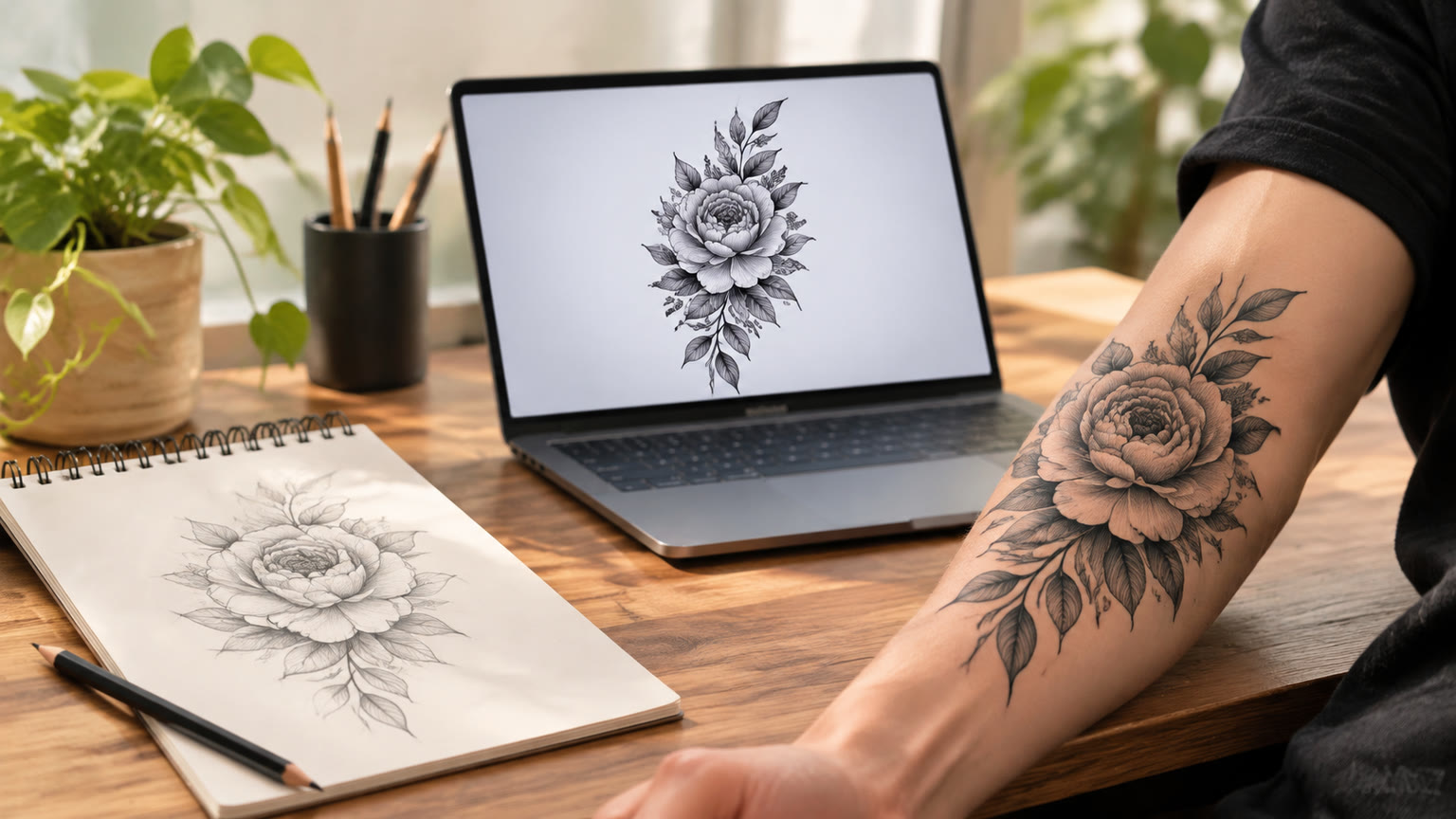
The best online AI tattoo creators help you explore styles, symbols, placement ideas, and compositions before you commit to a final design. For most people, the right choice is an easy browser-based tool that turns a detailed prompt into several visual directions, such as LazyKiwi's AI tattoo generator. This guide explains which types of creators are worth checking out, how to compare them, and how to build a more useful tattoo concept from your first prompt.
What Makes an Online AI Tattoo Creator Worth Using?
The best online AI tattoo creators are useful because they make visual exploration fast, clear, and repeatable. A strong tool should let you describe a subject, select an artistic direction, and generate an image that gives you something concrete to evaluate. The goal is not to replace a tattoo artist's judgment; it is to help you arrive with a better-developed idea.
- Prompt control: You should be able to describe the subject, mood, line quality, shading, and composition.
- Style range: Useful creators can support ideas such as fine line, blackwork, geometric, illustrative, ornamental, traditional, and abstract approaches.
- Readable output: A tattoo concept should have a clear silhouette and recognizable focal point, even when viewed at a smaller size.
- Fast iteration: The tool should make it practical to try alternate compositions instead of settling for the first result.
- Reference value: The final image should help you explain your concept to a professional tattoo artist.
Treat an AI-generated design as a visual starting point. Save the prompt and the strongest variations so you can explain what you liked, what you want removed, and what should change in the next draft.
Best Online AI Tattoo Creator for Fast Concepting
For fast tattoo concepting, start with a dedicated tool that focuses on tattoo ideas rather than making you configure a large creative workflow. LazyKiwi's AI tattoo generator is the most direct place to begin when you already know the subject or symbol you want to explore. It is especially useful for producing an initial visual direction that you can refine with more specific wording.
A dedicated tattoo creator is a good fit when your starting point sounds like “a moth with a crescent moon,” “a botanical snake in fine line style,” or “a small geometric mountain design.” The more clearly you describe the visual relationship between elements, the more useful the result becomes. Instead of listing unrelated objects, explain which element is dominant, how the supporting elements should surround it, and whether the design should feel delicate, bold, symmetrical, or organic.
- 1
Name the subject
Start with the main object, animal, symbol, phrase, or scene that should define the tattoo.
- 2
Choose the visual language
Add terms such as fine line, blackwork, stippling, ornamental, geometric, illustrative, or minimalist.
- 3
Describe the composition
Explain whether the design should be vertical, circular, symmetrical, compact, flowing, or arranged around a central focal point.
- 4
Request a clean concept
Ask for a clear tattoo design with strong contours and a readable silhouette rather than a busy poster-like image.
Compare Tattoo Styles Before You Choose One
The best way to use an AI tattoo creator is to compare styles with the same subject. Keeping the subject consistent shows whether the idea works better as delicate linework, high-contrast blackwork, geometric structure, or a more illustrative composition. This approach gives you a useful set of directions instead of a random collection of unrelated designs.
| Style direction | What to look for |
|---|---|
| Fine line | Thin contours, restrained detail, and a light visual weight that suits smaller or more delicate concepts. |
| Blackwork | Strong contrast, confident filled areas, and a silhouette that remains readable from a distance. |
| Geometric | Organized shapes, symmetry, repetition, and clean relationships between lines and negative space. |
| Ornamental | Decorative structure, balanced framing, repeating motifs, and a jewelry-like overall rhythm. |
| Illustrative | More expressive detail, recognizable storytelling, and a composition that feels like a small artwork. |
For each style test, change only one or two variables. If you change the subject, style, size, mood, and composition at the same time, it becomes difficult to understand why one result works better than another. You can also use the broader AI image generator when you want to explore a tattoo idea as part of a larger visual concept before narrowing it into a tattoo-specific prompt.
Write Better Prompts for AI Tattoo Designs
Better prompts produce better tattoo concepts because they give the generator a clear design brief. A short prompt can work for a simple symbol, but a more considered prompt is usually better for layered subjects, body-flow compositions, and styles that depend on negative space.
- Subject: State the main image and any secondary symbols.
- Style: Specify the linework, shading, texture, or artistic tradition you want to explore.
- Composition: Mention vertical, horizontal, circular, symmetrical, centered, flowing, or compact placement.
- Contrast: Say whether the design should be light and delicate or bold and highly contrasted.
- Detail level: Ask for sparse detail, moderate detail, or intricate detail based on the concept.
- Mood: Use words such as calm, mysterious, ancient, playful, elegant, or powerful when they support the idea.
- Output focus: Request a clean tattoo concept with a clear silhouette and intentional negative space.
A practical prompt pattern is: “A [subject] tattoo in [style], with [composition], [line or shading treatment], and [mood]. Keep the silhouette clear, the focal point strong, and the negative space intentional.”
Avoid stacking contradictory instructions. For example, “minimalist, extremely detailed, delicate, heavy blackwork, and densely packed” gives the creator competing priorities. Begin with the design's most important quality, then add only the details that support it.
Choose a Creator by Your Design Goal
The right online AI tattoo creator depends on what you need from the design. Someone exploring a first idea needs speed and variety, while someone with a nearly finished concept needs control over composition, references, and revisions. Classifying your goal first makes the tool comparison more useful.
| Your goal | Best creator type |
|---|---|
| Explore a vague idea | A dedicated tattoo generator with simple prompts and quick visual variations. |
| Compare several styles | A flexible image generator that lets you keep the subject while changing the visual direction. |
| Develop a sleeve or connected concept | A workflow that supports repeated iterations and consistent motifs across multiple images. |
| Create a reference for an artist | A generator that produces a clear composition with visible focal points and manageable detail. |
| Build a presentation or reveal | An image or video workflow that can show the concept, variations, or placement story over time. |
If your project includes a reveal or visual presentation, you can move from a still concept into the video generator. For example, a tattoo idea could appear through a controlled zoom, a sequence of style variations, or a gradual presentation of the central symbol. The video is not necessary for choosing the design, but it can help you communicate the concept in a more engaging format.
Refine the Design Before Showing It to an Artist
You should refine an AI tattoo concept by removing visual clutter, strengthening the focal point, and checking whether the design still works as a tattoo rather than only as a screen image. The most attractive generated image is not always the most practical reference. A clear, adaptable concept is more useful than an image overloaded with tiny details.
- 1
Select the strongest composition
Choose the version with the clearest subject and the most intentional use of empty space.
- 2
Remove unnecessary elements
Ask for fewer background objects, simpler textures, or a cleaner border if they compete with the main image.
- 3
Test a second line treatment
Try lighter linework, heavier contours, or a different shading approach to see what best supports the subject.
- 4
Check the intended scale
A design with many small details may need simplification if you imagine it as a small tattoo.
- 5
Prepare a clear reference set
Keep the preferred design, one alternate, and a short note explaining the changes you want from the professional artist.
Do not ask an AI creator to decide every production detail at once. Use it for concept development, then discuss final sizing, placement, line weight, color, and technical execution with the tattoo artist who will make the design.
Use Templates and Models for Presentation
Templates and model information become useful when you want to present a tattoo concept, not just generate one. LazyKiwi's templates library can help you think about how a still design might be introduced in a short visual sequence, while the models page provides a place to review the available model categories before choosing a broader creative workflow.
- Use a simple still image when you are comparing symbols, styles, and compositions.
- Use a controlled motion treatment when you want to reveal the design gradually.
- Keep the tattoo artwork large enough to inspect rather than covering it with decorative effects.
- Show the final concept alongside one or two alternatives so the differences are easy to understand.
- Keep presentation effects separate from the design itself so they do not change your judgment of the tattoo.
A zoom-based template such as dolly-in zoom-out can suit a concept reveal because it adds movement while keeping the artwork central. This is most helpful for portfolio material, social posts, or a personal presentation of how an idea developed from a rough symbol into a more complete composition.
A Simple Workflow for Choosing Your Final Concept
The most reliable workflow is to generate broadly, compare deliberately, and refine only the direction that has a strong visual foundation. You do not need dozens of unrelated images; you need a small set of variations that answer specific design questions.
- 1
Write a one-sentence brief
Describe the subject, intended style, approximate composition, and the feeling you want the design to convey.
- 2
Generate several directions
Keep the core subject stable while testing two or three different style or composition options.
- 3
Compare for clarity
Favor the concept with the strongest silhouette, clearest hierarchy, and most useful negative space.
- 4
Simplify the winner
Remove details that do not strengthen the subject and request a cleaner version.
- 5
Share a concise reference brief
Bring the preferred image, an alternate, the original idea, and a short list of requested changes to the tattoo artist.
This process makes an online AI tattoo creator valuable even when the first output is not your final design. Its main role is to turn an abstract idea into something you can compare, discuss, and improve.
Key takeaways
- The best online AI tattoo creators make it easy to test subjects, styles, and compositions in a browser.
- A dedicated tattoo generator is the fastest starting point for turning a rough idea into a visual concept.
- Keep the subject stable while comparing styles so you can identify what actually improves the design.
- Clear silhouettes, intentional negative space, and manageable detail matter more than visual complexity.
- Use AI output as a reference for discussion and refinement with the professional artist who will create the tattoo.
Image & Design Editor
Maya Chen
I test the image tools we ship on real photos — faces, text, backgrounds — and note which edits hold up at full size and which quietly fall apart.
FAQ
Common questions
What is the best online AI tattoo creator for beginners?
A dedicated tool such as LazyKiwi's AI tattoo generator is a practical starting point because it focuses directly on tattoo concepts. Begin with one subject, one style, and one composition instead of trying to describe an entire collection of ideas at once.
Can an AI tattoo creator make a custom design?
Yes, an AI creator can generate a custom visual direction from your subject, style, composition, and mood. The result should be treated as a concept to refine, since a professional tattoo artist may need to adjust line weight, scale, placement, and detail.
What should I include in an AI tattoo prompt?
Include the main subject, artistic style, composition, line or shading treatment, contrast, and mood. It also helps to request a clear silhouette and intentional negative space so the image reads as a tattoo concept rather than a crowded illustration.
Can I use the same tattoo idea in different styles?
Yes, keeping the subject the same while changing the style is one of the best ways to compare options. Try fine line, blackwork, geometric, ornamental, and illustrative directions, then select the version whose visual structure best fits your idea.
Can I turn a tattoo concept into a video?
Yes, you can use the video generator to present a tattoo concept through a reveal, zoom, or sequence of variations. Video is useful for presentation and storytelling, while the still image remains the main reference for discussing the tattoo itself.
How should I prepare an AI tattoo design for a tattoo artist?
Bring the preferred concept, one alternate version, and notes describing what you want simplified, removed, or emphasized. Explain the intended placement and approximate size, then let the artist adapt the idea to their technical process and the way the design will sit on the body.
Start Exploring Your Tattoo Concept
Turn a subject, symbol, or rough idea into a clearer visual direction with an online AI tattoo workflow.
Keep reading
Magnific Free vs Paid Features: What to Check
Compare Magnific's free and paid options by checking access, export limits, editing controls, and the cost of your actual workflow.
7 min read
New Year Family Prompts for AI Photos
Create warm, personal New Year family images with practical AI prompts for portraits, celebrations, keepsakes, and fresh-start moments.
7 min read
New Year Pet Prompts for Photos and Videos
Create festive pet portraits and short clips with copy-ready New Year prompts, styling ideas, and practical tips for better results.
7 min read